1. Киришүү
This manual provides detailed instructions for the installation, operation, and maintenance of your Anlapus FULL HD 1080P H.265+ Surveillance Kit. This system includes an 8-channel DVR with a pre-installed 1TB hard drive, 4 bullet cameras, and 4 dome cameras, designed to provide comprehensive security monitoring for your property.

Figure 1.1: Anlapus 8-channel DVR surveillance system components.
2. Пакеттин мазмуну
Төмөндө тизмеленген нерселердин баары пакетиңизге камтылганын текшериңиз. Эгерде кандайдыр бир нерселер жок болсо же бузулса, кардарларды колдоо менен байланышыңыз.
- 1x 8-Channel DVR (with 1TB HDD pre-installed)
- 4x 1080P Bullet Surveillance Cameras
- 4x 1080P Dome Surveillance Cameras
- 8x 60ft BNC Video Cables
- 3x Power Adapters (12V 2A)
- 2x 1ден 4кө чейинки кубат бөлгүчтөрү
- 1x USB чычкан
- 1x Instruction Manual (бул документ)
- 8x Монтаждоочу бурамалар
- 8x Warning Stickers

Figure 2.1: Contents of the Anlapus surveillance kit package.
3. Продукциянын өзгөчөлүктөрү
- Full HD 1080P токтому: Captures clear and detailed images with 2.0-megapixel quality.
- Өркүндөтүлгөн H.265+ видео кысуу: Азайтат file sizes by up to 50% compared to H.264, allowing for longer recording times and more efficient storage.
- Жакшыртылган түнкү көрүнүш: Equipped with 24 IR LEDs and an IR-CUT filter, providing clear black and white night vision up to 24 meters (80 feet).
- IP66 аба ырайынын рейтинги: Cameras are designed for both indoor and outdoor use, capable of withstanding various extreme weather conditions.
- Кыймылды аныктоо жана эскертүүлөр: Configurable motion detection zones with instant email alerts and push notifications to your smartphone.
- Бир нече жаздыруу режимдери: Supports 24/7 continuous recording, motion-activated recording, scheduled recording, and manual recording.
- Алыстан кирүү: View жандуу каналдар жана жазылган footage from anywhere using the free mobile application on your smartphone or tablet.
- Pre-installed 1TB Hard Drive: Ready for immediate use, eliminating the need to purchase and install a separate hard drive.

Figure 3.1: Day and Night Vision.
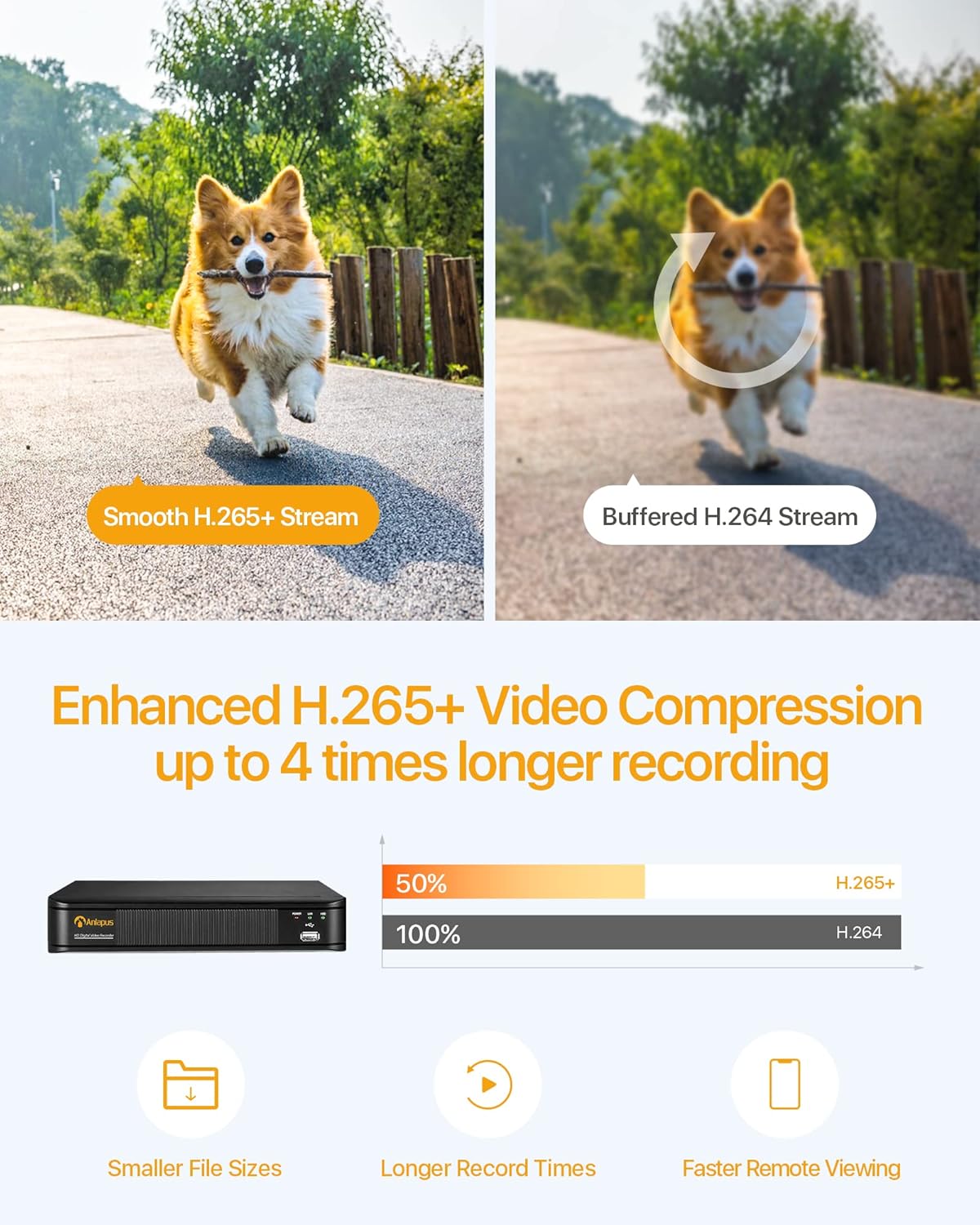
Figure 3.2: H.265+ Video Compression Benefits.

Figure 3.3: Day and Night Surveillance Example.

Figure 3.4: All-Weather Protection and Applications.
4. Системанын компоненттери бүттүview
4.1 DVR (Digital Video Recorder)
The DVR is the central unit for recording, storing, and managing video footage from all connected cameras. It features multiple video input ports, audio input/output, VGA and HDMI outputs for display, and USB ports for mouse control and data backup.
4.2 Surveillance Cameras
The kit includes both bullet and dome cameras. Both types offer 1080P resolution, night vision capabilities, and IP66 weatherproof housing. Bullet cameras are typically used for directional surveillance, while dome cameras offer a more discreet appearance and are often vandal-resistant.

Figure 4.1: Camera and DVR Connection Diagram.
5. Орнотуу колдонмосу
5.1 Баштапкы туташуу
- Камераларды туташтыруу: Use the provided BNC video cables to connect each camera to the 'VIDEO IN' ports on the back of the DVR.
- Кубаттуу камералар: Use the power adapters and 1-to-4 power splitters to provide power to all cameras.
- DVRди дисплейге туташтырыңыз: Connect the DVR to a monitor or TV using either an HDMI or VGA cable.
- Тармакка DVR туташтыруу: Connect the DVR's 'NETWORK' port to your router using an Ethernet cable for remote access.
- USB чычканды туташтыруу: Plug the USB mouse into one of the DVR's USB ports for navigation.
- DVR күйгүзүлгөн: Connect the DVR to its power adapter and plug it into an electrical outlet. The system will boot up.

Figure 5.1: Simple Connection for Mobile Access.
5.2 Мобилдик колдонмону орнотуу
- Колдонмону жүктөп алуу: Издөө the official Anlapus security app on Google Play Store or Apple App Store and install it on your smartphone.
- Каттоо эсеби: Колдонмону ачып, жаңы колдонуучу аккаунтун каттоо үчүн экрандагы көрсөтмөлөрдү аткарыңыз.
- Түзмөк кошуу: Scan the QR code displayed on your DVR's monitor or manually enter the device ID to add your DVR to the app.
- View Камералар: Кошулгандан кийин, сиз төмөнкүлөрдү жасай аласыз view live feeds from your cameras and access recorded footagд алыстан.
6. Иштөө нускамалары
6.1 Жазуу режимдери
Your DVR supports several recording modes:
- Continuous Recording (24/7): Эң эски азыктардын үстүнөн жазып, тынымсыз жаздыратtage катуу диск толуп калганда.
- Кыймылды аныктоо жазуусу: Кыймыл аныкталганда гана жаздырат, бул сактагычтагы орунду үнөмдөйт.
- Пландаштырылган жаздыруу: Жаздыруу үчүн атайын убакыттарды коюңуз.
- Кол менен жаздыруу: Жазууну кол менен баштоо жана токтотуу.
Configure these settings via the DVR's main menu using the USB mouse.

Figure 6.1: 24/7 Recording View.
6.2 Кыймылды аныктоо жана эскертүүлөр
Система кыймылды аныктоо жана эскертүүлөрдү жөнөтүү үчүн конфигурацияланышы мүмкүн:
- Аныктоо зоналарын конфигурациялоо: In the DVR settings, define specific areas within the camera's view кыймылды аныктоо үчүн.
- Сезгичтикти коюу: Жалган коңгуроолорду азайтуу үчүн кыймылды аныктоо сезгичтигин тууралаңыз.
- Эскертүүнү иштетүү: Activate email alerts and push notifications through the DVR settings and mobile app. When motion is detected, you will receive an alert on your smartphone.

Figure 6.2: Motion Detection and Smartphone Alert.

Figure 6.3: Smart Motion Detection Features.
6.3 Remote Access & Playback
Access your surveillance system from anywhere:
- Live View: Мобилдик тиркемени ачуу үчүн view туташкан бардык камералардан түз эфирдеги видео агымдары.
- Ойнотуу: Use the app's playback function to review foo жазылганtage stored on the DVR's hard drive. You can select specific dates and times.
- Көп түзмөк Viewing: The system supports simultaneous viewing on multiple devices, including smartphones, tablets, and desktop computers.

Figure 6.4: Mobile App Playback Interface.

Figure 6.5: Multi-Device Remote Viewing.
7. Техникалык тейлөө
- Таза камералар: Мезгил-мезгили менен камеранын линзаларын жумшак, гamp ачык сүрөт сапатын камсыз кылуу үчүн кездеме. Абразивдүү тазалагычтардан алыс болуңуз.
- Кабелдерди текшерүү: Ensure all cables are securely connected and free from damage. Replace any damaged cables immediately.
- DVR желдетүү: Ашыкча ысып кетпеши үчүн DVR жакшы желдетилген жерге коюлганын текшериңиз. Желдеткичтерди тосуп койбоңуз.
- Программалык камсыздоонун жаңыртуулары: Өндүрүүчүнү текшериңиз webоптималдуу иштөөнү жана коопсуздукту камсыз кылуу үчүн мезгил-мезгили менен микропрограммалык камсыздоону жаңыртып туруу үчүн сайтты текшерип туруңуз.
- Маалыматтын камдык көчүрмөсү: Маанилүү азык-түлүктөрдүн камдык көчүрмөсүн үзгүлтүксүз сактап туруңузtage from the DVR's hard drive to an external USB device.

Figure 7.1: USB Data Backup.
8. Кыйынчылыктарды
- Видео сигнал жок: Check all cable connections between cameras and DVR, and between DVR and display. Ensure cameras and DVR are powered on.
- Сүрөттүн сапаты начар: Clean camera lenses. Ensure cameras are properly focused (if adjustable). Check cable integrity.
- Алыстан кирүү мүмкүнчүлүгү жок: Verify the DVR is connected to the internet. Check network settings on the DVR and ensure your router is functioning correctly. Confirm the mobile app is properly configured and the device is added.
- Кыймылды аныктоо иштебей жатат: Review motion detection settings in the DVR menu. Adjust sensitivity and detection zones. Ensure alerts are enabled in both DVR and mobile app settings.
- DVR жаздырылбай жатат: Check hard drive status in DVR settings. Ensure recording schedules or motion detection settings are correctly configured.
Көбүрөөк жардам алуу үчүн, колдоо бөлүмүнө кайрылыңыз же кардарларды тейлөө кызматына кайрылыңыз.
9. Техникалык шарттар
| Бренд | Anlapus |
| Модель номери | AJ-AM8A4B-4W441E-106202S |
| Video Resolution | 1080p толук HD |
| Видеону кысуу | H.265 + |
| DVR каналдары | 8 канал |
| Сактоо сыйымдуулугу | 1 TB HDD (pre-installed) |
| Камера түрү | Bullet and Dome Cameras |
| Түнкү көрүү диапазону | 24 метрге чейин (80 фут) |
| Аба ырайына каршы рейтинг | IP66 |
| Байланыш технологиясы | Зымдуу |
| Power Source | Cable Electric (12 Volts DC) |
| Продукциянын өлчөмдөрү (L x W x Y) | 19.99 x 19.99 x 19.99 cm (DVR) |
| Элемент Салмагы | 7.36 kilograms (total package) |
| Өндүрүүчү | Anlapus |
10. Кепилдик жана колдоо
The manufacturer, ZOSI (parent company of Anlapus), provides the following support and warranty:
- 30 күндүк канааттануу кепилдиги: If you are not satisfied, you may be eligible for a refund or exchange within 30 days.
- Өмүр бою техникалык жардам: Comprehensive technical support is available for the lifetime of the product.
- 2 жылдык кепилдик: Продукт өндүрүштүк кемчиликтерге каршы 2 жылдык кепилдик менен жабылат.
For technical support or warranty claims, please refer to the contact information provided with your product packaging or visit the official Anlapus/ZOSI webсайт.


