Introduction
The Nikon D7500 is a high-performance DSLR camera designed for enthusiasts, offering advanced features in a compact and robust body. This kit includes the D7500 camera body, an AF-P DX NIKKOR 18-55mm f/3.5-5.6G VR Lens, and an AF-P DX NIKKOR 70-300mm f/4.5-6.3G ED VR Lens, providing versatility for various photographic needs. This manual provides essential information for setting up, operating, and maintaining your camera and lenses.

Figure 1: Nikon D7500 Dual Zoom Lens Kit components.
Негизги өзгөчөлүктөрү
- Class-leading image quality, ISO range, image processing, and metering equivalent to the D500.
- Large 3.2-inch, 922K dot, tilting LCD screen with touch functionality.
- 4K Ultra HD and 1080P Full HD video recording with stereo sound, power aperture control, auto ISO, and 4K UHD time-lapse.
- Built-in Wi-Fi and Bluetooth for easy connectivity via the Nikon SnapBridge app.
- Includes the compact AF-P DX NIKKOR 18-55mm f/3.5-5.6G VR Lens and the far-reaching AF-P DX NIKKOR 70-300mm f/4.5-6.3G ED VR Lens, both featuring Nikon’s Vibration Reduction (VR) image stabilization.
- Creative features built-in, including time-lapse, multiple exposure, creative picture controls, and focus shift photography.
Жайгашуу
1. Attaching Lenses
To attach a lens, align the white mounting mark on the lens barrel with the white mounting mark on the camera body. Rotate the lens counter-clockwise until it clicks into place. To remove, press the lens release button on the camera body and rotate the lens clockwise.
2. Батареяны орнотуу
Open the battery chamber cover on the bottom of the camera. Insert the EN-EL15a rechargeable lithium-ion battery with the arrow pointing towards the camera's front, ensuring the battery is correctly oriented. Close the cover securely.
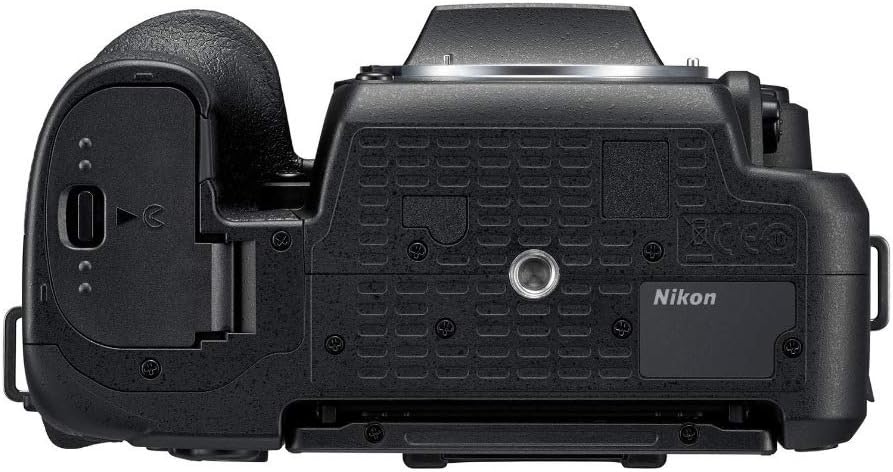
Figure 2: Battery and memory card compartment on the camera bottom.
3. Эстутум картасын орнотуу
The D7500 uses SD memory cards. Open the memory card slot cover (located next to the battery compartment). Insert the SD card with the label facing the back of the camera until it clicks into place. Close the cover.
4. Баштапкы орнотуу (күн/убакыт)
Upon first power-on, the camera will prompt you to set the date, time, and time zone. Use the multi-selector and OK button to navigate and confirm your selections.
Камераны иштетүү
1. Негизги атуу режимдери
Камеранын үстүндөгү режимди терүү ар кандай атуу режимдерин тандоого мүмкүндүк берет:
- АВТО: Жөнөкөй көрсөтүү үчүн толугу менен автоматтык режим.
- P (Программаланган автоматтык режим): Камера оптималдуу экспозиция үчүн жабуунун ылдамдыгын жана диафрагманы орнотот.
- S (Автоматтык приоритеттүү жапкыч): Колдонуучу жабуунун ылдамдыгын, камера диафрагманы орнотот.
- A (Апертура артыкчылыктуу авто): Колдонуучу диафрагманы, камера жабуунун ылдамдыгын орнотот.
- M (кол): Колдонуучу жапкычтын ылдамдыгын жана диафрагмасын орнотот.
- САХНА: Оптималдаштырылган жөндөөлөр үчүн ар кандай көрүнүш режимдеринен (мисалы, Портрет, Пейзаж) тандаңыз.
- ЭФФЕКТИ: Apply special effects to photos.

Figure 3: Top controls including the mode dial.
2. Видео жаздыруу
The D7500 supports 4K Ultra HD (2160p) and 1080p Full HD video recording. To start recording, rotate the live view selector to the movie icon and press the movie-record button. The camera offers power aperture control and auto ISO during video capture.
3. Автофокус системасы
The camera features a 51-point autofocus system with various focus modes including Single-Servo AF (S), Continuous-Servo AF (C), and Manual Focus (M). Auto Focus Technology is Contrast Detection.
4. Байланыш (Wi-Fi жана Bluetooth)
Utilize the built-in Wi-Fi and Bluetooth to connect your D7500 to smart devices via the Nikon SnapBridge app. This allows for easy image transfer and remote camera control.

Figure 4: Side ports for connectivity and external accessories.
Lenses Included
1. AF-P DX NIKKOR 18-55mm f/3.5-5.6G VR Lens
This compact and versatile standard zoom lens is ideal for everyday shooting, from wide-angle landscapes to portraits. It features Vibration Reduction (VR) for sharper images in low light or when shooting handheld.

Figure 5: AF-P DX NIKKOR 18-55mm f/3.5-5.6G VR Lens.
2. AF-P DX NIKKOR 70-300mm f/4.5-6.3G ED VR Lens
This telephoto zoom lens extends your reach, perfect for capturing distant subjects, sports, and wildlife. Its Vibration Reduction (VR) technology helps minimize camera shake for clear, steady shots.

Figure 6: AF-P DX NIKKOR 70-300mm f/4.5-6.3G ED VR Lens.
Техникалык тейлөө
1. Тазалоо
- Линзалар: Use a lens blower to remove dust, then a soft lens brush. For smudges, use a lens cleaning solution and a microfiber cloth.
- Сенсор: For stubborn dust, use a sensor cleaning kit or consult a professional. Avoid touching the sensor directly.
- Камеранын корпусу: Жумшак, кургак чүпүрөк менен сүртүңүз. өжөр кир үчүн, бир аз d колдонууamp чүпүрөк, анан кылдат кургатуу.
2. Батареяга кам көрүү
Charge the battery fully before use. Store batteries in a cool, dry place. Avoid extreme temperatures. If not using the camera for an extended period, remove the battery.
3. Сактоо
Store the camera and lenses in a dry, dust-free environment, ideally in a camera bag or cabinet with desiccant to prevent mold and mildew.
Проблемаларды чечүү
If you encounter issues with your Nikon D7500, consider the following general troubleshooting steps:
- Камера күйбөй жатат: Батарея заряддалганын жана туура салынганын текшериңиз.
- Сүрөттөр бүдөмүк: Ensure the lens is properly attached, autofocus is engaged, and shutter speed is appropriate for the lighting conditions. Check for lens or sensor smudges.
- Эстутум картасынын катасы: Эстутум картасы туура салынганын жана толбогонун текшериңиз. Картаны форматтап көрүңүз (бул бардык дайындарды өчүрөт).
- Туташуу маселелери: Ensure Wi-Fi/Bluetooth is enabled on both the camera and your smart device. Restart both devices and try reconnecting.
For more detailed troubleshooting, refer to the comprehensive user manual provided with your camera or visit the Nikon support webсайт.
Техникалык шарттар
| Өзгөчөлүк | Деталь |
|---|---|
| Модель аты | D7500 Dual Zoom Lens kit |
| Бренд | Nikon |
| Фото сенсор технологиясы | CMOS |
| Натыйжалуу дагы эле чечим | 20.9 депутат |
| Фото сенсордун өлчөмү | APS-C |
| Шайкеш орнотуулар | Nikon F (DX) |
| Image Stabilization | Оптикалык |
| ISO диапазону | 100-51200 |
| Video Resolution | 4K UHD 2160p |
| Screen Size | 3.2 дюйм |
| Дисплей түрү | Tilting LCD with Touch Functionality |
| Автофокус чекиттери | 51 |
| Үзгүлтүксүз атуу | 9 FPS |
| Байланыш технологиясы | Bluetooth, WiFi |
| Элемент Салмагы | 640 грамм |
Кепилдик жана колдоо
The Nikon D7500 Dual Zoom Lens Kit comes with a 1 жылдык өндүрүүчүнүн кепилдиги.
For additional support, product information, or to explore other Nikon products, please visit the Official Nikon Store on Amazon.


