Introduction
The Olafus 30W LED Flood Light is a versatile lighting solution designed for both indoor and outdoor use. Featuring Bluetooth RGBW technology, it offers 16 million colors and 22 dynamic modes, allowing for extensive customization of lighting ambiance. Control is managed via a dedicated mobile application, supporting individual or group control of up to 300 lights. Key features include music synchronization, DIY scene customization, and a convenient timer function with memory recall.
Коопсуздук маалыматы
- Кубат булагынын продукттун көлөмүнө дал келгенин текшериңизtagталаптар (120 вольт).
- Do not attempt to disassemble or modify the flood light. This may void the warranty and pose a safety risk.
- Продукцияны күйүүчү материалдардан алыс кармаңыз.
- For outdoor installation, ensure all connections are waterproof and protected from direct exposure to water, despite the IP66 rating.
- Орнотуудан, тазалоодон же техникалык тейлөөдөн мурун ар дайым электр кубатынан ажыратыңыз.
- Эгерде кандайдыр бир бузулуу байкалса, колдонууну дароо токтотуп, кардарларды колдоо кызматына кайрылыңыз.
Кутуда эмне бар
Ар бир пакетте төмөнкү элементтер бар:
- 2 LED RGBW Flood Lights

Image: Two Olafus 30W LED Flood Lights and the accompanying mobile application interface.
Жайгашуу
1. Физикалык орнотуу
- Жайгашкан жерди тандоо: Select a suitable location for the flood light, considering its intended use (e.g., yard, wall, floor). The light is rated IP66 waterproof for outdoor use.
- Монтаждоо: The flood light features an adjustable bracket for flexible mounting.

Сүрөт: деталдуу view of the flood light's dimensions, efficient heat dissipation design, and adjustable bracket.
Securely attach the light using appropriate hardware for your chosen surface (floor mount, wall mount). Ensure the bracket is tightened to hold the desired angle. - Кубат туташуу: Plug the flood light into a standard 120V AC power outlet. The power cord is approximately 1 meter (3.28 feet) long.
2. Колдонмону жүктөп алуу жана жупташтыруу
- Колдонмону жүктөп алуу: Издөө the "Mesh RGBW" app (or similar as indicated in the product packaging/QR code) on your smartphone's app store (iOS or Android).
- Bluetooth иштетүү: Смартфонуңузда Bluetooth иштетилгенин текшериңиз.
- Жупташтыруу: Open the app. The app should automatically detect nearby Olafus flood lights. Follow the in-app instructions to pair your lights. If automatic pairing fails, some users have found success by plugging the lights into a power strip and toggling the power off and on several times to initiate pairing mode.
- Топтук көзөмөл: The Bluetooth Mesh 5.0 technology allows you to control lights individually or group them for synchronized control. You can connect up to 300 lights.

Image: Illustration of Mesh Group Control, showing how multiple lights can be connected and controlled via Bluetooth.
Иштөө нускамалары
1. Түстү жана жарыктыкты башкаруу
- 16 миллион түстөр: Use the color wheel in the app to select from 16 million available colors.
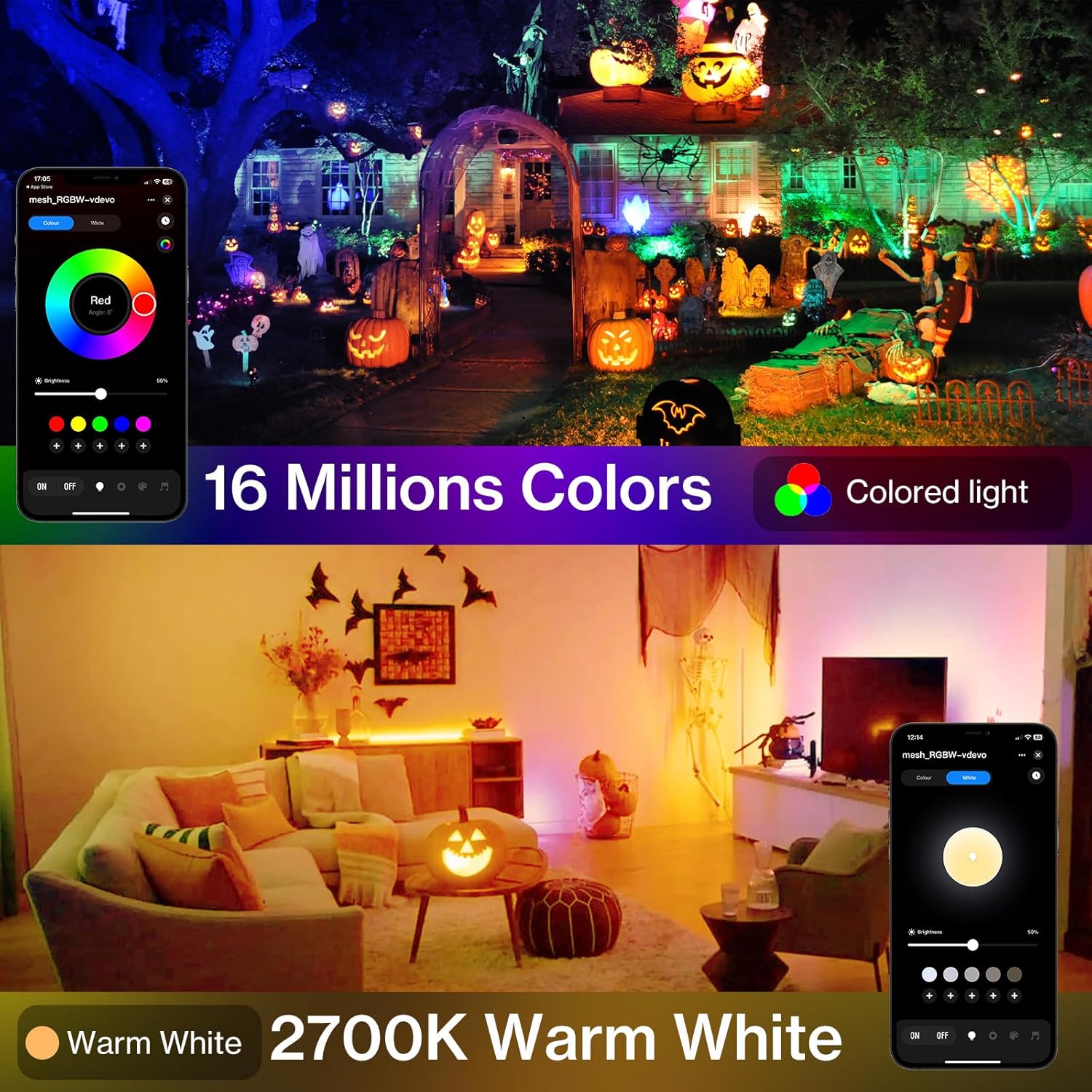
Image: The flood light displaying a range of colors, controlled via the mobile app's color selection interface.
- Жылуу ак (2700K): In addition to RGB colors, the light offers a dedicated 2700K warm white option for traditional lighting.
- Жарыктыкты жөндөө: Use the brightness slider in the app to adjust the light intensity from 0% to 100%.
2. Dynamic Modes and DIY Scenes
- 22 Алдын ала коюлган режимдер: The app includes 22 pre-programmed dynamic modes (e.g., flash, fade, jump) for various effects.
- DIY Settings: Create and save your own custom lighting scenes by adjusting color, brightness, mode, and speed. These can be saved and recalled instantly.

Image: A living room illuminated with custom dynamic colors, demonstrating the DIY customization feature via the app.
3. Музыканы синхрондоштуруу
- Музыка синхрондоштуруу режими: Activate the music sync feature in the app to make the lights change color and intensity in rhythm with music played through your smartphone's microphone.
Video: Demonstration of how to use the app and remote control for the flood lights, including music sync functionality.
4. Таймер функциясы
- Schedule On/Off: Use the built-in timing chip to set specific times for the lights to automatically turn on or off.

Image: A pool area illuminated by flood lights, with the mobile app displaying timer settings for automatic operation.
- Эстутум функциясы: The lights will remember the last used settings (color, brightness, mode) when turned off and back on.
Техникалык тейлөө
- Тазалоо: Regularly wipe the surface of the flood light with a soft, damp Чаңды жана таштандыларды кетирүү үчүн чүпүрөк колдонуңуз. Катуу химиялык заттарды же абразивдүү тазалоочу каражаттарды колдонбоңуз.
- Текшерүү: Periodically check the power cord and housing for any signs of damage. Ensure the mounting bracket remains secure.
- Суу өткөрбөйт рейтинги: The light is IP66 waterproof, meaning it is protected against powerful water jets. However, avoid submerging the light in water.

Сүрөт: жакын план view of the flood light being sprayed with water, highlighting its IP66 waterproof feature.
Проблемаларды чечүү
| Көйгөй | Мүмкүн себеп | Чечим |
|---|---|---|
| Жарык күйбөйт. | No power, loose connection, faulty outlet. | Check power plug, ensure outlet is working, try a different outlet. |
| Bluetooth аркылуу колдонмого туташуу мүмкүн эмес. | Bluetooth not enabled, light not in pairing mode, interference. | Ensure Bluetooth is on. Try unplugging and replugging the light several times to force pairing mode. Reduce distance between phone and light. |
| Түстөр так эмес же жооп бербейт. | App glitch, poor Bluetooth signal. | Restart the app. Restart the light by unplugging and replugging. Ensure strong Bluetooth connection. |
| Music sync not working. | Microphone access denied, low volume, app issue. | Check app permissions for microphone access. Increase music volume. Restart app. |
Техникалык шарттар
| Өзгөчөлүк | Деталь |
|---|---|
| Бренд | Олафус |
| Модель аты | LAB20Z |
| Ватtage | 30 Ватт |
| Жарык булагы түрү | LED |
| Ачык түс | RGB & 2700K Warm White |
| Жарыктык | 1750 Lumen |
| Башкаруу ыкмасы | App (Bluetooth Mesh 5.0) |
| Тtage | 120 вольт |
| Сууга туруктуулук деңгээли | IP66 суу өткөрбөйт |
| Материал | Алюминий |
| Продукциянын өлчөмдөрү | 4.37"L x 1.02"W x 5.35"H |
| Элемент Салмагы | 1.94 фунт |
| Камтылган компоненттер | 2 LED RGBW Flood Lights |
Кепилдик жана колдоо
For warranty information, technical support, or any inquiries regarding your Olafus 30W LED Flood Light, please refer to the contact details provided on the official Olafus website or within the product packaging. Keep your purchase receipt for warranty claims.
Visit the official Olafus Store for more information: Olafus Store


