1. Киришүү
This user manual provides detailed instructions for the safe and efficient operation of your Veidoo 10-inch Android Tablet PC. Please read this manual thoroughly before using the device and retain it for future reference. This tablet is designed for various uses, including communication, entertainment, and productivity.

This image shows the Veidoo 10-inch Android Tablet PC. The front of the tablet displays the home screen with the current time, date, and various application icons such as Camera, Gallery, Settings, and Music. The rear of the tablet, visible behind the front, is black with a subtle textured design and features the rear camera module.
2. Коопсуздук маалыматы
- Аппаратты экстремалдык температурага, түз күндүн нуруна же жогорку нымдуулукка дуушар кылбаңыз.
- Аппаратты түшүрүүдөн же катуу таасирлерден сактаныңыз.
- Өндүрүүчү тарабынан бекитилген заряддоо түзүлүштөрүн жана аксессуарларын гана колдонуңуз.
- Аппаратты өз алдынча бөлүүгө же оңдоого аракет кылбаңыз. Квалификациялуу тейлөө кызматкерлерине кайрылыңыз.
- Аппаратты балдардан жана үй жаныбарларынан алыс кармаңыз.
- Аппаратты жана анын батареясын жергиликтүү эрежелерге ылайык таштаңыз.
3. Продукт бүтүп калдыview
3.1 Физикалык өзгөчөлүктөрү
Familiarize yourself with the various ports and buttons on your Veidoo Tablet PC:

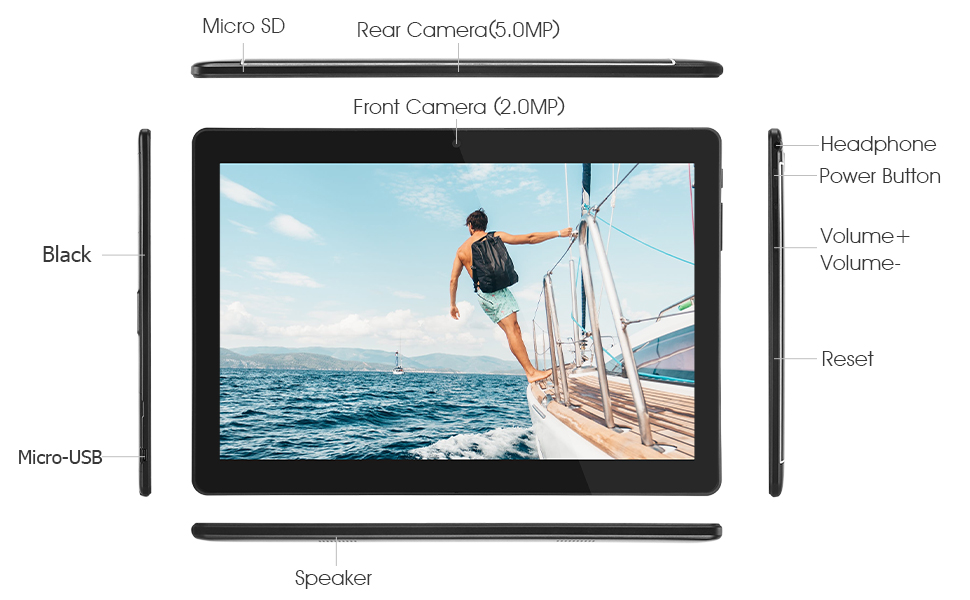
This diagram illustrates the various physical components and ports of the Veidoo 10-inch Android Tablet PC. It clearly labels the Micro SD card slot, the 5.0MP rear camera, the 2.0MP front camera, the headphone jack, the power button, the volume up and down buttons, the reset pinhole, the Micro-USB charging port, and the speaker.
- Micro SD оюгу: Кеңейтилүүчү сактагыч үчүн.
- Арткы камера (5.0MP): Сүрөт жана видео тартуу үчүн.
- Алдыңкы камера (2.0 мегапиксел): Видео чалуулар жана селфи үчүн.
- Гарнитура уячасы: 3.5 мм гарнитураны туташтырыңыз.
- Кубат баскычы: Күйгүзүү/өчүрүү үчүн басып туруңуз, ал эми уктоо/ойготуу үчүн кыска басыңыз.
- Үн баскычтары: Аудионун үнүн тууралоо.
- Пин тешигин баштапкы абалга келтирүү: Use a thin object to reset the device if unresponsive.
- Микро-USB порту: Заряддоо жана маалыматтарды өткөрүү үчүн.
- Баяндамачы: Аудио чыгаруу.
3.2 Пакеттин мазмуну
Продукт кутучаңызда бардык нерселер бар экенин текшериңиз:

This image displays the items typically found inside the Veidoo 10-inch Android Tablet PC product box. It includes the tablet itself, a black protective case, a power adapter (wall charger), a USB charging and data cable, a service warranty card, and a leaflet containing frequently asked questions and support information.
- Veidoo 10-inch Android Tablet PC
- Кубаттуу адаптер
- USB кабели
- Protective Case (optional, may vary by package)
- Колдонуучунун Колдонмосу (бул документ)
- Кызмат Кепилдик картасы
- FAQ Leaflet
4. Орнотуу
4.1 Батареяны заряддоо
Before first use, fully charge the tablet. Connect the USB cable to the tablet's Micro-USB port and the other end to the power adapter. Plug the adapter into a wall outlet. The charging indicator will show the charging status. A full charge typically takes 3-4 hours.

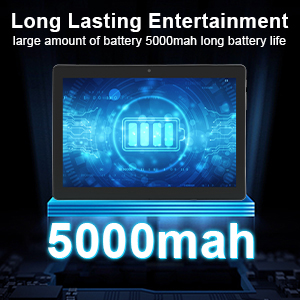
This image focuses on the Veidoo 10-inch Android Tablet PC's battery capacity, prominently displaying a battery icon and '5000mAh'. This signifies the tablet's 5000mAh battery, designed to provide extended usage time for entertainment and productivity.
4.2 Күйгүзүү/өчүрүү
- Күйгүзүү үчүн: Press and hold the Power button until the Veidoo logo appears on the screen.
- Өчүрүү үчүн: Меню пайда болгонго чейин Кубат баскычын басып, кармап туруңуз. "Өчүрүү" дегенди тандап, ырастаңыз.
- Уйку/Ойгонуу: Планшетти уктатуу же ойготуу үчүн Кубат баскычын кыскача басыңыз.
4.3 Inserting SIM and Micro SD Cards
The tablet supports dual SIM cards for 3G phone calls and a Micro SD card for expandable storage.
- Планшеттин капталынан SIM/SD карта уячасын табыңыз.
- Carefully open the slot cover.
- Insert the SIM card(s) and/or Micro SD card into the designated slots with the gold contacts facing down. Ensure they are correctly seated.
- Уячанын капкагын бекем жабыңыз.
This image demonstrates the storage capabilities of the Veidoo 10-inch Android Tablet PC, showing multiple applications and content open. It highlights the device's 16GB internal storage (ROM) and its ability to expand storage up to 32GB via a Micro SD card, allowing for ampколдонмолор, сүрөттөр жана видеолор үчүн бош орун.
4.4 Баштапкы орнотуу
Планшет биринчи жолу күйгүзүлгөндө, ал сизге баштапкы орнотуу процессин көрсөтөт:
- Каалаган тилиңизди тандаңыз.
- Wi-Fi тармагына туташыңыз.
- Google аккаунтуңуз менен кириңиз же жаңысын түзүңүз. Бул Google Play Дүкөнүнөн колдонмолорду жүктөп алуу үчүн керек.
- Экран кулпусун орнотуу (PIN, үлгү, сырсөз).
- Review жана шарттарды кабыл алуу.
5. Планшетти иштетүү
5.1 Негизги навигация
- таптаңыз: Бир нерсени тандаңыз же колдонмону ачыңыз.
- Басып кармап туруу: Access context menus or move icons.
- Серпүү: Экрандарды же тизмелерди сыдырыңыз.
- Чымчып-кичирейтүү: Сүрөттөрдү чоңойтуу же кичирейтүү жана web барактар.
5.2 Байланыш (Wi-Fi жана Bluetooth)
- Wi-Fi: барыңыз Орнотуулар > Тармак жана интернет > Wi-Fi. Turn Wi-Fi on, select your network, and enter the password.
- Bluetooth: барыңыз Орнотуулар > Туташкан түзмөктөр > BluetoothBluetooth'ту күйгүзүңүз, түзмөктөрдү издеп, каалаган аксессуарыңыз менен жупташтырыңыз.
5.3 Making Phone Calls (3G)
With a valid SIM card inserted, you can make and receive 3G phone calls:

This image shows a group of four individuals participating in a video call using the Veidoo 10-inch Android Tablet PC. This illustrates the tablet's capability for video conferencing and its 3G phone call functionality, allowing users to connect with others remotely.
- ачыңыз Телефон колдонмо.
- Dial the number using the keypad or select a contact.
- Чалууну баштоо үчүн чалуу баскычын таптаңыз.
5.4 Камераларды колдонуу
The tablet is equipped with a front and rear camera for photos and videos.
- ачыңыз Камера колдонмо.
- Камера сүрөтчөсүн колдонуп, алдыңкы жана арткы камералардын ортосунда которуштуруу.
- Сүрөткө тартуу же видео жазууну баштоо/токтоо үчүн жапкычты таптаңыз.
5.5 Сактагычты башкаруу
Сенин колуңдан келет view and manage your tablet's internal and external storage:
- барыңыз Орнотуулар > Сактагыч.
- Here you can see storage usage and free up space by deleting unnecessary files же колдонмолорду чыгарып салуу.
5.6 Installing and Uninstalling Apps
This image features the Veidoo 10-inch Android Tablet PC showcasing its Android 10 operating system with a multitude of application icons. This highlights that the device is GMS (Google Mobile Services) certified, ensuring access to Google Play Store and other Google services.
- Орнотуу: ачыңыз Google Play дүкөнү колдонмосун ачып, каалаган колдонмоңузду издеп, таптаңыз Орнотуу.
- Орнотуудан чыгаруу: барыңыз Орнотуулар > Колдонмолор жана эскертмелер > Бардык колдонмолорду көрүү. Select the app you wish to uninstall and tap Чыгаруу.
6. Техникалык тейлөө
- Тазалоо: Экранды жана корпусту тазалоо үчүн жумшак, мамыксыз чүпүрөктү колдонуңуз. Абразивдүү тазалоочу каражаттарды же эриткичтерди колдонбоңуз.
- Программалык камсыздоо жаңыртуулары: Системанын жаңыртууларын дайыма текшерип туруңуз Орнотуулар > Система > Системаны жаңыртуу оптималдуу аткарууну жана коопсуздукту камсыз кылуу.
- Батареяга кам көрүү: To prolong battery life, avoid fully discharging the battery frequently. Store the tablet in a cool, dry place when not in use for extended periods.
- Маалыматтын камдык көчүрмөсү: Regularly back up important data to a cloud service or external storage device to prevent data loss.
7. Кыйынчылыктарды
| Көйгөй | Мүмкүн чечим |
|---|---|
| Планшет күйбөйт | Ensure the battery is charged. Connect the charger and wait a few minutes before attempting to power on. If unresponsive, try pressing the reset pinhole. |
| Экран жооп бербей жатат | Restart the tablet by holding the Power button. If that doesn't work, use the reset pinhole. Ensure the screen is clean and dry. |
| Wi-Fi'га туташпай жатат | Check if Wi-Fi is enabled in settings. Ensure the Wi-Fi password is correct. Restart your router and the tablet. |
| Колдонмолор бузулуп же катып жатат | Колдонмону жаап, кайра ачыңыз. Колдонмонун кэшин тазалаңыз Жөндөөлөр> Колдонмолор жана эскертмелер. Update the app or uninstall and reinstall it. Ensure sufficient storage space. |
| Батареянын иштөө мөөнөтү начар | Reduce screen brightness. Close unused apps running in the background. Turn off Wi-Fi, Bluetooth, and GPS when not in use. Limit background data usage. |
8. Техникалык шарттар
Key technical specifications for the Veidoo 10-inch Android Tablet PC (Model T10):

This image provides a visual summary of the Veidoo Tablet PC's key specifications. It highlights features such as 1GB RAM, a 2MP front and 5MP rear camera setup, a 10.1-inch IPS HD display with 1280x800 resolution, 16GB of internal storage, Android 10 operating system, Wi-Fi connectivity, a Quad-Core CPU, and dual SIM card support.
| Өзгөчөлүк | Деталь |
|---|---|
| Модель аты | Touch (T10) |
| Туруктуу экран дисплей өлчөмү | 10.1 дюйм |
| Screen Resolution | 800 x 1280 (IPS) |
| RAM | 1 ГБ (DDR3 SDRAM) |
| Катуу дисктин/флеш эс тутумдун өлчөмү | 16 ГБ (Micro SD аркылуу 32 ГБ чейин кеңейтүүгө болот) |
| Зымсыз түрү | 802.11b, 802.11b/g (Wi-Fi), Bluetooth |
| Батареянын орточо иштөө мөөнөтү | 6 Hours (5000mAh Lithium Polymer) |
| Аппараттык платформа | Android |
| Операция системасы | Android 6.0 Marshmallow (GMS Certified) |
| Элемент Салмагы | 2.86 фунт |
| Продукциянын өлчөмдөрү | 9.49 x 6.69 x 0.37 дюйм |
| Арткы Webcam Resolution | 5 депутат |
| Фронт Webcam Resolution | 2 депутат |
| Процессорлордун саны | 4 (Quad-Core) |
| Power Source | Батарея менен иштейт, электр зымдары |
9. Кепилдик жана колдоо
Your Veidoo Tablet PC comes with a service warranty. Please refer to the included Service Warranty Card for specific terms and conditions, including warranty period and coverage details.
For technical support, troubleshooting assistance, or warranty claims, please contact Veidoo customer service. Contact information can typically be found on the warranty card or the official Veidoo website. When contacting support, please have your model number (T10) and purchase information ready.
You can also visit the official Veidoo store on Amazon for more information and support resources: Veidoo Store


