1. Киришүү
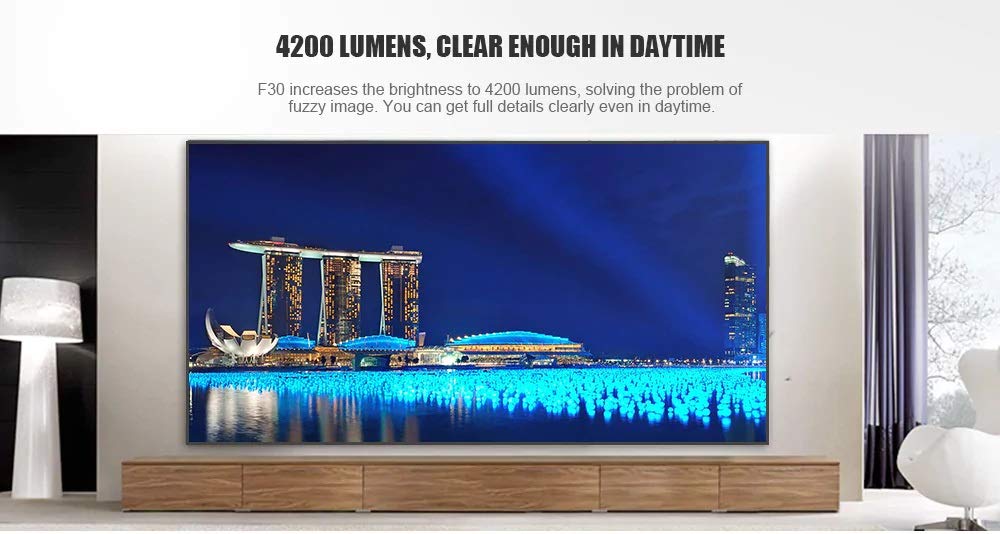
This manual provides essential instructions for the safe and efficient use of your Vivibright F30 Projector. Please read this manual thoroughly before operating the device and retain it for future reference. The Vivibright F30 is a Full HD 1080p LED projector designed for home theater, education, and business presentations, offering 4200 lumens brightness and multiple connectivity options.
2. Коопсуздук маалыматы
- Электр камсыздоо: Белгиленген кубат адаптерин гана колдонуңуз. Voltage проектордун талаптарына дал келет.
- Вентиляция: Вентиляция тешиктерин жаап албаңыз. Ашыкча ысып кетүүнүн алдын алуу үчүн проектордун айланасында туура аба агымы үчүн жетиштүү мейкиндикти камсыз кылыңыз.
- Жылуулук: Проектор лamp generates heat. Avoid touching the lens or vents immediately after use.
- Көздү коргоо: l болгондо проектордун объективине тике карабаamp is on. The bright light can cause eye strain or damage.
- Жайгашкан жери: Проекторду туруктуу, тегиз жерге коюңуз. Аны күн нуру түз тийген жерге, жылуулук булактарынын жанына же нымдуулугу жогору же чаңдуу чөйрөгө койбоңуз.
- Тазалоо: Тазалоодон мурун электр кубатынан ажыратыңыз. Жумшак, кургак чүпүрөктү колдонуңуз. Суюк же аэрозоль тазалагычтарды колдонбоңуз.
- Тейлөө: Проекторду өзүңүз тейлөөгө аракет кылбаңыз. Бардык тейлөө иштерин квалификациялуу адистерге тапшырыңыз.
3. Пакеттин мазмуну
Пакетте бардык буюмдар бар экенин текшериңиз:
- Vivibright F30 Projector
- Электр кабели
- Алыстан башкаруу
- Колдонуучунун Колдонмосу (бул документ)
- HDMI кабели (аймакка/пакетке жараша өзгөрүшү мүмкүн)
4. Продукт бүтүп калдыview
Проектордун компоненттери жана интерфейстери менен таанышыңыз.
4.1-сүрөт: Фронт view of the Vivibright F30 Projector, showing the lens and ventilation.

4.2-сүрөт: Side view of the Vivibright F30 Projector, highlighting the various input ports.
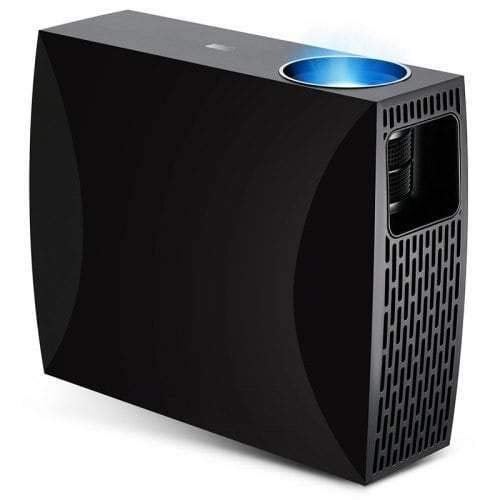
4.3-сүрөт: Top or rear view of the Vivibright F30 Projector, showing control buttons or additional vents.
4.1. Interfaces
- HDMI порттору: For connecting devices like laptops, gaming consoles, Blu-ray players, and media players.
- VGA порту: For connecting older computers or other VGA-compatible devices.
- USB порттору: For connecting USB storage devices to play media directly.
- Аудио чыгышы: Тышкы динамиктерди же наушниктерди туташтыруу үчүн.
- Кубат киргизүү: Электр кабелин туташтыруу үчүн.
5. Орнотуу
5.1. Жайгаштыруу
Position the projector on a stable surface or mount it appropriately. Ensure the projector is perpendicular to the projection screen for optimal image geometry. The projection distance can range from 1.2 to 6.8 meters, depending on the desired screen size.
5.2. Power Connection
- Электр кабелин проектордун кубат киргизүү портуна туташтырыңыз.
- Электр кабелинин экинчи учун жерге туташтырылган электр розеткасына сайыңыз.
5.3. Киргизүү түзүлүштөрүн туташтыруу
Connect your desired source device (e.g., laptop, media player) to the projector using an appropriate cable (HDMI, VGA, USB). Ensure the cable is securely connected to both the projector and the source device.
5.4. Фокус жана негизги ташты тууралоо
- Фокус: Проектордун линзасындагы фокус шакекчесин сүрөт экранда так жана даана көрүнгөнгө чейин айландырыңыз.
- Негизги таш: If the projected image is trapezoidal (wider at the top or bottom), use the keystone correction feature (manual or digital, depending on model) to adjust the image to a rectangular shape.
6. Иштөө нускамалары
6.1. Күйгүзүү / Өчүрүү
- Күйгүзүү: Press the power button on the projector or the remote control. The indicator light will change, and the lamp жарык кылат.
- Өчүрүү: Press the power button again. Confirm shutdown if prompted. Allow the projector to cool down before unplugging it.
6.2. Киргизүү булагын тандоо
Press the "Source" button on the remote control or the projector's control panel to cycle through available input sources (HDMI1, HDMI2, VGA, USB). Select the input corresponding to your connected device.
6.3. Меню навигациясы
Use the arrow buttons on the remote control or projector to navigate through the on-screen display (OSD) menu. Press "OK" or "Enter" to select an option and "Exit" or "Menu" to go back or close the menu.
6.4. Сүрөт жана аудио жөндөөлөрү
Adjust picture settings such as brightness, contrast, color, and aspect ratio via the OSD menu to optimize image quality. Adjust volume levels for the built-in speaker or connected external audio devices.
7. Техникалык тейлөө
7.1. Объективди тазалоо
Gently wipe the projector lens with a soft, lint-free cloth specifically designed for optical surfaces. Do not use abrasive materials or harsh chemicals.
7.2. Проектордун корпусун тазалоо
Проектордун сыртын тазалоо үчүн жумшак, кургак чүпүрөктү колдонуңуз. Өжөр тактар үчүн бир аз сүртүңүз.amp кездемени колдонсо болот, андан кийин кургак чүпүрөк менен сүртүңүз. Желдетүүчү тешиктерге суюктук кирбегенин текшериңиз.
7.3. Лamp Жашоо
The Vivibright F30 Projector utilizes an LED lamp with an estimated lifespan of up to 50,000 hours, requiring no regular replacement under normal usage conditions.
8. Кыйынчылыктарды
| Көйгөй | Мүмкүн себеп | Чечим |
|---|---|---|
| Сүрөт көрсөтүлгөн жок |
|
|
| Сүрөт бүдөмүк |
|
|
| Сүрөт трапеция формасында (кейстоун эффектиси) |
|
|
| Үн жок |
|
|
| Проектор ысып кетет же өчүп калат |
|
|
9. Техникалык шарттар
| Өзгөчөлүк | Деталь |
|---|---|
| Бренд | Vivibright |
| Модел | F30 |
| Native Resolution | 1920 x 1080 (Full HD) |
| Колдоого алынган резолюция | 4K чейин |
| Жарыктык | 4200 Lumens (LED Luminous) |
| Контраст катышы | 2200:1 |
| Дисплей технологиясы | LCD |
| Lamp Type | LED |
| Lamp Жашоо | 50,000 саатка чейин |
| Проекциялык аралык | 1.2дөн 6.8 метрге чейин |
| Ызы-чуу деңгээли | 29 децибел |
| Байланыш | HDMI, VGA, USB |
| Өзгөчөлүктөр | Portable, Built-in Speaker |
| Элемент Салмагы | 3 кг |
| Монтаж түрү | Столдун үстү |
10. Кепилдик жана колдоо
10.1. Кепилдик маалыматы
The Vivibright F30 Projector comes with a 1 жылдык кепилдик сатып алынган күндөн тартып. Бул кепилдик өндүрүштүк кемчиликтерди жана нормалдуу колдонуудагы бузулууларды камтыйт. Кепилдик дооматтары үчүн сатып алганыңыздын далилин сактап коюңуз.
The warranty does not cover damage caused by misuse, accidents, unauthorized repairs, or normal wear and tear.
10.2. Кардарларды колдоо кызматы
For technical assistance, warranty claims, or further inquiries, please contact Vivibright customer support through their official website or the contact information provided with your purchase documentation. When contacting support, please have your product model (F30) and purchase details ready.


