1. Киришүү
This manual provides detailed instructions for the Inateck KB02006 Backlit Detachable Keyboard Case, designed to enhance the functionality and protection of your iPad Pro 12.9-inch (2020/2018 models). Please read this manual thoroughly before use to ensure proper operation and to maximize your product experience.

Image 1: Inateck KB02006 Backlit Detachable Keyboard Case with iPad Pro 12.9. This image displays the keyboard case in an open position with an iPad inserted, showcasing the backlit keyboard and the device's screen.
2. Шайкештик
The Inateck KB02006 Keyboard Case is specifically designed for the following iPad models:
- iPad Pro 12.9 дюймдук (4-муундагы, 2020)
- iPad Pro 12.9 дюймдук (3-муундагы, 2018)
Бул иш туура келбейт with the iPad Pro 12.9-inch (5th Generation, 2021) or any other iPad models.
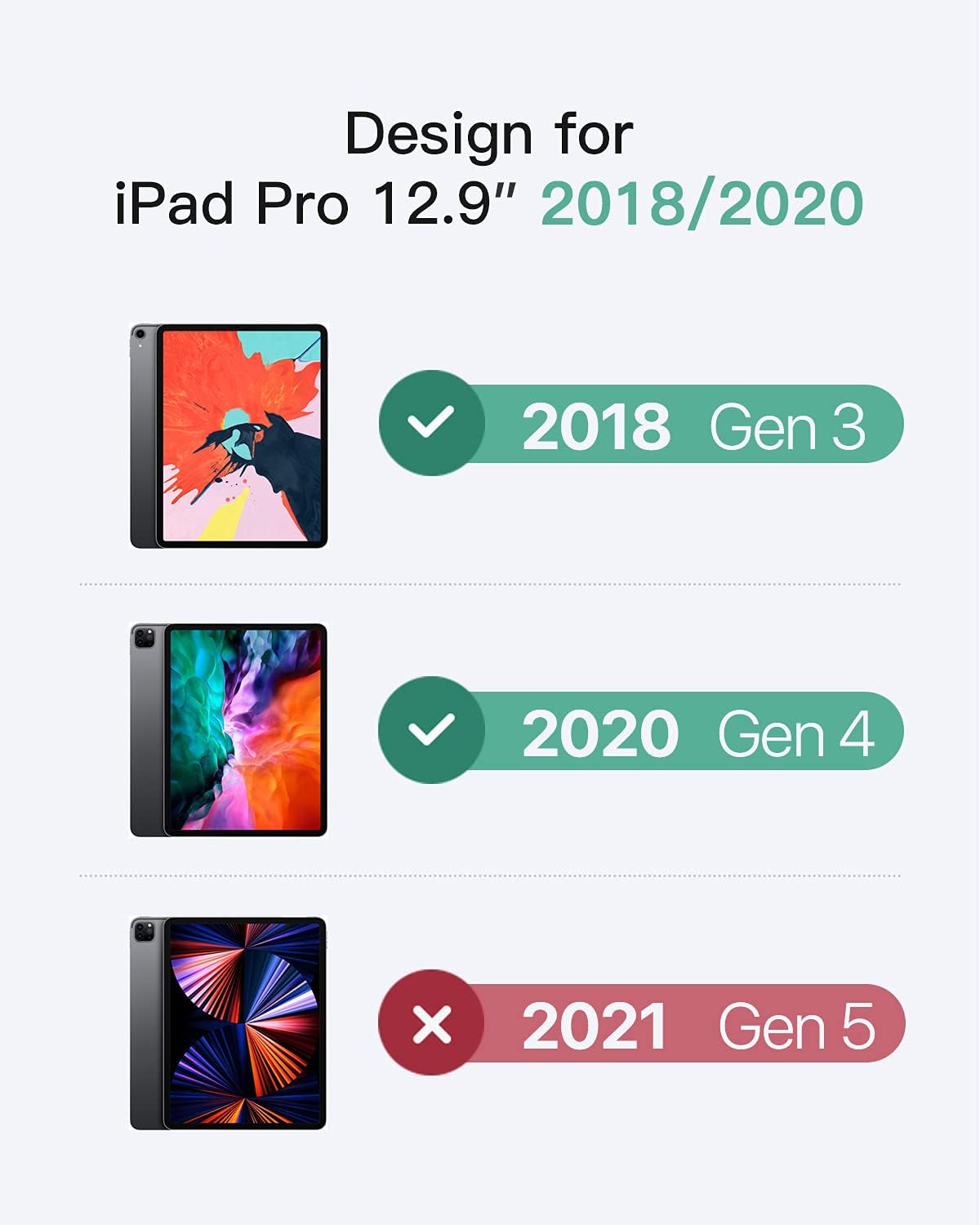
Image 2: Compatibility chart. This graphic illustrates the compatible iPad Pro 12.9-inch models (2018 Gen 3, 2020 Gen 4) and explicitly states incompatibility with the 2021 Gen 5 model.
3. Негизги өзгөчөлүктөрү
- Бөлүнүүчү дизайн: The upper cover, made of TPU material, functions as a protective iPad case and can also serve as an iPad stand for video viewing. The keyboard can be detached for flexible use.
- Көп бурчтуу тууралоо: The integrated kickstand offers three adjustable angles, providing comfortable viewing, typing, and gaming experiences.
- Backlit Keyboard with Customizable Lighting: Enjoy hundreds of cycling colorful breathing light effects. The backlight can be customized in three different zones, allowing you to choose your preferred colors.
- Integrated Apple Pencil Holder: Features a dedicated slot for your Apple Pencil 2, allowing for convenient carrying, charging, and pairing without needing to remove the keyboard case.
- Ар тараптуу коргоо: The case provides effective corner protection and is made from soft rubber material, safeguarding your iPad from daily wear and tear.
- Узак иштөө өмүрү: The keyboard offers approximately 282 hours of continuous working time and up to 180 days of standby time on a single charge.

Image 3: Detachable design. This image shows the keyboard being separated from the iPad case, highlighting the modularity of the product.

Image 4: Adjustable viewing angles. This graphic demonstrates the case's ability to adjust the iPad to various angles (30-160 degrees) for optimal use.

Image 5: Backlit keyboard in use. A user's hands are shown typing on the keyboard, which illuminates with multiple colors, enhancing visibility in low-light conditions.

Image 6: Apple Pencil holders. This image highlights the two designated areas for the Apple Pencil: one for charging/pairing and another for secure storage.

Image 7: All-round protection. A close-up view of the case's robust corners and soft rubber material, emphasizing its protective qualities.

Image 8: Long working life. A person is shown using the keyboard case with an iPad, illustrating its portability and extended battery performance.
4. Орнотуу нускамалары
4.1 Installing the iPad into the Case
- Align your iPad Pro 12.9-inch (2020/2018 model) with the protective TPU case.
- Gently press the iPad into the case, ensuring all corners and edges are securely fitted. Verify that all ports and buttons are accessible and aligned correctly.
4.2 Connecting the Keyboard via Bluetooth
- Баскычтоп шайкеш кубатталганын текшериңиз.
- Locate the ON/OFF switch on the keyboard and slide it to the 'ON' position. The indicator light will briefly illuminate.
- басыңыз Туташуу button on the keyboard (or Fn + C, depending on the keyboard layout) to enter Bluetooth pairing mode. The Bluetooth indicator light will start blinking.
- iPad'иңизден төмөнкүгө өтүңүз Орнотуулар > Bluetooth жана Bluetooth күйгүзүлгөнүн текшериңиз.
- Your iPad will search for nearby Bluetooth devices. Select "Inateck Keyboard" (or a similar name) from the list of available devices.
- Follow any on-screen prompts on your iPad to complete the pairing process. Once successfully paired, the Bluetooth indicator light on the keyboard will stop blinking.
5. Иштөө нускамалары
5.1 Баскычтоптун арткы жарыгын башкаруу
- To turn the backlight on/off or adjust brightness: Press the Жарык key (often depicted with a sun icon). Repeated presses will cycle through different brightness levels or turn the backlight off.
- Арткы жарык түсүн өзгөртүү үчүн: басыңыз Fn + Жарык key. This will cycle through the available colors and the 'Star light effect' modes.
5.2 Атайын функция баскычтары
The keyboard includes dedicated function keys for quick access to iPad features:
- Үй: iPad'дын башкы экранына кайтып келет.
- Издөө: iPad'дын издөө функциясын иштетет.
- Жарыктык: Экран жарыктыгын тууралайт.
- Көлөмү: Controls media volume (mute, volume down, volume up).
- Медиа башкаруу элементтери: Ойнотуу/тындыруу, мурунку трек, кийинки трек.
- Кулпуланган экран: iPad экранын кулпулайт.
5.3 Кикстанды колдонуу
The integrated kickstand allows for versatile positioning of your iPad:
- Gently pull out the kickstand from the back of the iPad case.
- Adjust the kickstand to one of the three available angles to suit your activity (e.g., upright for viewing, slightly reclined for typing).
5.4 Apple Pencil Storage and Charging
The case features two dedicated areas for your Apple Pencil 2:
- One slot is designed to hold the Apple Pencil securely while allowing it to charge and pair magnetically with your iPad.
- A second slot provides additional secure storage when charging or pairing is not required.
6. Техникалык тейлөө
6.1 Тазалоо
- To clean the case and keyboard, use a soft, slightly damp кездеме.
- Катуу химиялык заттарды, абразивдүү тазалоочу каражаттарды же эриткичтерди колдонуудан алыс болуңуз, анткени алар продуктунун сырткы көрүнүшүнө зыян келтириши мүмкүн.
- Ensure the keyboard is powered off and disconnected from the iPad before cleaning.
6.2 Батареяга кам көрүү
- Charge the keyboard regularly to maintain optimal battery health and performance.
- Батареяны бат-баттан толук кубаттап калуудан алыс болуңуз.
- Эгер клавиатураны узак убакытка сактасаңыз, аны болжол менен 50% га чейин кубаттап, салкын, кургак жерде сактаңыз.
7. Кыйынчылыктарды
7.1 Keyboard Not Connecting to iPad
- Күчтү текшерүү: Баскычтоп күйүк турганын жана батареясы жетиштүү заряддалганын текшериңиз.
- Bluetooth күйүк: Verify that Bluetooth is enabled on your iPad (Settings > Bluetooth).
- Түзмөктү кайра жупташтыруу: If previously paired, try forgetting the device on your iPad (Settings > Bluetooth > "Inateck Keyboard" > Forget This Device) and then re-pair it following the instructions in Section 4.2.
- Түзмөктөрдү кайра иштетүү: iPad жана клавиатураны өчүрүп күйгүзүңүз.
7.2 Ачкычтар жооп бербейт
- Батарея деңгээли: Клавиатуранын батарейканын деңгээлин текшерип, керек болсо заряддаңыз.
- Байланыш: Ensure the keyboard is properly connected via Bluetooth (refer to Section 7.1).
- Таза ачкычтар: Inspect keys for any debris that might be obstructing their movement.
7.3 Backlight Not Working or Incorrect
- Күйгүзүү: Баскычтоп күйгүзүлгөнүн текшериңиз.
- Орнотууларды тууралоо: Cycle through the backlight brightness and color settings using the Жарык ачкыч жана Fn + Light key (refer to Section 5.1).
- Батарея: Low battery might affect backlight performance. Charge the keyboard.
8. Техникалык шарттар
| Өзгөчөлүк | Деталь |
|---|---|
| Бренд | Inateck |
| Модель номери | KB02006 (8541534371) |
| Шайкеш түзмөктөр | iPad Pro 12.9-inch (2020/2018) |
| Аппараттык платформа | Планшет |
| Операция системасы | iOS |
| Keyboard Description | QWERTY |
| Өзгөчө өзгөчөлүк | Backlit, Detachable Keyboard |
| Баскычтоптун арткы жарыгы | RGB (Multi-zone, customizable) |
| Түс | Кара |
| Материал | Plastic (TPU for case) |
| Элемент Салмагы | 2.46 фунт |
| Продукциянын өлчөмдөрү | 11.5 x 9.65 x 0.83 дюйм |
| Power Source | Кайра заряддалуучу батарея (1 литий-иондук батарея кошулган) |
| Камтылган компоненттер | Баскычтоп кутусу |
9. Кепилдик жана колдоо
For detailed warranty information regarding your Inateck KB02006 Backlit Detachable Keyboard Case, please refer to the official Inateck webсайтка же продуктуңузга кошулган кепилдик картасы.
Should you encounter any issues or require technical assistance, please contact Inateck customer support through their official channels. You can typically find support contact information on the Inateck webсайт: www.inateck.com


