Introduction
Сатып алганыңыз үчүн рахматasing the Greadio Retro Bluetooth Speaker and FM Radio. This compact and stylish device combines vintage aesthetics with modern audio technology, offering a rich sound experience through Bluetooth 5.0, FM radio, TF card playback, and AUX input. Designed for portability and ease of use, it's an ideal companion for music lovers who appreciate classic design.
Please read this manual carefully before using the product to ensure proper operation and to maximize its lifespan. Keep this manual for future reference.
Продукт өзгөчөлүктөрү
- Компакт жана көчмө: Mini size (approximately 4.4 x 2.7 x 2 inches) with surprisingly loud volume.
- Жогорку сапаттагы аудио: Four-watt amplifiers for rich, clear sound with strong bass enhancement.
- Көп функциялуу ойнотуу: Supports Bluetooth 5.0 wireless connection, FM radio (87.5-108 MHz), TF card (MP3 player), and AUX input.
- Батареянын узак иштөө мөөнөтү: Built-in 1100 mAh rechargeable lithium-ion battery provides up to 8 hours of playtime.
- Ретро дизайн: Уникалдуу винtage appearance with a smooth red paint finish, blending classic aesthetics with modern technology.
- Колдонууга оңой: Intuitive controls for volume, tuning, and mode selection.
Пакеттин мазмуну
Сураныч, кутудан чыгарганда пакеттин мазмунун текшерип, бардык буюмдар бар экенин текшериңиз:
- Greadio Retro Bluetooth Speaker (Model: R919)
- Микро USB заряддоо кабели
- 3.5 мм AUX аудио кабели
- User Manual

Image: Contents of the Greadio Retro Bluetooth Speaker package, showing the red speaker, a Micro USB charging cable, a 3.5mm AUX cable, and the user manual.
Башкаруу каражаттары жана порттор
Familiarize yourself with the controls and ports on your Greadio Retro Bluetooth Speaker:
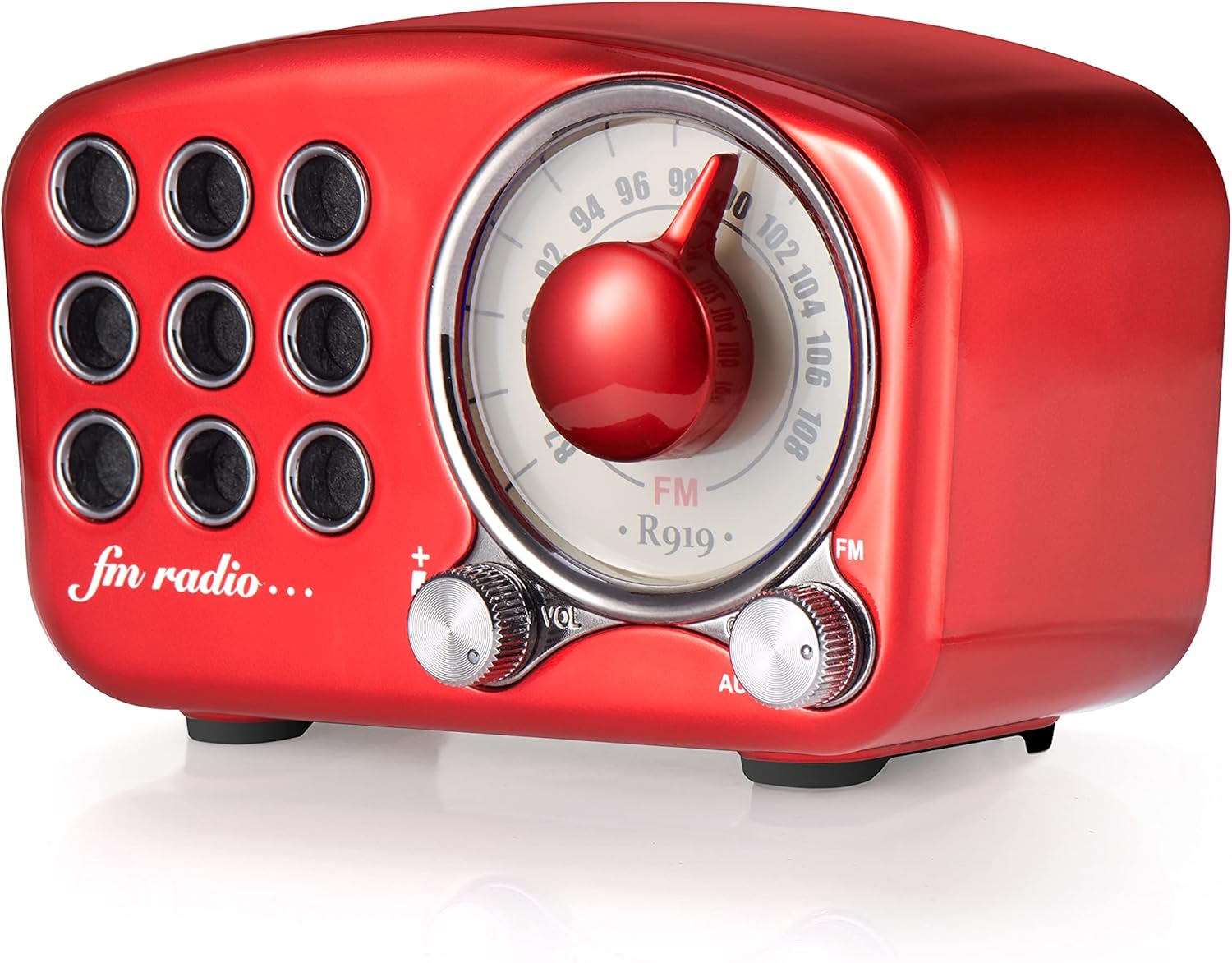
Сүрөт: алдыңкы view of the Greadio R919 speaker, highlighting the large central tuning dial, the volume knob on the left, and the mode switch (FM/AUX) on the right.
- Тюнинг терүү: Large central dial for selecting FM radio frequencies.
- Үн баскычы (VO): Located on the left, turn to adjust the audio volume.
- Mode Switch (FM/AUX): Located on the right, switch between FM radio mode and AUX input mode.
- Кубат которгучу: Often integrated with the volume knob (turn clockwise to power on, counter-clockwise to power off).

Сүрөт: Арткы view of the Greadio R919 speaker, showing the Micro USB charging port, 3.5mm AUX input jack, and the TF (MicroSD) card slot.
- Микро USB кубаттоочу порт: Заряддоо кабелин туташтыруу үчүн.
- AUX киргизүү уячасы: For connecting external audio devices via the 3.5mm AUX cable.
- TF карта уячасы: For inserting a TF (MicroSD) card with MP3 audio files.
Жайгашуу
Баштапкы заряддоо
Before first use, it is recommended to fully charge the speaker. Connect the supplied Micro USB cable to the charging port on the back of the speaker and the other end to a USB power adapter (not included) or a computer's USB port. The charging indicator light will typically illuminate during charging and turn off or change color when fully charged.
A full charge usually takes a few hours and provides up to 8 hours of playback time.
Иштөө нускамалары
Күйгүзүү/өчүрүү
- To power on, turn the Volume knob clockwise until you hear a click and the speaker powers on.
- To power off, turn the Volume knob counter-clockwise until you hear a click and the speaker powers off.
Bluetooth режими
The speaker will automatically enter Bluetooth pairing mode when powered on if no other mode is selected or if the mode switch is set to Bluetooth (if applicable, otherwise it defaults to Bluetooth).
- Динамик күйгүзүлгөнүн текшериңиз.
- Мобилдик түзмөгүңүздө (смартфон, планшет, ноутбук) Bluetooth иштетиңиз жана жеткиликтүү түзмөктөрдү издеңиз.
- Select "R919" or "Greadio R919" from the list of found devices.
- Once connected, the speaker will emit a confirmation sound. You can now play audio from your device through the speaker.

Image: The Greadio R919 speaker wirelessly connected to a smartphone, tablet, and laptop, illustrating its Bluetooth compatibility.
FM радио режими
- Switch the mode selector to "FM".
- Slowly turn the Tuning Dial to search for FM radio stations. The frequency range is 87.5-108 MHz.
- Үн баскычын каалаган угуу деңгээлине коюңуз.
- For better reception, extend the built-in antenna (if present, or reposition the speaker).

Image: A family enjoying the Greadio R919 speaker while listening to FM radio outdoors, demonstrating its portability and radio function.
TF Card (MP3 Player) Mode
- MP3 аудиосу бар TF (MicroSD) картасын салыңыз files into the TF card slot on the back of the speaker.
- The speaker should automatically switch to TF card playback mode and begin playing the first compatible audio file.
- Use the volume knob to adjust the sound level. (Note: Track navigation controls may not be available on this model, playback is sequential).
AUX киргизүү режими
- Connect one end of the supplied 3.5mm AUX audio cable to the AUX input jack on the back of the speaker.
- Connect the other end of the AUX cable to the headphone jack or audio output of your external audio device (e.g., MP3 player, computer).
- Switch the mode selector to "AUX".
- Play audio from your external device. Adjust volume using both the speaker's volume knob and your external device's volume controls.
Техникалык тейлөө
- Тазалоо: Динамиктин бетин тазалоо үчүн жумшак, кургак чүпүрөктү колдонуңуз. Абразивдүү тазалагычтарды, момдорду же эриткичтерди колдонбоңуз.
- Сактагыч: Динамикти түз күн нурунан жана өтө температурадан алыс салкын, кургак жерде сактаңыз.
- Батареяга кам көрүү: Батареянын иштөө мөөнөтүн узартуу үчүн, бат-баттан батарейканы толук зарядсыздандырбаңыз. Узак убакыт колдонулбаса да, динамикти үзгүлтүксүз заряддап туруңуз.
- Суу каршылык: This speaker is NOT water-resistant. Avoid exposure to water or high humidity.
Проблемаларды чечүү
| Көйгөй | Мүмкүн себеп | Чечим |
|---|---|---|
| Күч жок | Battery is dead; Power switch is off. | Charge the speaker; Turn the volume knob clockwise to power on. |
| Bluetooth режиминде үн жок | Speaker not paired; Volume too low on speaker or device. | Ensure speaker is in Bluetooth mode and paired; Increase volume on both speaker and connected device. |
| FM радиосун кабыл алуу начар | Сигнал алсыз; динамиктин абалы. | Reposition the speaker; Extend the antenna (if applicable); Try tuning to a stronger station. |
| TF картасы ойнобой жатат | Card not inserted correctly; Incompatible file format; Corrupted card. | Reinsert TF card; Ensure files are MP3 format; Try a different TF card. |
| AUX режиминде үн жок | Cable not connected properly; Mode not set to AUX; Volume too low. | Check AUX cable connections; Switch mode to AUX; Increase volume on both speaker and external device. |
Техникалык шарттар
| Өзгөчөлүк | Деталь |
|---|---|
| Бренд | Greadio |
| Модел | R919 |
| Байланыш технологиясы | Bluetooth 5.0, Көмөкчү |
| Tuner Technology | FM (87.5-108 МГц) |
| Динамик чыгаруу күчү | 4 Ватт |
| Power Source | Батарея менен иштейт |
| Батарея түрү | Литий ион |
| Батарея сыйымдуулугу | 1100 мАч |
| Батареянын орточо иштөө мөөнөтү | 8 саатка чейин |
| Продукциянын өлчөмдөрү (L x W x Y) | 10.67 x 6.35 x 4.57 см (4.2 x 2.5 x 1.8 дюйм) |
| Элемент Салмагы | 199.58 г (0.44 фунт) |
| Материалдын түрү | Plastic with Red Coating/Paint |
| Шайкеш түзмөктөр | Smartphone, Laptop, MP3 Player, etc. |
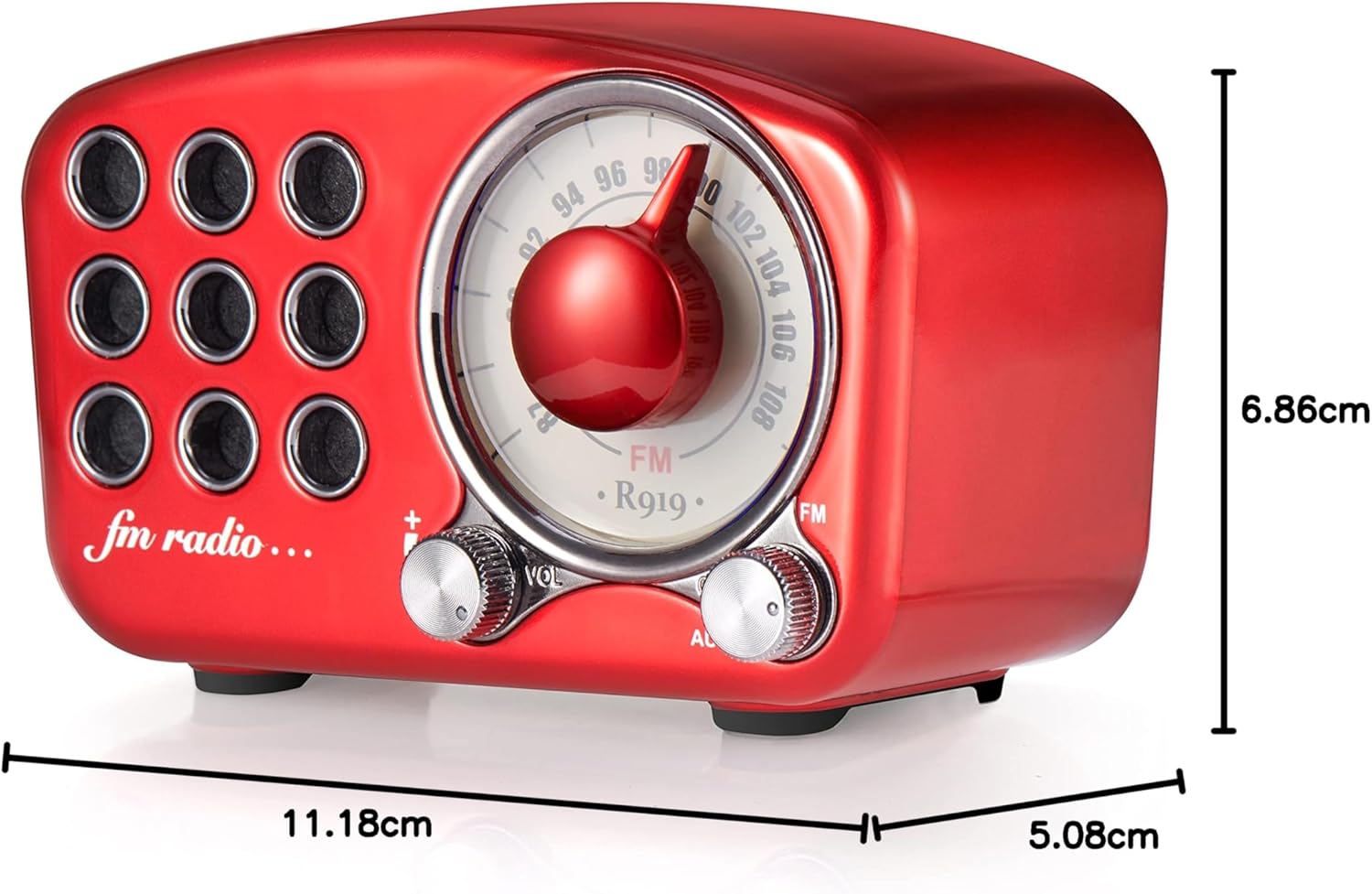
Image: Diagram showing the dimensions of the Greadio R919 speaker: 11.18 cm (length), 5.08 cm (width), and 6.86 cm (height).
Кепилдик жана колдоо
The Greadio Retro Bluetooth Speaker comes with a бир жылдык өндүрүүчүнүн кепилдик, нормалдуу колдонууда материалдардын жана жасалгалоодогу кемчиликтерди жабуу.
Additionally, Greadio provides өмүр бою кардарларды тейлөө. If you encounter any issues or have questions regarding your product, please contact Greadio customer support through the retailer's platform or the official Greadio webжардам үчүн сайт.
Please note that the warranty does not cover wear and tear, misuse, accidental damage, or unauthorized repairs.


