1. Introduction and Overview
The Emtek Empowered Motorized Touchscreen Keypad Smart Deadbolt combines Emtek's renowned long-lasting quality with advanced smart home technology. Designed for security and convenience, this deadbolt offers keyless entry, remote access, and intelligent features to enhance your home's safety.
This manual will guide you through the installation, setup, and daily operation of your new smart deadbolt, ensuring you can fully utilize its capabilities.

Сүрөт 1.1: Алдыңкы view of the Emtek Empowered Motorized Touchscreen Keypad Smart Deadbolt.
2. Негизги өзгөчөлүктөрү
- Арткы жарык баскычтоп: The keypad illuminates with a touch, featuring numbers designed for durability and resistance to wear.
- Кошумча орнотуулар: Customize settings such as auto re-lock, privacy mode, and tamper alarms for enhanced security.
- Motorized Deadbolt: Features a quiet motor and a tapered deadbolt to accommodate minor door misalignments.
- Жөнөкөй орнотуу: Designed to replace existing deadbolts with minimal tools, fitting standard doors 1-3/4” to 2-1/4” thick with a 2-1/8” face bore prep.
- Weather Protected: Includes a rubber gasket for increased protection against outdoor elements.
- Акылдуу туташуу: Integrated with August technology, allowing for unlimited entry codes, remote control via the August mobile app, and 24/7 activity history.
- Auto-Unlock Function: Features Home Mode and Away Mode, enabling automatic unlocking when you approach your door (within approximately 200 meters) and automatic locking when you leave.
- Үн жардамчысынын шайкештиги: Works seamlessly with Amazon Alexa, Google Assistant, and Siri.
- August Connect Wi-Fi Bridge & DoorSense: The smart bundle includes a pre-installed August module, August Connect Wi-Fi Bridge for remote access, and DoorSense for real-time door status monitoring.
- BILT App Support: Access easy step-by-step 3D instructions for installation and setup via the BILT app.
- 9V Battery Port: A convenient 9V battery port is included to prevent lockouts in case of main battery depletion.
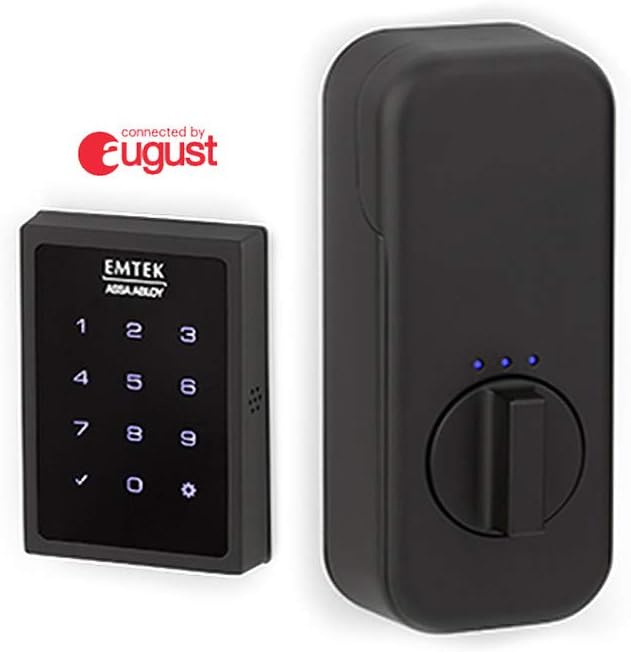
Figure 2.1: Emtek Empowered Smart Deadbolt exterior keypad and interior unit.

Figure 2.2: ашыкview of August connectivity features including the mobile app, Wi-Fi bridge, and DoorSense.
3. Пакеттин мазмуну
Сураныч, орнотууну баштоодон мурун бардык компоненттер бар экендигин текшериңиз:
- Батарея капкагы
- Ички эскуч
- Монтаждоо плитасы
- Strike Plate
- Коопсуздук плитасы
- Deadbolt Latch (2-3/4”)
- Deadbolt Latch (2-3/8”)
- August Connect
- August Door Sense
- AA батарейкалар (x4)
- #8-32 x 5/16” Machine Screws (x4)
- #8 x 3/4” Wood Screws (x2)
- #10-32 x 1-3/8” Machine Screws (x2)
- #10 x 3” Wood Screws (x2)
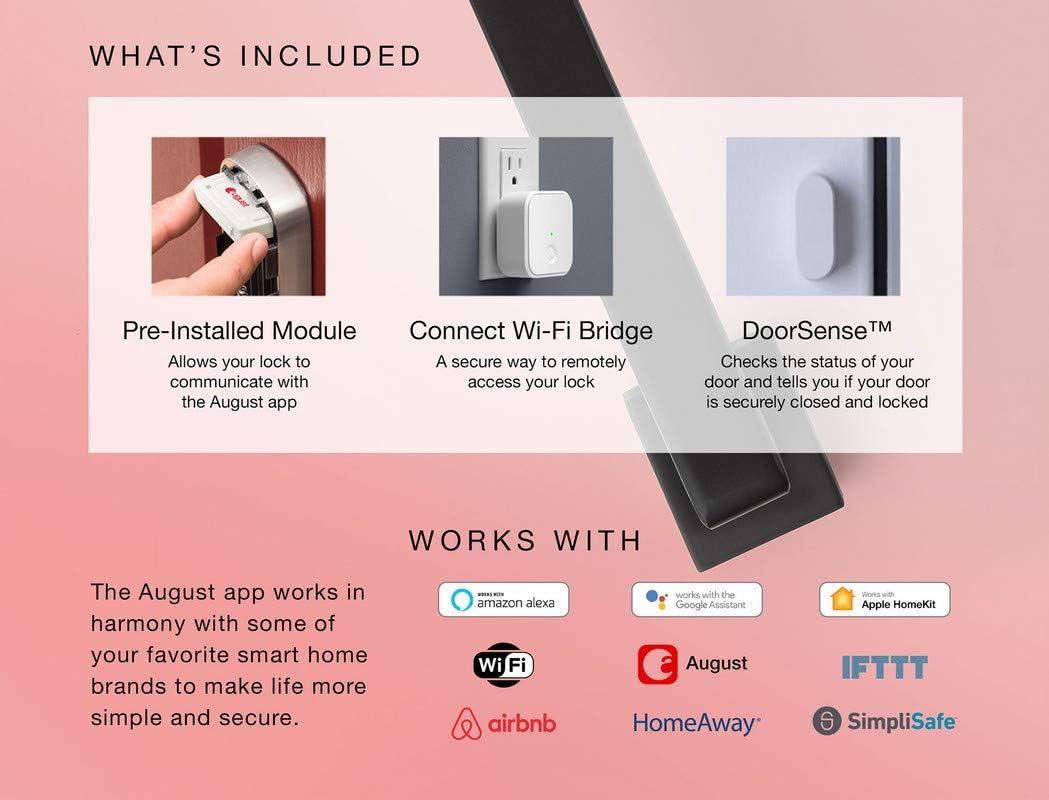
Figure 3.1: Visual representation of included components and smart home compatibility.
4. Орнотуу жана орнотуу
The Emtek Empowered Smart Deadbolt is designed for simple installation, typically requiring only a screwdriver. It replaces most existing deadbolts and is compatible with standard doors 1-3/4” to 2-1/4” thick with a standard 2-1/8” face bore door prep.
4.1. Орнотууга чейинки текшерүүлөр
- Ensure your door thickness and bore prep meet the specifications.
- Бардык пакеттин мазмуну бар экенин ырастаңыз.
- For optimal smart features, ensure you have a stable Wi-Fi connection at your installation location.
4.2. Орнотуу кадамдары
For detailed, step-by-step 3D instructions, it is highly recommended to download and use the BILT колдонмосу. The app provides visual guidance for each stagорнотуу процессинин e.
General steps include:
- Учурдагы бекиткичиңизди алып салыңыз.
- Жаңы бекиткич кулпуну эшиктин четине орнотуңуз.
- Сырткы клавиатура топтомун орнотуңуз.
- Ички монтаждоо плитасын орнотуңуз.
- Connect the cable from the exterior assembly to the interior escutcheon.
- Secure the interior escutcheon.
- Install the batteries (4 AA batteries included).
- Perform the door handing process as instructed by the lock or BILT app.
- Install the August Connect Wi-Fi Bridge and DoorSense according to their respective instructions to enable smart features.

Figure 4.1: ашыкview of hassle-free setup and customizable features.
5. Иштөө нускамалары
5.1. Баскычтоптун иштеши
- Бекитүү: Simply touch the keypad with your palm or fingers. The deadbolt will extend.
- Кулпуну ачуу үчүн: Enter your programmed user code on the backlit keypad. The deadbolt will retract.
5.2. August App Control
The August mobile app provides comprehensive control and monitoring capabilities:
- Алыстан кулпулоо/кулпуну ачуу: Control your deadbolt from anywhere using the app.
- Конок мүмкүнчүлүгү: Create and manage unlimited entry codes for guests, setting specific access schedules.
- Активдүүлүккө мониторинг жүргүзүү: View a 24/7 history log of who enters and exits your home.
- DoorSense Status: Check if your door is securely closed and locked in real-time.
- Auto-Unlock (Home/Away Mode): Configure the lock to automatically unlock as you approach your home and lock when you leave.

Figure 5.1: Home Mode and Away Mode for automatic unlocking and locking.
5.3. Үн менен башкаруу
Integrate your Emtek smart deadbolt with your preferred voice assistant for hands-free control:
- Amazon Alexa: "Алекса, алдыңкы эшикти бекит."
- Google Жардамчысы: "Hey Google, is the back door locked?"
- Сири: "Hey Siri, unlock the garage door." (Requires Apple HomeKit setup via August app)
6. Техникалык тейлөө
6.1. Батареяны алмаштыруу
The deadbolt requires 4 AA alkaline batteries. When battery levels are low, the lock will provide an alert. To replace batteries:
- Remove the battery cover on the interior escutcheon.
- Эски батарейкаларды алып салыңыз.
- Туура полярдуулукту камсыз кылып, жаңы AA щелочтуу батареяларын салыңыз.
- Батареянын капкагын алмаштырыңыз.
Маанилүү: In case of complete battery depletion, a 9V battery port is available on the exterior keypad for temporary power to unlock the deadbolt. Simply hold a 9V battery to the contacts on the bottom of the keypad while entering your code.
6.2. Тазалоо
Clean the exterior keypad and interior unit with a soft, damp кездеме. Абразивдүү тазалагычтарды же эриткичтерди колдонуудан алыс болуңуз, анткени алар финишке жана электрондук компоненттерге зыян келтириши мүмкүн.
7. Кыйынчылыктарды
If you encounter issues with your Emtek Empowered Smart Deadbolt, refer to the following common problems and solutions:
| Көйгөй | Мүмкүн себеп | Чечим |
|---|---|---|
| Кулпу баскычтоп киргизүүгө жооп бербейт. | Dead batteries; Keypad not waking up. | Replace AA batteries. Ensure you are touching the keypad to activate it. Use 9V battery backup if completely dead. |
| Дедболт толук узартылбайт/артына тартылбайт. | Door misalignment; Low battery; Obstruction in door frame. | Check door alignment and strike plate. Replace batteries. Clear any obstructions. Re-run door handing process. |
| Cannot connect to August app or Wi-Fi. | August Connect not properly set up; Wi-Fi signal weak; App issues. | Ensure August Connect is plugged in and within range of the lock and Wi-Fi router. Check Wi-Fi signal strength. Restart August Connect and your mobile device. Consult August app help or BILT app. |
| Auto-unlock not working consistently. | Phone location services disabled; App not running in background; Geofencing issues. | Ensure location services are enabled for the August app. Keep the app running in the background. Calibrate your home's geofence in the August app settings. |
| Lock is unresponsive after installation. | Incorrect wiring/connection; Missing battery contact; Manufacturing defect. | Double-check all cable connections. Verify battery contacts are correctly seated. If issues persist, contact Emtek customer support. |
For further assistance, refer to the BILT app or contact Emtek customer support.
8. Техникалык шарттар
| Өзгөчөлүк | Деталь |
|---|---|
| Бренд | Эмтек |
| Модель аты | Empowered Motorized Touchscreen Keypad Smart Deadbolt |
| Модель номери | EMP1101US19 |
| Кулпу түрү | Баскычтоп |
| Өзгөчөлүктөр | Touchscreen, Wi-Fi, Motorized, Backlit Keypad |
| Материал | Жез |
| Түс | Flat Black Coated (US19) |
| Элементтин өлчөмдөрү (L x W x Y) | 6 x 3 x 3 дюйм |
| Элемент Салмагы | 4.86 фунт |
| Эшиктин калыңдыгынын шайкештиги | 1-3/4” to 2-1/4” |
| Power Source | 4 АА батарейкалар (кошулган) |
| Камдык күч | 9V Батарея порту |
| Connectivity Protocol | Wi-Fi (via August Connect) |
| Controller Type | Amazon Alexa, Google Жардамчысы, Siri |
9. Кепилдик жана колдоо
Emtek products are known for their quality and durability. For specific warranty information regarding your Empowered Motorized Touchscreen Keypad Smart Deadbolt, please refer to the warranty card included in your product packaging or visit the official Emtek webсайт.
For technical support, troubleshooting assistance, or to inquire about replacement parts, please contact Emtek customer service. You can also find helpful resources and 3D installation guides on the BILT колдонмосу.


