1. Киришүү
The Autel MaxiDiag MD906 PRO is a professional diagnostic scan tool designed for comprehensive vehicle system analysis and maintenance. This device offers full system diagnostics, a variety of service functions, and supports advanced vehicle communication protocols. This manual provides detailed instructions for setting up, operating, and maintaining your MD906 PRO scanner.
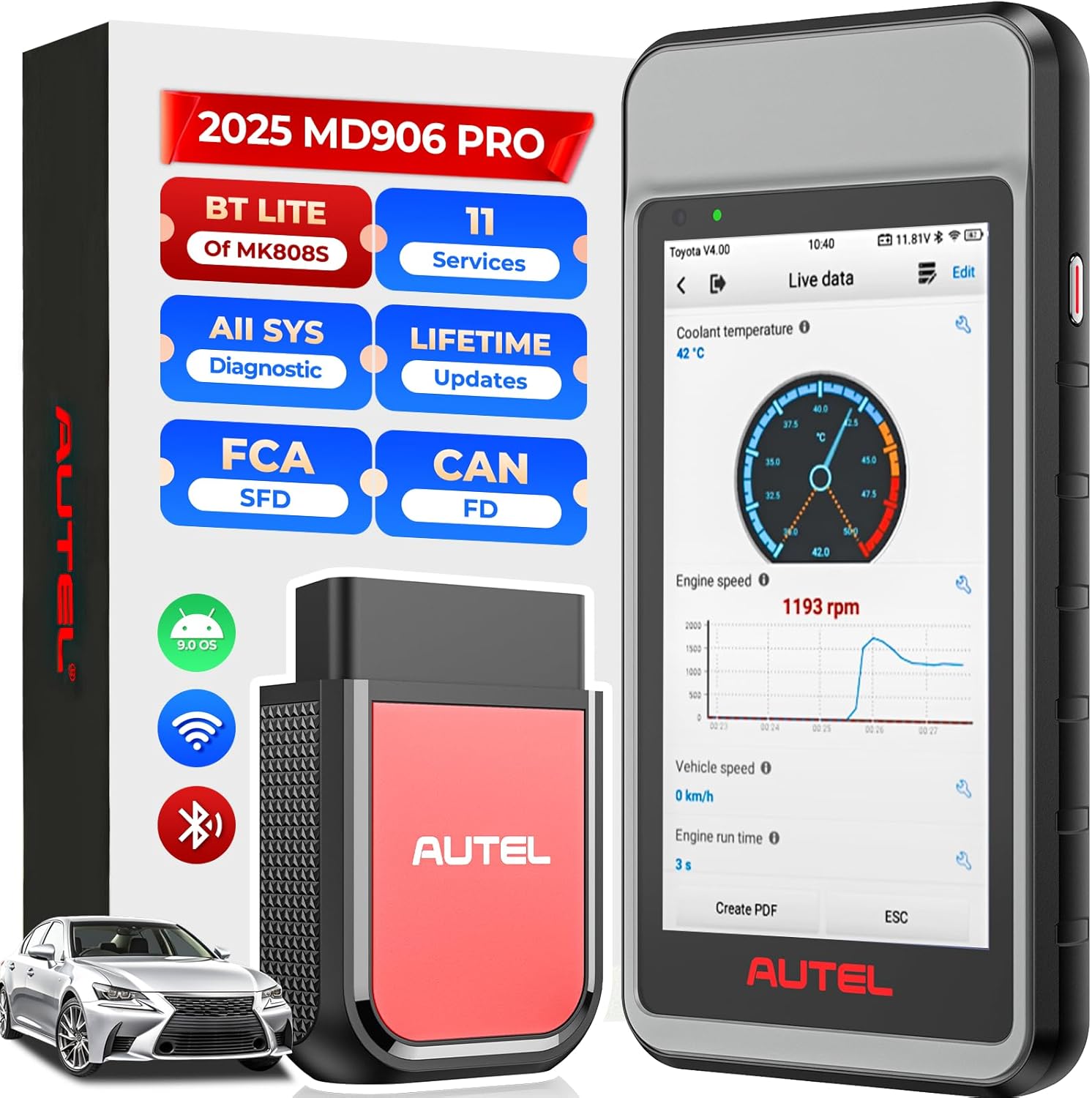
Figure 1: The Autel MaxiDiag MD906 PRO diagnostic tablet and its VCI (Vehicle Communication Interface) unit.
2. Пакеттин мазмуну
Төмөндө тизмеленген нерселердин баары пакетиңизге камтылганын текшериңиз:
- Autel MaxiDiag MD906 PRO Diagnostic Tablet
- VCI150 Lite Bluetooth Vehicle Communication Interface
- Негизги кабель
- USB кабели
- Кубаттуу адаптер
- User Manual

Figure 2: Illustration of the items included in the MD906 PRO package.
3. Продукт бүтүп калдыview жана Техникалык шарттар
The MD906 PRO is equipped with advanced hardware and software features to provide efficient and accurate vehicle diagnostics.
3.1 Негизги өзгөчөлүктөрү
- Full System Diagnostics: Accesses all available vehicle systems.
- 11+ Service Functions: Performs common maintenance and reset procedures.
- Enhanced OBD2 Modes: Supports all 10 OBD2 test modes.
- CAN FD Protocol Support: Compatible with newer vehicle models.
- FCA AutoAuth & VW-SFD Access: Enables secure gateway access for specific brands.
- Wireless VCI: Bluetooth connectivity for flexible operation.
- Wi-Fi Printing & Cloud Report: Facilitates report management and sharing.
- Lifetime Free Updates: Ensures continuous access to the latest software and vehicle coverage.
3.2 Аппараттык спецификациялар
- Иштетүү системасы: Android 9.0
- Processor: Advanced Quad-core Processor
- Эстутум: 2 ГБ RAM, 64 ГБ ROM
- Display: 5.5-inch LCD touchscreen with 1280x720 resolution
- Battery: 5000mAh Lithium-Polymer battery
- Connectivity: Bluetooth VCI150 Lite, Wi-Fi (2.4G)

Figure 3: ашыкview of the MD906 PRO's hardware components and specifications.
4. Орнотуу
4.1 Аппаратты заряддоо
Before initial use, fully charge the MD906 PRO tablet using the provided power adapter. The 5000mAh battery provides extended operating time.
4.2 Күйгүзүү/өчүрүү
- To Power On: Press and hold the Power button until the Autel logo appears.
- To Power Off: Press and hold the Power button, then select 'Power Off' from the options.
4.3 Initial Setup and VCI Connection
- Upon first startup, follow the on-screen prompts to select your preferred language and region.
- Connect the MD906 PRO to a Wi-Fi network for software updates and online features.
- Plug the VCI150 Lite unit into the vehicle's OBD2 port. The VCI will automatically establish a Bluetooth connection with the tablet. Ensure the VCI indicator light is solid blue, indicating a successful connection.
4.4 Программалык камсыздоо жаңыртуулары
The MD906 PRO includes lifetime free software updates. Regularly check for updates to ensure optimal performance and the latest vehicle coverage. To update, navigate to the 'Update' application on the tablet's main menu and follow the instructions.
5. Иштөө нускамалары
5.1 Унаага туташтыруу
Locate the vehicle's 16-pin OBD2 Data Link Connector (DLC), typically found under the dashboard on the driver's side. Plug the VCI150 Lite unit into the DLC. Ensure the vehicle's ignition is in the 'ON' position or the engine is running, as required by the diagnostic procedure.
5.2 Толук системанын диагностикасы
The MD906 PRO can perform OE-level diagnostics on all available electronic systems, including Engine, ABS, SRS, Transmission, EPB, HVAC, and more.
- DTCлерди окуу/тазалоо: Retrieve and erase Diagnostic Trouble Codes from all control modules.
- View Жандуу маалыматтар: Display real-time data streams from various sensors and components.
- Кадр дайындарын тоңдуруп коюу: View a snapshot of vehicle conditions at the time a fault code was set.
- ECU маалыматын алуу: Access specific information about the Electronic Control Unit.
- Автоматтык сканерлөө 2.0: Automatically identify the vehicle and scan all systems for faults, providing a quick overview of vehicle health.

Figure 4: The MD906 PRO interface displaying an all-system diagnostic scan, showing various vehicle modules.
5.3 Атайын кызмат функциялары
The MD906 PRO supports over 11 common maintenance and reset services. Note that the availability of specific functions may vary by vehicle make, model, and year.
- Майды калыбына келтирүү: Май алмаштырылгандан кийин майдын иштөө мөөнөтү системасын баштапкы абалга келтирет.
- EPB баштапкы абалга келтирүү: Тормоз колодкасын алмаштыргандан кийин электрондук тормоз системасын баштапкы абалга келтирет.
- SAS баштапкы абалга келтирүү: Руль бурчу сенсорун калибрлейт.
- Батареяны каттоо: Унаанын ECU менен жаңы батареяны каттайт.
- Дроссельди кайра үйрөнүү: Adapts the throttle position sensor.
- ABS кан агуу: Performs brake bleeding procedures.
- Инжектор коддоо: Жаңы инжектор номерлерин ECUга коддойт.
- TPMS баштапкы абалга келтирүү: Resets Tire Pressure Monitoring System sensors.
- AFS Headlamp: Adapts the Adaptive Front Lighting System.
- A/F Adjustment: Adjusts air/fuel ratio parameters.
- DPF калыбына келтирүү: Initiates Diesel Particulate Filter regeneration.

Figure 5: A visual representation of the various service functions available on the MD906 PRO.
5.4 OBD2 Test Modes
The MD906 PRO supports all 10 modes of OBD2 tests for emissions-related diagnostics on most OBD2-compliant vehicles (1996 and newer).
- Коддорду окуу/тазалоо
- Live Data
- Фреймдин берилиштерин тоңдуруу
- I/M даярдыгы абалы
- O2 Monitor Test
- Борттогу монитор тест
- Компоненттик тест
- Унаа маалыматы
- Азыркы модулдар
- DTC издөө
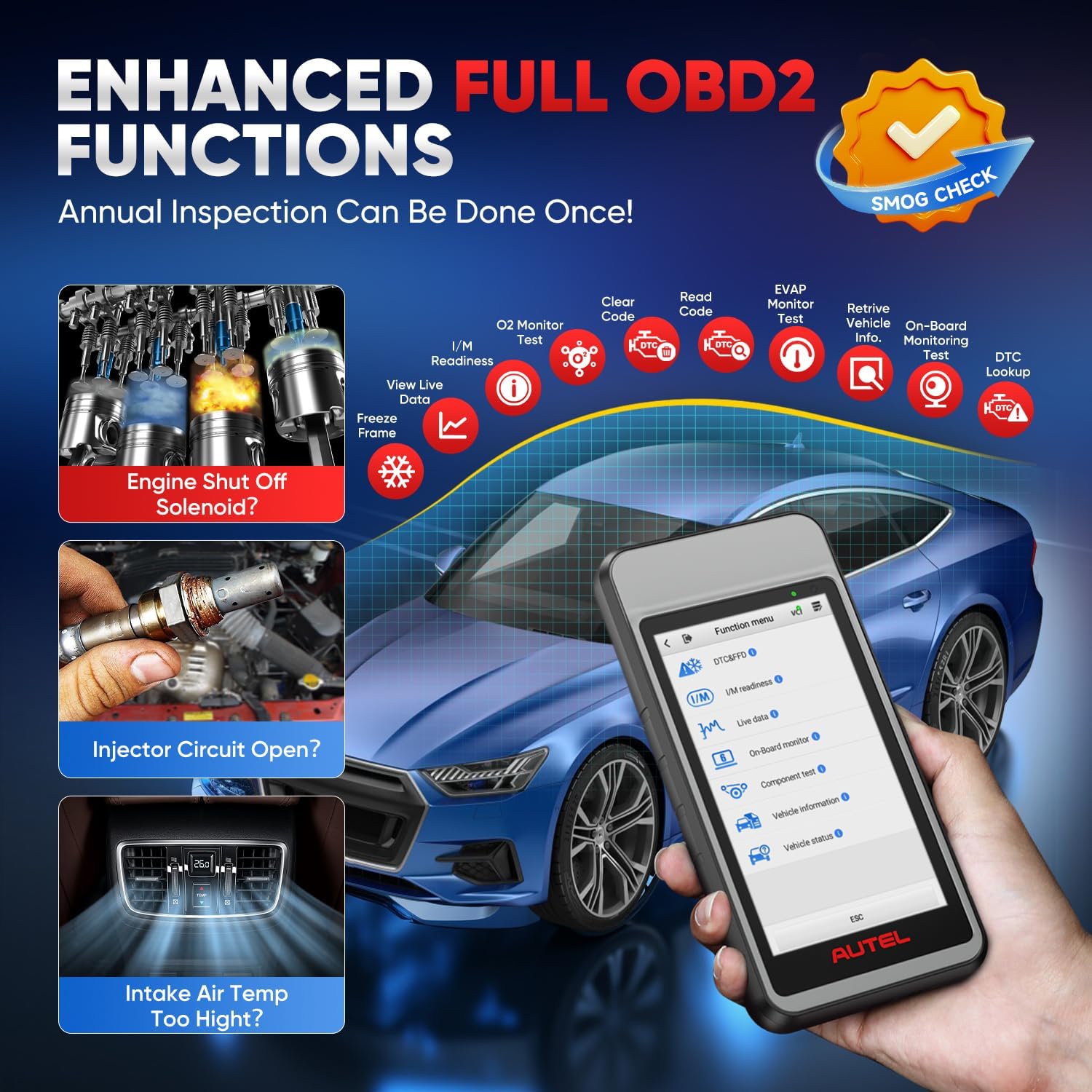
Figure 6: The MD906 PRO interface illustrating the various enhanced OBD2 functions available for vehicle inspection.
5.5 Live Data Display
The device offers multiple ways to view live data, aiding in the diagnosis of intermittent vehicle problems:
- Текст режими: Displays parameters as a list.
- Waveform Graph Mode: Presents data in waveform graphs for visual analysis and comparison.
- Analog Gauge Mode: Shows parameters in gauge charts.

7-сүрөт: Мисamples of live data display modes on the MD906 PRO, including text, graph, and analog gauge.
5.6 CAN FD and FCA AutoAuth Support
The MD906 PRO supports the latest CAN FD protocol, offering faster data transmission for newer vehicle models (e.g., 2020+ GM and 2021+ Chrysler vehicles). It also provides access to secure gateways for FCA (2018+ Chrysler/Dodge/Jeep/Alfa Romeo/Fiat) and VW-SFD (2020+ VAG models) vehicles. Access to these secure gateways typically requires an AutoAuth account.

Figure 8: Information on CAN FD protocol support and secure gateway access for FCA and VW-SFD vehicles.
5.7 Reporting and Printing
Diagnostic reports can be generated and managed directly from the device:
- Wi-Fi басып чыгаруу: Print diagnostic reports directly to a Wi-Fi enabled printer.
- Upload Report to Cloud: Automatically synchronize diagnostic information to the cloud, allowing for easy access and sharing via SMS, QR codes, or email.

Figure 9: The MD906 PRO demonstrating its Wi-Fi printing capability for diagnostic reports.

Figure 10: The MD906 PRO's feature for uploading diagnostic reports to the cloud for storage and sharing.
6. Техникалык тейлөө
6.1 Программалык камсыздоо жаңыртуулары
Regularly update the software to ensure the scanner operates with the latest vehicle data and features. Connect the device to Wi-Fi and use the 'Update' application.
6.2 Батареяга кам көрүү
Батареянын иштөө мөөнөтүн узартуу үчүн, түзмөктү тез-тез толук зарядсыздандырбаңыз. Батареянын деңгээли төмөн болгондо түзмөктү кубаттаңыз. Түзмөктү узак убакыт бою колдонбогондо салкын, кургак жерде сактаңыз.
6.3 Тазалоо
Аппаратты жумшак, гamp кездеме. Экранга же экранга зыян келтириши мүмкүн болгон абразивдүү тазалоочу каражаттарды же эриткичтерди колдонуудан алыс болуңуз.asing.
7. Кыйынчылыктарды
7.1 DTC издөө
The MD906 PRO includes a built-in DTC library. When a Diagnostic Trouble Code is displayed, use the 'DTC Lookup' function to retrieve detailed definitions and potential causes, facilitating faster diagnosis.
7.2 Жалпы маселелер
- Түзмөк күйбөй жатат: Батарея заряддалганын текшериңиз. Кубат адаптерин туташтырып, кайра аракет кылыңыз.
- VCI туташпай жатат: Verify the VCI is securely plugged into the vehicle's OBD2 port and the vehicle's ignition is on. Check Bluetooth settings on the tablet.
- Байланыш каталары: Ensure the vehicle's ignition is on. Check for loose connections. Verify vehicle compatibility for the specific function being performed.
- Software freezing: Restart the device. Ensure the software is up to date.
8. Кепилдик жана колдоо
Autel provides comprehensive support for the MD906 PRO:
- Өмүр бою акысыз жаңыртуулар: Enjoy continuous software updates without additional cost.
- 1 жылдык кепилдик: The device is covered by a one-year warranty from the date of purchase.
- 30-Day Replacement/Return Policy: Refer to your purchase agreement for details on returns and replacements.
- Көп тилдүү колдоо: The MD906 PRO supports over 15 languages. To change the language, please contact Autel support with your device's serial number.
Figure 11: ашыкview of Autel's commitment to customer support, including updates and warranty.


