1. Киришүү
This manual provides comprehensive instructions for the setup, operation, maintenance, and troubleshooting of your Canyon CNS-SW71SS Smartwatch. Please read this manual carefully before using your device to ensure proper function and longevity.
The Canyon CNS-SW71SS Smartwatch is designed to help you monitor your fitness activities and stay connected. It features a 1.22-inch color screen, multi-sport modes, heart rate monitoring, sleep tracking, and notification alerts. Its IP68 water resistance makes it suitable for various environments.
2. Продукт бүтүп калдыview
2.1 Негизги өзгөчөлүктөрү
- 1.22-inch color touch screen display.
- Multi-sport mode for tracking various activities.
- Daily activity monitoring: calories, steps, heart rate, and sleep.
- Notifications for incoming calls, SMS, emails, calendar events, and social media.
- Music control and remote camera function.
- Smart alarm and weather data display.
- Батареянын иштөө мөөнөтү 7 күнгө чейин.
- IP68 water resistance (submersible up to 1 meter for 30 minutes).
- Bluetooth 4.0 байланышы.
- Compatible with iOS and Android operating systems.
- Comes with two interchangeable wristbands: metal and TPU.
2.2 Компоненттер
The Canyon CNS-SW71SS Smartwatch consists of the main watch unit, interchangeable wristbands, and a charging cable.

Сүрөт 1: Алдыңкы view of the Canyon CNS-SW71SS Smartwatch, showing the display with steps, distance, calories, and heart rate data.

2-сүрөт: Бурчтуу view of the Canyon CNS-SW71SS Smartwatch, featuring a silver metal mesh strap and a round display.
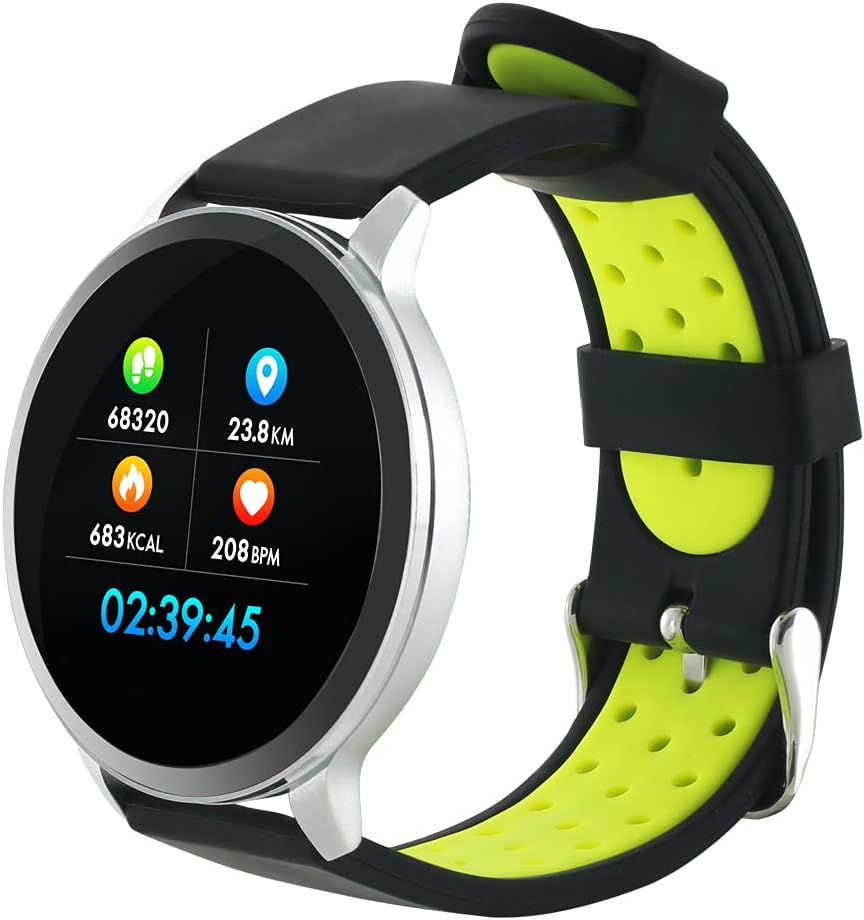
Figure 3: The Canyon CNS-SW71SS Smartwatch shown with an alternative black and lime green TPU strap, highlighting its interchangeable design.

4-сүрөт: Арткы view of the Canyon CNS-SW71SS Smartwatch, displaying the optical heart rate sensor and magnetic charging contacts.

Figure 5: The retail packaging for the Canyon CNS-SW71SS Smartwatch, illustrating key features and the included two straps.
3. Орнотуу
3.1 Акылдуу саатты кубаттоо
- Кубаттоочу кабелди USB кубат адаптерине (кошулмада жок) же компьютердин USB портуна туташтырыңыз.
- Align the magnetic charging pins of the cable with the charging contacts on the back of the smartwatch. The watch will vibrate and display a charging icon.
- Allow approximately 2-3 hours for a full charge. A full charge provides up to 7 days of usage.
3.2 Installing the Canyon Fit Application
- Scan the QR code provided in the packaging or search for "Canyon Fit" in your smartphone's app store (Google Play Store for Android, Apple App Store for iOS).
- Тиркемени жүктөп алып, орнотуңуз.
- Open the Canyon Fit app and follow the on-screen instructions to create an account and set up your profile.
3.3 Смартфонуңуз менен жупташуу
- Акылдуу саатыңыздын кубатталганын жана күйүп турганын текшериңиз.
- Смартфонуңузда Bluetooth'ду иштетиңиз.
- Open the Canyon Fit application.
- Navigate to the device pairing section within the app (usually found under 'Device' or 'Profile').
- Select your smartwatch (e.g., "CNS-SW71SS") from the list of available devices.
- Суралган учурда смартфонуңузда жана акылдуу саатыңызда жупташтыруу өтүнүчүн ырастаңыз.
3.4 Attaching/Changing Wristbands
The smartwatch comes with two wristbands (metal and TPU) that can be interchanged. To attach or change a wristband, locate the quick-release pins on the underside of the strap. Slide the pin to detach the current strap and then align and slide the pin of the new strap into the corresponding holes on the watch body until it clicks into place.
4. Иштөө нускамалары
4.1 Негизги навигация
- Сенсордук экран: Swipe left/right to navigate through different functions and menus. Swipe up/down to view эскертмелер же тез орнотуулар.
- Каптал баскычы: Press the side button to return to the main watch face or to wake up the screen. A long press may access power options or specific features depending on the context.
4.2 Фитнеске көз салуу
- Көп спорт режими: Access the 'Workout' or 'Sport' menu on your watch. Select your desired activity (e.g., running, cycling, walking) to start tracking. The watch will record duration, distance, calories burned, and heart rate.
- Күнүмдүк аракет: The watch automatically tracks your steps, distance, and calories burned throughout the day. View these statistics on the watch face or in the Canyon Fit app.
- Жүрөктүн кагышын көзөмөлдөө: The watch continuously monitors your heart rate. You can also manually initiate a heart rate measurement from the heart rate interface.
- Уйкуга көз салуу: Wear the smartwatch to bed, and it will automatically track your sleep patterns, including deep sleep, light sleep, and wake times. View detailed sleep analysis in the Canyon Fit app.
4.3 Билдируулер
Once paired with your smartphone and with notification permissions granted in the Canyon Fit app, your smartwatch will display alerts for:
- Кирүүчү чалуулар
- SMS билдирүүлөр
- Электрондук почталар
- Календар окуялары
- Social Media Apps (e.g., WhatsApp, Facebook, InstagRAM)
Сааттын жүзүн өйдө сүрүңүз view recent notifications. You can dismiss notifications from the watch.
4.4 Кошумча функциялар
- Музыкалык башкаруу: While music is playing on your phone, you can use the watch to play/pause, skip tracks, and adjust volume.
- Алыскы камера: Open the camera function in the Canyon Fit app. Use your smartwatch as a remote shutter button to take photos on your phone.
- Акылдуу Ойготкуч: Set alarms through the Canyon Fit app. The watch will vibrate to wake you up gently.
- Аба ырайы маалыматы: Once connected to your phone, the watch will display current weather conditions and forecasts for your location.
5. Техникалык тейлөө
5.1 Тазалоо
- Сааттын экранын жана корпусун жумшак менен сүртүңүз, damp кездеме.
- For the metal strap, use a soft brush to gently clean any debris. For the TPU strap, wash with mild soap and water.
- Заряддоодон мурун заряддоо контакттары таза жана кургак экенин текшериңиз.
- Тазалоо үчүн катуу химиялык заттарды же абразивдүү материалдарды колдонуудан алыс болуңуз.
5.2 Сууга туруктуулук (IP68)
The Canyon CNS-SW71SS Smartwatch is IP68 rated, meaning it is resistant to dust and can be immersed in water up to 1 meter deep for a maximum of 30 minutes. While it can withstand splashes, rain, and brief immersion, it is not recommended for hot showers, saunas, or diving, as steam and high water pressure can compromise the seals.
- Do not press any buttons while the watch is submerged.
- Сууга тийгенден кийин саатты жакшылап кургатып алыңыз.
5.3 Батареяга кам көрүү
- Батареяны бат-баттан толук кубаттап калуудан алыс болуңуз.
- Батареянын ден соолугун сактоо үчүн, колдонбосо дагы, аппаратты дайыма заряддап туруңуз.
- Саатты узак убакытка колдонбогондо салкын, кургак жерде сактаңыз.
6. Кыйынчылыктарды
- Күйгүзүлбөй жаткан саат: Саат толук заряддалганын текшериңиз. Аны заряддагычка кеминде 30 мүнөт туташтырыңыз.
- Смартфон менен жупташуу мүмкүн эмес:
- Телефонуңузда Bluetooth иштетилгенин текшериңиз.
- Ensure the Canyon Fit app has necessary permissions.
- Телефонуңузду да, акылдуу саатыңызды да өчүрүп күйгүзүңүз.
- Түзмөктү колдонмо аркылуу жупташып, кайра жупташып көрүңүз.
- Эскертмелер көрүнбөй жатат:
- Check notification settings in the Canyon Fit app and your phone's system settings.
- Саат Bluetooth аркылуу туташып турганын текшериңиз.
- Inaccurate heart rate/activity data:
- Саат өтө тар же өтө бош эмес, билегиңизге бекем тагылганын текшериңиз.
- Сааттын артындагы сенсорду тазалаңыз.
- Environmental factors or certain movements can affect accuracy.
- Экран жооп бербейт: Try restarting the smartwatch by holding down the side button. If unresponsive, allow the battery to fully drain and then recharge.
7. Техникалык шарттар
| Модель аты | CNS-SW71SS |
| Бренд | КАНЬОН |
| Дисплей өлчөмү | 1.22 дюйм |
| Операциялык системанын шайкештиги | Android, iOS |
| Байланыш технологиясы | Bluetooth 4.0 |
| Сууга туруктуулук рейтинги | IP68 |
| Өзгөчөлүктөр | Wireless Charging (implied by product data), Multi-Sport Mode, Heart Rate Monitor, Sleep Tracker, Notifications |
| Шайкеш түзмөктөр | Смартфон |
| Батарея | Rechargeable (1 included) |
| Түс параметрлери | Black, Lime Green, Silver |
8. Кепилдик жана колдоо
For warranty information and technical support, please refer to the documentation included with your purchase or visit the official Canyon website. You can also contact Canyon customer service for assistance with product issues or inquiries.
Онлайн колдоо: https://canyon.eu/support/ (Чыгampшилтеме, расмий колдоо барагын текшериңиз)