1. Киришүү
Thank you for choosing the EWEADN GX-50 USB Keyboard. This manual provides essential information for setting up, operating, and maintaining your new keyboard. Please read these instructions carefully to ensure optimal performance and longevity of your device.
2. Пакеттин мазмуну
Сураныч, пакетте төмөнкү нерселерди текшериңиз:
- EWEADN GX-50 USB Keyboard
- Колдонуучунун Колдонмосу (бул документ)
3. Продукт бүтүп калдыview
The EWEADN GX-50 is a full-sized 104-key USB keyboard designed for PC and laptop use. It features a standard QWERTY layout and USB connectivity for reliable performance. The keyboard also includes customizable backlighting for enhanced visibility and aesthetics.

3.1-сүрөт: EWEADN GX-50 USB Keyboard. This image displays the full 104-key layout of the keyboard in its standard white color, viewбир аз бурчтан.
3.1 Негизги өзгөчөлүктөрү
- Толук өлчөмдөгү макет: 104 keys, including a numeric keypad.
- USB туташуу: Plug-and-play functionality.
- Арткы жарыктандыруу: Integrated backlighting with multiple color options.
- Туруктуу дизайн: Constructed for everyday use.
4. Орнотуу нускамалары
Follow these steps to connect your EWEADN GX-50 USB Keyboard to your computer:
- Баскычтопту таңгактан чыгаруу: Баскычтопту таңгагынан кылдаттык менен чыгарып алыңыз.
- USB портун табыңыз: Identify an available USB Type-A port on your PC or laptop.
- USB кабелин туташтыруу: Insert the USB connector of the keyboard cable firmly into the USB port on your computer.
- Драйверди орнотуу: The operating system (e.g., Windows 10) will automatically detect and install the necessary drivers. This process may take a few moments.
- Функционалдуулугун текшерүү: Once the drivers are installed, the keyboard is ready for use. Test by typing in a text editor or browser.
5. Иштөө нускамалары
5.1 Негизги терүү
The EWEADN GX-50 keyboard functions like a standard 104-key keyboard. Simply press the desired keys to input text or commands into your computer.
5.2 Функция баскычтары (F1-F12)
The function keys (F1 through F12) perform various tasks depending on the application or operating system. Some common uses include:
- F1: Жардам
- F2: Атын өзгөртүү (fileс/папкалар)
- F5: Жаңыртуу (web барактар)
- F11: Толук экран режими
5.3 Жарыкты башкаруу
The GX-50 keyboard features integrated backlighting. Use the following key combinations to control the backlight:
- Fn + Жылдыруу кулпусу: Toggles backlight on/off or cycles through lighting modes.
- Fn + Home/End: Adjusts backlight brightness (if supported).
- Fn + Page Up/Page Down: Changes backlight color or effect (if supported).
Refer to the visual examples below for different backlight appearances:
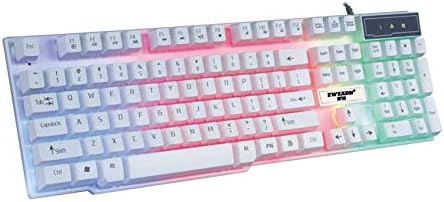
5.1-сүрөт: Keyboard with multi-color (RGB) backlighting activated. This image shows the keys illuminated with a spectrum of colors.
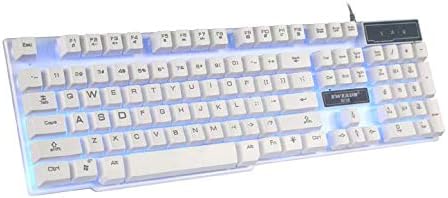
5.2-сүрөт: Keyboard with blue backlighting. The keys are illuminated with a solid blue color.

5.3-сүрөт: Keyboard with pink backlighting. The keys are illuminated with a solid pink color.
6. Техникалык тейлөө жана кам көрүү
To ensure the longevity and proper functioning of your EWEADN GX-50 keyboard, follow these maintenance guidelines:
- Тазалоо:
- Тазалоодон мурун клавиатураны компьютерден ажыратыңыз.
- Бир аз жумшак, түксүз кездемени колдонуңуз dampклавиатураны жана бетти сүртүү үчүн суу же жумшак тазалоо эритмеси менен жабыңыз.
- Катуу химиялык заттарды, абразивдүү тазалагычтарды же эриткичтерди колдонуудан алыс болуңуз.
- Баскычтардын ортосундагы чаңды жана калдыктарды тазалоо үчүн кысылган абаны колдонуңуз.
- Сактагыч: Клавиатураны күн нурунан жана экстремалдык температурадан алыс, салкын, кургак жерде сактаңыз.
- Төгүлгөндөн сактаныңыз: Ички бөлүктөргө зыян келтирбөө үчүн клавиатурадан суюктуктарды алыс кармаңыз.
7. Кыйынчылыктарды
If you encounter issues with your EWEADN GX-50 keyboard, refer to the following common troubleshooting steps:
| Көйгөй | Мүмкүн чечим |
|---|---|
| Клавиатура жооп бербей жатат. |
|
| Certain keys are not working. |
|
| Backlighting is not working or behaving incorrectly. |
|
If the problem persists after trying these solutions, please contact EWEADN customer support for further assistance.
8. Техникалык шарттар
| Өзгөчөлүк | Деталь |
|---|---|
| Бренд | Eweadn |
| Модель номери | GX-50 |
| Байланыш | USB Wired |
| Ачкычтардын саны | 104 |
| Баскычтоп тили | Англисче |
| Шайкеш түзмөктөр | Компьютер, ноутбук |
| Операциялык системанын шайкештиги | Windows 10 (жана жалпысынан Windowsтун башка версиялары, macOS, Linux менен шайкеш келет) |
| Түс | Ак |
| Сууга туруктуулук деңгээли | Сууга чыдамдуу эмес |
9. Кепилдик жана колдоо
EWEADN products are designed for reliability and performance. For warranty information, please refer to the warranty card included with your purchase or visit the official EWEADN website. If you require technical support or have questions not covered in this manual, please contact EWEADN customer service through their official channels.
Сатып алуу квитанциясын кепилдик дооматтары үчүн сатып алуунун далили катары сактаңыз.


