1. Киришүү
The Celly Pro Mount Screen/Dashboard Holder is a universal car mount designed to securely hold smartphones up to 6.5 inches. It features a strong suction cup for attachment to either the windshield or dashboard, an automatic locking function for optimal stability, and 360-degree rotation for flexible viewing angles. This manual provides instructions for proper installation, operation, and maintenance of your device.
2. Коопсуздук маалыматы
- Do not install the holder in a location that obstructs your view жолдун, күзгүлөрдүн же унаа башкаруу элементтеринин.
- Ensure the holder is securely attached before placing a device in it. A loose holder can become a projectile in an accident.
- Do not adjust the holder or your device while driving. Always pull over to a safe location to make adjustments.
- Avoid exposing the holder to extreme temperatures for prolonged periods, as this may affect the suction cup's performance.
- Балдар жетпеген жерде сактаңыз.
3. Пакеттин мазмуну
Бардык компоненттердин бар экендигин текшериңиз:
- Celly Pro Mount Holder Unit
- Сорулгазы база

Сүрөт 3.1: Алдыңкы view of the Celly Pro Mount Holder Unit.
4. Орнотуу жана орнотуу
Follow these steps to install your Celly Pro Mount:
- Жайгашкан жерди тандаңыз: Select a flat, clean, and smooth surface on your windshield or dashboard that does not obstruct your view же коопсуздук жаздыкчаларына тоскоол болот.
- Бетти тазалоо: Wipe the chosen surface with a clean cloth to remove any dust or grease. Allow it to dry completely.
- Сорох чөйчөктү тиркөө: Press the suction cup firmly against the cleaned surface.
- Рычагын бекитүү: Push the locking lever down to create a strong vacuum seal. Ensure the holder is firmly attached and does not wobble.
- Бурчту тууралоо: Loosen the adjustment knob on the arm to set the desired viewing angle, then tighten it to secure the position.

Сүрөт 4.1: Каптал view of the holder showing the adjustable arm and suction cup base.
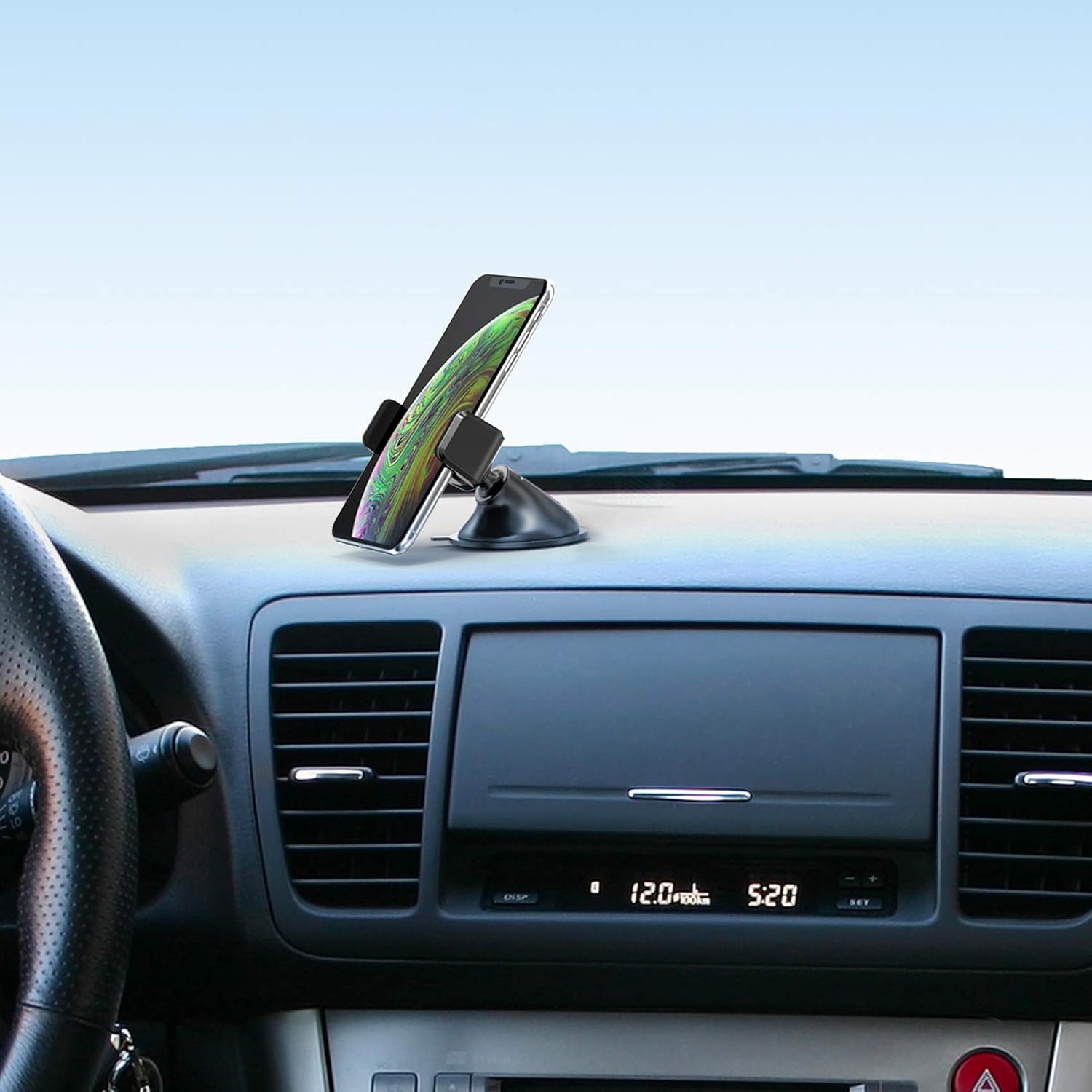
Сүрөт 4.2: Мисample of the holder installed on a car dashboard with a smartphone.
5. Иштөө нускамалары
Using your Celly Pro Mount is straightforward:
- Смартфонду киргизүү: Gently pull apart the adjustable grips of the holder. Place your smartphone into the holder and release the grips. The automatic locking function will secure your device.
- Смартфонду алып салуу: To remove your smartphone, gently pull apart the adjustable grips again and lift your device out.
- Rotate Device: The holder allows for 360-degree rotation. Simply rotate your smartphone to switch between portrait and landscape viewing modes as desired.

Сүрөт 5.1: Жакын пландан view of the holder's grip mechanism.
6. Техникалык тейлөө
To ensure the longevity and optimal performance of your Celly Pro Mount:
- Тазалоо: Картуучуну жана соргучту жумшак менен сүртүңүз, гamp кездеме. Катуу химиялык заттарды же абразивдүү тазалагычтарды колдонбоңуз.
- Сорох чөйчөктү багуу: Эгерде соргуч чөйчөк кармагычын жоготуп алса, аны жылуу суу менен чайкап, абада кургатыңыз. Бул анын жабышчаак касиеттерин калыбына келтирүүгө жардам берет.
- Сактагыч: When not in use for extended periods, detach the holder and store it in a cool, dry place away from direct sunlight.
7. Кыйынчылыктарды
- Holder not sticking to surface:
- Беттин таза, кургак жана жылмакай экенине ынаныңыз.
- Press the suction cup firmly before engaging the locking lever.
- Rinse the suction cup with water and let it air dry to restore stickiness.
- Smartphone not held securely:
- Ensure your smartphone is within the compatible size range (up to 6.5 inches).
- Make sure the grips fully close around your device.
- Holder wobbles after installation:
- Tighten all adjustment knobs securely.
- Re-attach the suction cup, ensuring a strong vacuum seal.
8. Техникалык шарттар
| Модель аты | MOUNTDASH |
| Бренд | Селли |
| Өлчөмдөрү (L x W x Y) | 10.2 x 18.4 x 5.4 см |
| Салмагы | 80 грамм |
| Материал | Пластик |
| Монтаж түрү | Айнек, аспаптар тактасы |
| Өзгөчө өзгөчөлүк | Rotatable (360 degrees) |
| Шайкеш түзмөктөр | Universal (Smartphones up to 6.5 inches) |
9. Кепилдик жана колдоо
Specific warranty and support information for the Celly Pro Mount Screen/Dashboard Holder is not provided in the available product data. Please refer to the product packaging or the manufacturer's official webкепилдик шарттары жана кардарларды колдоо байланыш маалыматы үчүн сайттын толук маалыматын караңыз.


