1. Киришүү
This manual provides comprehensive instructions for the safe and effective operation of your Nestling HK-688 Walkie Talkies. These mini 2-way radios are designed for clear communication over long distances, making them ideal for children's outdoor adventures, camping, hiking, and general play.
The Nestling HK-688 Walkie Talkies feature 22 UHF channels, a generous range, and user-friendly controls. Please read this manual thoroughly before using the device to ensure proper functionality and to maximize your experience.

Image: Three Nestling HK-688 walkie talkies in camo blue, camo pink, and camo green, displayed with their product packaging.
2. Продукт бүтүп калдыview
2.1 Пакеттин мазмуну
Стандарттык пакет төмөнкү элементтерди камтыйт:
- 3x Nestling HK-688 Camo Kids Walkie Talkies (Camo Blue, Camo Pink, Camo Green)
- 1x Колдонуучунун колдонмосу (бул документ)
- Эскертүү: AAA батарейкалары камтылган эмес жана өзүнчө сатып алынышы керек.
2.2 Негизги өзгөчөлүктөрү
- 22 FRS/GMRS Channels: Provides multiple communication options.
- Узак аралык: Up to 3km (1.9 miles) in typical conditions, and up to 5km (3.1 miles) in open fields.
- Таза үн сапаты: Ensures effective communication.
- LCD арткы жарык дисплей: Жеңил үчүн viewing of channel, battery status, and other indicators.
- Built-in Mini LED Torch: Useful for low-light conditions.
- Automatic Channel Scan: Quickly finds active channels.
- Automatic Squelch: Reduces background noise for clearer reception.
- CTCSS 99 Sub-codes: Enhances privacy by filtering unwanted signals.
- Эскертүү: Notifies you of incoming calls.
- Канал кулпусу: Prevents accidental channel changes.
- PTT/VOX Function: Push-to-Talk for manual transmission or Voice Operated Exchange for hands-free communication.
- Battery Save Function: Батареянын иштөө мөөнөтүн узартат.
- Төмөн кубаттуулук жөнүндө эскертүү: Indicates when batteries are running low.
- Жөнгө салынуучу Көлөмү: Control the listening level.
- Жеңил жана портативдик: Designed for easy carrying with a built-in belt clip.
- Drop Resistant Design: Enhanced durability for active use.

Image: Visual representation of the walkie talkie's dimensions and key features like drop resistance, low battery alert, flashlight, and communication range.

Image: Features of the walkie talkie, including 22 channels with privacy codes, extended range, noise reduction, drop resistance, and a built-in flashlight.
2.3 Аппараттын компоненттери

Image: Detailed diagram illustrating the various parts of the walkie talkie, including buttons, display, and audio components.
- Антенна: Сигналдарды берүү жана кабыл алуу үчүн.
- Lamp (Flashlight): Орнотулган LED жарыгы.
- Микрофон: For speaking into the device.
- PTT баскычы (баскыч менен сүйлөшүү): Үнүңүздү өткөрүү үчүн басып туруңуз.
- LCD дисплей: Shows channel, battery level, and other indicators.
- Call Lock Button: Locks the current channel.
- Монитор баскычы: Allows listening to weak signals on the current channel.
- Lamp Скандоо баскычы: Activates the flashlight and initiates channel scan.
- Төмөн баскычы: Navigates menus or decreases values.
- Кубат/Меню баскычы: Аппаратты күйгүзөт/өчүрүп, менюга кирет.
- Баяндамачы: For listening to incoming transmissions.
3. Орнотуу
3.1 Батареяны орнотуу
Each Nestling HK-688 Walkie Talkie requires 4x AAA batteries (not included).
- Release the Belt Clip: Press the lock on the top of the belt clip and lift the clip up to detach it from the radio.
- Батарея бөлүмүн ачуу: Locate the battery cover on the back of the walkie talkie. Gently push down on the tab and slide the cover off.
- Батареяларды салыңыз: Insert 4x AAA batteries into the compartment, ensuring correct polarity (+/-) as indicated inside the compartment.
- Батарея бөлүмүн жабуу: Replace the battery cover and slide it until it clicks securely into place. Reattach the belt clip if desired.
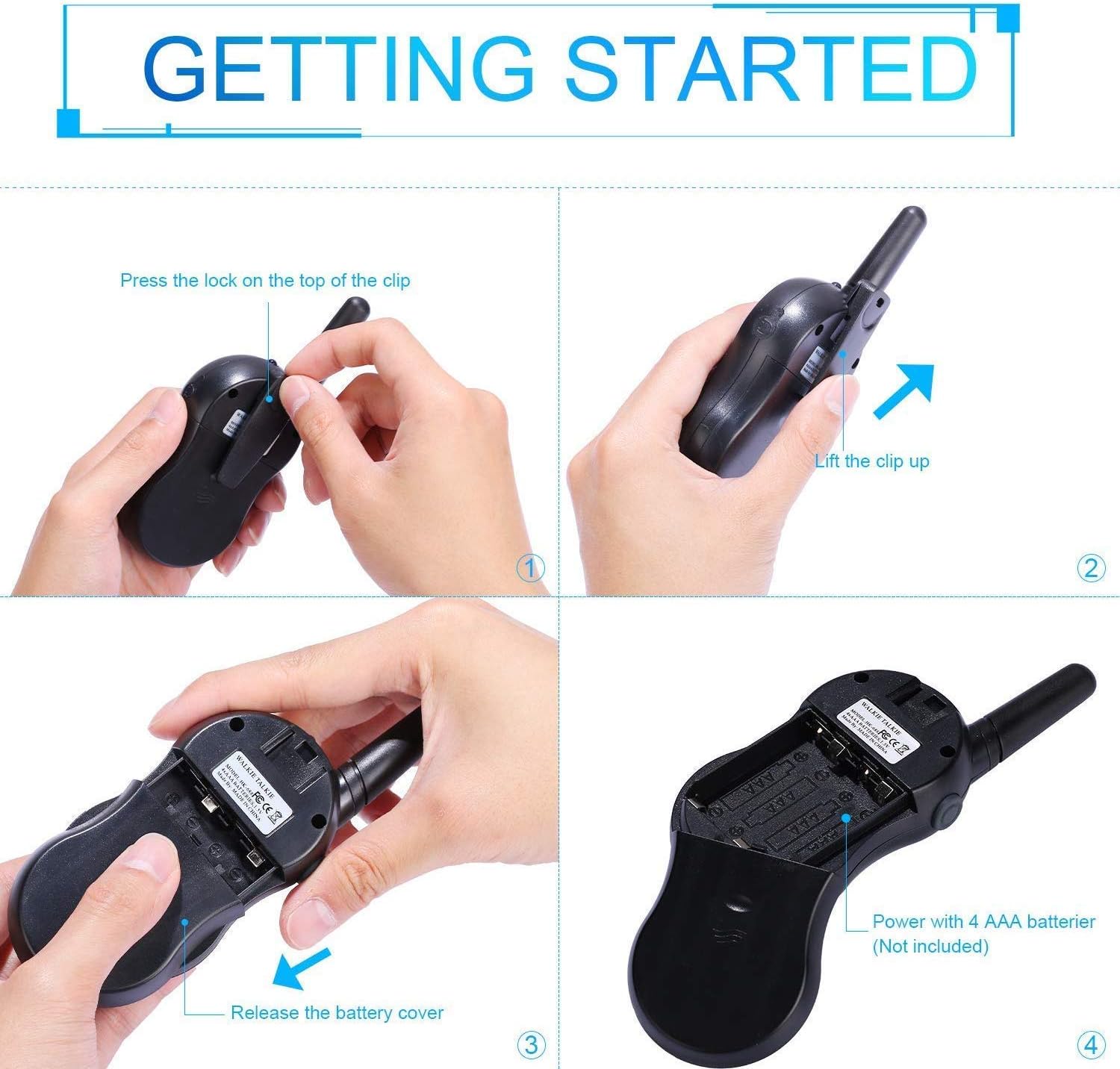
Image: Step-by-step instructions for opening the battery compartment and inserting AAA batteries into the walkie talkie.

Image: An open battery compartment of the walkie talkie, ready for battery insertion.
3.2 Күйгүзүү/өчүрүү
To turn the walkie talkie on or off, press and hold the Күч/Меню button until the LCD screen illuminates or turns off.
4. Иштөө нускамалары
4.1 Basic Communication (Push-to-Talk)
- Канал тандоо: Ensure all walkie talkies you wish to communicate with are set to the same channel and sub-code. Use the Up жана Төмөн каналдарды өзгөртүү үчүн баскычтар.
- Берүү: басып, кармап туруңуз PTT button (located on the side of the radio). Speak clearly into the microphone, holding the radio approximately 2-3 inches from your mouth.
- Кабыл алуу: бошотуңуз PTT button to listen for incoming transmissions.
Tip: For optimal range and clarity, avoid obstructions like buildings, dense foliage, or large metal objects. Adverse weather conditions can also affect range.
4.2 Channel Selection and Sub-codes (CTCSS/DCS)
Your walkie talkie supports 22 FRS/GMRS channels and 99 CTCSS/DCS sub-codes. Sub-codes help filter out unwanted conversations on the same channel, enhancing privacy.
- басыңыз Меню Каналды тандоо режимине кирүү үчүн баскычты бир жолу басыңыз. Каналдын номери күйүп-өчүп турат.
- колдонуу Up or Төмөн каалаган каналды тандоо үчүн баскычтар (1-22).
- басыңыз Меню button again to enter sub-code selection mode. The sub-code number will flash.
- колдонуу Up or Төмөн buttons to select your desired sub-code (0-99). Setting to 0 disables the sub-code.
- басыңыз PTT button or wait a few seconds for the setting to be saved and exit the menu.
4.3 VOX функциясы (Үн менен башкарылуучу алмашуу)
The VOX function allows for hands-free communication. When activated, the radio will automatically transmit when it detects your voice.
- басыңыз Меню button multiple times until the VOX icon (VOX) appears on the LCD and flashes.
- колдонуу Up or Төмөн buttons to select the VOX sensitivity level (e.g., 1-3, with 1 being most sensitive). Select "OFF" to disable VOX.
- басыңыз PTT button or wait a few seconds to save the setting and exit.
4.4 Фонардын иштеши
To turn the built-in LED flashlight on or off, briefly press the Lamp button (often combined with the Scan button).
4.5 Call Alert Tone
To send a call alert tone to other radios on the same channel, briefly press the Чалуу button (often represented by a musical note icon).
4.6 Каналдын кулпусу
To prevent accidental channel changes, you can lock the current channel.
- басып, кармап туруңуз Call Lock button (often represented by a key icon) until a key icon appears on the LCD.
- Кулпуну ачуу үчүн басып, кармап туруңуз Call Lock button again until the key icon disappears.

Сүрөт: Мисamples of suitable scenarios for using the walkie talkies, such as outdoor play, family activities, and leisure.

Image: Illustrations of walkie talkies being used for communication in both play and household settings.
5. Техникалык тейлөө
5.1 Батареяга кам көрүү
- Ар дайым жаңы, жогорку сапаттагы AAA батарейкаларын колдонуңуз.
- Remove batteries from the walkie talkie if it will not be used for an extended period to prevent leakage and damage.
- Колдонулган батарейкаларды жергиликтүү эрежелерге ылайык таштаңыз.
5.2 Тазалоо жана сактоо
- Clean the walkie talkie with a soft, damp кездеме. Катуу химиялык заттарды же абразивдүү тазалагычтарды колдонбоңуз.
- Do not immerse the walkie talkie in water, as it is not water-resistant.
- Store the walkie talkie in a cool, dry place away from direct sunlight and extreme temperatures.
6. Кыйынчылыктарды
| Көйгөй | Мүмкүн себеп | Чечим |
|---|---|---|
| Күч жок | Батареялар өлүп калган же туура эмес орнотулган. | Туура полярдуулукту камсыз кылуу менен батарейкаларды жаңысына алмаштырыңыз. |
| Өткөрүп же кабыл албайт | Not on the same channel/sub-code; out of range; PTT button not pressed/released. | Ensure all radios are on the same channel and sub-code. Move closer to the other radio. Press and hold PTT to transmit, release to receive. |
| Үн сапаты начар / Статикалык | Out of range; obstructions; low battery; squelch setting. | Move closer. Avoid obstructions. Replace batteries. Check squelch settings. |
| Channel changes accidentally | Channel lock is not activated. | Activate the channel lock function. |
| VOX иштебей жатат | VOX sensitivity too low or VOX is off. | Adjust VOX sensitivity to a higher level or ensure VOX is enabled. |
7. Техникалык шарттар
| Өзгөчөлүк | Деталь |
|---|---|
| Бренд | Nestling |
| Модел | HK-688 |
| Жыштык диапазону | 400-470 МГц |
| Каналдар | 22 FRS/GMRS каналдары |
| Суб-коддор | CTCSS 99 |
| Өткөрүү күчү | <=0.5 Вт |
| Модуляция түрү | FM-F3E |
| Диапазон | Up to 3km (1.9 miles) typical, MAX 5km (3.1 miles) in open field |
| Squelch | Автоматтык өчүрүү |
| Дисплей түрү | ЖК арткы жарык |
| Наушник уясы | 2.5мм / 0.1ч |
| Электр камсыздоо | 4x AAA batteries per radio (Not Included) |
| Product Dimensions (H x L x D) | 14см x 5.5см x 3.5см (5.5 x 2.2 x 1.4 дюйм) |
| Пакет Салмагы | 370г |
| Түс | Camo Blue, Camo Pink, Camo Green |
| Сууга туруктуулук деңгээли | Сууга чыдамдуу эмес |
8. Кепилдик жана колдоо
Nestling HK-688 Walkie Talkies come with a 12 ай кепилдик сатып алынган күндөн тартып.
For any support inquiries, troubleshooting assistance beyond this manual, or warranty claims, please refer to the contact information provided on the product packaging or the retailer's webпродукт сатылып алынган сайт.


