1. Киришүү
This manual provides instructions for the MERCUSYS MS105G 5-Port Gigabit Desktop Switch. The MS105G is designed to expand your wired network capacity, offering five 10/100/1000 Mbps auto-negotiation RJ45 ports. It is a plug-and-play device, requiring no configuration, making it ideal for home and small office network expansion.
2. Пакеттин мазмуну
Пакетиңизге төмөнкү буюмдардын киргизилгенин текшериңиз:
- MERCUSYS MS105G 5-Port Gigabit Desktop Switch
- Кубаттуу адаптер
- Ыкчам орнотуу колдонмосу

Image: The MERCUSYS MS105G switch, power adapter, and quick installation guide as found in the product packaging.
3. Продукт бүтүп калдыview
3.1 алдыңкы панели
The front panel of the MS105G features five RJ45 ports and LED indicators for status monitoring.

Сүрөт: алдыңкы view of the MERCUSYS MS105G switch, showing the five RJ45 ports and the power input.
- RJ45 порттору (1-5): These ports support 10/100/1000 Mbps Ethernet connections. They automatically detect the speed of the connected device and adjust accordingly.
- LED көрсөткүчтөрү: Each port has an associated LED. A solid green light indicates a stable link at 1000 Mbps. A solid orange light indicates a stable link at 10/100 Mbps. A blinking light indicates data activity.
3.2 Арткы панель
The rear panel typically contains the power input port.
- Электр порту: Берилген кубат адаптерин бул жерге туташтырыңыз.
4. Орнотуу
The MS105G switch is designed for simple plug-and-play installation. Follow these steps to set up your device:
- Өчүрүү түзмөктөрү: Disconnect the power from your router, modem, and any devices you plan to connect to the switch.
- Которгучту туташтыруу:
- Connect your modem or router to any of the RJ45 ports on the MS105G using an Ethernet cable.
- Connect your network devices (e.g., computers, smart TVs, game consoles, network printers) to the remaining RJ45 ports on the MS105G using Ethernet cables.
- Туташуу кубаты: Connect the provided power adapter to the power port on the MS105G, then plug the adapter into a standard electrical outlet.
- Түзмөктөрдү күйгүзүү: Power on your modem, then your router, and finally your connected network devices.
The switch will automatically detect and configure the connections. The corresponding LED indicators for active ports will illuminate.
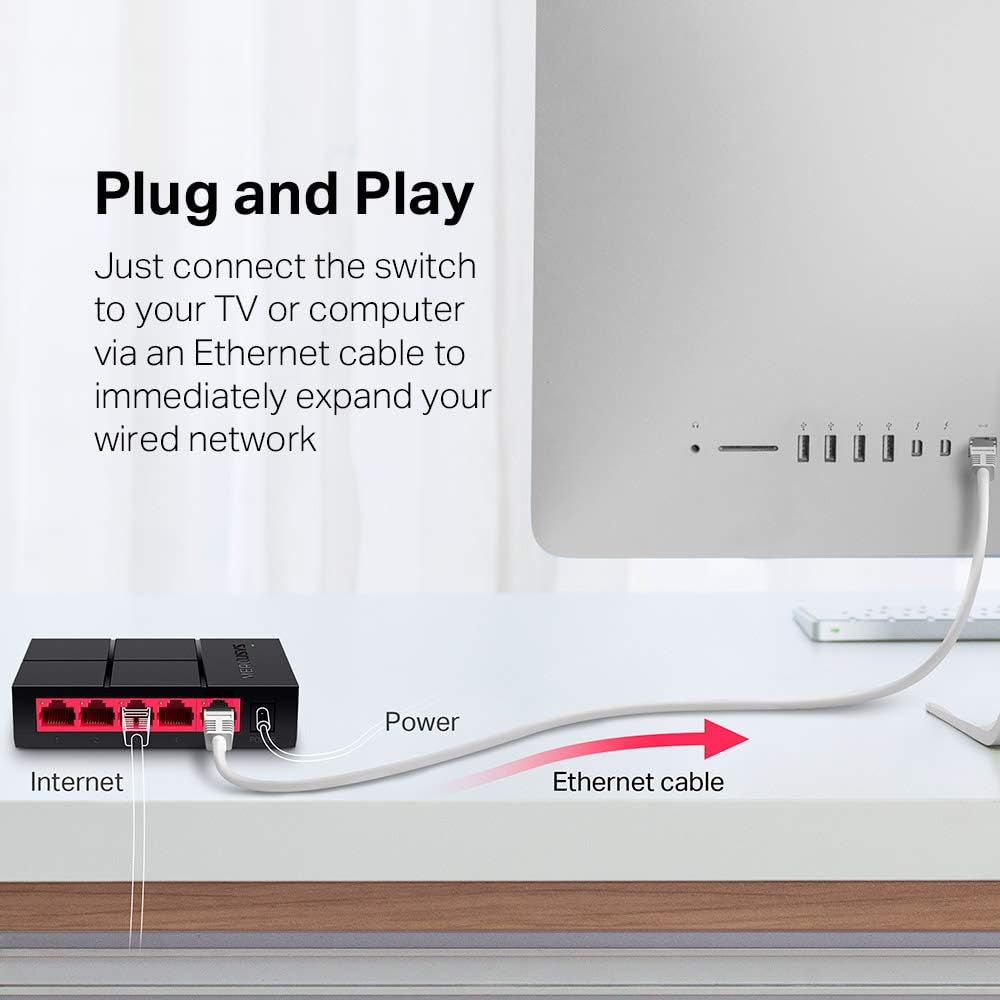
Image: Diagram illustrating the plug-and-play setup of the MERCUSYS MS105G switch, connecting it to an internet source and a computer.
5. Иштөө нускамалары
The MERCUSYS MS105G is a non-managed switch, meaning it operates automatically without requiring any user configuration. Once connected as described in the Setup section, it will begin forwarding data between connected devices.
- Автоматтык сүйлөшүүлөр: Each port automatically detects the speed (10/100/1000 Mbps) and duplex mode (Half/Full Duplex) of the connected device.
- Auto MDI/MDIX: The switch automatically detects if a straight-through or crossover cable is needed, eliminating the need for specific cable types.
- LED көрсөткүчтөрү: Observe the LED indicators on the front panel to confirm link status and activity for each port.
6. Техникалык тейлөө
To ensure optimal performance and longevity of your MS105G switch, consider the following maintenance guidelines:
- Жайгашкан жери: Place the switch in a cool, dry location away from direct sunlight, heat sources, and excessive moisture. Ensure adequate ventilation around the device.
- Тазалоо: Которгучтун сыртын тазалоо үчүн жумшак, кургак чүпүрөктү колдонуңуз. Суюктук же аэрозолдук тазалоочу каражаттарды колдонбоңуз.
- Кабелдик башкаруу: Keep Ethernet cables neatly organized to prevent tangles and accidental disconnections.
- Электр камсыздоо: Аппарат менен кошо берилген кубат адаптерин гана колдонуңуз.
7. Кыйынчылыктарды
If you encounter issues with your MS105G switch, refer to the following common troubleshooting steps:
- Кубат жок:
- Кубат адаптери өчүргүчкө жана иштеген электр розеткасына бекем туташтырылганын текшериңиз.
- Башка аспапка сайып, розетка иштеп жатканын текшериңиз.
- Портто шилтеме/аракет жок:
- Check that the Ethernet cable is securely connected to both the switch port and the connected device.
- Кабелдин бузулушуна жол бербөө үчүн башка Ethernet кабелин колдонуп көрүңүз.
- Туташкан түзмөк күйгүзүлгөнүн жана анын тармак адаптери туура иштеп жатканын текшериңиз.
- Аппаратты которгучтун башка портуна туташтырууга аракет кылыңыз.
- Жай тармак ылдамдыгы:
- Ensure all connected devices and cables support Gigabit Ethernet (Cat5e or Cat6 cables are recommended for Gigabit speeds).
- Check the LED indicator for the port; a green light indicates a Gigabit connection, while an orange light indicates 10/100 Mbps.
- Restart your modem, router, and the switch.
If problems persist, consult the MERCUSYS support webкошумча жардам үчүн сайт.
8. Техникалык шарттар
| Өзгөчөлүк | Description |
|---|---|
| Модел | MS105G |
| Порттар | 5 x 10/100/1000 Mbps RJ45 Ports (Auto-Negotiation, Auto MDI/MDIX) |
| Маалыматтарды өткөрүү ылдамдыгы | 1000 Мегабит/секунда (Гигабит Ethernet) |
| Өлчөмдөрү (W x D x H) | 10.5 x 7 x 2.5 см (4.1 x 2.8 x 1.0 дюйм) |
| Салмагы | 0.08 килограмм (80 г) |
| Энергияны керектөө | Макс 5 Вт |
| Кубаттуу адаптер | Input: 100-240VAC, 50/60Hz; Output: 5VDC/0.6A (typical) |
| Материал | Пластик Casing |
| Монтаждоо | Desktop (Plug-In Mount) |

Image: Dimensions of the MERCUSYS MS105G switch, showing its compact size of 10.5 cm by 7 cm by 2.5 cm.
9. Кепилдик жана колдоо
MERCUSYS products typically come with a manufacturer's warranty. For specific warranty terms and conditions, please refer to the warranty card included with your product or visit the official MERCUSYS website. Technical support and additional resources can also be found on the MERCUSYS support page.
For the latest drivers, manuals, and support information, please visit: www.mercusys.com/support


