1. Киришүү
This manual provides comprehensive instructions for the setup, operation, and maintenance of your NETUM NT-G5 Bluetooth Thermal Label Printer. Please read this guide thoroughly to ensure proper use and optimal performance of your device.
2. Продукт бүтүп калдыview
2.1 Пакеттин мазмуну
Пакетти ачканда, бардык буюмдар бар экенин текшериңиз:
- NETUM NT-G5 Thermal Label Printer
- USB заряддоо кабели
- Ыкчам баштоо колдонмосу (эгер камтылган болсо)
- One roll of labels (pre-installed or separate)
2.2 Принтердин компоненттери
Familiarize yourself with the main parts of the NT-G5 printer:

Сүрөт 2.2.1: Деталдаштырылган view of the NETUM NT-G5 printer, highlighting key components such as the top cover open button, paper exit, OLED display, power/setting button, USB interface, power interface, and feed/OK button.
- Top Cover Open Button: Used to open the printer cover for label roll installation.
- Кагаздан чыгуу: Where printed labels emerge. Maximum width: 57mm.
- Paper Tear-off Knife: Басылган этикеткаларды таза ажыратуу үчүн.
- OLED дисплей: Shows printer status and settings.
- Power/Setting Button: Powers the device on/off and navigates settings.
- Feed/OK Button: Feeds labels or confirms selections. Controls print speed (20-50mm/s).
- USB интерфейси: For charging and data connection (1500mAh battery).
- Power Interface: Киргизүү: 5V 2A.
3. Орнотуу колдонмосу
3.1 Принтерди заряддоо
Before first use, fully charge the printer. Connect the USB charging cable to the printer's USB interface and a 5V 2A power adapter. The OLED display will indicate charging status.
3.2 Loading the Label Roll
- Press the Top Cover Open Button to open the printer's top cover.
- Adjust the paper plate to match the width of your label roll. The adjustable paper plate supports label roll diameters from 20mm to 50mm, with a maximum paper width of 54mm and a largest print width of 48mm.
- Insert the label roll with the printing surface facing upwards. Ensure the leading edge of the labels extends slightly out of the paper exit.
- Үстүнкү капкакты чыкылдагыча бекем жабыңыз.
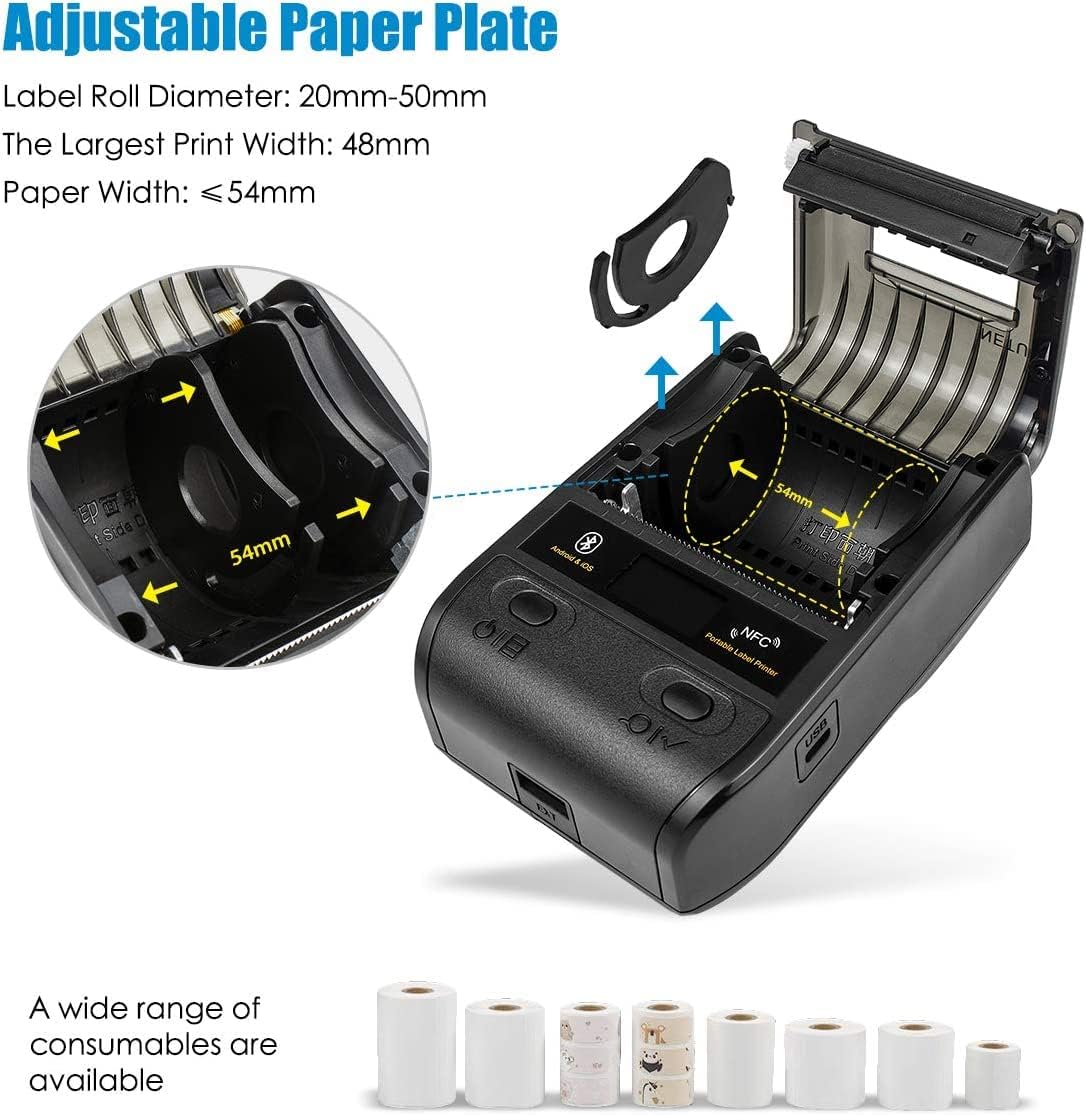
Сүрөт 3.2.1: Illustration of the adjustable paper plate mechanism and proper label roll insertion. The printer accommodates label rolls with diameters between 20mm and 50mm, and paper widths up to 54mm.
3.3 Колдонмону орнотуу жана Bluetooth туташуу
The NETUM NT-G5 printer operates via Bluetooth connection with a dedicated mobile application.
- Колдонмону жүктөп алыңыз: Издөө the "WeiDa" barcode design app on the Apple App Store (for iOS devices) or Google Play Store (for Android devices).
- Bluetooth иштетүү: Смартфонуңузда же планшетиңизде Bluetooth иштетилгенин текшериңиз.
- Принтерди күйгүзүү: Press and hold the Power/Setting Button to turn on the printer.
- Колдонмо аркылуу туташуу: Open the WeiDa app, navigate to the device connection section, and select your NT-G5 printer from the list of available Bluetooth devices. The app will guide you through the pairing process.

Сүрөт 3.3.1: Visual representation of the Bluetooth connection process between a mobile device and the NT-G5 printer, along with icons for downloading the companion app from major app stores.
4. Пайдалануу боюнча нускамалар
4.1 Basic Printing Steps
Follow these general steps to print labels:

Сүрөт 4.1.1: A simplified three-step process for operating the NT-G5 printer, covering paper loading, Bluetooth pairing, and label printing.
- Ensure the paper roll is correctly installed (refer to Section 3.2).
- Connect the printer to your smartphone via Bluetooth using the WeiDa app (refer to Section 3.3).
- Within the WeiDa app, design your label using available templates or create a custom layout.
- Once your label design is complete, initiate the print command from the app.
- The printer will produce your high-quality thermal label.
4.2 Колдоого алынган этикетка түрлөрү жана колдонмолору
The NT-G5 printer is versatile and supports various label types for different applications:

Сүрөт 4.2.1: A collage demonstrating various label applications for the NT-G5 printer, such as jewelry tags, name labels, address labels, clothing tags, price tags, and cable labels.
- Зергерчилик Tags: For pricing and product information.
- Name Labels: For organization and identification.
- Дарек белгилери: For mailing and shipping.
- Кийим-кече Tags: For retail pricing and product details.
- Баасы Tags: General use for product pricing.
- Cable Labels: For organizing and identifying cables.
4.3 Шайкеш операциялык системалар
The NETUM NT-G5 printer is compatible with a range of operating systems, primarily through its dedicated mobile application:
- iOS: Compatible with Apple iPhones and iPads.
- Android: Compatible with Android smartphones and tablets.
- Windows: Limited compatibility, typically requiring specific drivers or software.
- Linux: Limited compatibility, typically requiring specific drivers or software.
5. Техникалык тейлөө
5.1 Басып чыгаруу башын тазалоо
To maintain print quality and extend the life of your printer, regularly clean the thermal print head. Use a soft cloth dampened with isopropyl alcohol. Gently wipe the print head surface. Ensure the printer is turned off and cooled down before cleaning.
The print head has an estimated life of 50KM of print.
5.2 Батареяга кам көрүү
The printer uses a Lithium Polymer battery. To maximize battery life:
- Батареяны бат-баттан толук кубаттап калуудан алыс болуңуз.
- Принтерди узак убакытка колдонбогондо салкын, кургак жерде сактаңыз.
- Charge the printer regularly, even if not in frequent use, to prevent deep discharge.
6. Кыйынчылыктарды
6.1 Жалпы маселелер жана чечимдер
| Маселе | Мүмкүн себеп | Чечим |
|---|---|---|
| Принтер Bluetooth аркылуу туташпай жатат | Bluetooth is off on device; printer is off; app not recognizing printer. | Ensure Bluetooth is enabled on your mobile device. Turn the printer off and on again. Restart the WeiDa app. Ensure the printer is within range. |
| Басып чыгаруу сапаты начар / Өчүп калган энбелгилер | Low battery; dirty print head; incorrect label type; print density settings. | Charge the printer fully. Clean the print head (refer to Section 5.1). Ensure you are using thermal labels. Adjust print density settings in the app. |
| Энбелгилер туура эмес азыктандырылган | Label roll incorrectly installed; paper plate not adjusted; labels jammed. | Re-install the label roll, ensuring it's properly seated and the paper plate is adjusted to the label width (refer to Section 3.2). Clear any jammed labels. |
| App issues / Crashes | Эскирген колдонмо версиясы; программалык камсыздоонун карама-каршылыгы. | Update the WeiDa app to the latest version. Restart your mobile device. Reinstall the app if issues persist. |
7. Техникалык шарттар
| Өзгөчөлүк | Деталь |
|---|---|
| Модель номери | NT-G5 |
| Продукциянын өлчөмдөрү | 4.33 x 3.15 x 2.36 дюйм |
| Элемент Салмагы | 10.9 унция |
| Батареялар | 1 Литий Полимердик батарейка (кошулган) |
| Max Paper Width | 54мм |
| Largest Print Width | 48мм |
| Этикетка түрмөгүнүн диаметри | 20-50 мм |
| Басып чыгаруу ылдамдыгы | 20-50мм/с |
| Print Head Life | 50KM |
| Power Input | 5V 2A |
| Байланыш | Bluetooth 4.0, NFC |
| Операциялык системанын шайкештиги | iOS, Android, Windows, Linux (via app/drivers) |
8. Кепилдик жана колдоо
NETUM products are manufactured to high-quality standards. For specific warranty details, please refer to the warranty card included with your product or visit the official NETUM webсайт. Сатып алганыңыздын далили катары сатып алуу дүмүрчөгүңүздү сактаңыз.
For technical support, troubleshooting assistance, or inquiries regarding replacement parts and accessories, please contact NETUM customer service through the contact information provided on the official webсайтында же продуктунун таңгагында.