1. Киришүү
This manual provides detailed instructions for the Inateck BK2005 Keyboard Case. Please read this manual thoroughly before using the product to ensure proper operation and to maximize its lifespan.
1.1 Шайкештик
The Inateck BK2005 Keyboard Case is specifically designed for the following iPad models:
- iPad Air 2019 (3rd Generation)
- iPad Pro 10.5 дюймдук
This keyboard case is NOT compatible with the iPad 10.2-inch (7th Generation) or other iPad models.
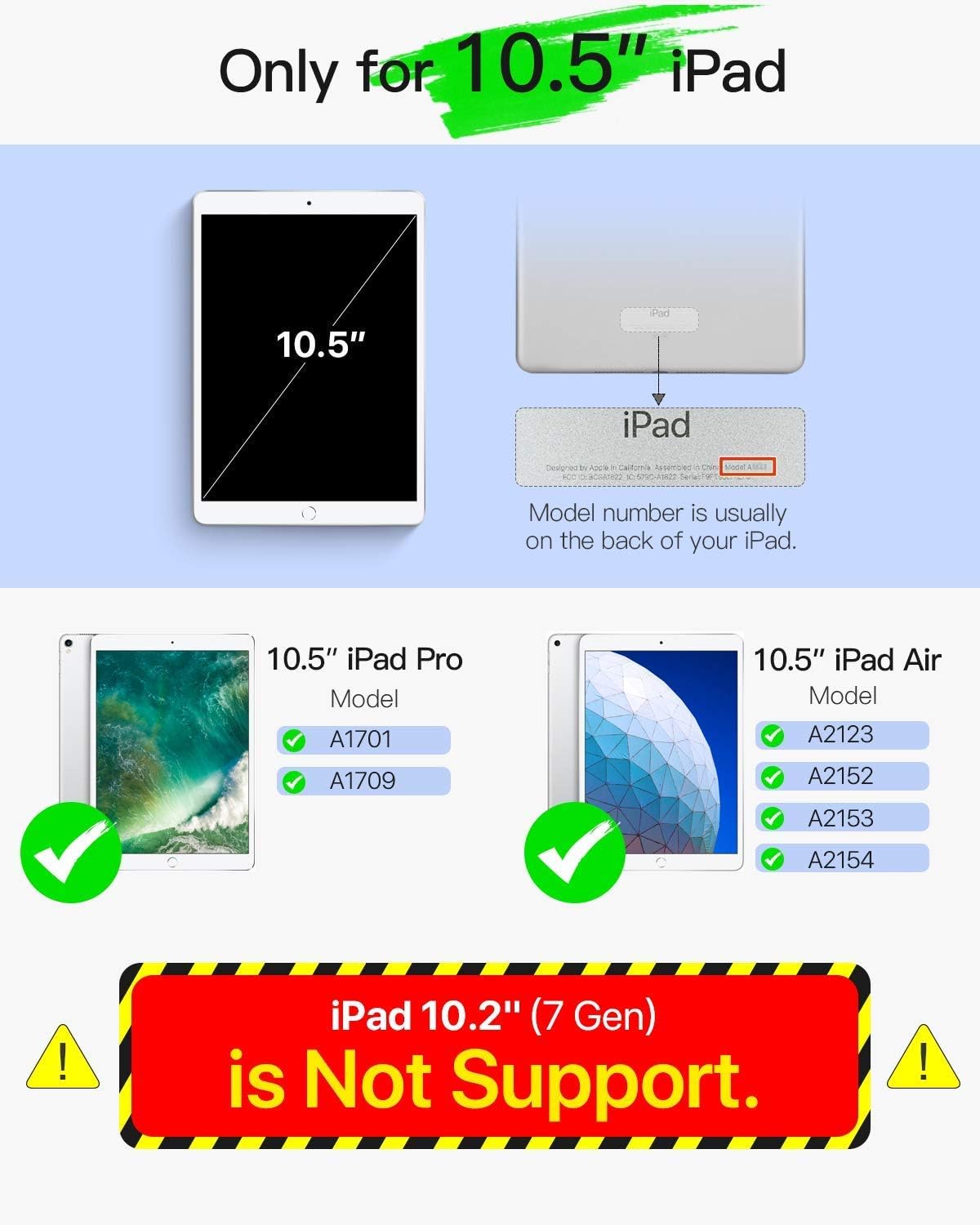
Image 1.1: Compatibility Guide. This image illustrates the specific iPad models compatible with the Inateck BK2005 Keyboard Case, highlighting that it supports 10.5-inch iPad Pro and iPad Air models, but not the 10.2-inch iPad (7th Gen).
2. Пакеттин мазмуну
Сураныч, пакетте төмөнкү нерселерди текшериңиз:
- Inateck BK2005 Keyboard Case
- USB заряддоо кабели
- Колдонуучунун Колдонмосу (бул документ)
3. Продукциянын өзгөчөлүктөрү
3.1 Ultra-Light and Thin Design
The BK2005 keyboard is engineered for portability. It measures only 0.5 cm in thickness, and the combined keyboard and cover are 1.5 cm thick. The total weight is approximately 360g, making it significantly lighter than many comparable products.

Image 3.1: Ultra-Light and Thin Profile. This image demonstrates the slim design of the keyboard case, highlighting its minimal thickness and light weight for enhanced portability.
3.2 Automatic Power On/Off
The BK2005 features an intelligent magnetic sensor that automatically powers the keyboard on when your iPad is securely positioned in the typing stand. When the iPad is removed or the case is closed, the keyboard powers off. This eliminates the need for a physical power switch.

Image 3.2: Automatic Power On. This image shows the magnetic strip where the iPad connects, triggering the keyboard to power on automatically, indicated by a green light.

Image 3.3: iPad Placement for Auto Power On. This image illustrates the action of placing the iPad into the case, activating the automatic power-on function of the keyboard via magnetic connection.
3.3 Узартылган батареянын иштөө мөөнөтү
The keyboard is equipped with a long-lasting battery. A full charge, typically taking 2-3 hours, can provide up to 90 days of standby time. This means the device may only require charging approximately four times per year with typical usage.

Image 3.4: Extended Battery Life. This image depicts the keyboard case in use, emphasizing its long battery life with a claim of 90-day standby time from a single charge.
3.4 Convenient Shortcut Keys
The keyboard features a 6-row layout, including an additional row dedicated to function shortcut keys. These keys allow for quick access to common functions such as taking screenshots, locking the screen, or adjusting volume with a single press, eliminating the need for complex key combinations.
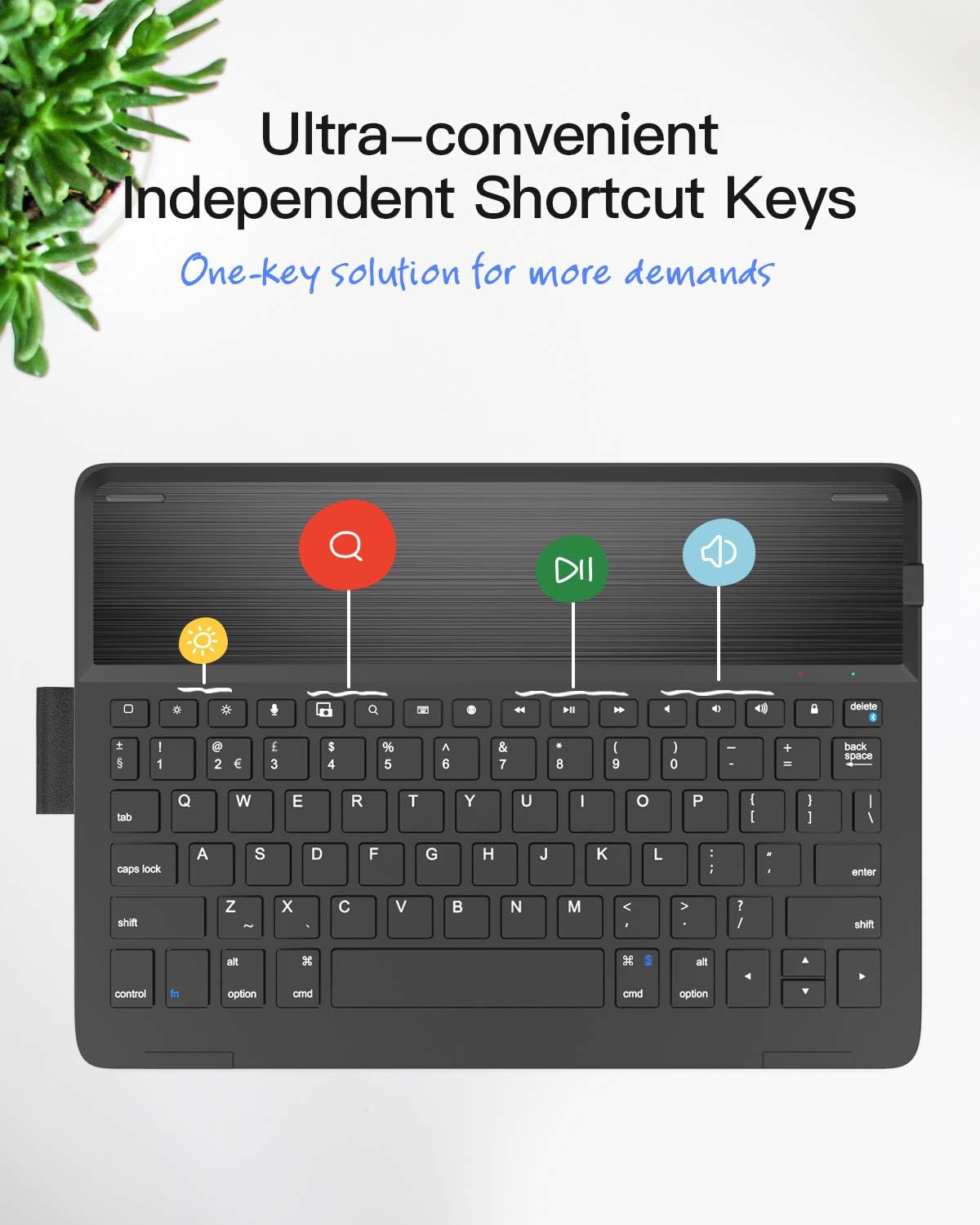
Image 3.5: Dedicated Shortcut Keys. This image highlights the top row of the keyboard, showcasing the independent shortcut keys for various functions like screen brightness, search, and media playback controls.
3.5 жөнгө салынат Viewбурчтар
The case design allows for multiple viewing angles, enabling users to find a comfortable position for typing, viewтартуу же чийүү.

Image 3.6: Adjustable Angles. This image demonstrates the flexibility of the case, allowing the iPad to be positioned at various angles for optimal viewжана өз ара аракеттенүү.
4. Орнотуу нускамалары
4.1 Баскычтопту заряддоо
- Баскычтоптогу заряддоо портун табыңыз.
- Берилген USB кубаттоо кабелин клавиатуранын кубаттоо портуна туташтырыңыз.
- USB кабелинин экинчи учун USB кубат адаптерине (кошумча эмес) же компьютердин USB портуна туташтырыңыз.
- Заряддоо индикаторунун жарыгы күйөт. Толук кубаттоо адатта 2-3 саатка созулат.
- Толук заряддалгандан кийин, заряддоо кабелин ажыратыңыз.
4.2 Bluetooth жупташтыруу
- Баскычтоп кубатталганын текшериңиз.
- Place your compatible iPad into the keyboard case's stand. The keyboard will automatically power on.
- iPad'иңизден төмөнкүгө өтүңүз Орнотуулар > Bluetooth жана Bluetooth күйгүзүңүз.
- On the Inateck keyboard, press and hold the Fn ачкыч жана Del key (which has a chain-link symbol) simultaneously for 3-5 seconds. The Bluetooth indicator light on the keyboard will start flashing, indicating it is in pairing mode.
- On your iPad, locate "Inateck BK2005" or a similar name in the list of available devices and tap to connect.
- Once paired, the Bluetooth indicator light on the keyboard will stop flashing and remain solid for a moment, then turn off. Your keyboard is now ready for use.
5. Иштөө нускамалары
5.1 Automatic Power On/Off
- To power on the keyboard, simply place your iPad into the magnetic stand groove of the case. The keyboard will activate automatically.
- To power off the keyboard, remove your iPad from the stand groove or close the case. The keyboard will automatically deactivate.
5.2 Using Shortcut Keys
The top row of keys provides quick access to various iPad functions. Press these keys directly to activate their respective functions:
- Үй: iPad'дын башкы экранына кайтып келет.
- Издөө: iPad'дын издөө функциясын иштетет.
- Brightness Down/Up: Экран жарыктыгын тууралайт.
- Медиа башкаруу элементтери: Ойнотуу/тындыруу, мурунку трек, кийинки трек.
- Көлөмдү көзөмөлдөө: Үнсүз, Үндү азайтуу, Үндү жогорулатуу.
- Кулпуланган экран: iPad экранын кулпулайт.
- Скриншот: Скриншот тартат.
6. Техникалык тейлөө
6.1 Тазалоо
To clean the keyboard case, use a soft, lint-free cloth. For stubborn marks, slightly dampen the cloth with water or a mild, non-abrasive cleaner. Avoid using harsh chemicals or abrasive materials, as these can damage the surface.
6.2 Батареяга кам көрүү
- Батареянын иштөө мөөнөтүн сактоо үчүн, көп колдонулбаса да, клавиатураны үзгүлтүксүз кубаттап туруңуз.
- Avoid exposing the keyboard to extreme temperatures (hot or cold) for extended periods, as this can affect battery performance and lifespan.
- Ички батареяны өзүңүз алмаштырууга аракет кылбаңыз. Эгерде батарея менен көйгөйлөр жаралса, кардарларды колдоо кызматына кайрылыңыз.
7. Кыйынчылыктарды
7.1 Keyboard Not Connecting/Reconnecting
- Батареяны текшерүү: Баскычтоп жетиштүү заряддалганын текшериңиз.
- Bluetooth күйүк: Verify that Bluetooth is enabled on your iPad.
- Кайра жупташтыруу: If the connection is lost frequently, try unpairing the keyboard from your iPad's Bluetooth settings (forget this device) and then re-pairing it following the instructions in Section 4.2.
- Wake Keyboard: If the iPad has been idle for a while, the keyboard may enter sleep mode. Tap any key a couple of times to wake it up and re-establish the connection.
- iPad'ды кайра жүктөө: Кээде, iPad'ыңызды өчүрүп-күйгүзүү байланыш көйгөйлөрүн чечиши мүмкүн.
7.2 Ачкычтар жооп бербейт
- Ensure the keyboard is powered on and successfully connected via Bluetooth.
- Check if the iPad is properly seated in the magnetic stand, as this triggers the keyboard's power.
- If specific keys are not working, try cleaning around them to ensure no debris is obstructing their movement.
8. Техникалык шарттар
| Өзгөчөлүк | Деталь |
|---|---|
| Модель номери | BK2005-BCK |
| Өлчөмдөр (Продукт) | 25.5 x 18.49 x 1.5 см |
| Салмагы | 476 г |
| Баскычтоп калыңдыгы | 0.5 см |
| Шайкеш түзмөктөр | iPad Air 2019 (3rd Gen), iPad Pro 10.5-inch |
| Батареянын иштөө мөөнөтү (күтүү режими) | 90 күнгө чейин |
| Заряддоо убактысы | 2-3 саат |
| Баскычтоптун жайгашуусу | QWERTY |
| Ачкычтардын саны | 78 |
9. Кепилдик жана колдоо
Inateck products come with a standard warranty. For detailed warranty information, product support, or to report any issues, please refer to the warranty card included with your purchase or visit the official Inateck webсайт. Кепилдик дооматтары үчүн сатып алганыңыздын далилин сактап коюңуз.


