1. Продукт бүтүп калдыview
The Roborock S6 Robot Vacuum and Mop is an advanced cleaning device designed for efficient floor maintenance. It combines powerful vacuuming with a mopping function, featuring a high suction power of 2000Pa and a long battery life of up to 180 minutes. The device utilizes Laser Distance Sensors (LDS) for 360° coverage and intelligent route planning, creating real-time room maps for precise cleaning. It supports virtual walls and multiple maps, allowing for customized cleaning schedules and zone management.
2. Кутуда эмне бар
The Roborock S6 package typically includes:
- Roborock S6 Robot Vacuum and Mop
- Заряддоо док
- Электр кабели
- Суу танкы
- Mop Cloths
- Side Brush
- Main Brush Cleaning Tool
- User Manual
3. Орнотуу жана орнотуу
Баштапкы заряддоо
Before first use, place the Roborock S6 on its charging dock and allow it to fully charge. Ensure the charging dock is placed against a wall with sufficient clear space around it (at least 0.5m on both sides and 1.5m in front). A full charge typically takes 3-4 hours.

This image shows the Roborock S6 robot vacuum positioned on its charging dock, ready for charging.
Колдонмону орнотуу жана туташуу
Download the Roborock app from your mobile device's app store (available for iOS and Android). Open the app and follow the on-screen instructions to create an account and add your Roborock S6. This typically involves connecting the robot to your home Wi-Fi network (2.4GHz only).
Water Tank and Mop Cloth Installation
For mopping functionality, fill the water tank with clean water. Attach a clean mop cloth securely to the water tank. Slide the filled water tank assembly into the designated slot at the rear of the robot until it clicks into place.

This image shows the Roborock S6 robot vacuum from a top-front perspective, highlighting its sleek white design and the laser distance sensor tower on top.
4. Иштөө нускамалары
Тазалоо циклин баштоо
You can start a cleaning cycle by pressing the power button on the robot or by using the Roborock app. The robot will automatically map your home during its first cleaning run and plan an efficient cleaning route for subsequent cleanings.

Бул сүрөт үстүн көрсөтөт view of the Roborock S6, showing the power and home buttons, and the laser distance sensor tower.
Тазалоо режимдери
The Roborock S6 offers various cleaning modes to suit different needs, including Quiet, Balanced, Turbo, and Max suction modes. These can be selected and adjusted via the Roborock app.
Чыпкалоо функциясы
To utilize the mopping function, ensure the water tank is filled and the mop cloth is attached. The robot will automatically switch to combined vacuuming and mopping. It is important to avoid using the mopping function on carpets or rugs.

This image shows the Roborock S6 from a side angle, illustrating its compact profile and side sensor.
Virtual Walls and No-Go Zones
Use the Roborock app to set up virtual walls or no-go zones. This feature allows you to restrict the robot from entering specific areas or crossing certain boundaries, such as pet feeding areas or delicate furniture.
Тазалоолорду пландаштыруу
You can schedule automated cleaning times through the Roborock app. This allows the robot to clean your home at preferred times, such as daily or weekly, even when you are not present.
5. Техникалык тейлөө жана кам көрүү
Regular maintenance ensures optimal performance and extends the lifespan of your Roborock S6.
Таштанды чыгаруу
Empty the dustbin regularly, ideally after each cleaning cycle, especially if cleaning large areas or pet hair. Open the top cover, remove the dustbin, and dispose of collected debris.
Фильтрди тазалоо
The washable filter should be cleaned weekly. Remove it from the dustbin and rinse it under running water. Ensure it is completely air-dried before reinserting to prevent damage to the vacuum motor.
Main Brush Cleaning
Remove the main brush from the bottom of the robot and clean any tangled hair or debris using the provided cleaning tool. It is recommended to perform this weekly, or more frequently if needed.
Side Brush тазалоо
Check and clean the side brush periodically for tangled hair or debris. If the bristles are worn or damaged, replace the side brush to ensure effective edge cleaning.
Сенсорду тазалоо
Wipe all sensors (cliff sensors, wall sensor, charging contacts) with a soft, dry cloth. Clean sensors ensure accurate navigation and prevent falls.
Water Tank and Mop Cloth Cleaning
After each mopping session, empty any remaining water from the tank and allow it to air dry. Clean the mop cloth thoroughly after each use to maintain hygiene and mopping effectiveness.
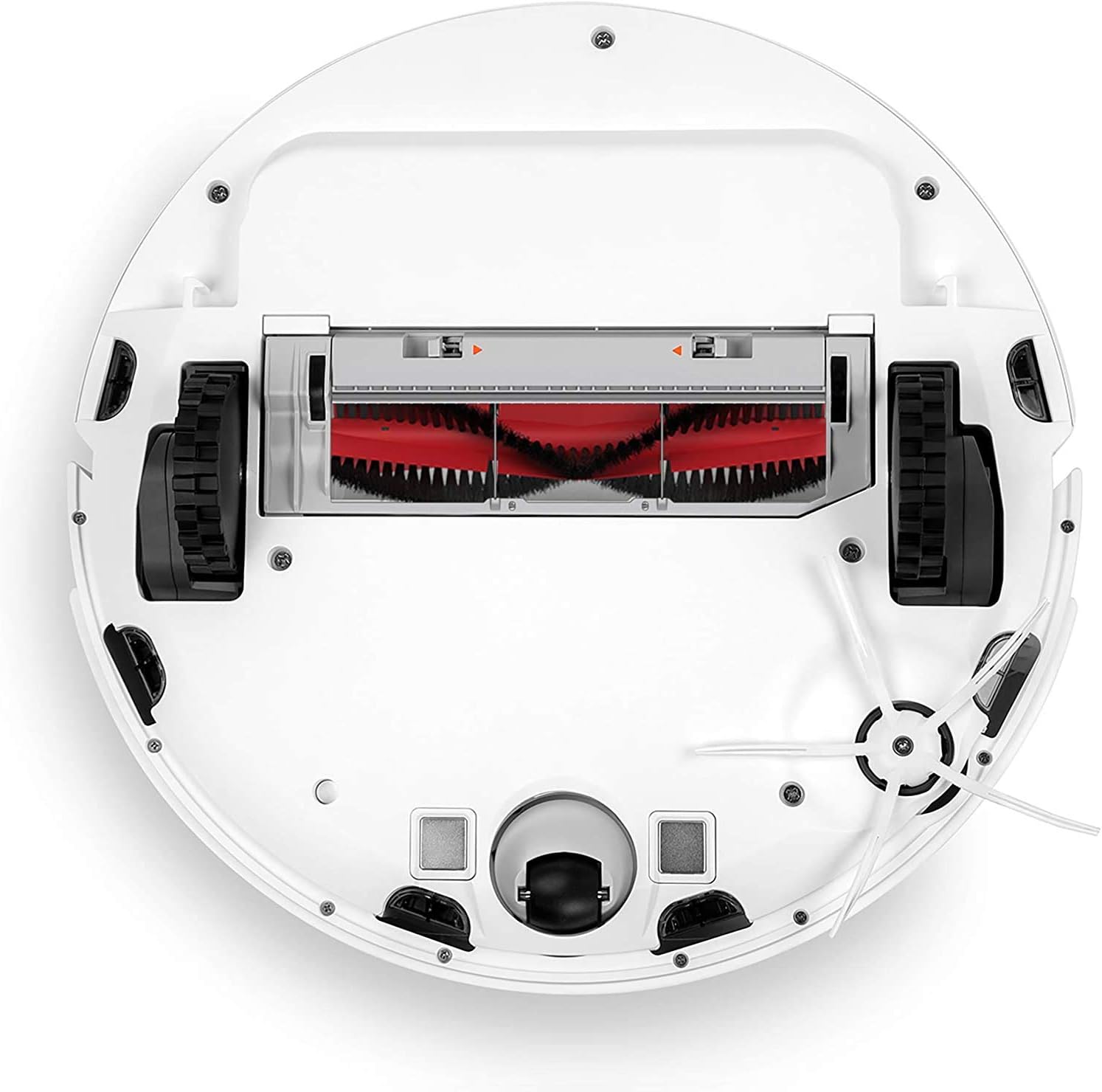
This image shows the underside of the Roborock S6, revealing the main brush, side brush, and wheels, which are key components for cleaning and maintenance.
6. Кыйынчылыктарды
If you encounter issues with your Roborock S6, refer to the following common troubleshooting steps:
- Робот заряддалбай жатат: Ensure the charging dock is powered on and the robot is correctly aligned with the charging contacts. Clean the charging contacts on both the robot and the dock with a dry cloth.
- Robot stuck or displaying an error message: Check for any obstructions around the robot's wheels or brushes. Clear any tangled cables, small objects, or debris. Refer to the Roborock app for specific error codes and detailed solutions.
- Соруунун начар иштеши: Empty the dustbin, clean the filter thoroughly, and check the main brush for any blockages or tangled hair. Ensure the suction inlet is clear.
- Mopping not effective or no water dispensing: Ensure the water tank is filled with clean water and the mop cloth is clean and properly attached. Check if the water outlet on the tank is clogged.
- Робот Wi-Fiга туташпай жатат: Ensure your Wi-Fi network is 2.4GHz, as the robot may not support 5GHz networks. Restart your Wi-Fi router and the robot. Follow the app's connection guide carefully, ensuring correct password entry.
- Иш учурунда адаттан тыш ызы-чуу: Check the main brush, side brush, and wheels for any foreign objects or debris that might be causing the noise. Clean or remove as necessary.
For persistent issues, consult the Roborock app's help section or the official Roborock support webсайт.
7. Продукттун спецификациялары
| Өзгөчөлүк | Спецификация |
|---|---|
| Бренд | roborock |
| Модель номери | XM200009 |
| Түс | Ак |
| Продукциянын өлчөмдөрү (L x W x Y) | 35 x 35 x 9.6 см |
| Элемент Салмагы | 3.6 килограмм |
| Күч | 58 Ватт |
| Ызы-чуу деңгээли | 58 дБ |
| Шайкеш түзмөктөр | Телефон |
| Кошумча спецификациялар | Dustbin Type, Rechargeable |
| Биринчи жеткиликтүү күн | 19-май, 2019-жыл |
8. Кепилдик жана колдоо
For detailed warranty information, terms, and conditions, please refer to the warranty card included with your product or visit the official roborock webсайт. Сатып алуу квитанциясын кепилдик дооматтары үчүн сатып алуунун далили катары сактаңыз.
For technical support, frequently asked questions, and additional resources, please visit the official roborock support page or contact their customer service directly. You can find more information and support resources on the official roborock webсайт: www.roborock.com


