AMIR Wireless Refrigerator Thermometer with 2 Sensors User Manual
Model: 4868e9ff-1090-40b4-8a6a-025a98227e17
Introduction
This manual provides detailed instructions for the setup, operation, and maintenance of your AMIR Wireless Refrigerator Thermometer. This device is designed to monitor temperatures in various environments, including refrigerators, freezers, and other indoor spaces, using two wireless sensors. Please read this manual thoroughly before using the product to ensure proper function and longevity.
Маанилүү коопсуздук маалыматы
- Эски жана жаңы батарейкаларды аралаштырбаңыз.
- щелочтуу, стандарттуу (көмүртек-цинк) же кайра заряддалуучу (никель-кадмий) батареяларды аралаштырбаңыз.
- Түгөнгөн батареяларды ар дайым тез арада алып салыңыз.
- Батареяларды жергиликтүү эрежелерге ылайык туура жок кылыңыз.
- Do not expose the main unit or sensors to extreme temperatures or direct sunlight for extended periods.
- Keep the device away from water and high humidity, except for the sensors which are designed for refrigerator/freezer use.
- This device is for informational purposes only and should not be used as a substitute for professional temperature monitoring in critical applications.
Пакеттин мазмуну
Сураныч, бардык буюмдар бар экенин текшерүү үчүн пакетти текшериңиз:
- 1 x Main Display Unit
- 2 x Wireless Sensors
- 1 х Колдонуучунун колдонмосу (бул документ)
Продукт бүттүview
The AMIR Wireless Refrigerator Thermometer consists of a main display unit and two wireless sensors. The main unit displays temperatures from both sensors and its own ambient temperature. It features a large LCD screen with backlight, MAX/MIN record, and an audible alarm function.
Негизги дисплей бирдигинин өзгөчөлүктөрү:
- Indoor/Outdoor Temperature Display (Dual-channel)
- Unit Selector (Celsius/Fahrenheit)
- MAX/MIN Temperature Record
- 24-hour / All-time Record Option
- Upper/Lower Limit Alarm Function
- Арткы жарыктуу чоң LCD
- Төмөн батарея көрсөткүчү
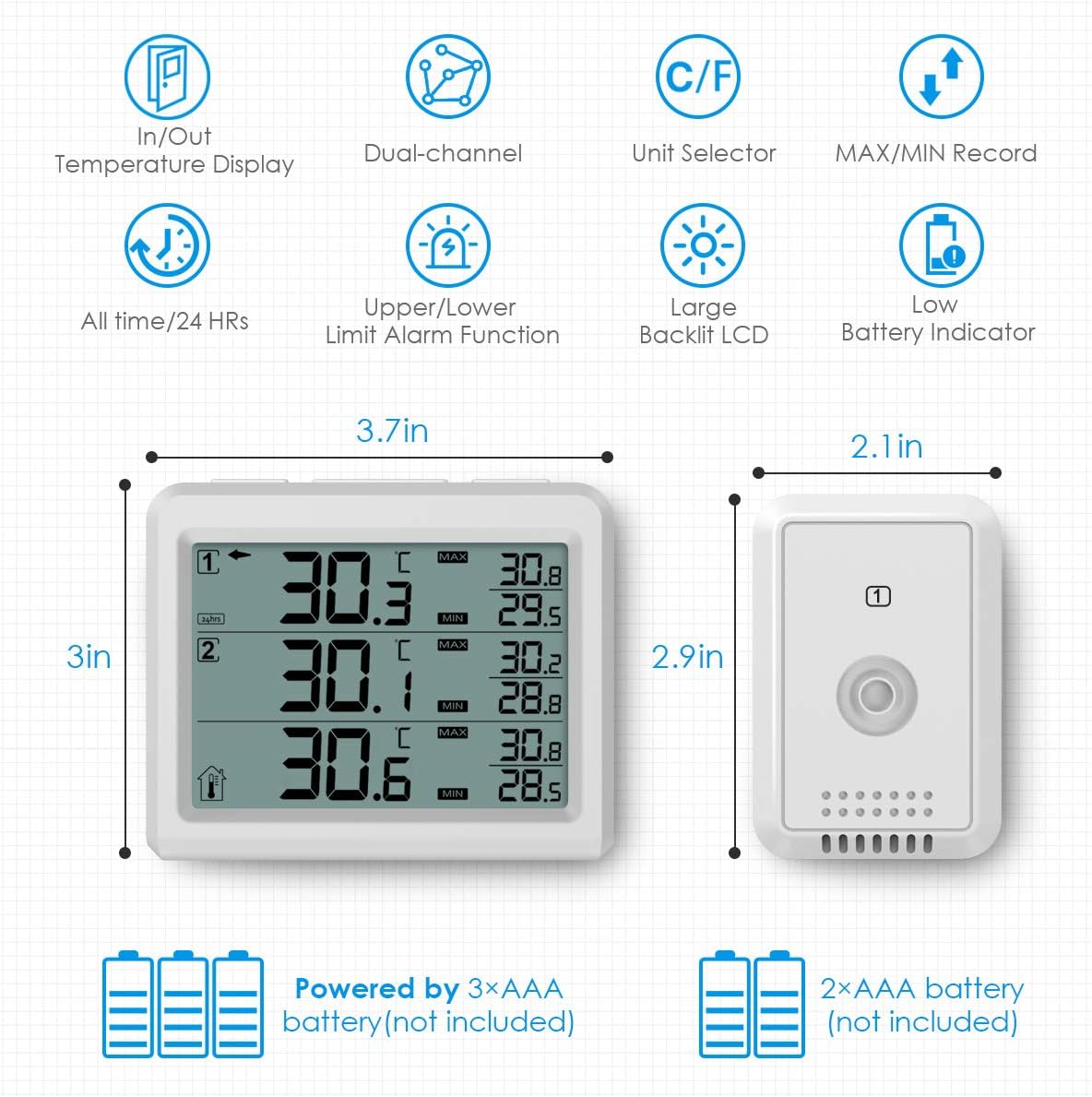
Сүрөт: Main display unit and two wireless sensors with key features and dimensions. The main unit measures 3.7 inches wide by 3 inches high. Each sensor measures 2.1 inches wide by 2.9 inches high. The main unit is powered by 3x AAA batteries, and each sensor by 2x AAA batteries (batteries not included).
Орнотуу колдонмосу
1. Батареяны орнотуу
Негизги дисплей блогу үчүн:
- Негизги блоктун артындагы батарея бөлүкчөсүнүн капкагын ачыңыз.
- Insert 3 AAA batteries (not included) according to the polarity markings (+/-).
- Батарея уясынын капкагын жабыңыз.
For the Wireless Sensors:
- Open the battery compartment cover on the back of each sensor.
- Insert 2 AAA batteries (not included) into each sensor according to the polarity markings (+/-).
- Close the battery compartment cover. The sensor's LED indicator will flash once, indicating it is transmitting data.
Эскертүү: Use fresh alkaline batteries for optimal performance, especially in low temperatures. Rechargeable batteries are not recommended.
2. Sensor Pairing
The main unit should automatically connect to the sensors once batteries are installed. If a sensor does not connect, or if you need to re-establish connection:
- Ensure both the main unit and the sensor are powered on and within range.
- On the main unit, press the "CH/+" button to select the desired channel (1 or 2) for the sensor you wish to reconnect.
- Press and hold the "CH/+" button for approximately 3 seconds. The main unit will attempt to reconnect to the selected sensor. The signal icon for that channel will flash until a connection is established.
Видео: This video demonstrates the basic functions of the Brifit Digital Fridge Thermometer, including indoor/outdoor dual-channel temperature display, backlight activation, switching between Fahrenheit and Celsius, and reconnecting sensors by pressing and holding the CH/+ button. It also shows how to set MAX/MIN alarms and switch between 24H and ALL TIME records.
3. Сенсордун жайгашуусу
Place the wireless sensors in the desired monitoring locations, such as inside a refrigerator, freezer, or other indoor areas. The sensors are designed to withstand cold temperatures.

Сүрөт: Two wireless sensors placed inside a refrigerator and a freezer compartment, demonstrating their intended use for monitoring different locations. The main unit displays readings from both sensors. The maximum transmission distance is approximately 328ft/100m in open air.

Сүрөт: Various installation options for the main display unit and sensors. The main unit can be placed on a tabletop using its built-in stand or wall-mounted using the hang hole. Sensors also have hang holes for wall mounting or can be placed on shelves. The image shows the battery compartments and stand on the back of the main unit and a sensor.
Иштөө нускамалары
1. Күйгүзүү/өчүрүү
The main unit and sensors power on automatically once batteries are installed. There is no manual power on/off button for the sensors. To turn off the main unit, remove its batteries.
2. Температура бирдигин тандоо (°C/°F)
To switch between Celsius (°C) and Fahrenheit (°F), locate the °C/°F switch inside the battery compartment of the main unit. Slide the switch to your preferred unit.
3. Арткы жарык функциясы
Press any button on the main unit to activate the backlight for approximately 10 seconds, improving readability in low-light conditions.

Сүрөт: The main display unit with its backlight activated, showing clear temperature readings in a dimly lit room. The large LCD screen is designed for easy reading.
4. Setting Temperature Alarms (MAX/MIN)
The thermometer allows you to set upper (MAX) and lower (MIN) temperature limits for each channel. An audible alarm will sound if the temperature goes outside these set limits.
- Press and hold the "ALARM" button for 3 seconds. The MAX alarm value will flash.
- Use the "CH/+" or "CLEAR/-" buttons to adjust the MAX temperature limit.
- Press the "ALARM" button again to confirm the MAX setting and proceed to the MIN alarm setting. The MIN alarm value will flash.
- Use the "CH/+" or "CLEAR/-" buttons to adjust the MIN temperature limit.
- Press the "ALARM" button once more to confirm the MIN setting and exit alarm setting mode. The display will return to normal operation.

Сүрөт: The main display unit showing the alarm function, with indicators for MAX and MIN temperature thresholds. An alarm bell icon signifies that the alarm feature is active, alerting users when temperature readings exceed or fall below set limits.
5. Viewing MAX/MIN Records
The main unit records the maximum and minimum temperatures detected by each sensor and its own ambient sensor.
- In normal mode, press the "MAX/MIN" button once to display the maximum recorded temperatures for all channels.
- Press the "MAX/MIN" button again to display the minimum recorded temperatures for all channels.
- Press the "MAX/MIN" button a third time to return to the current temperature display.
6. Clearing MAX/MIN Records and Switching 24H/ALL TIME
To clear the MAX/MIN records or switch between 24-hour and all-time records:
- In normal mode, press and hold the "CLEAR/-" button for 3 seconds. This will clear the MAX/MIN records and switch the display between 24-hour and all-time recording modes.
Техникалык тейлөө
Тазалоо:
- Негизги блокту жана сенсорлорду жумшак, d менен сүртүңүзamp кездеме.
- Абразивдүү тазалагычтарды же эриткичтерди колдонбоңуз.
- Ensure the devices are completely dry before re-installing batteries or placing them in use.
Батареяны алмаштыруу:
When the low battery indicator appears on the display, replace the batteries in the respective unit (main unit or sensor) as soon as possible to ensure continuous and accurate monitoring. Follow the battery installation steps in the Setup Guide.
Проблемаларды чечүү
| Көйгөй | Мүмкүн себеп | Чечим |
|---|---|---|
| No temperature reading on a channel. | Sensor not paired or out of range; dead batteries in sensor. | Check sensor batteries and replace if necessary. Re-pair the sensor by pressing and holding the "CH/+" button on the main unit for 3 seconds. Move sensor closer to the main unit. |
| Температураны туура эмес көрсөткүчтөр. | Sensor placed too close to heat sources or vents; low batteries. | Relocate the sensor to a more representative area. Replace batteries. |
| Дисплей күңүрт же бош. | Low or dead batteries in the main unit. | Негизги блоктогу батарейкаларды алмаштырыңыз. |
| Күтүүсүздөн ойготкуч шыңгырайт. | Temperature exceeded set MAX/MIN limits. | Check the current temperature and the set alarm limits. Adjust limits if needed. |
Техникалык шарттар
| Өзгөчөлүк | Деталь |
|---|---|
| Бренд | АМИР |
| Модель номери | 4868e9ff-1090-40b4-8a6a-025a98227e17 |
| Дисплей түрү | Арткы жарыгы бар санариптик LCD |
| Байланыш технологиясы | Зымсыз |
| Кубат булагы (Негизги блок) | Батарея менен иштейт (3x AAA, камтылган эмес) |
| Кубат булагы (сенсорлор) | Battery Powered (2x AAA per sensor, not included) |
| Өзгөчө өзгөчөлүк | Audible Alarm, MAX/MIN Record |
| Ички/тышкы колдонуу | Indoor |
| Жооп убактысы | 10 секунд |
| Элемент Салмагы | 7 унция |
| Материал | Пластик |
Кепилдик жана колдоо
AMIR provides the following support for this product:
- Сапатты коргоо: 12-month quality protection from the date of purchase.
- Акысыз алмаштыруу: 60 days free replacement for manufacturing defects.
- Кардарларды тейлөө: 7*24h customer service is available for any inquiries or assistance. Please refer to the product packaging or official AMIR webбайланыш маалыматы үчүн сайт.


