Introduction
The Simrad RS40-B is a state-of-the-art VHF radio system designed for marine use, featuring an integrated Class B AIS transceiver and internal GPS. This manual provides essential information for the proper installation, operation, and maintenance of your RS40-B VHF radio to ensure safe and effective communication on the water.
Негизги өзгөчөлүктөрү
- Integrated Class B AIS transceiver for seeing and being seen by other AIS-equipped vessels.
- Class D DSC approved VHF radio for digital selective calling.
- Integrated GPS receiver for accurate position data.
- Removable fist mic with support for front or rear connection, allowing flexible mounting.
- Expandable with up to two optional HS40 wireless handsets for remote control and intercom functionality.
- Ability to add an optional loudhailer or external speaker.
- NMEA 0183® and NMEA 2000® connectivity for integration with other marine electronics.
Кутуда эмне бар
Upon unpacking your Simrad RS40-B, please verify that all components listed below are present:
- RS40 VHF Radio Unit
- Removable Fist Mic
- RS40/V60 VHF Mounting bracket with Knobs and Screws
- RS40/V60 VHF Flush Mounting kit
- RS40 / RS40-B VHF Suncover
- RS40/V60 Fist Mic mounting clip
Орнотуу жана орнотуу
Proper installation is crucial for the optimal performance of your Simrad RS40-B VHF radio. Ensure all connections are secure and follow marine electronics installation best practices.
Монтаждоо параметрлери
The RS40-B can be flush-mounted or bracket-mounted. The removable fist mic offers flexibility, allowing it to be connected to either the front or rear of the radio unit. Optional extension cables can be used to mount the mic separately from the main unit, reducing cable clutter in your helm area.

Сүрөт 1: Алдыңкы view of the Simrad RS40-B VHF radio and its removable fist mic. The mic can be connected to the front or rear of the unit.
Байланыштар
The RS40-B supports NMEA 0183® and NMEA 2000® connectivity for integration with other marine electronic systems, such as chartplotters and multifunction displays. This allows for sharing of GPS data and AIS target information across your vessel's network.

2-сүрөт: Арткы view of the Simrad RS40-B unit, illustrating the various connection ports for power, antenna, NMEA, and optional accessories.
Өлчөмдөр
The unit dimensions are approximately 7.92 inches wide by 3.85 inches high when flush mounted. Refer to the technical drawing for detailed measurements to ensure proper fit and installation space.
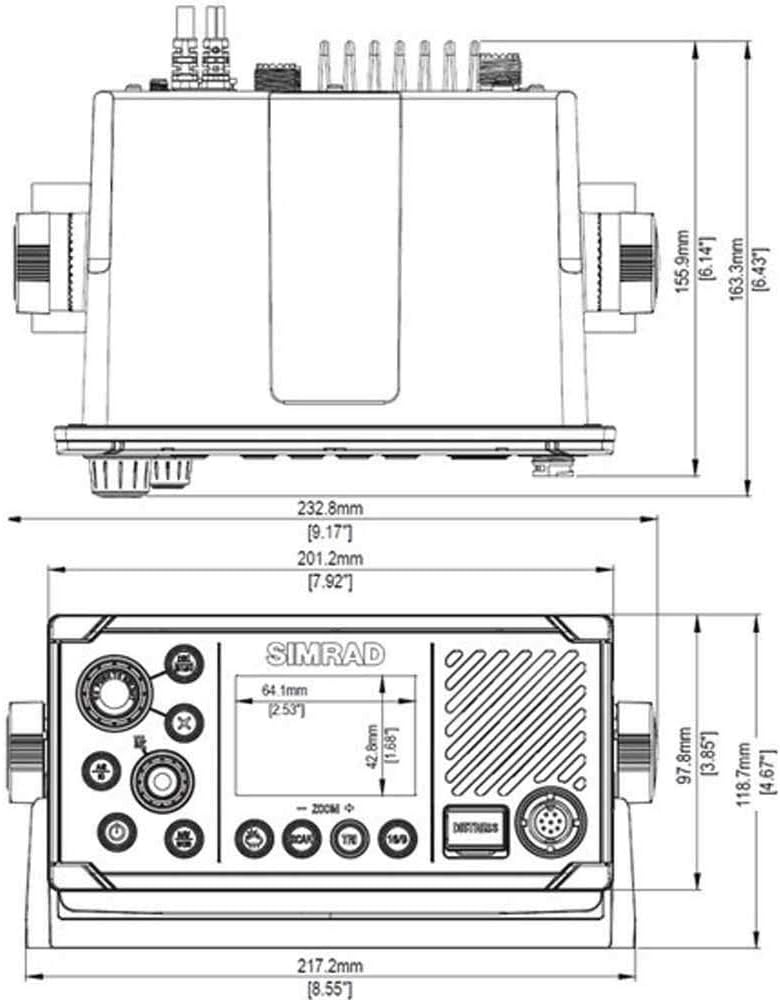
Figure 3: Detailed technical drawing providing precise dimensions of the Simrad RS40-B unit for installation planning.
Иштөө нускамалары
The Simrad RS40-B is designed for intuitive operation. Familiarize yourself with the controls and display for effective use.

4-сүрөт: Бурчтуу view of the Simrad RS40-B, highlighting the main display and control buttons for easy access during operation.
Негизги радио операциясы
- Күйгүзүү/өчүрүү: Кубат баскычын басып, кармап туруңуз (⏻) аппаратты күйгүзүү же өчүрүү.
- Канал тандоо: Use the rotary knob or the CH +/- buttons on the fist mic to cycle through available channels.
- Үндү тууралоо: Adjust the volume using the VOL +/- buttons on the fist mic or the dedicated volume knob on the main unit.
- Өткөрүп берүү: To transmit, press and hold the Push-To-Talk (PTT) button on the fist mic while speaking clearly into the microphone. Release the button to listen.
- Distress Button: кызыл КЫЙЫНЧЫЛЫК button is for emergency use only. Pressing and holding this button will initiate a DSC distress call. Ensure you are familiar with proper DSC distress procedures.
Өркүндөтүлгөн функциялар
- Аба ырайы каналдары: Access weather channels by selecting the appropriate channel (e.g., Channel 17 for SAR/Weather). The unit can transmit weather information when on the correct channel.
- DSC Menu: басыңыз DSC MENU button to access options such as DSC Calls, Track Buddy, and Contacts. This allows for direct digital communication with other vessels.
- AIS Display: AIS target information can be viewed directly on the radio's built-in screen or overlaid on a compatible multifunction display connected via NMEA.
Техникалык тейлөө
Regular maintenance ensures the longevity and reliable performance of your Simrad RS40-B VHF radio.
- Тазалоо: Clean the unit and mic with a soft, damp кездеме. Абразивдүү тазалагычтардан же эриткичтерден качыңыз.
- Байланыштары: Periodically check all cable connections for corrosion or damage, especially in a marine environment.
- Программалык камсыздоо жаңыртуулары: Симрадды текшериңиз website for any available software updates to ensure your unit has the latest features and performance enhancements.
Проблемаларды чечүү
This section provides solutions to common issues you might encounter with your RS40-B VHF radio.
| Көйгөй | Мүмкүн себеп | Чечим |
|---|---|---|
| Күч жок | Loose power connection, blown fuse, battery issue. | Check power cable, inspect fuse, verify battery voltage. |
| Аудио жок / Төмөн үн | Volume too low, speaker disconnected, faulty speaker. | Increase volume, check speaker connection, test with external speaker if available. |
| Берүү/кабыл алуу мүмкүн эмес | Antenna issue, incorrect channel, squelch too high. | Check antenna connection, select correct channel, adjust squelch. |
| GPS/AIS Data Not Displaying | NMEA connection issue, GPS antenna blocked, AIS not active. | Verify NMEA connections, ensure clear view for GPS antenna, check AIS settings. |
For more complex issues, please contact Simrad customer support or consult a qualified marine electronics technician.
Техникалык шарттар
| Атрибут | Нарк |
|---|---|
| Бренд | Симрад |
| Модель номери | RS40-B (DSI-075) |
| Элемент Салмагы | 5.51 фунт (2.5 кг) |
| Продукциянын өлчөмдөрү | 18 x 10 x 6 дюйм (45.7 x 25.4 x 15.2 см) |
| Түс | Кара |
| Каналдардын саны | 8 |
| Өзгөчө өзгөчөлүк | Integrated AIS and GPS Receivers |
| Жыштык диапазону | 156-174 МГц |
| Сүйлөшүү диапазону максималдуу | 23 миля |
| Tuner Technology | VHF |
| Сууга туруктуулук деңгээли | Сууга чыдамдуу |
| Өндүрүүчү | Симрад |
| Биринчи жеткиликтүү күн | 3-июнь, 2019-жыл |
Кепилдик жана колдоо
For detailed warranty information, product registration, and technical support, please visit the official Simrad webсайтка же кардарларды тейлөө бөлүмүнө кайрылыңыз. Сатып алуу квитанциясын кепилдик дооматтары үчүн сатып алуунун далили катары сактаңыз.
Сиз кошумча ресурстарды жана байланыш маалыматын таба аласыз Simrad Store on Amazon.


