Introduction
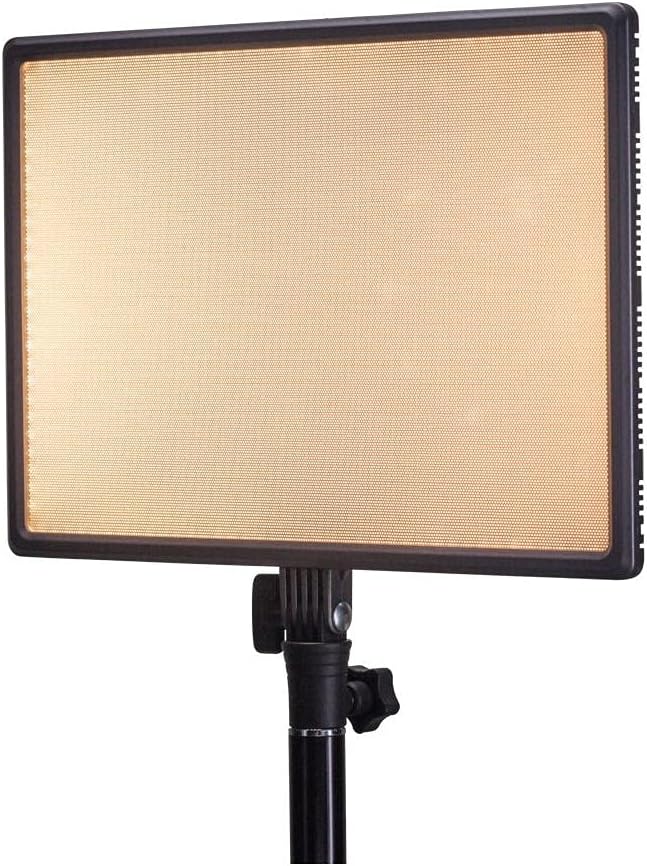
Thank you for choosing the Nanlite LumiPad 25 LED Panel. This manual provides essential information for the safe and effective operation of your device. Please read it thoroughly before use and retain it for future reference.
Коопсуздук чаралары
- Аппаратты сууга же жогорку нымдуулукка дуушар кылбаңыз.
- Көздүн LED жарыгынын түздөн-түз таасиринен алыс болуңуз.
- Use only approved power adapters and batteries.
- Агрегатты ажыратууга же өзгөртүүгө аракет кылбаңыз.
- Балдар жетпеген жерде сактаңыз.
Пакеттин мазмуну
Пакетиңизде бардык буюмдар бар экенин текшериңиз:
- Nanlite LumiPad 25 LED Panel
- Монтаждоо адаптери
- AC Power Adapter (may be sold separately)
- User Manual
Жайгашуу
1. Mounting the Light Panel
- Attach the included mounting adapter to the 1/4-inch screw thread located at the bottom of the LumiPad 25.
- Secure the mounting adapter to a compatible light stand or tripod.
- Adjust the angle of the LED panel using the tilt mechanism on the mounting adapter.

2. Аппаратты кубаттоо
The LumiPad 25 offers multiple power options:
- AC кубаттуулугу: Connect the AC power adapter to the DC IN port on the back of the panel, then plug the adapter into a wall outlet.
- Батарея кубаттуулугу: Insert two compatible NP-F style batteries (sold separately) into the battery slots on the back of the panel. Ensure correct polarity.


Операция
1. Күйгүзүү/өчүрүү
Locate the power switch on the back of the panel. Flip the switch to the 'ON' position to power on the light. Flip it to 'OFF' to power off.
2. Жарыктыкты жөндөө
Use the 'DIMMER' control knob on the back of the panel to adjust the light output from 0% to 100% brightness. Rotate clockwise to increase brightness and counter-clockwise to decrease.
3. Түс температурасын жөндөө
Use the '5600K' control knob on the back of the panel to adjust the color temperature from warm (3200K) to cool (5600K). Rotate clockwise for cooler temperatures and counter-clockwise for warmer temperatures.

Техникалык тейлөө
Тазалоо
To clean the LED panel, use a soft, dry cloth. For stubborn marks, a slightly damp Аппараттын ичине суюктуктун кирбешин камсыз кылуу үчүн жумшак жуугуч каражаты бар чүпүрөктү колдонсо болот. Абразивдүү тазалоочу каражаттарды же эриткичтерди колдонбоңуз.
Сактагыч
When not in use, store the LumiPad 25 in a cool, dry place, away from direct sunlight and extreme temperatures. If storing for extended periods, remove batteries.
Проблемаларды чечүү
| Көйгөй | Мүмкүн себеп | Чечим |
|---|---|---|
| Жарык күйбөйт. | No power, faulty connection, or depleted batteries. | Check power adapter connection or replace/recharge batteries. Ensure power switch is ON. |
| Brightness not adjusting. | Dimmer knob not functioning or at minimum/maximum setting. | Rotate the dimmer knob fully in both directions. If issue persists, contact support. |
| Color temperature not changing. | Color temperature knob not functioning or at minimum/maximum setting. | Rotate the color temperature knob fully in both directions. If issue persists, contact support. |
Техникалык шарттар
| Өзгөчөлүк | Деталь |
|---|---|
| Модель номери | 11-2002 |
| Продукциянын өлчөмдөрү | 13.58 x 37 x 9 inches (overall packaging) / 1.2"L x 1.2"W x 1.2"H (unit) |
| Элемент Салмагы | 7.1 унция |
| Жарыктык | 2140 lumens (max) |
| Түс температурасы | 3200K - 5600K |
| Кубат параметрлери | AC Adapter, NP-F style batteries, DC via D-tap cable |
Кепилдик жана колдоо
Nanlite products are covered by a limited warranty. For detailed warranty information, technical support, or service inquiries, please visit the official Nanlite webсайтка кайрылыңыз же жергиликтүү дистрибьютериңиз менен байланышыңыз.
Official Nanlite Webсайт: www.nanlite.com


