Introduction
Thank you for choosing the Blueendless 2-Bay SATA HDD/SSD Docking Station HD05. This device is designed to provide convenient access to 2.5-inch and 3.5-inch SATA hard drives and solid-state drives (HDDs/SSDs) for data transfer and offline duplication. Please read this manual carefully to ensure proper installation and operation.
Продукт бүттүview
Негизги өзгөчөлүктөрү:
- Supports simultaneous reading of two 2.5-inch or 3.5-inch SATA HDDs/SSDs.
- Integrated Hard Drive Duplicator Function (Offline Clone) for standalone drive duplication.
- Connects to a computer via USB 3.0 for use as an external hard drive dock.
- On/Off power switch for easy control.
- LED indicators for power and activity status.
- Hot-swappable, plug and play functionality; no drivers required for most operating systems.
- USB 3.0 interface provides data transfer rates up to 5 Gbps.
- Compatible with OS X, Linux, Windows 2000/XP/Vista/7/8/10 (32-bit & 64-bit), and Android (Smart TV).
Пакеттин мазмуну:
- Blueendless HDD Docking Station HD05
- USB 3.0 маалымат кабели
- Электр камсыздоо
- Колдонуучунун Колдонмосу (бул документ)
Продукт диаграммасы:

Сүрөт 1: Алдыңкы view of the Blueendless HD05 Docking Station, showing the two drive bays and power button.
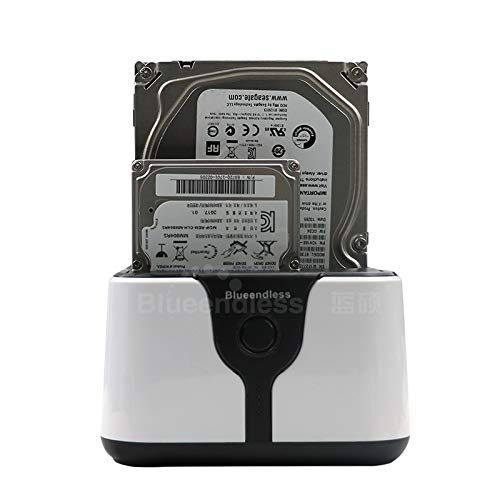
Figure 2: The docking station with a 3.5-inch HDD and a 2.5-inch HDD/SSD inserted into the bays, demonstrating drive compatibility.
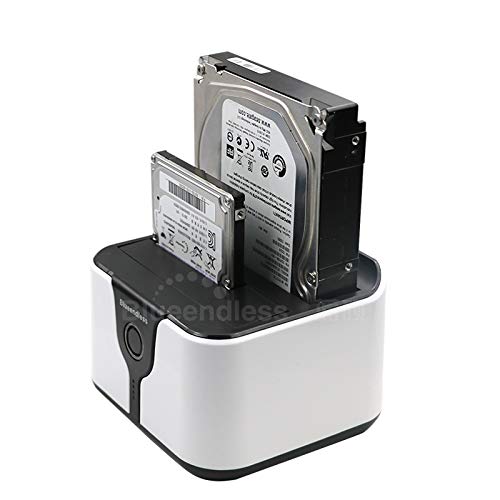
3-сүрөт: бурчтуу view of the docking station with both 2.5-inch and 3.5-inch drives inserted, highlighting the compact design.
Жайгашуу
- Туташуу кубаты: Connect the provided power adapter to the docking station's power input and then to a wall outlet.
- Connect to Computer (Optional for Data Transfer): If using for data transfer, connect the supplied USB 3.0 data cable from the docking station's USB port to an available USB 3.0 port on your computer.
- Дисктерди киргизүү: Carefully insert your 2.5-inch or 3.5-inch SATA HDDs/SSDs into the drive bays (Slot 1 and Slot 2). Ensure they are fully seated.
- Күйгүзүү: Press the On/Off power switch on the docking station. The power LED indicator will illuminate.
- Драйверди орнотуу: For most modern operating systems (Windows, OS X, Linux), no additional drivers are required. The device should be recognized automatically.
Иштөө нускамалары
A. Data Transfer Mode (Connected to Computer)
- Ensure the docking station is powered on and connected to your computer via the USB 3.0 cable.
- Insert one or two SATA HDDs/SSDs into the drive bays.
- Your operating system should detect the drives as external storage devices. You can now access, read, and write data to them as you would with any other external drive.
- To safely remove a drive, always use the "Safely Remove Hardware" option in your operating system before physically removing the drive or powering off the docking station.
B. Offline Clone Function (Standalone Duplication)
The offline clone function allows you to duplicate a hard drive without connecting to a computer. This is ideal for creating backups or upgrading drives.
- Дисктерди даярдоо:
- салыңыз Баштапкы диск (the drive you want to copy FROM) into Slot 1 (Source).
- салыңыз Максаттуу Drive (the drive you want to copy TO) into Slot 2 (Target).
- Маанилүү: The target drive must be of equal or larger capacity than the source drive. All data on the target drive will be overwritten during the cloning process. Ensure you have backed up any important data from the target drive before proceeding.
- Компьютерден ажыратуу: Ensure the USB data cable is disconnected from the docking station and your computer. The cloning process must be performed offline.
- Күйгүзүү: Connect the power adapter and turn on the docking station.
- Клондоону баштоо: Press and hold the "Clone" button (usually located near the drive bays) for approximately 3-5 seconds until the clone progress LEDs begin to flash.
- Прогресс мониторинги: The LED indicators will show the cloning progress (e.g., 25%, 50%, 75%, 100%). Do not interrupt the process.
- Аяктоо: Once all progress LEDs are solid, the cloning process is complete. You can now safely power off the docking station and remove the drives.
Эскертүү: The cloning speed depends on the drive capacities and types. Larger drives will take longer to clone.
Техникалык тейлөө
- Док станциясын таза жана чаңсыз кармаңыз. Тазалоо үчүн жумшак, кургак чүпүрөк колдонуңуз.
- Аппаратты экстремалдык температурага, нымдуулукка же тике күн нуруна тийгизүүдөн сактаңыз.
- Do not attempt to disassemble or repair the device yourself. This may void the warranty.
- Ensure proper ventilation around the device during operation, especially during long cloning processes.
Проблемаларды чечүү
- Issue: Drives not recognized by computer.
- Ensure the docking station is powered on and the USB 3.0 cable is securely connected to both the docking station and the computer.
- Компьютериңиздеги башка USB портуна туташып көрүңүз.
- Test with a different USB 3.0 cable.
- Check if the drives are properly seated in the bays.
- Verify that the drives themselves are functional by testing them in another enclosure or directly connected to a computer.
- For new drives, they may need to be initialized and formatted in Disk Management (Windows) or Disk Utility (OS X) before they appear.
- Issue: Offline clone fails or does not start.
- Ensure the USB data cable is disconnected from the computer. The clone function is offline only.
- Verify that the source drive is in Slot 1 and the target drive is in Slot 2.
- Максаттуу дисктин сыйымдуулугу баштапкы дисктин сыйымдуулугуна барабар же андан чоң экенин ырастаңыз.
- Ensure both drives are properly inserted and detected by the docking station (power on, then insert drives, check activity LEDs).
- Press and hold the clone button for the required 3-5 seconds until the progress LEDs start flashing.
- If the drives are very old or have bad sectors, cloning might fail.
- Көйгөй: Маалыматтарды берүү ылдамдыгы жай.
- Компьютериңиздеги USB 3.0 портуна туташканыңызды текшериңиз. USB 2.0 порттору ылдамдыкты азайтат.
- Verify that the USB 3.0 cable is not damaged.
- The actual transfer speed also depends on the speed of the installed HDDs/SSDs.
Техникалык шарттар
| Өзгөчөлүк | Деталь |
|---|---|
| Модел | HD05 |
| Колдоого алынган Drive түрлөрү | 2.5-inch / 3.5-inch SATA I/II/III HDD & SSD |
| Оюктары саны | 2 |
| Интерфейс | USB 3.0 (USB 2.0 менен артка шайкеш келет) |
| Маалыматтарды өткөрүү ылдамдыгы | 5 Гбит/сек чейин (USB 3.0) |
| Оффлайн клондоо функциясы | Supported (Standalone) |
| Шайкеш операциялык системалар | OS X, Linux, Windows 2000/XP/Vista/7/8/10, Android (Smart TV) |
| Өлчөмдөрү (L x W x Y) | 118 x 115 x 89 мм (болжол менен 12 x 12 x 8 см) |
| Элемент Салмагы | 254 г |
| Электр камсыздоо | Тышкы кубат адаптери (кошулган) |
Кепилдик жана колдоо
This Blueendless HD05 Docking Station comes with a 6 айлык кепилдик сатып алынган күндөн тартып. Бул кепилдик нормалдуу колдонуудагы өндүрүш кемчиликтерин камтыйт.
For technical support, warranty claims, or further assistance, please contact your retailer or the Blueendless customer service department through their official website or contact channels. Please have your product model number (HD05) and proof of purchase ready when contacting support.


