D-Link Mydlink HD Pan & Tilt Wi-Fi камерасы (DCS-8515LH) Колдонуучунун колдонмосу
Model: DCS-8515LH
Introduction
This manual provides comprehensive instructions for the setup, operation, and maintenance of your D-Link Mydlink HD Pan & Tilt Wi-Fi Camera (DCS-8515LH). This camera offers 360° viewing capabilities, automatic motion tracking, and integration with smart home assistants, providing enhanced monitoring for your indoor spaces.
Пакеттин мазмуну
Төмөндө тизмеленген нерселердин баары пакетиңизге камтылганын текшериңиз:
DCS-8515LH Camera
Кубаттуу адаптер
Кронштейн орнотуу
Ыкчам орнотуу колдонмосу
Figure 1: D-Link DCS-8515LH Camera Components
This image displays the D-Link DCS-8515LH camera from multiple angles, highlighting its key components. Labels indicate the location of the IR LEDs, light sensor, built-in microphone, microSD card slot, speaker, and power connector at the base.
Продукт бүттүview
The D-Link DCS-8515LH is an HD Pan & Tilt Wi-Fi Camera designed for indoor surveillance. It features a 120° angle lens with a 340° pan range and 105° tilt capability, allowing for extensive coverage of your room. Key functionalities include:
HD Video Quality: Captures clear 720p HD video.
Түнкү көрүнүш: Built-in infrared LEDs provide visibility up to 5 meters in darkness.
Кыймылды жана үндү аныктоо: Alerts you to activity with snapshots and contact options.
Эки тараптуу аудио: Камера аркылуу реалдуу убакыт байланышын иштетет.
Ийкемдүү сактагыч: Supports cloud recording and local microSD card storage.
Smart Home интеграциясы: Amazon Alexa жана Google Assistant менен шайкеш келет.
Figure 2: D-Link DCS-8515LH Camera
This image shows the D-Link DCS-8515LH camera, a white and black dome-shaped device with a visible camera lens, designed for indoor use.
Орнотуу нускамалары
D-Link DCS-8515LH камераңызды орнотуу үчүн бул кадамдарды аткарыңыз:
mydlink колдонмосун жүктөп алыңыз:Издөө "mydlink" in your device's app store (iOS or Android) and install the application.
Камераны күйгүзүү: Connect the provided power adapter to the camera and plug it into a power outlet. Wait for the camera's LED indicator to blink orange, indicating it's ready for setup.
Колдонмого түзмөк кошуу: Open the mydlink app, sign in or create a new account. Tap the menu icon, then select "Add a Device." Scan the QR code located on the camera or its Quick Installation Guide.
Экрандагы көрсөтмөлөрдү аткарыңыз: The app will guide you through connecting the camera to your Wi-Fi network and configuring initial settings. Ensure your mobile device is connected to the 2.4 GHz Wi-Fi network you intend to use for the camera.
Жайгашкан жери: Position the camera in your desired indoor location. The included mounting bracket can be used for wall or ceiling installation if needed.
Video 1: D-Link Product Overview жана Орнотуу
Бул видео жалпы маалымат беретview of a D-Link camera and demonstrates basic setup steps, including connecting power and using the mydlink app for initial configuration. While it features a different model, the setup process is similar for the DCS-8515LH.
Figure 3: mydlink App Interface for Camera Control
This image illustrates the mydlink app on a smartphone, showing the interface for controlling the camera's view, including a panorama view angle selection feature that allows users to tap to jump to a specific area.
Иштөө нускамалары
Панорама жана Тилтти башкаруу
From the mydlink app, you can remotely control the camera's pan (horizontal) and tilt (vertical) movements to view different areas of your room. Use the on-screen controls to adjust the camera's direction.
360° View: The camera offers a comprehensive 360° coverage when combining its 120° lens with its pan and tilt capabilities.
Панорама View Angle Selection: Tap on a specific area in the panoramic view within the app to quickly direct the camera to that point.
Figure 4: Pan & Tilt Live Video in mydlink App
This image shows a hand holding a smartphone displaying the mydlink app. The app is showing a live video feed from the camera, demonstrating the pan and tilt functionality to view a wide area of a room.
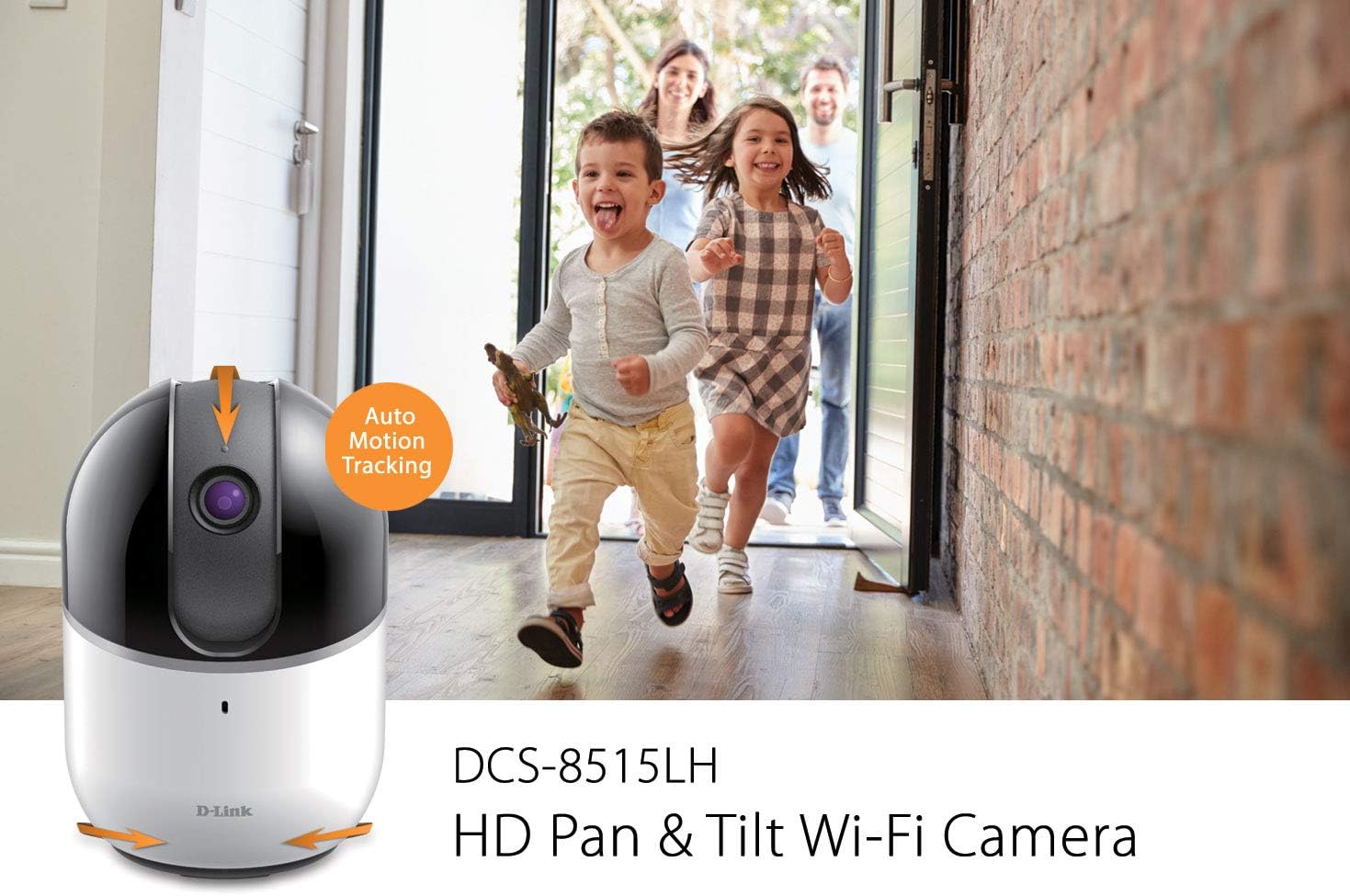
Auto Motion Tracking
When enabled, the camera will automatically pan and tilt to follow moving objects within its field of view, алардын алкакта калышын камсыз кылуу.
Figure 5: Auto Motion Tracking Feature
This image illustrates the camera's auto motion tracking feature. The D-Link DCS-8515LH camera is shown with an overlay indicating "Auto Motion Tracking," while children are depicted running in the background, demonstrating the camera's ability to follow movement.
Түнкү көрүнүш
The camera is equipped with infrared LEDs for night vision, allowing it to capture clear video in low-light or complete darkness up to 5 meters.
Кыймыл жана үн аныктоо
Configure the mydlink app to receive instant notifications on your mobile device when motion or sound is detected. These alerts can include snapshots and options to call a designated contact.
Figure 6: Rich Notifications from mydlink App
This image displays a smartphone screen with a notification from the mydlink app, indicating that motion has been detected by the DCS-8515LH camera. The notification provides options to view жаша фооtage or call a designated contact.
Эки тараптуу аудио
Utilize the built-in microphone and speaker to engage in two-way conversations through the camera, allowing you to communicate with individuals in the camera's vicinity.
Жаздыруу параметрлери
Камера бир нече жаздыруу ыкмаларын колдойт:
Булут жаздыруу: Store video recordings securely in the mydlink cloud. Free and paid plans are available.
Local MicroSD Card: Insert a microSD card (up to 256 GB, as per latest firmware) into the camera for local storage of recordings.
Купуялык режими
Activate Privacy Mode via the mydlink app to physically cover the camera lens, ensuring complete privacy when needed.
Smart Home интеграциясы
The DCS-8515LH camera is compatible with Amazon Alexa and Google Assistant, allowing for voice control and integration into your smart home ecosystem. You can stream live video to compatible devices like Fire TV, Echo Spot, or Google Chromecast.
7-сүрөт: Акылдуу үй интеграциясы
This image demonstrates the D-Link camera's compatibility with smart home platforms. It shows the camera integrated with Amazon Alexa (displaying a baby monitor feed on an Echo Show) and Google Assistant (displaying a live camera feed on a television).
Техникалык тейлөө
Камераңыздын оптималдуу иштешин жана узак иштөөсүн камсыз кылуу үчүн:
Тазалоо: Камера линзасын жана корпусун жумшак, кургак чүпүрөк менен акырын сүртүңүз. Катуу химиялык заттарды же абразивдүү тазалоочу каражаттарды колдонуудан алыс болуңуз.
Программалык камсыздоонун жаңыртуулары: Regularly check for and install firmware updates through the mydlink app to ensure your camera has the latest features and security enhancements.
Жайгашкан жери: Камераны туруктуу, кургак имараттын ичинде, түз күн нурунан, жылуулук булактарынан жана ашыкча нымдуулуктан алыс коюңуз.
Проблемаларды чечүү
If you encounter issues with your D-Link DCS-8515LH camera, consider the following:
Туташуу маселелери:
Ensure your Wi-Fi network is active and the camera is within range of your router.
Wi-Fi сырсөзүңүз mydlink колдонмосуна туура киргизилгенин текшериңиз.
Restart your camera and Wi-Fi router.
Видеонун сапаты начар:
Check your internet connection speed. A stable and fast connection is crucial for HD streaming.
Чаңды же тактарды кетирүү үчүн камеранын линзасын тазалаңыз.
Motion/Sound Detection Not Working:
Ensure motion and sound detection settings are enabled in the mydlink app.
Adjust sensitivity levels to suit your environment.
Колдонмо маселелери:
Ensure your mydlink app is updated to the latest version.
Try force-closing and reopening the app, or reinstalling it if problems persist.
Заводдун баштапкы абалга келтирүү: If all else fails, perform a factory reset (refer to the Quick Installation Guide for specific steps) and re-add the camera to the mydlink app.
Техникалык шарттар
Өзгөчөлүк
Деталь
Модель аты
DCS-8515LH
Видео тартуунун резолюциясы
720p HD
Пан колому
340°
Тилтүү диапазону
105°
View Angle (Lens)
120°
Түнкү көрүнүш аралык
5 метрге чейин
Connectivity Protocol
Wi-Fi
Зымсыз байланыш технологиясы
Wi-Fi
Сактагыч параметрлери
Cloud, Local MicroSD Card (up to 256GB)
Аудио
Эки тараптуу аудио
Эскертүү түрү
Аудио жана кыймыл
Шайкеш түзмөктөр
Смартфон, Планшет
Controller Type
Amazon Alexa, Google Жардамчысы
Power Source
Электр зымдары
Продукциянын өлчөмдөрү (L x W x Y)
3.3 x 3.3 x 4.9 дюйм
Элемент Салмагы
12.6 унция
Кепилдик жана колдоо
Кепилдиктин толук маалыматын алуу үчүн продуктуңузга кошулган кепилдик картасын караңыз же расмий D-Linkке баш багыңыз website. Technical support and additional resources can be found on the D-Link support pages.
Сиз да зыярат кылсаңыз болот Amazon боюнча D-Link дүкөнү өнүм жөнүндө маалымат жана кардарларды тейлөө үчүн.
D-Link DCS-8302LH Full HD Wi-Fi камерасынын Колдонуучу колдонмосу D-Link DCS-8302LH Full HD Wi-Fi камерасы үчүн комплекстүү колдонуучу нускама, орнотууну, орнотууну, колдонмону колдонууну, көйгөйлөрдү аныктоону, техникалык мүнөздөмөлөрдү жана ченемдик маалыматты камтыйт. Mydlink колдонмосу аркылуу камераңызды кантип туташтырууну, орнотууну жана башкарууну үйрөнүңүз.
D-Link DIR-L1900 жогорку натыйжалуу Mesh Wi-Fi роутерин тез орнотуу боюнча колдонмо Пакеттин мазмунун, D-Link Wi-Fi колдонмосу аркылуу орнотуу параметрлерин камтыган D-Link DIR-L1900 Жогорку Performance Mesh Wi-Fi роутери үчүн тез орнотуу көрсөтмөсү же web браузер, көп берилүүчү суроолор, үн жардамчысы интеграциясы, техникалык колдоо жана D-Link Wi-Fi Mesh кеңейтүүсү.