1. Киришүү
The AIYIMA DAC-A2 is a versatile Digital-to-Analog Converter (DAC) and headphone amplifier designed to enhance your audio experience. It features multiple digital input options and provides both RCA line-out and a 3.5mm headphone output, along with adjustable bass and treble controls for personalized sound. This manual provides detailed instructions for setup, operation, and maintenance of your DAC-A2.

Figure 1: AIYIMA DAC-A2 Headphone Ampөмүр DAC
2. Негизги өзгөчөлүктөрү
- Integrated DAC and Headphone Amplifier: Built-in Hi-Fi headphone amplifier chip capable of driving 16ohm to 200ohm headphones.
- Advanced Chipset: Utilizes SA9023+CS8416+97220+NE5532 for optimal audio performance.
- Multiple Digital Inputs: Supports PC-USB, Optical, and Coaxial S/PDIF inputs, compatible with most home audio systems, PCs, and Macs.
- Versatile Outputs: Features RCA line-out for connecting to powered speakers or external amplifiers, and a 3.5mm headphone output.
- High-Resolution Audio: PC-USB input supports up to 24Bit/96KHz; Optical/Coaxial inputs support up to 24Bit/192kHz.
- Tone Controls: Independent bass and treble controls to customize your audio output.
- Compact and Portable: DC 5V power input allows for a portable and professional desktop audio device.

Figure 2: Internal Chipset and Features Overview
3. Пакеттин мазмуну
Сураныч, пакетте төмөнкү нерселерди текшериңиз:
- AIYIMA DAC-A2 Unit
- USB кабели (Тип Адан Бга чейин)
- Оптикалык кабель (Toslink)
- DC 5V Power Cable (USB-C for power)
- User Manual
4. Башкаруу элементтери жана интерфейстер

3-сүрөт: алдыңкы жана арткы панелдин жайгашуусу
4.1 алдыңкы панели
- Киргизүү которгучу: Toggle between USB, Optical (OPT), and Coaxial (COA) inputs.
- 3.5 мм гарнитуранын чыгышы: Гарнитураңызды бул жерге туташтырыңыз.
- Bass Control Knob: Adjust the low-frequency response.
- Treble Control Knob: Adjust the high-frequency response.
- Үндү көзөмөлдөө баскычы: Adjust the overall output volume. This knob also acts as the power switch (push to turn on/off) and has a power indicator light.
4.2 Арткы панель
- DC 5V кубат киргизүү: Connect the provided DC 5V power cable.
- RCA аудио чыгышы (сол/оң): Connect to powered speakers or an external ampөмүрлүү.
- Coaxial Input (COA): Connect a coaxial digital audio source.
- Optical Input (OPT): Connect an optical digital audio source.
- PC-USB киргизүү: Connect to your computer for USB audio.
5. Орнотуу жана байланыштар
Follow these steps to connect your AIYIMA DAC-A2 to your audio system:
- Кубат туташуу: Connect the provided DC 5V power cable to the "DC 5V" input on the rear panel of the DAC-A2. Connect the other end to a suitable 5V power source (e.g., a USB wall adapter, not included). Ensure the power indicator light on the front panel illuminates when the volume knob is pressed to turn on.
- Киргизүү булагы туташуусу: Төмөнкү киргизүү ыкмаларынын бирин тандаңыз:
- PC-USB: Connect the provided USB cable from your computer's USB port to the "PC-USB" input on the DAC-A2.
- Оптикалык: Connect an optical cable from your audio source (e.g., TV, game console) to the "OPTICAL" input.
- Коаксиалдуу: Connect a coaxial cable from your audio source to the "COAXIAL" input.
- Чыгуу туташуу: Choose one of the following output methods:
- RCA чыгаруу: Connect RCA cables from the "AUDIO OUT" (L/R) ports on the DAC-A2 to your powered speakers or an external ampкөтөргүчтүн киргизүүсү.
- 3.5 мм гарнитуранын чыгышы: Plug your headphones into the 3.5mm jack on the front panel. Note: The headphone output takes priority. If headphones are connected, sound will be routed to them and not the RCA outputs.
- Киргизүүнү тандоо: Use the input switch on the front panel to select the desired audio source (USB, OPT, or COA).
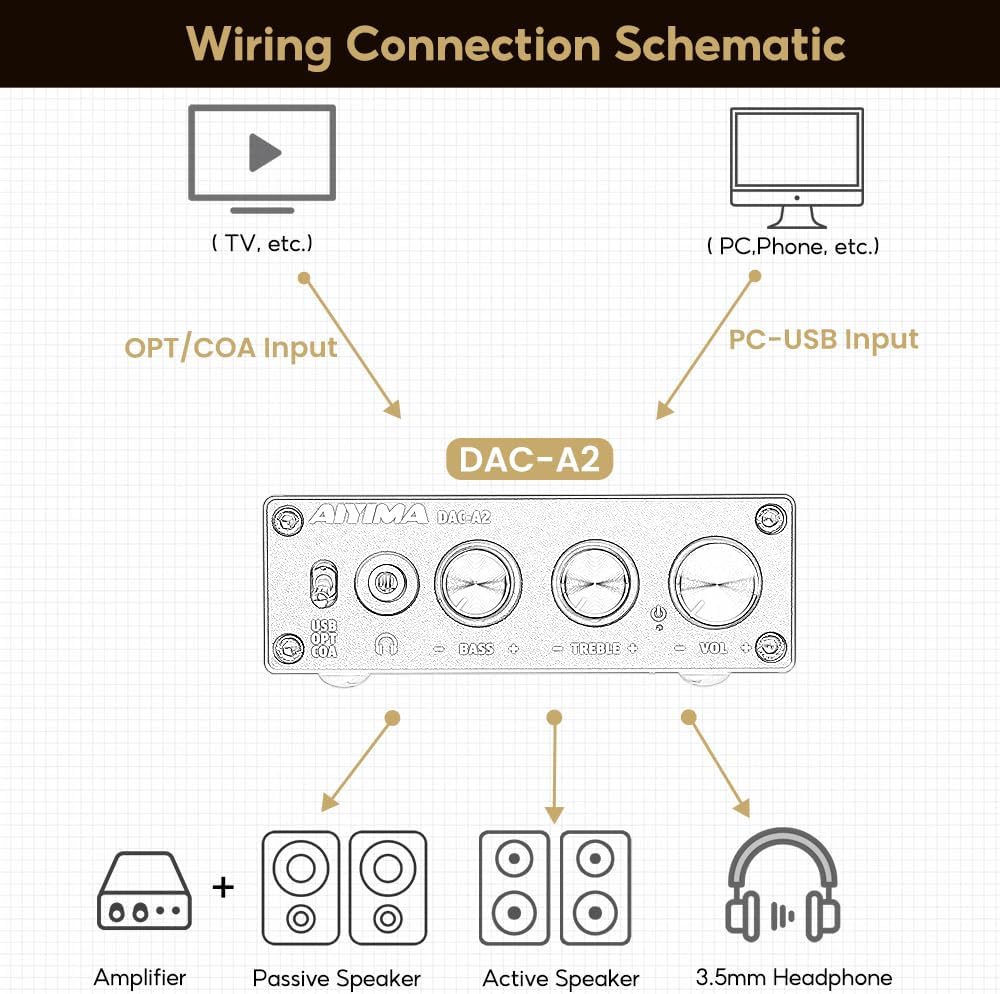
4-сүрөт: Туташуу диаграммасы
Video 1: Demonstrates connecting the AIYIMA DAC-A2 to a laptop and an amplifier, showing the audio output to speakers and headphones. It illustrates switching between PC-USB input and adjusting volume, bass, and treble controls.
6. Иштөө нускамалары
- Күйгүзүү/өчүрүү: Press the Volume Control Knob to turn the unit on or off. The power indicator light will illuminate when on.
- Киргизүүнү тандоо: Use the Input Switch (USB/OPT/COA) on the front panel to select your active audio source.
- Үндү тууралоо: Rotate the Volume Control Knob clockwise to increase volume and counter-clockwise to decrease it.
- Басс тууралоо: Rotate the Bass Control Knob to increase or decrease the bass frequencies according to your preference.
- Үч ырды жөндөө: Rotate the Treble Control Knob to increase or decrease the treble frequencies according to your preference.

Figure 5: Adjustable Bass and Treble Controls
Video 2: Shows the AIYIMA DAC-A2 in a desktop setup, demonstrating the connection of headphones and the adjustment of volume, bass, and treble controls for an enhanced audio experience.
7. Техникалык шарттар

Сүрөт 6: Продукциянын өлчөмдөрү
| Өзгөчөлүк | Спецификация |
|---|---|
| Бренд | АЙЫМА |
| Модель номери | DAC-A2 |
| Чипсет | SA9023+CS8416+97220+NE5532 |
| PC-USB киргизүү Sampling Rate | 24бит/96КГц |
| Оптикалык/коаксиалдык киргизүү Sampling Rate | 24бит/192кГц |
| Headphone Impedance Range | 16ohm to 200ohm |
| Maximum Supply Voltage | 5 вольт |
| Minimum Supply Voltage | 5 вольт (ток) |
| Interface Type | Coaxial, USB, Optical |
| Каналдардын саны | 1 |
| Продукциянын өлчөмдөрү (L x W) | 3.86"L x 2.89"W (approx. 98mm x 73mm) |
| Элемент Салмагы | 14.8 унция (болжол менен 420 г) |
8. Кыйынчылыктарды
If you encounter issues with your DAC-A2, please refer to the following common problems and solutions:
- Үн чыгышы жок:
- Ensure the DAC-A2 is powered on and the power indicator is lit.
- Verify that the correct input source (USB, OPT, COA) is selected using the front panel switch.
- Check all cable connections (input and output) are secure.
- If using headphones, ensure they are fully plugged into the 3.5mm jack. Remember the headphone output has priority over RCA.
- Adjust the volume knob on the DAC-A2 and ensure your connected speakers/amplifier also have their volume turned up.
- For PC-USB input, check your computer's sound settings to ensure the DAC-A2 is selected as the default playback device.
- Бурмаланган же начар үн сапаты:
- Бардык кабелдер туура туташтырылганын жана бузулбаганын текшериңиз.
- Сапат маселелери боюнча аудио булагын текшериңиз.
- Adjust the Bass and Treble controls to see if they are set to extreme levels causing distortion.
- Ensure the power supply is stable and providing sufficient 5V power. An unstable power supply can cause noise.
- Үзүлгүс үн:
- Кабелдик туташуулардын боштугун текшериңиз.
- Ensure the power supply is consistent.
- If using PC-USB, try a different USB port on your computer or a different USB cable.
9. Техникалык тейлөө
- Тазалоо: Агрегаттын сыртын тазалоо үчүн жумшак, кургак чүпүрөктү колдонуңуз. Суюк тазалагычтарды же эриткичтерди колдонбоңуз.
- Сактагыч: Аппаратты күн нурунан жана экстремалдык температурадан алыс салкын, кургак жерде сактаңыз.
- Колдонуу: Аппаратты түшүрүүдөн же катуу соккулардан сактаныңыз.
- Вентиляция: Ашыкча ысып кетүүнүн алдын алуу үчүн аппараттын айланасында жетиштүү желдетүүнү камсыз кылыңыз.
10. Кепилдик жана колдоо
AIYIMA products are designed for reliability and performance. For warranty information, technical support, or service inquiries, please refer to the contact information provided with your purchase or visit the official AIYIMA webсайт. Кепилдик дооматтары үчүн сатып алганыңыздын далилин сактап коюңуз.
11. Коопсуздук боюнча маанилүү маалымат
- Do not expose this unit to rain, moisture, or extreme temperatures.
- в ачпагылаasinг. Ичинде колдонуучу тейлей турган бөлүктөр жок. Бардык тейлөөлөрдү квалификациялуу кызматкерлерге тапшырыңыз.
- Use only the specified power supply (DC 5V).
- Аппаратты жылуулук булактарынын жанына же тике күн нуруна коюудан алыс болуңуз.
- Балдар жетпеген жерде сактаңыз.


