1. Киришүү
This manual provides detailed instructions for the installation, operation, and maintenance of your Aerocool Streak Mid-Tower ATX PC Gaming Case. Designed for both new and experienced PC builders, the Streak case offers a compact design with a polished aluminum front panel, vibrant RGB lighting, and a full tempered glass side panel to showcase your components. It supports various cooling configurations to ensure optimal performance for your system.
2. Коопсуздук маалыматы
Please read and understand all safety instructions before installing or operating the PC case. Failure to do so may result in personal injury or damage to the product.
- Орнотуу же техникалык тейлөө иштерин жүргүзүүдөн мурун ар дайым кубат булагын розеткадан сууруп коюңуз.
- Be aware of sharp edges inside the case. Handle components with care to avoid cuts.
- Майда тетиктерди жана бурамаларды балдардан алыс кармаңыз.
- Электр шоктун алдын алуу үчүн туура жерге туташтырууну камсыз кылыңыз.
- Do not expose the case to water or excessive humidity.
3. Пакеттин мазмуну
Пакетте бардык буюмдар бар экенин текшериңиз:
- Aerocool Streak Mid-Tower ATX PC Gaming Case
- Accessory box (screws, standoffs, cable ties, etc.)
- Колдонуучунун Колдонмосу (бул документ)
4. Case Components Overview
Familiarize yourself with the various parts of your Aerocool Streak case.

4.1-сүрөт: Бурчтуу view of the Aerocool Streak PC case, showcasing the RGB front panel and tempered glass side panel.

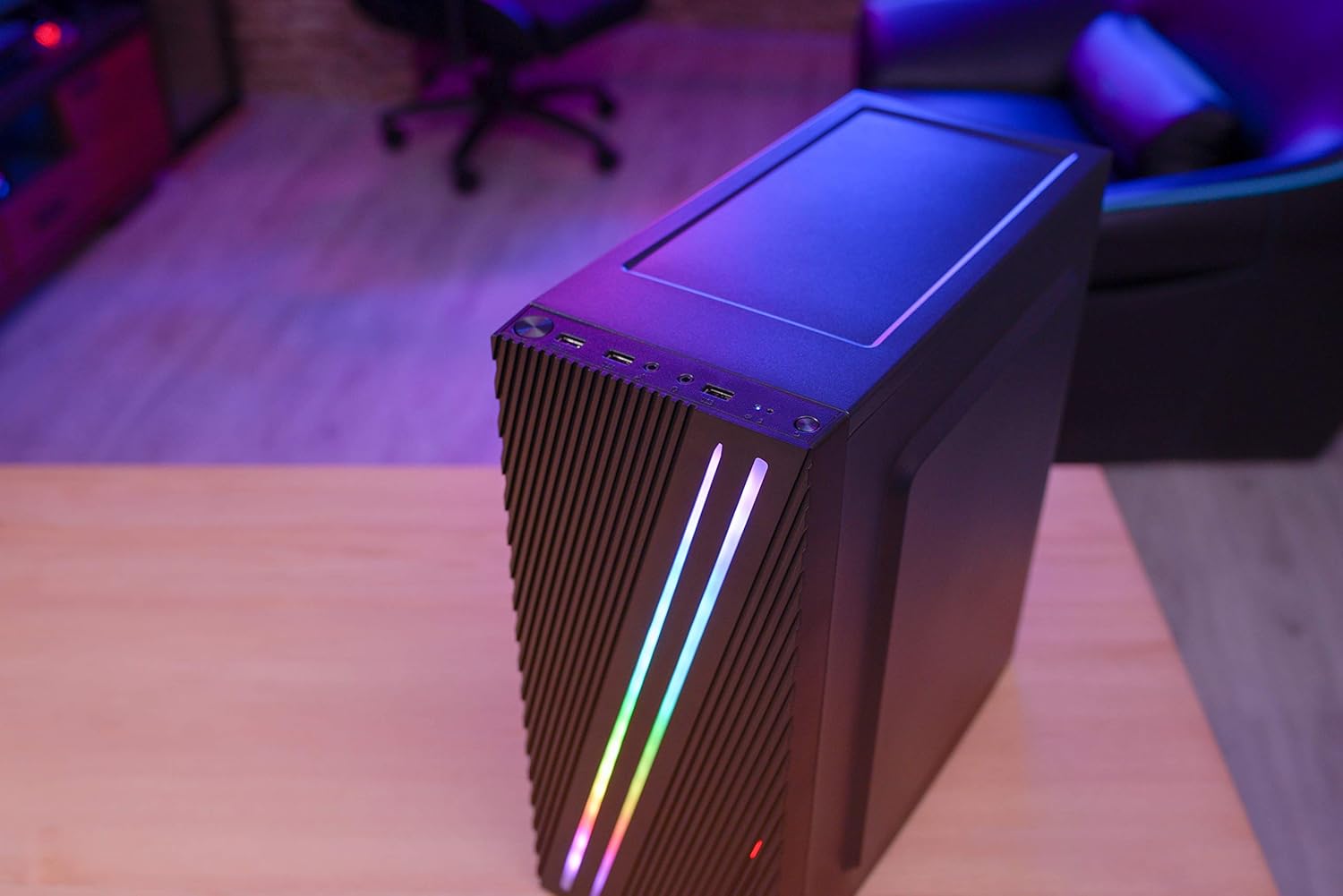
4.2-сүрөт: Жогортон ылдый бурчтуу view of the Aerocool Streak PC case, highlighting the top panel and front I/O ports.
4.1 Алдыңкы киргизүү/чыгаруу порттору
The front I/O panel provides convenient access to essential connections.
4.3-сүрөт: Close-up of the front I/O panel, showing the power button, LED control button, USB 3.0 port, two USB 2.0 ports, and HD audio/microphone jacks.
- Кубат баскычы: Системаны күйгүзүү/өчүрүү үчүн.
- LED башкаруу баскычы: To cycle through RGB lighting modes.
- USB 3.0 порту (x1): жогорку ылдамдыктагы маалыматтарды берүү үчүн.
- USB 2.0 порттору (x2): Стандарттык USB түзмөктөр үчүн.
- HD Audio & Mic Jacks: Кулакчындарды жана микрофондорду туташтыруу үчүн.
4.2 Interior Layout
The interior is designed for efficient component installation and cable management.

4.4-сүрөт: Ички view of the Aerocool Streak PC case, showing the motherboard tray, drive bays, and cable routing cutouts.
5. Орнотуу жана орнотуу
Follow these steps to assemble your PC components within the Aerocool Streak case.
5.1 Даярдоо
- Кутучаны ачып, бардык таңгактоочу материалдарды алып салыңыз.
- Корпусту туруктуу, тегиз бетке коюңуз.
- Gather necessary tools: Phillips head screwdriver, cable ties (included in accessory box).
- Remove the tempered glass side panel by unscrewing the four thumb screws.
5.2 Motherboard орнотуу
The Aerocool Streak supports ATX, Micro-ATX, and Mini-ITX motherboards.

5.1-сүрөт: Diagram illustrating the compatible motherboard sizes (Mini-ITX, Micro-ATX, ATX) within the case.
- Install the necessary motherboard standoffs into the motherboard tray according to your motherboard's form factor.
- Place your motherboard carefully onto the standoffs, aligning the screw holes.
- Берилген бурамалар менен энелик тактаны бекитиңиз.
5.3 Электр менен камсыздоо блогун (PSU) орнотуу
The case features a bottom-mount PSU design.
- Кубат блогун корпустун арткы астыңкы жагындагы атайын бөлүмгө жылдырыңыз.
- Secure the PSU to the case rear with screws.
5.4 Сактоочу дискти орнотуу
Install your 2.5" SSDs and 3.5" HDDs.
- 2.5" SSD: Mount SSDs to the designated 2.5" drive trays or mounting points on the motherboard tray.
- 3.5" HDD: Катуу дисктерди кубат блогунун астындагы диск капасына орнотуңуз.
5.5 Expansion Card Installation (Graphics Card, etc.)
The case supports high-end graphics cards up to 335mm in length.
- Керектүү PCIe уячасынын капкактарын корпустун арткы бөлүгүнөн алып салыңыз.
- Insert your expansion card into the corresponding PCIe slot on the motherboard.
- Картаны бурамалар менен бекитиңиз.
5.6 Муздатуу системасын орнотуу
The Aerocool Streak supports both air and liquid cooling solutions.

5.2-сүрөт: Diagram showing air cooling options, including front 120mm fans (optional) and a rear 80mm fan (included).

5.3-сүрөт: Diagram illustrating liquid cooling support, specifically a 240mm radiator at the front (optional).
- Аба муздатуу: The case supports up to two 120mm fans at the front (optional) and includes one 80mm fan at the rear.
- Суюктук муздатуу: A 240mm radiator can be installed at the front of the case (optional).
- Install fans or radiators into their respective mounting points and secure them with screws.
5.7 Кабелди башкаруу
Utilize the cable routing cutouts and tie-down points behind the motherboard tray to organize cables for improved airflow and aesthetics.
- Route all power and data cables through the designated cutouts.
- Use cable ties to bundle and secure cables neatly.
6. Иштөө нускамалары
6.1 Системаңызды күйгүзүү
- Ensure all components are correctly installed and all cables are securely connected.
- Connect the power cable to your PSU and then to a wall outlet.
- Кубат булагындагы кубат которгучун "ON" абалына коюңуз.
- Press the power button on the front I/O panel of the case to start your system.
6.2 RGB жарыкты башкаруу
The Aerocool Streak features 18 distinct RGB lighting modes on its front panel.

6.1-сүрөт: The Aerocool Streak PC case with its vibrant RGB lighting illuminated on the front panel.
- басыңыз LED башкаруу баскычы on the front I/O panel to cycle through the 18 available lighting modes.
- These modes include 11 RGB flow modes and 7 static color modes.
7. Техникалык тейлөө
Regular maintenance helps ensure the longevity and optimal performance of your PC case and components.
7.1 Корпусту тазалоо
- Сырткы: жумшак колдонуу, damp сырткы беттерин сүртүү үчүн чүпүрөк. Абразивдүү тазалагычтардан алыс болуңуз.
- Ички иштер: Periodically use compressed air to remove dust buildup from inside the case, especially around fans and heatsinks.
7.2 Dust Filter Maintenance
The case may include removable dust filters to prevent dust ingress. Clean these filters regularly.
- Locate and carefully remove any dust filters (e.g., top, bottom, front).
- Clean the filters with water and mild soap, or use compressed air.
- Чыпкаларды кайра орнотуудан мурун, алардын толугу менен кургак экенине ынаныңыз.
8. Кыйынчылыктарды
If you encounter issues with your Aerocool Streak case, refer to the following common problems and solutions.
- Система күйбөйт:
- Check all power connections, including the PSU to the wall, PSU switch, and motherboard power cables.
- Алдыңкы панелдин кубат которуштуруу кабели энелик платага туура туташтырылганын текшериңиз.
- RGB lighting is not working:
- Verify that the RGB lighting cables are properly connected to the power supply or motherboard RGB header.
- Press the LED control button to cycle through modes, as it might be on a static black mode.
- Poor airflow/overheating:
- Бардык корпус желдеткичтери туура айланып жатканын текшериңиз.
- Чаң чыпкаларын жана ички компоненттерин тазалаңыз.
- Verify proper fan orientation for optimal airflow (intake/exhaust).
9. Техникалык шарттар
| Өзгөчөлүк | Спецификация |
|---|---|
| Модель аты | Streak |
| Модель номери | ACCM-PV19012.11 |
| Иштин түрү | Орто мунара |
| Motherboard шайкештиги | ATX, Micro ATX, Mini ITX |
| Материал | Tempered Glass (side panel) |
| Түс | Кара |
| Алдыңкы I / O порттору | 1x USB 3.0, 2x USB 2.0, HD Audio, Mic, LED Control Button, Power Button |
| RGB жарыктандыруу | 18 Lighting Modes (11 flow, 7 static) |
| CPU муздаткычын тазалоо | 151 мм чейин |
| Графикалык картанын узундугу | 335 мм чейин |
| PSU монтаждоо | Төмөнкү тоо |
| Муздатуу ыкмасы | Аба, суу |
| Камтылган күйөрмандар | 1x 80 мм арткы желдеткич |
| Optional Fan Support | Маңдайы: 2x 120mm |
| Радиатор колдоо | Front: 1x 240mm (optional) |
10. Кепилдик жана колдоо
The Aerocool Streak PC Gaming Case comes with a 2-year warranty on parts. For technical support, warranty claims, or further assistance, please contact your retailer or the official Aerocool support channels. Keep your proof of purchase for warranty validation.


