Introduction
The VTech KidiMagic Starlight Alarm Clock is a versatile and interactive device designed for children aged 6 to 12 years. It combines the functions of an alarm clock, a star projector, a light effects generator, a speaker, a radio, and a game console. This manual provides essential information for setting up, operating, and maintaining your KidiMagic Starlight.
Маанилүү эскертүү: The default language of this product is French. Please refer to the "Language Settings" section for information on language options, if available, or be aware that some voice prompts and display text may be in French.
Коопсуздук маалыматы
- ЭСКЕРТҮҮ: Not suitable for children under 6 years due to small parts and potential choking hazards.
- Adult supervision is recommended during initial setup and play.
- Агрегатты сууга салбаңыз же ашыкча нымдуулукка дуушар кылбаңыз.
- Use only the specified batteries (4 x LR6/AA) or a compatible AC adapter (not included).
- Replace original batteries at the first sign of failure for optimal performance.
- Avoid direct eye exposure to the projection light for extended periods.
Кутуда эмне бар
Пакетти ачкандан кийин, төмөнкү нерселердин бардыгы бар экенин текшериңиз:
- 1 x VTech KidiMagic Starlight Alarm Clock
- 1 x MP3 Connection Cable
- 4 x LR6 (AA) Batteries (pre-installed for demo purposes, replace for full use)
- 1 х Колдонуучунун колдонмосу (бул документ)

Сүрөт: алдыңкы view of the KidiMagic Starlight product packaging, showing the pink star alarm clock inside the box.
Жайгашуу
1. Battery Installation / Power Connection
The KidiMagic Starlight operates on 4 x LR6 (AA) batteries or an optional AC adapter (not included). For initial setup, it is recommended to replace the pre-installed demo batteries with fresh ones.
- Бирдиктин артындагы батарея отсегин табыңыз.
- Бурагычты колдонуп, батарея бөлүкчөсүнүн капкагын ачыңыз.
- Туура полярдуулукту (+/-) камсыз кылып, 4 жаңы LR6 (AA) батарейкасын салыңыз.
- Батарея уясынын капкагын ордуна коюңуз жана аны бурама менен бекитиңиз.
- Alternatively, connect a compatible VTech AC adapter (sold separately) to the DC input jack.

Сүрөт: Арткы view of the KidiMagic Starlight, highlighting the battery compartment and power input.
2. Exiting Demo Mode
For optimal operation, you must exit the demo mode. This usually involves pressing and holding a specific button or following on-screen prompts upon first power-up. Refer to the on-screen instructions or the quick start guide included in the packaging for precise steps.
3. Initial Settings (Time & Date)
Upon first use or after battery replacement, you will need to set the current time and date. Use the navigation buttons (usually arrows) and the OK button to adjust and confirm the settings on the display screen.
Иштөө нускамалары
Жалпы навигация
The KidiMagic Starlight features a central display screen surrounded by various function buttons. Use the directional buttons to navigate menus and the 'OK' button to select options.

Image: The KidiMagic Starlight alarm clock, displaying its screen and surrounding control buttons for various functions.
1. Ойготкуч саат функциясы
- Access the 'Alarm' menu from the main screen.
- Set up to two different alarm times.
- Choose from a selection of 6 melodies or relaxing nature sounds for your alarm tone.
- Enable or disable the alarm as needed.
2. Time Projection
The KidiMagic Starlight can project the time onto the ceiling, surrounded by sparkling stars or flowers.
- Locate the projection lens at the top of the star.
- Ensure the room is dark for best projection visibility.
- Adjust the angle of the unit to position the projection correctly on the ceiling.

Image: The KidiMagic Starlight in action, projecting the digital time and star patterns onto a ceiling.
3. Light Effects & Color Changing
The star changes color with soft, magical light effects. It features 7 different color variations and 12 light effects.
- Кыймылды аныктоо: Pass your hand over the top of the star to trigger a magical color change.
- Explore the different light effect modes through the settings menu.

Image: A visual representation of the KidiMagic Starlight's color-changing capabilities, showing three units glowing in different hues.
4. Speaker & MP3 Playback
The KidiMagic Starlight can function as a speaker for external audio devices.
- Connect your MP3 player or other audio device to the KidiMagic Starlight using the included MP3 cable.
- Adjust the volume using the dedicated volume buttons on the unit.

Image: The KidiMagic Starlight with musical notes, illustrating its capability to function as a speaker for music playback.
5. Radio Function
Сүйүктүү FM радиостанцияларыңызды күүлүңүз.
- Navigate to the 'Radio' menu.
- Use the navigation buttons to scan for and select FM stations.
- Save your preferred stations for quick access.
6. Оюндар
The KidiMagic Starlight includes 8 games, including 5 magical clairvoyance games.
- Select the 'Games' option from the main menu.
- Follow the on-screen instructions to play the various games.
- The clairvoyance games involve the unit "reading your mind" to guess a chosen card or drawing.
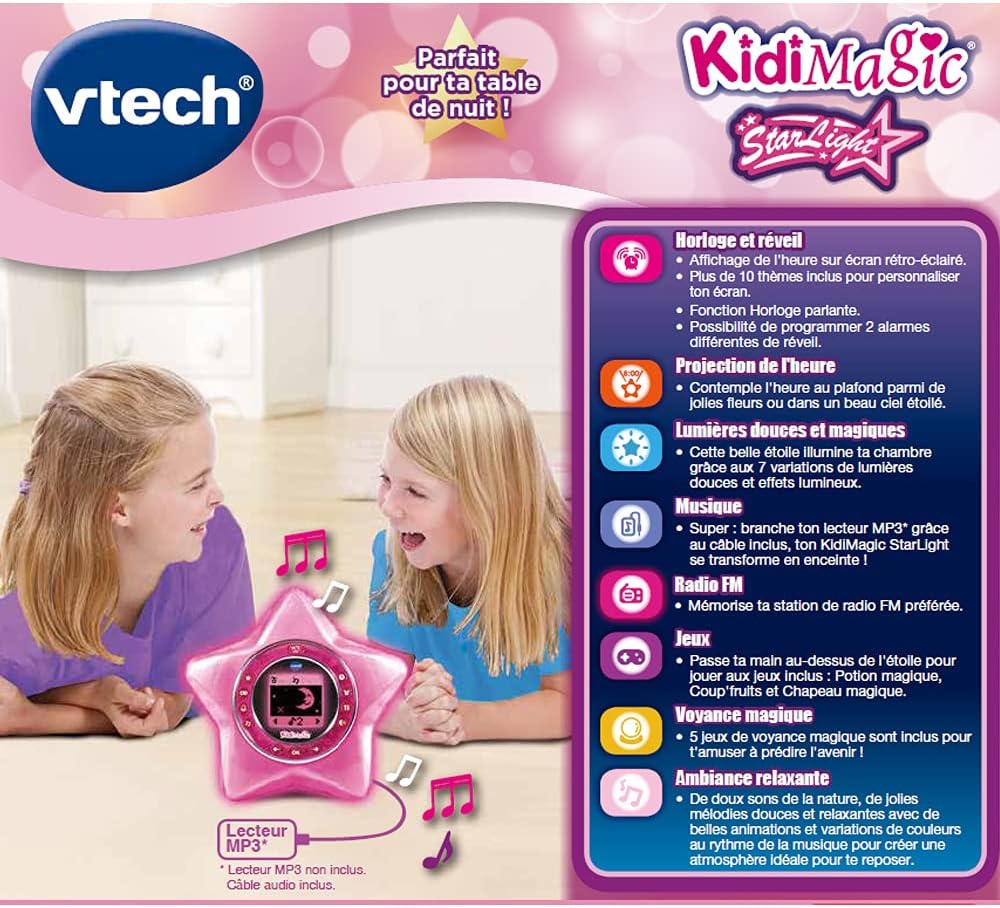
Image: The KidiMagic Starlight's screen displaying a game, featuring two animated characters, indicating its interactive game functions.
7. Screen Customization
Customize the backlit screen with over 10 different themes.
- Access the 'Settings' or 'Display' menu.
- Browse through the available themes and select your preferred one.
Техникалык тейлөө
- Тазалоо: Бир аз d менен сүртүңүзamp кездеме. Катуу химиялык заттарды же абразивдүү тазалагычтарды колдонбоңуз.
- Батареяга кам көрүү: Агып кетүүнүн алдын алуу үчүн бирдик узак убакыт бою колдонулбай турган болсо, батарейкаларды алып салыңыз.
- Сактагыч: Store the KidiMagic Starlight in a cool, dry place away from direct sunlight and extreme temperatures.
Проблемаларды чечүү
| Көйгөй | Мүмкүн себеп | Чечим |
|---|---|---|
| Түзмөк күйбөйт. | Low or dead batteries; incorrect battery polarity; AC adapter not connected (if applicable). | Replace batteries with new ones, ensuring correct polarity. Check AC adapter connection. |
| Проекция күңүрт же бүдөмүк. | Room is too bright; projection lens is dirty; unit is too far from the surface. | Ensure room is dark. Gently clean the projection lens with a soft cloth. Move the unit closer to the projection surface. |
| Кыймылды аныктоо иштебей жатат. | Obstruction over the sensor; hand not close enough or moving too fast. | Ensure nothing is blocking the sensor area. Pass your hand slowly and closely over the star. |
| Үн бурмаланган же жок. | Volume too low; MP3 cable not fully inserted; radio signal weak. | Increase volume. Re-insert MP3 cable firmly. Adjust radio antenna or reposition unit for better signal. |
| Product is in French. | Default language setting. | This model's default language is French. Check the settings menu for a language option, though it may not be available for all functions. |
Техникалык шарттар
| Өзгөчөлүк | Деталь |
|---|---|
| Модель номери | VTH80-520405 |
| Сунушталган Жаш | 6 - 12 жыл |
| Power Source | 4 x LR6 (AA) batteries (included for demo) or optional AC adapter (not included) |
| Элемент Салмагы | 14.1 унция (болжол менен 400 г) |
| Жарык эффекттери | 7 color variations, 12 light effects |
| Оюндар | 8 games (including 5 clairvoyance games) |
| Melodies/Sounds | 6 melodies, relaxing nature sounds |
| Дисплей | Backlit screen with over 10 themes |
| Байланыш | MP3 cable input |
| Демейки тил | Франсузча |
Кепилдик жана колдоо
VTech products are designed with quality and durability in mind. For warranty information and customer support, please refer to the official VTech webсайтка же кардарларды тейлөө бөлүмүнө кайрылыңыз.
- Онлайн колдоо: Расмий VTechга барыңыз webКөп берилүүчү суроолор, өнүмдөрдү каттоо жана колдоо булактары үчүн сайт. www.vtechkids.com
- Байланыш маалыматы: Refer to the product packaging or VTech's webаймактык кардарларды тейлөө байланыш маалымат сайты.
Продукт сериялык номери: 3417765204050 (This number can be found on the product packaging and may be required for warranty claims or support inquiries.)


