1. Киришүү
This manual provides essential information for the safe and efficient operation of your TCL 55P8 55-inch AI 4K UHD Android Smart LED TV. Please read it thoroughly before using the product and retain it for future reference. This television combines advanced display technology with smart features for an enhanced viewтажрыйбасы.

Сүрөт 1.1: Алдыңкы view of the TCL 55P8 TV displaying a vibrant image.
2. Коопсуздук маалыматы
Коопсуз иштөөнү камсыз кылуу жана зыян келтирбөө үчүн төмөнкү сактык чараларын аткарыңыз:
- Электр камсыздоо: Телевизорду көрсөтүлгөн көлөмдө AC кубат булагына гана туташтырыңызtage range. Ensure the power cord is not damaged or pinched.
- Вентиляция: Вентиляция тешиктерин жаап албаңыз. Ашыкча ысып кетүүнүн алдын алуу үчүн сыналгынын айланасында туура аба агымы үчүн жетиштүү орун сактаңыз.
- Суу жана ным: Do not expose the TV to rain, moisture, or place objects filled with liquids on or near the TV.
- Тазалоо: Тазалоодон мурун сыналгыдан ажыратыңыз. Жумшак, кургак чүпүрөктү колдонуңуз. Суюктук же аэрозолдук тазалоочу каражаттарды колдонбоңуз.
- Жайгашкан жери: Place the TV on a stable, level surface or mount it securely to a wall. Avoid placing it in direct sunlight or near heat sources.
- Тейлөө: Телевизорду өзүңүз тейлөөгө аракет кылбаңыз. Бардык тейлөөлөрдү квалификациялуу тейлөө кызматкерлерине тапшырыңыз.
3. Кутуда эмне бар
Upon unpacking your TCL 55P8 TV, verify that all the following components are included:
- 1 x TCL 55P8 LED TV
- 1 x Table Top Stand (set)
- 1 x Wall Mount Bracket (Note: Wall mount is provided, but installation service is separate for TVs above 55 inches.)
- 1 x User Manual
- 1 x Кепилдик картасы
- 1 x Алыстан башкаруу
- 2 x AAA батарейкалар (алыстан башкаруу үчүн)
- 1 x AV-RCA Adapter
4. Орнотуу
4.1 Физикалык орнотуу
You can install your TV using the included tabletop stand or a wall mount bracket.
Үстөл үстүндөгү стендди орнотуу:
- Экран бузулуп калбашы үчүн, телевизорду жумшак, тегиз бетке бетин ылдый каратып этияттык менен коюңуз.
- Тирөөчтүн негизин телевизордун астыңкы жагындагы атайын уячаларга бекитиңиз.
- Тирөөчтөрдү берилген бурамалар менен бекитиңиз.
- Телевизорду түз, туруктуу, түз жерге коюңуз.

Image 4.1: The TCL 55P8 TV securely placed on its tabletop stand.
Дубалга орнотуу:
If you choose to wall mount the TV, use the provided wall mount bracket. For TVs above 55 inches, professional installation is recommended. Ensure the wall can support the TV's weight (approximately 12 kg). Refer to the wall mount bracket's specific instructions for detailed steps.
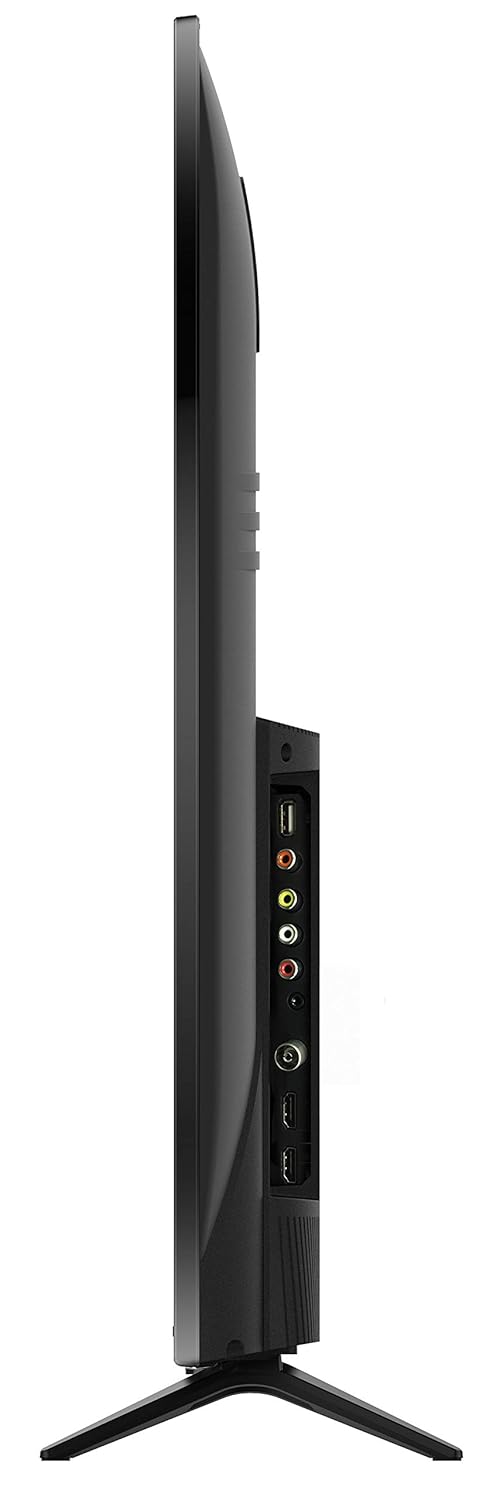
Сүрөт 4.2: Арткы view of the TCL 55P8 TV, indicating VESA mounting points for wall installation.
4.2 Тышкы түзмөктөрдү туташтыруу
Your TCL 55P8 TV offers various ports for connecting external devices:
- HDMI порттору (x3): Приставкаларды, Blu-ray ойноткучтарын, оюн консолдорун же HDMI иштетилген башка түзмөктөрдү туташтырыңыз.
- USB порттору (x2): Медиа ойнотуу үчүн USB флэш-дисктерди же тышкы катуу дисктерди туташтырыңыз.
- LAN порту: Зымдуу интернет байланышы үчүн Ethernet кабелин туташтырыңыз.
- AV киргизүү: Use the provided AV-RCA adapter to connect older devices with composite video and stereo audio outputs.
- Гарнитура уячасы: Жеке угуу үчүн гарнитураны туташтырыңыз.
- Digital Audio Out: Жакшыртылган үн үчүн саундбарга же үй кинотеатрына туташыңыз.

Image 4.3: Diagram illustrating the various connectivity ports available on the TCL 55P8 TV.
5. Иштөө нускамалары
5.1 Күйгүзүү/өчүрүү
Press the power button on the remote control or on the TV to turn it on or off. The TV may take a few moments to boot up due to its Android operating system.
5.2 Алыстан башкаруу
The included remote control allows you to navigate the TV's features. It supports both IR and Bluetooth technology. Insert the two AAA batteries into the remote control, ensuring correct polarity.
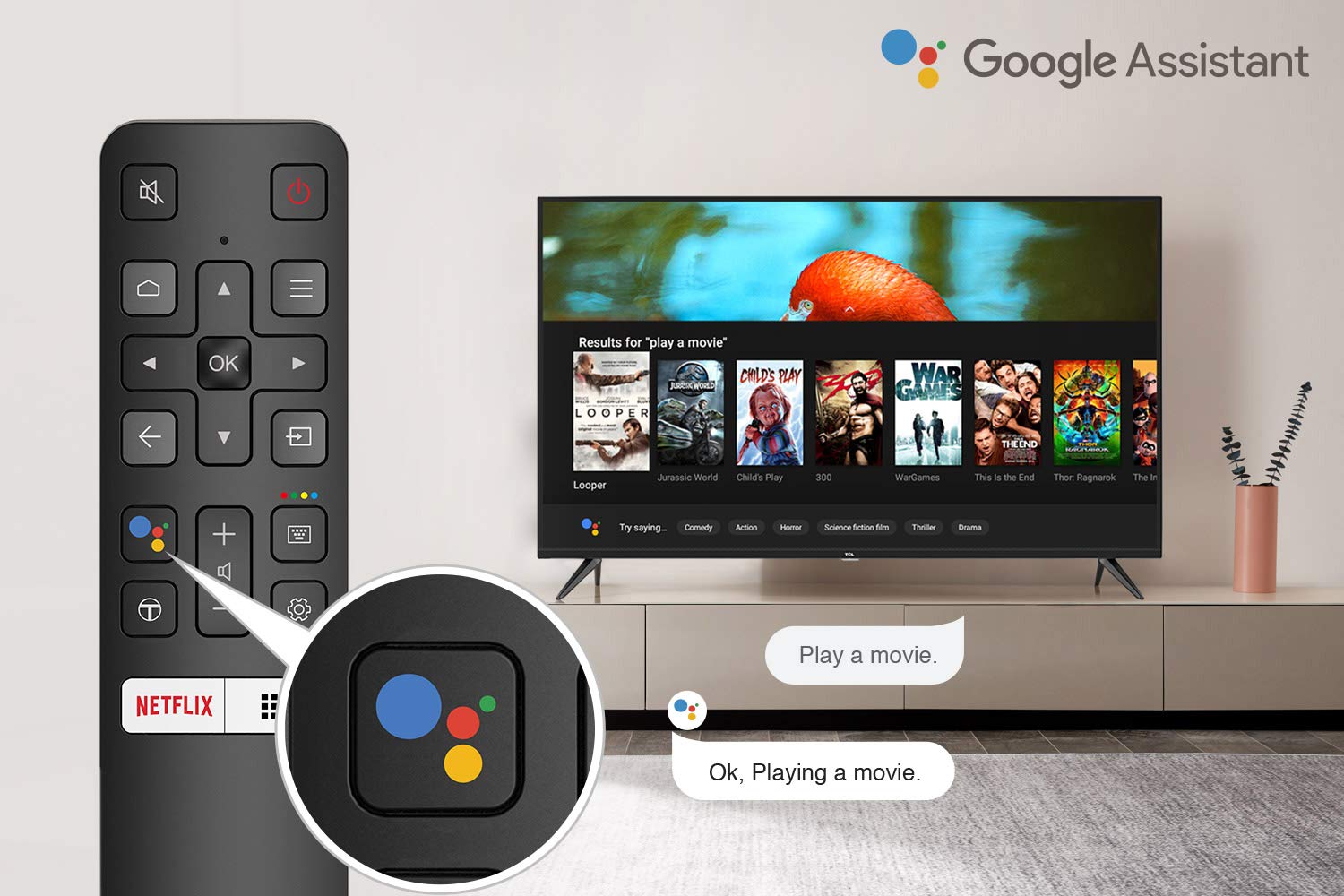
Image 5.1: The remote control for the TCL 55P8 TV, highlighting the Google Assistant button for voice commands.
5.3 Акылдуу телевизордун функциялары (Android TV 9.0)
Your TCL 55P8 TV runs on Android TV 9.0, offering a wide range of smart functionalities:
- AI-Google Assistant: Мазмунду издөө, акылдуу үй түзмөктөрүн башкаруу жана маалымат алуу үчүн алыстан башкаруу пульту аркылуу үн буйруктарын колдонуңуз.
- Google Cast (Chromecast built-in): Cast content from your compatible smartphone, tablet, or computer directly to the TV screen.
- T-cast: Utilize the T-cast app for additional smart features and screen mirroring.
- Bluetooth: Connect Bluetooth-enabled devices such as headphones or game controllers.
- Колдонмого мүмкүндүк алуу: Download and install various applications from the Google Play Store, including streaming services like Netflix, Amazon Prime Video, YouTube, Hotstar, Sony Liv, and Zee5.
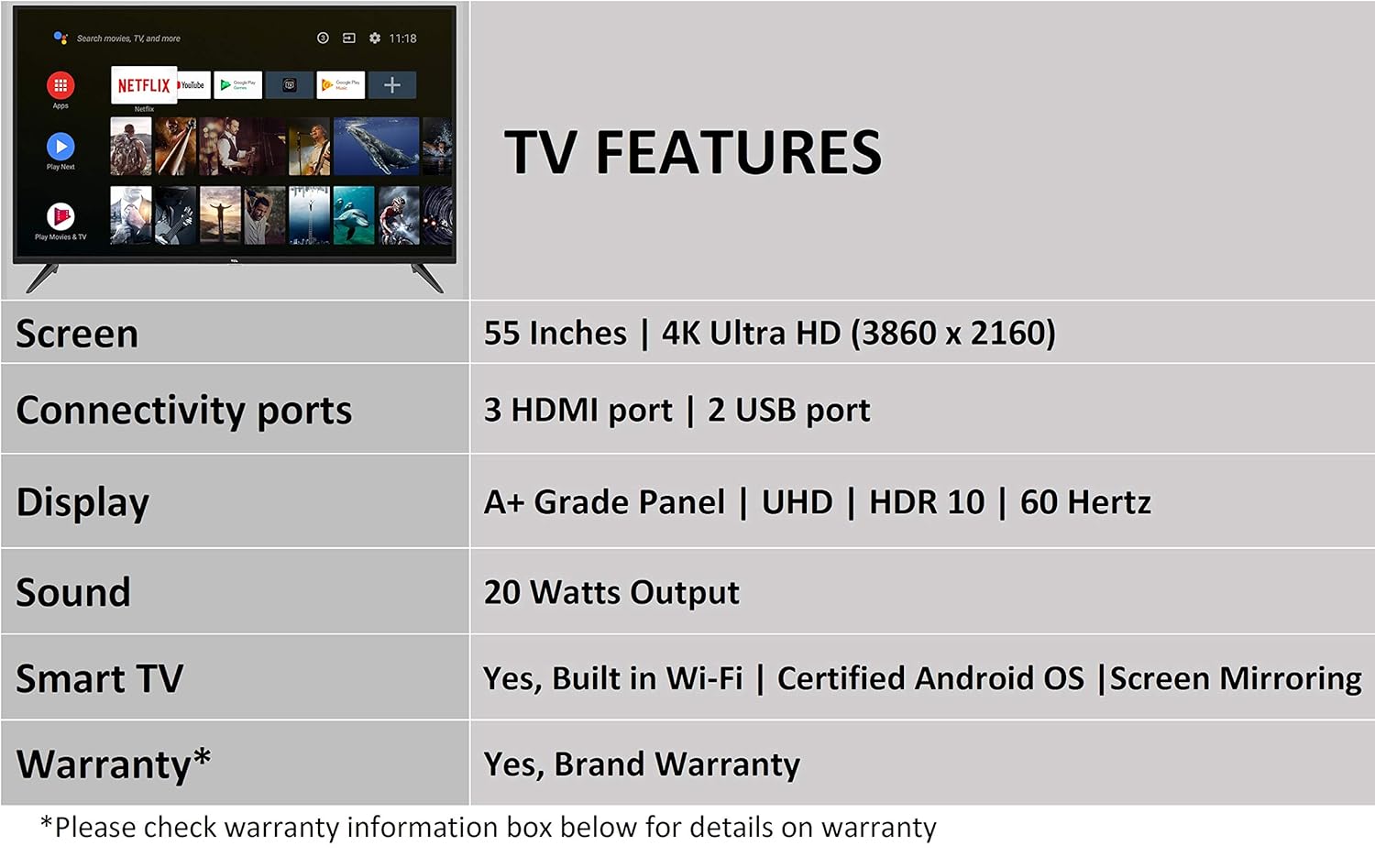
Image 5.2: The Android TV home screen on the TCL 55P8, displaying icons for popular streaming applications.
5.4 Сүрөт жана үн орнотуулары
- Сүрөт: Navigate to the picture settings menu to adjust brightness, contrast, color, and sharpness. The TV supports 4K Ultra HD resolution, HDR10, and features Micro Dimming for enhanced contrast.
- Үн: Access sound settings to adjust volume, equalizer, and select audio output modes. The TV provides 20 Watts of audio output and supports Dolby Audio.
6. Техникалык тейлөө
6.1 Телевизорду тазалоо
- Экран: Gently wipe the screen with a soft, lint-free, dry cloth. For stubborn marks, slightly dampкездемени суу менен сүртүңүз (экранга түз чачпаңыз).
- Дене: Телевизордун алкагын сүртүп, жумшак, кургак чүпүрөк менен туруңуз.
- Абайлаңыз: Do not use abrasive cleaners, alcohol, benzene, or thinners, as these can damage the TV's surface.
6.2 Программалык камсыздоо жаңыртуулары
Your Android TV may receive periodic software updates. Ensure your TV is connected to the internet to receive these updates, which can improve performance and add new features. You can usually check for updates in the TV's settings menu.
7. Кыйынчылыктарды
Телевизоруңузда көйгөйлөргө туш болсоңуз, төмөнкү жалпы чечимдерди караңыз:
| Көйгөй | Мүмкүн чечим |
|---|---|
| Күч жок | Check if the power cord is securely plugged into the TV and the wall outlet. Ensure the power outlet is functional. |
| Сүрөт жок, бирок Үн бар | Туура киргизүү булагынын тандалганын текшериңиз. HDMI/AV кабелинин туташууларын текшериңиз. Телевизорду өчүрүп-күйгүзүп көрүңүз. |
| Үн жок, бирок Сүрөт бар | Үн деңгээлин текшерип, телевизордун үнсүз эместигин текшериңиз. Эгерде тышкы динамиктерди колдонсоңуз, аудио кабелдердин туташууларын текшериңиз. Аудио чыгаруу жөндөөлөрүн текшериңиз. |
| Пульт иштебейт | Replace batteries. Ensure there are no obstructions between the remote and the TV's IR sensor. Re-pair the Bluetooth remote if necessary. |
| Тармакка туташуу маселелери | Check Wi-Fi password. Restart your router. Ensure the TV is within range of the Wi-Fi signal or the Ethernet cable is properly connected. |
| Жай иштөө / Колдонмонун иштебей калышы | Close unused applications. Clear cache for problematic apps. Restart the TV. Consider a factory reset if issues persist (note: this will erase all data). |
Эгерде бул чечимдерди колдонуп көргөндөн кийин көйгөй чечилбесе, TCL кардарларды колдоо кызматына кайрылыңыз.
8. Техникалык шарттар
Detailed technical specifications for the TCL 55P8 55-inch AI 4K UHD Android Smart LED TV:
| Өзгөчөлүк | Спецификация |
|---|---|
| Модел | 55P8 |
| Screen Size | 55 дюйм (138.78 см) |
| Резолюция | 4K Ultra HD (3840 x 2160 пиксел) |
| Жаңыртуу ылдамдыгы | 60 Гц |
| Viewбурч | 178 градус |
| Дисплей түрү | LED, A+ класстагы панель |
| HDR колдоо | HDR 10 |
| Операция системасы | Android 9.0 |
| Процессор | Quad-core A55 (1.1GHz) |
| Графикалык сопроцессор | Mali470x3 (600MHz-800MHz) |
| RAM | 2 ГБ |
| Ички сактагыч | 16 ГБ |
| Аудио чыгаруу | 20 Ватт |
| Аудио технологиясы | AI Sound Engine, Dolby Audio |
| HDMI порттору | 3 (HDMI 2.0, HDCP2.2, ARC on Port 1) |
| USB порттору | 2 2.0 (USB XNUMX) |
| Байланыш | Wi-Fi (2x2 b/g/n 2.4GHz), Ethernet, Bluetooth 5.0 |
| Өзгөчөлүктөр | AI-Google Assistant, Google Cast, T-cast, Micro Dimming |
| Продукциянын өлчөмдөрү (LxWxH) | 124.4 x 23.9 x 77.5 см (стенд менен) |
| Элемент Салмагы | 12 кг |

Image 8.1: Dimensional diagram of the TCL 55P8 TV, showing height, width, and depth measurements.
9. Кепилдик жана колдоо
9.1 Кепилдик маалыматы
Your TCL 55P8 TV comes with an 18 айлык кепилдик provided by TCL from the date of purchase. Please retain your purchase receipt and warranty card for any warranty claims.
9.2 Installation and Customer Support
For requesting installation, wall mounting, or a product demonstration after delivery, please contact TCL customer service:
- Акысыз номерлер: 18004190622 же 18001020622
For any other technical assistance or support, please refer to the contact information provided on your warranty card or the official TCL webсайт.
9.3 Кайтаруу саясаты
This product is eligible for replacement or refund within 10 days of delivery in case of any product defects, damage, or features not matching the description provided. Please refer to the retailer's return policy for detailed terms and conditions.


