1. Киришүү
This manual provides comprehensive instructions for the LEAP Chess Clock, Model Chess1. Designed for both amateur and professional use, this digital timer is suitable for various two-player board games, including Chess, Chinese Chess, and Go. Its user-friendly interface and clear display ensure precise timekeeping for competitive play.

1-сүрөт: The LEAP Chess Clock Model Chess1 being used for International Chess, Go Chess, and Chinese Chess, demonstrating its versatility across different board games.
2. Продукт бүтүп калдыview
The LEAP Chess Clock Model Chess1 features a robust design with a clear LED digital display and intuitive controls. Familiarize yourself with the main components:
- Негизги дисплей: Large LED screen for clear time readings.
- Башкаруу баскычтары: Five primary buttons for easy operation.
- Game Lever: Top lever to switch turns between players.
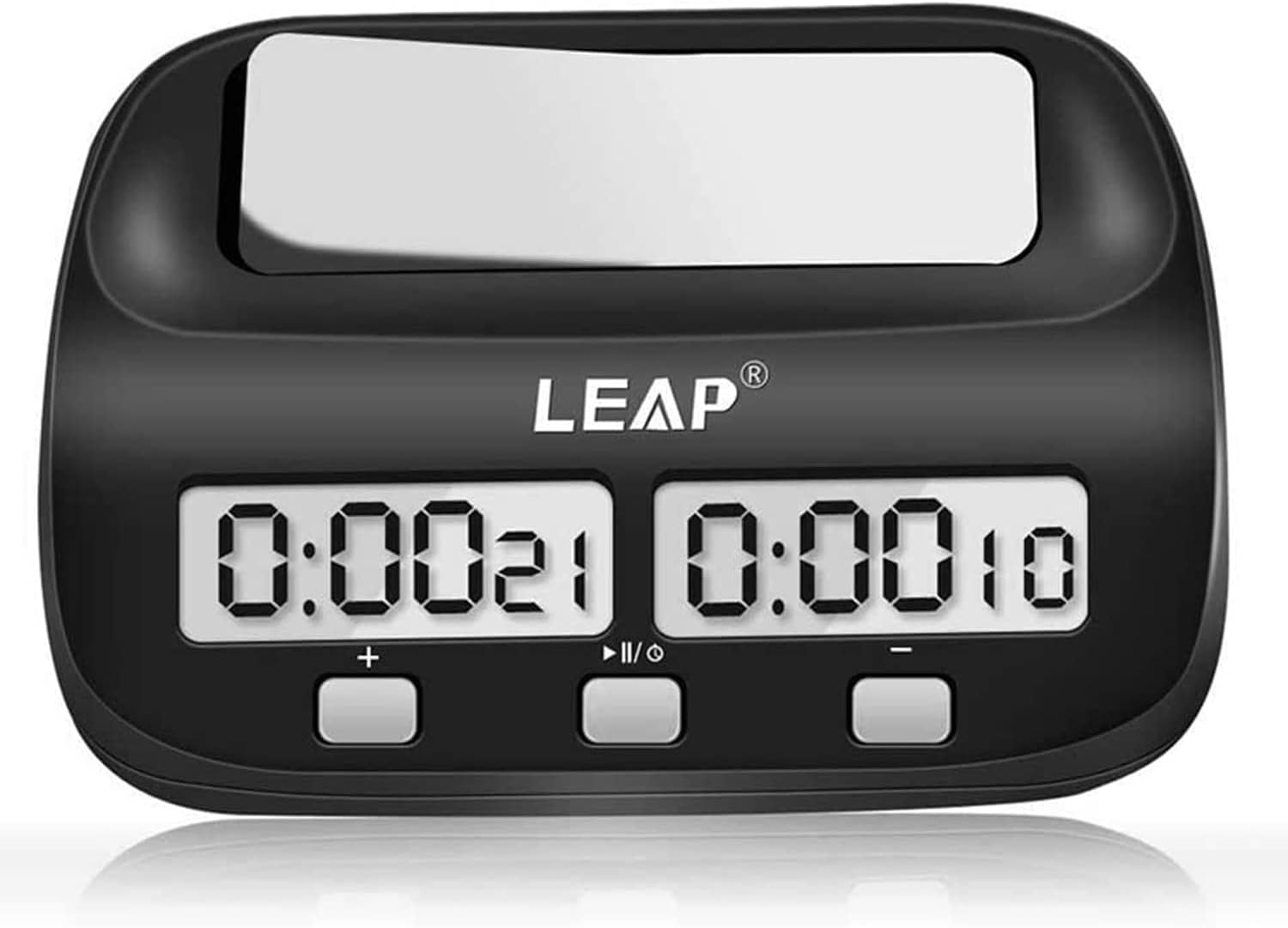
2-сүрөт: Фронт view of the LEAP Chess Clock, Model Chess1, showing the dual digital displays and the control buttons at the bottom. The brand logo "LEAP" is visible above the displays.

3-сүрөт: Жогорудан төмөн view of the LEAP Chess Clock, Model Chess1, highlighting the white game lever at the top, which players press to switch turns.
4-сүрөт: Side view of the LEAP Chess Clock, Model Chess1, illustrating its compact profile and the ergonomic design of the game lever.
3. Орнотуу
The LEAP Chess Clock requires one AA battery for operation. The battery is not included with the product.
- Батарея бөлүмүн сааттын астыңкы бетинен табыңыз.
- Батарея уясынын капкагын ачыңыз.
- Туура полярдуулукту (+/-) камсыз кылуу менен бир AA батареясын салыңыз.
- Батарея уясынын капкагын бекем жабыңыз.
Upon battery installation or reinstallation, the clock will reset to its default settings. The screen will display "0:00 00". Press the Start/Pause/Setting button (labeled as "I/O" or "Play/Pause") to begin counting up or to enter setting mode.
4. Иштөө нускамалары
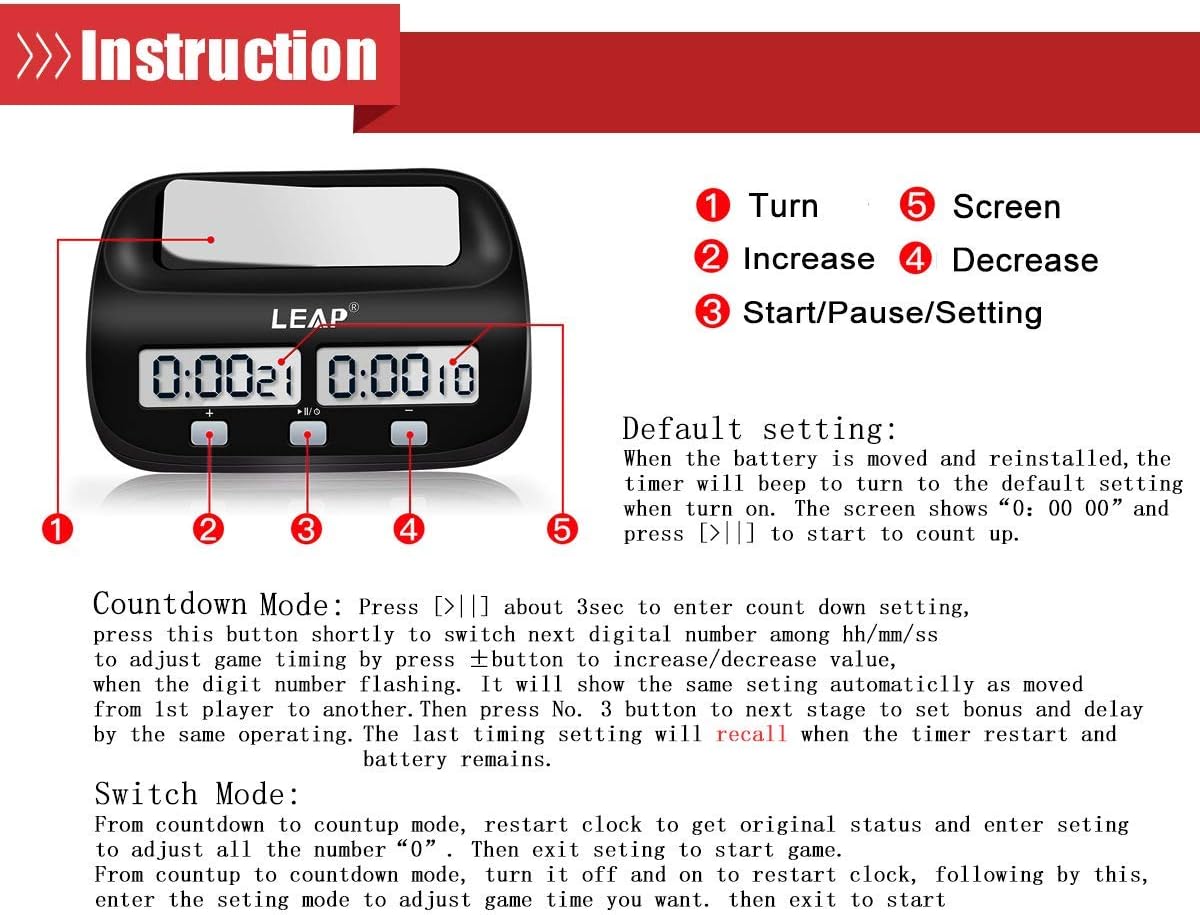
The LEAP Chess Clock is designed for straightforward operation with five main buttons and a game lever. Refer to the diagram below for button identification.

5-сүрөт: Instruction diagram for the LEAP Chess Clock, showing the labeled components: (1) Turn lever, (2) Increase button (+), (3) Start/Pause/Setting button (Play/Pause), (4) Decrease button (-), and (5) Screen.
4.1 Демейки жөндөө
When the battery is moved and reinstalled, the timer will beep to turn to the default setting when turned on. The screen shows "0:00 00". Press the Start/Pause/Setting button (labeled as "I/O" or "Play/Pause") to start counting up.
4.2 Countdown Mode Setup
To enter countdown setting mode:
- Press and hold the Start/Pause/Setting button (labeled as "I/O" or "Play/Pause") for approximately 3 seconds.
- The display will show flashing digits. Short press the Start/Pause/Setting button to cycle through the digital segments (hours, minutes, seconds).
- Use the Increase (+) and Decrease (-) buttons to adjust the time value for the currently flashing segment.
- After setting the time for the first player, short press the Start/Pause/Setting button again to move to the next stage, which allows setting bonus and delay times.
- The last timing setting will be recalled when the timer is restarted, provided the battery remains installed.
The maximum accumulated time for countdown is 10 hours.
4.3 Bonus and Delay Modes
After setting the countdown time, short press the Start/Pause/Setting button to enter bonus mode settings, then delay mode settings. Use the Increase (+) and Decrease (-) buttons to adjust these values as needed.
- Bonus Mode: Adds a specified amount of time to a player's clock after each move.
- Кечигүү режими: Delays the start of a player's clock for a specified duration after their opponent's move.
4.4 Ойготкуч функциясы
The clock features an alarm that sounds when a player's time runs out. This alarm can be enabled or disabled according to user preference. Specific instructions for enabling/disabling the alarm are typically found within the setting menus, often toggled by one of the control buttons during setup.
4.5 Switching Turns
During a game, press the top game lever (labeled as "Turn" or "1" in Figure 5) to switch the active timer between players. This action pauses one player's clock and starts the other's.
5. Техникалык шарттар
| Өзгөчөлүк | Деталь |
|---|---|
| Бренд | СЕКИРҮҮ |
| Модель номери | Chess1 (PQ9907S) |
| Материал | ABS пластик |
| Дисплей түрү | LED санарип дисплей |
| Өлчөмдөрү (L x W x Y) | 13.21 x 3.56 x 9.3 см (5.2 x 1.4 x 3.66 дюйм) |
| Салмагы | 250 грамм (0.55 фунт) |
| Power Source | 1 x AA Батарея (киргизилген эмес) |
| Max Accumulated Time | 10 hours (countdown/count-up) |
| Өзгөчөлүктөрү | Countdown/Count-up, Bonus Mode, Delay Mode, Alarm Function |
| UPC | 707331281527 |

6-сүрөт: Dimensional drawing of the LEAP Chess Clock, Model Chess1, indicating its length (5.2 inches), width (4.5 inches), height (3.3 inches), and thickness (1.4 inches, 0.7 inches at the base).
6. Техникалык тейлөө
To ensure the longevity and optimal performance of your LEAP Chess Clock, follow these simple maintenance guidelines:
- Тазалоо: Wipe the clock with a soft, dry cloth. Avoid using abrasive cleaners or solvents, which can damage the plastic casing же дисплей.
- Сактагыч: Store the clock in a cool, dry place away from direct sunlight and extreme temperatures.
- Батарея: Remove the AA battery if the clock will not be used for an extended period to prevent battery leakage and potential damage to the device.
- Колдонуу: Handle the clock with care to avoid dropping it or subjecting it to strong impacts, which could affect its internal electronic components.
7. Кыйынчылыктарды
If you encounter issues with your LEAP Chess Clock, refer to the following common problems and solutions:
- Clock does not turn on:
- Ensure the AA battery is inserted correctly with the proper polarity.
- Батареяны жаңысына алмаштырыңыз.
- Дисплей күңүрт же бүлбүлдөп жатат:
- The battery may be low. Replace it with a fresh AA battery.
- Settings are not saved:
- Ensure the battery is not removed after setting the time, as settings are recalled if the battery remains installed.
- Re-enter your desired settings carefully.
- Баскычтар жооп бербейт:
- Try removing and reinserting the battery to reset the device.
- Баскычтарды эч кандай таштандылар тосуп калбаганын текшериңиз.
Бул чечимдерди колдонууга аракет кылгандан кийин көйгөйлөр чечилбесе, кардарларды колдоо кызматына кайрылыңыз.
8. Кепилдик жана колдоо
For warranty information or technical support regarding your LEAP Chess Clock Model Chess1, please refer to the documentation provided at the point of purchase or contact the manufacturer directly. Keep your purchase receipt as proof of purchase.
Manufacturer: LEAP
For further assistance, please visit the official LEAP webсайтка же кардарларды тейлөө бөлүмүнө кайрылыңыз.


