Introduction
This manual provides detailed instructions for the ATUMTEK Selfie Stick Tripod, an integrated 3-in-1 aluminum Bluetooth selfie stick with a wireless remote and tripod stand. It is designed for use with various smartphones, including iPhone and Samsung models.
Негизги өзгөчөлүктөрү
- Интеграцияланган инновациялык дизайн: Combines selfie stick and tripod for exceptional stability. The extendable pole is constructed with aviation-grade aluminum alloy.
- Жөнгө салынуучу бурч жана айлануучу телефон кармагыч: Features a 270-degree rotatable phone holder for horizontal and vertical clamping, and 180-degree head rotation for optimal angles. Accommodates devices up to 3.42 inches wide.
- Detachable Bluetooth Remote & Impressive Battery Life: Bluetooth control distance up to 33ft. Built-in 50mAh rechargeable Lithium battery allows up to 15,000 photos per full charge via USB Type-C. Compatible with IOS 7.0, Android 5.0, and above.
- Super Lightweight & Convenient to Carry: Discreet retractable design with a folded size of only 7.7 inches, extending up to 31.3 inches. Easily portable.
- Колдонууга оңой жана универсалдуу шайкеш келет: Quick Bluetooth connection and effortless shutter control. Versatile for self-photography, wider scenery, or as a desktop phone holder.

The ATUMTEK Selfie Stick Tripod in its various configurations: as a tripod stand with a phone in portrait mode, collapsed for portability, and extended as a selfie stick with a phone in landscape mode. The detachable Bluetooth remote is also shown.
Кутуда эмне бар
- 1x 31.3" Selfie Stick Tripod
- 1x Bluetooth алыстан башкаруу жапкычы
- 1x USB C кабели
- 1x Колдонуучунун колдонмосу
Contents of the ATUMTEK Selfie Stick Tripod package, including the collapsed selfie stick, Bluetooth remote, USB-C charging cable, and user manual.
Орнотуу колдонмосу
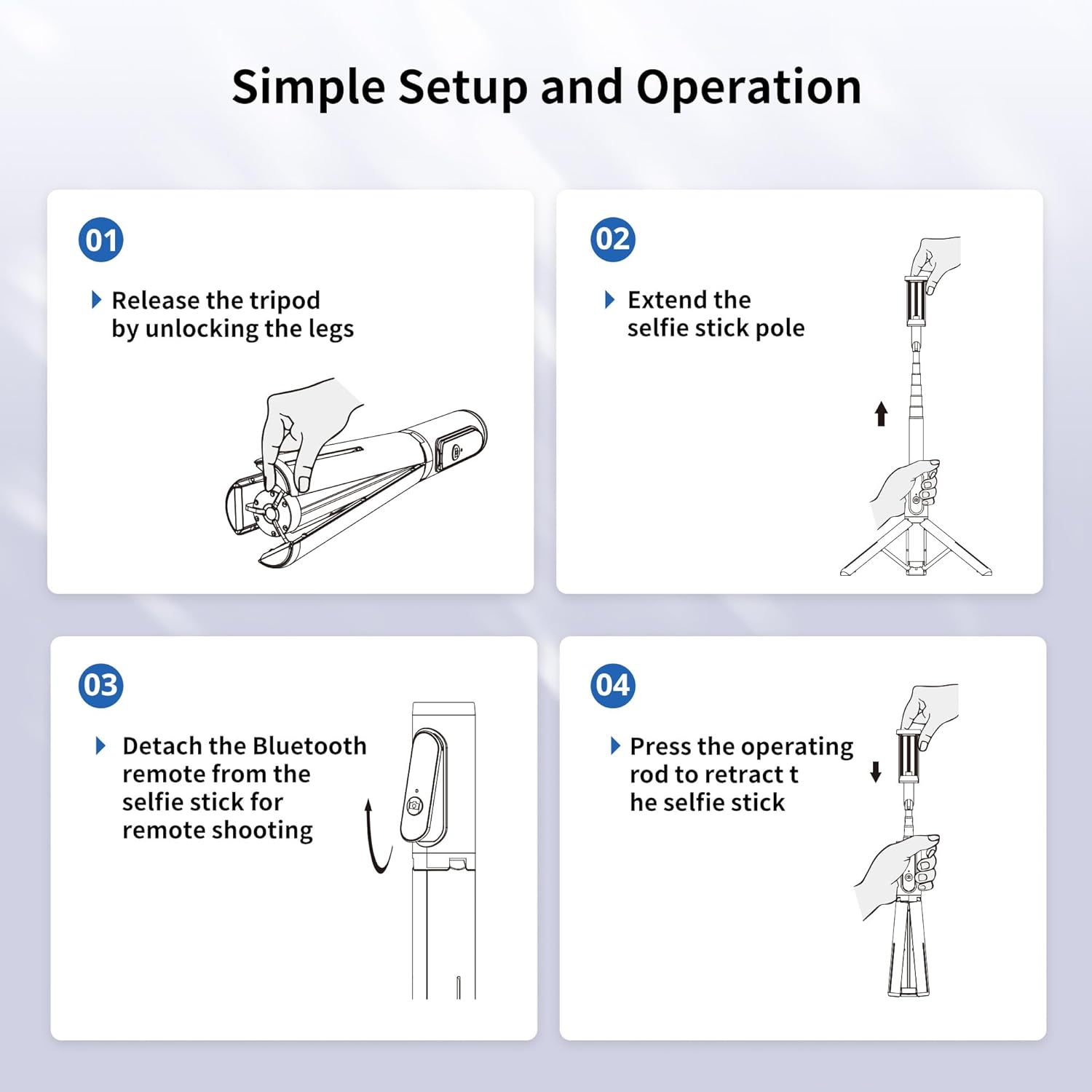
Tripodду ачуу
- Gently unlock the tripod legs from the base.
- Extend the selfie stick pole fully. This action will automatically spread the tripod legs for stability.

Diagram illustrating the first two steps of setting up the ATUMTEK Selfie Stick Tripod: releasing the tripod legs and extending the pole.
Смартфонуңузду туташтыруу
The phone holder supports devices with widths up to 3.42 inches. Gently pull apart the phone holder clamps and insert your smartphone. Ensure it is securely seated.
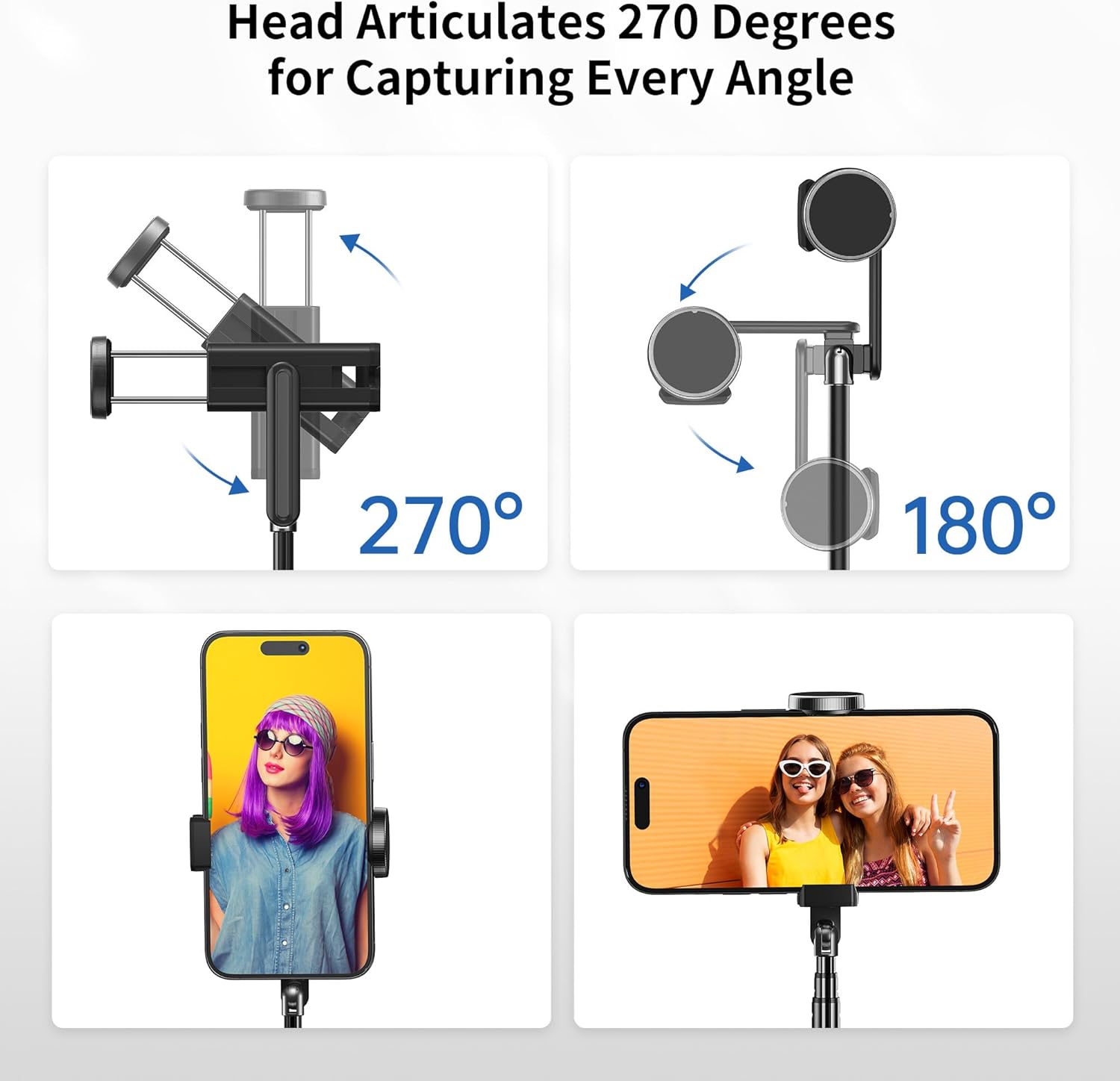
Illustrations showing the 270-degree rotatable phone holder and 180-degree head articulation, allowing for both horizontal and vertical phone clamping and various shooting angles.
Операция
Bluetooth Жупташтыруу
- Bluetooth пульту кубатталганын текшериңиз.
- Turn on the Bluetooth remote by pressing and holding the button until the indicator light flashes.
- On your smartphone, go to Bluetooth settings and search for "ATUMTEK" or a similar device name.
- Select the device to pair. The indicator light on the remote will stop flashing once successfully paired.
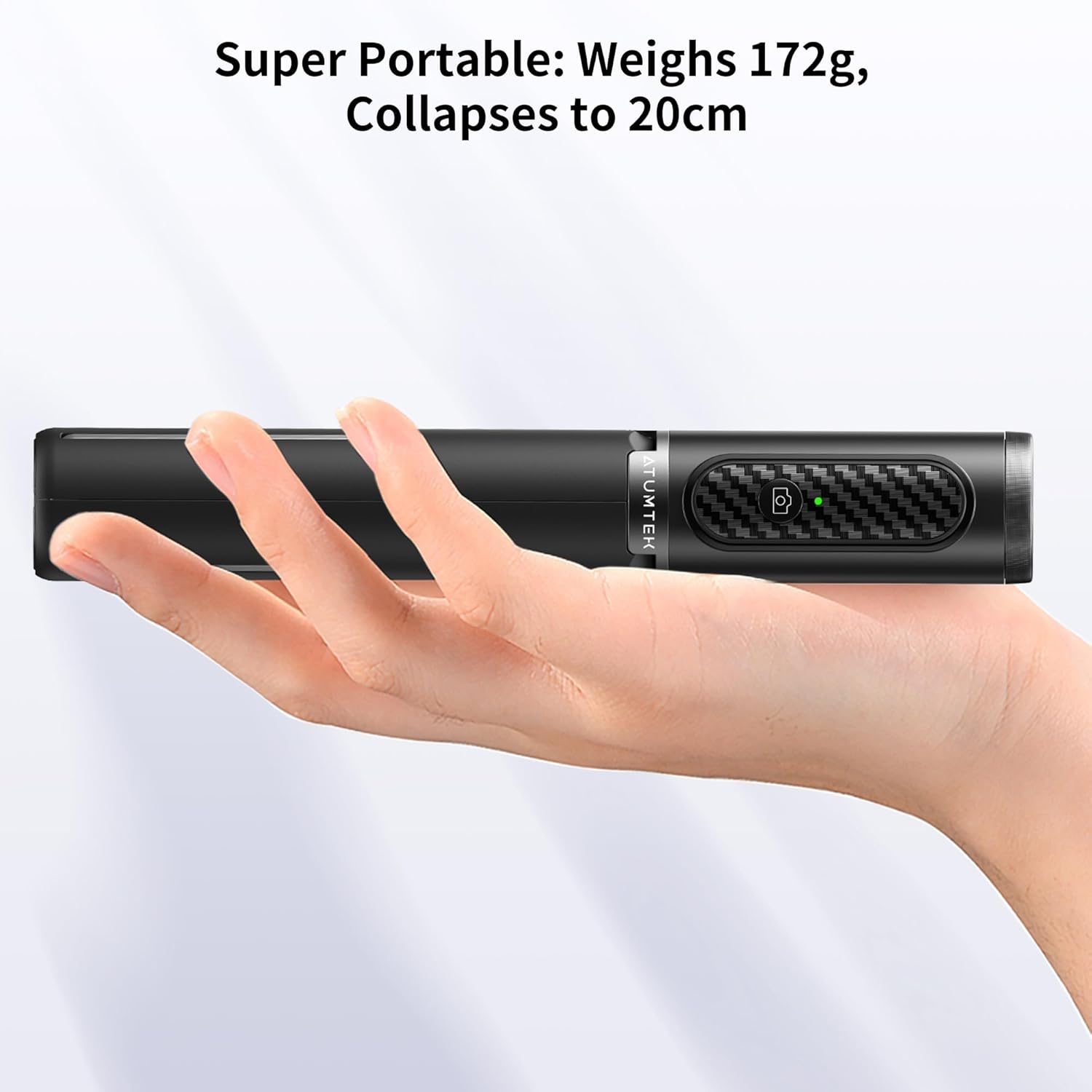
The detachable Bluetooth remote control for the ATUMTEK Selfie Stick Tripod, showing its Type-C charging port and the remote in use with a phone on the tripod.
Сүрөттөрдү/Видеолорду тартуу
- Смартфонуңуздун камера тиркемесин ачыңыз.
- Position your phone as desired, utilizing the 270-degree rotatable holder and 180-degree head articulation for optimal angle.
- For remote shooting, detach the Bluetooth remote from the selfie stick.
- Press the shutter button on the Bluetooth remote to capture photos or start/stop video recording.
Селфи таякчасы катары колдонуу
With the tripod legs folded and locked, extend the aluminum pole to your desired length (up to 31.3 inches) for handheld selfie shots.
Штатив катары колдонуу
With the tripod legs extended and stable, place the unit on a flat surface. Adjust the pole height and phone angle for stable hands-free shooting or viewing.
Demonstration of the ATUMTEK Selfie Stick Tripod's versatility, showcasing its use as both a selfie stick and a stable tripod for various shooting scenarios.
Техникалык тейлөө
To ensure the longevity of your ATUMTEK Selfie Stick Tripod, follow these maintenance guidelines:
- Тазалоо: Түзмөктү жумшак, кургак чүпүрөк менен сүртүңүз. Катуу химиялык заттарды же абразивдүү материалдарды колдонуудан алыс болуңуз.
- Сактагыч: Store the selfie stick in a cool, dry place when not in use. Keep it away from extreme temperatures and direct sunlight.
- Батареяга кам көрүү: Recharge the Bluetooth remote regularly, even if not in frequent use, to maintain battery health. Avoid fully draining the battery for extended periods.
- Колдонуу: Do not force the telescoping sections or tripod legs. Always follow the proper unfolding and folding procedures to prevent damage.
Проблемаларды чечүү
| Көйгөй | Мүмкүн себеп | Чечим |
|---|---|---|
| Bluetooth пульт жупташтырылбай жатат. | Remote battery low or off. | Ensure the remote is charged and turned on. |
| Bluetooth пульт жупташтырылбай жатат. | Телефондо Bluetooth иштетилген эмес. | Смартфонуңузда Bluetooth'ду иштетиңиз. |
| Bluetooth пульт жупташтырылбай жатат. | Interference or previously paired device. | Turn off Bluetooth on other nearby devices. Forget the device in your phone's Bluetooth settings and try pairing again. |
| Selfie stick unstable as a tripod. | Legs not fully extended or on uneven surface. | Ensure the pole is fully extended to spread the legs. Place on a flat, stable surface. |
| Phone not fitting in holder. | Phone width exceeds maximum capacity. | The holder accommodates phones up to 3.42 inches wide. Do not force larger phones. |
Техникалык шарттар
| Өзгөчөлүк | Деталь |
|---|---|
| Модель номери | ATSS002 |
| Продукциянын өлчөмдөрү (бүктөлгөн) | 7.9 x 2.4 x 1.8 дюйм |
| Элемент Салмагы | 6 унция (170 грамм) |
| Катталган өлчөмү | 7.7 дюйм |
| Максималдуу Узундук | 31.3 дюйм |
| Батарея түрү | 1 Литий Полимердик батарейка (кошулган) |
| Батарея сыйымдуулугу (Алыскы) | 50mAh |
| Заряддоо порту | USB Type-C |
| Bluetooth башкаруу аралык | 33 фут чейин |
| Шайкеш түзмөктөр | IOS 7.0+, Android 5.0+ (Smartphones up to 3.42 inches wide) |
| Өндүрүүчү | ATUMTEK |
| Келип чыккан өлкө | Кытай |
Кепилдик жана колдоо
For warranty information, technical support, or customer service inquiries, please visit the official ATUMTEK brand store or contact their customer support channels.
Official ATUMTEK Store: Amazon'догу ATUMTEK дүкөнү


