1. Киришүү
Сатып алганыңыз үчүн рахматasing the VIVIBRIGHT GP100UP LED Projector. This manual provides essential information for the safe and efficient operation of your device. Please read it thoroughly before use and retain it for future reference.
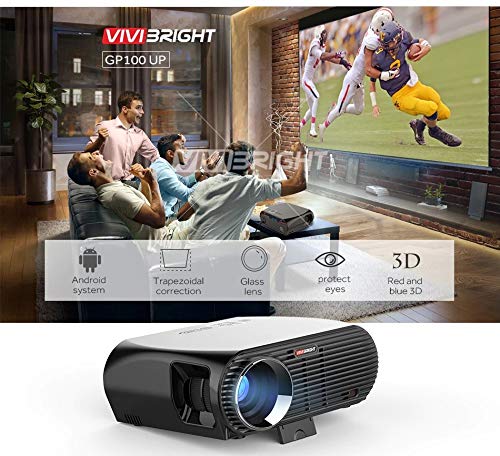
The VIVIBRIGHT GP100UP is an Android 6.0-based LED projector featuring built-in Wi-Fi and Bluetooth, designed for home theater and office presentations. It supports Full HD content and offers a bright projection experience.
2. Коопсуздук маалыматы
- Электр камсыздоо: Белгиленген кубат адаптерин гана колдонуңуз. Voltage сиздин жергиликтүү электр камсыздооңузга дал келет.
- Вентиляция: Желдетүүчү тешиктерди жаппаңыз. Проектордун ысып кетишине жол бербөө үчүн, анын айланасында жетиштүү аба айлануусун камсыз кылыңыз.
- Суюктук таасири: Проекторду суудан же башка суюктуктардан алыс кармаңыз. г менен операция жасабагылаamp чөйрөлөр.
- Тазалоо: Тазалоодон мурун электр энергиясын өчүрүңүз. Жумшак, кургак чүпүрөктү колдонуңуз. Суюктук же аэрозолдук тазалоочу каражаттардан качыңыз.
- Объектти киргизүү: Never insert objects of any kind into the projector openings as they may touch dangerous voltage пункттары же кыска бөлүктөрү.
- Тейлөө: Бул продуктту өзүңүз тейлөөгө аракет кылбаңыз. Бардык тейлөөнү квалификациялуу тейлөө кызматкерлерине тапшырыңыз.
- Көздү коргоо: l болгондо проектордун объективине тике карабаamp күйүк. Жарык жарык көзгө зыян келтириши мүмкүн.
3. Пакеттин мазмуну
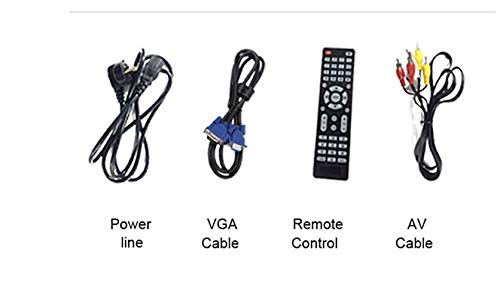
Төмөндө тизмеленген нерселердин баары пакетиңизге камтылганын текшериңиз:
- VIVIBRIGHT GP100UP Projector
- Электр кабели
- VGA кабели
- AV Cable
- Алыстан башкаруу
- Колдонуучунун Колдонмосу (бул документ)
3.1-сүрөт: Included accessories with the VIVIBRIGHT GP100UP projector, including power cable, VGA cable, remote control, and AV cable.
4. Продукт бүтүп калдыview
4.1. Проектордун өлчөмдөрү
4.1-сүрөт: Алды менен үстү view of the VIVIBRIGHT GP100UP projector with approximate dimensions: 11 inches (length), 8.85 inches (width), and 4 inches (height).
4.2. Киргизүү/чыгыш порттору
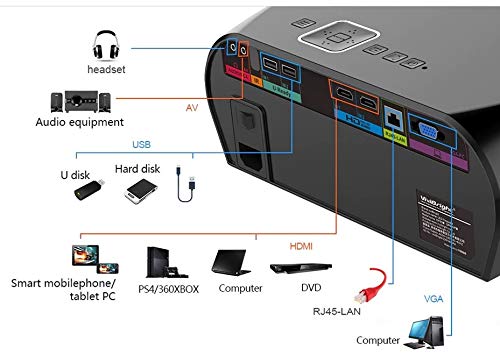
The projector features various ports for connecting external devices:
4.2-сүрөт: Detailed diagram of the projector's rear panel, illustrating connectivity options including headset, audio equipment (AV), USB ports for U disk and hard disk, HDMI ports, RJ45-LAN, and VGA port.
- HDMI: Connect to Blu-ray players, gaming consoles, laptops, or other HDMI-enabled devices.
- USB: For connecting USB drives (U disk) or external hard drives.
- OF: Композиттик видео жана стерео аудиону колдонуу менен эски түзмөктөрдү туташтыруу үчүн.
- VGA: For connecting to computers or laptops with a VGA output.
- RJ45-LAN: Зымдуу тармак туташуусу үчүн.
- Гарнитура уячасы: Тышкы кулакчындарды же динамиктерди туташтыруу үчүн.
4.3. Алыстан башкаруу
The included remote control allows for convenient operation of the projector.
4.3-сүрөт: Remote control layout with key functions: ON/OFF, Volume Up/Down, OK, Menu, Home, Speed, Mute, Back, Mouse Mode, and the USB receiver.
- КҮЙГҮЗҮҮ/ӨЧҮРҮҮ: Power on or off the projector.
- Көлөм +/-: Аудионун үнүн тууралаңыз.
- OK: Тандоону ырастоо.
- Меню: Проектордун жөндөөлөрүнө кирүү.
- Үй: Return to the main Android interface.
- Артка: Мурунку экранга кайтыңыз.
- Чычкан режими: Activate/deactivate air mouse function (if applicable).
- Үнсүз: Аудионун үнүн өчүрүү же ачуу.
5. Орнотуу
5.1. Жайгаштыруу
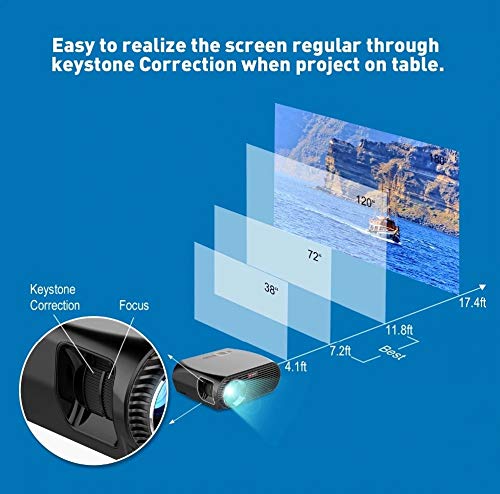
Place the projector on a stable, flat surface or mount it to the ceiling. Ensure there are no obstructions to the lens or ventilation ports. The optimal projection distance for a clear image is between 1 to 5 meters.
5.1-сүрөт: Illustration of projection distances and corresponding screen sizes, along with the location of the keystone correction and focus rings on the projector.
- For a 72-inch screen, the recommended distance is approximately 7.2 feet (2.2 meters).
- For a 120-inch screen, the recommended distance is approximately 11.8 feet (3.6 meters).
5.2. Power Connection
- Электр кабелин проектордун кубат киресине туташтырыңыз.
- Электр кабелинин экинчи учун ылайыктуу электр розеткасына сайыңыз.
- Проектордогу кубат индикаторунун жарыгы күйүп турушу керек.
5.3. Фокусту жана Keystone коррекциясын түзүү
After powering on, adjust the image for clarity and proper geometry.
- Фокус: Rotate the focus ring near the lens until the projected image is sharp and clear.
- Негизги ташты оңдоо: If the projected image appears trapezoidal (wider at the top or bottom), use the keystone correction ring or lever (usually located near the focus ring) to adjust the image until it is rectangular. The GP100UP supports +/- 15 degrees vertical keystone correction.
6. Иштөө нускамалары
6.1. Initial Power On and Android Interface
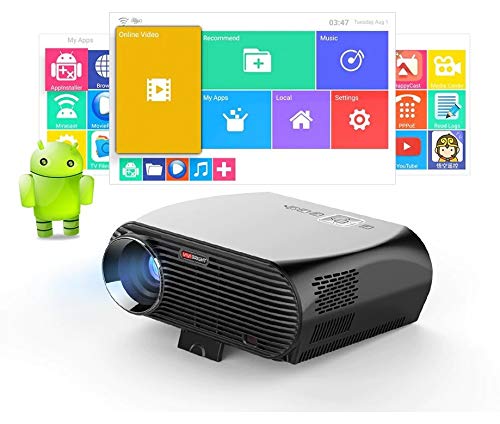
Press the power button on the projector or remote control to turn on the device. The projector will boot into its Android 6.0 operating system interface.
6.1-сүрөт: The VIVIBRIGHT GP100UP projector in operation, highlighting its Android system capabilities and other features.
Navigate the Android interface using the remote control. You can access pre-installed applications, settings, and media files.
6.2. Тышкы түзмөктөрдү туташтыруу
To project content from external sources:
- Connect your device (e.g., laptop, gaming console, USB drive) to the appropriate port on the projector (HDMI, USB, AV, VGA).
- On the projector's Android interface, navigate to the "Input Source" or "Source" option.
- Select the corresponding input source (e.g., HDMI1, USB, AV, VGA) to display content from your connected device.
6.3. Wireless Connectivity (Wi-Fi, Bluetooth, Screen Mirroring)
The GP100UP supports various wireless functions:
- Wi-Fi:
- Go to "Settings" on the Android interface.
- "Wi-Fi" тандап, аны күйгүзүңүз.
- Choose your desired network and enter the password to connect.
- Bluetooth:
- Go to "Settings" on the Android interface.
- Select "Bluetooth" and turn it on.
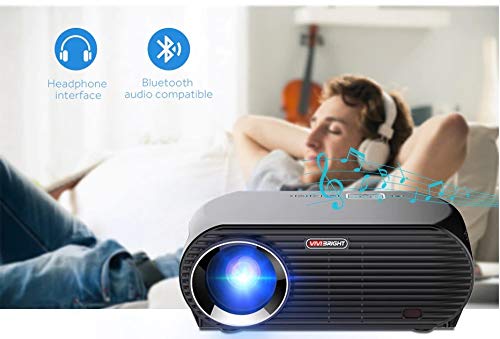
- Наушник же динамиктер сыяктуу Bluetooth аудио түзмөктөрү менен жупташтырыңыз.
6.2-сүрөт: The projector's Bluetooth audio compatibility, allowing connection to wireless headphones or speakers.
- Screen Mirroring (Miracast/Airplay/DLNA):
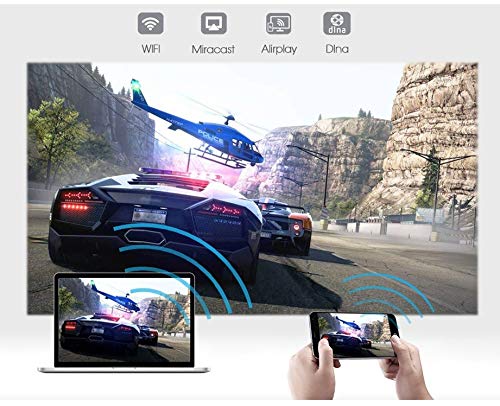
The projector supports mirroring content from compatible smartphones, tablets, and laptops via Wi-Fi, Miracast, Airplay, and DLNA.
- Ensure both your device and the projector are connected to the same Wi-Fi network.
- On the projector's Android interface, open the relevant screen mirroring application (e.g., Miracast, Airplay, DLNA).
- On your smartphone/tablet/laptop, activate its screen mirroring function (e.g., "Screen Mirroring," "Smart View," "Cast," "AirPlay").
- Select the projector from the list of available devices to begin mirroring.

6.3-сүрөт: Wireless screen mirroring capabilities, enabling content from mobile devices and laptops to be displayed on the projector.
7. Техникалык тейлөө
7.1. Объективди тазалоо
Оптикалык линзалар үчүн атайын жасалган жумшак, түксүз кездемени колдонуңуз. Чаңды же тактарды кетирүү үчүн линзаны акырын сүртүңүз. Абразивдүү материалдарды же катуу химиялык заттарды колдонуудан алыс болуңуз.
7.2. Cleaning the Projector Casing
Проектордун сыртын жумшак, кургак чүпүрөк менен сүртүңүз. өжөр белгилери үчүн, бир аз гamp кездемени колдонсо болот, андан кийин кургак чүпүрөк менен сүртүңүз. Желдетүүчү тешиктерге суюктук кирбегенин текшериңиз.
7.3. Air Filter (if applicable)
While LED projectors typically have sealed optical engines, regularly check ventilation openings for dust accumulation. Use a soft brush or compressed air to clear any blockages.
8. Кыйынчылыктарды
| Көйгөй | Мүмкүн себеп | Чечим |
|---|---|---|
| Сүрөт көрсөтүлгөн жок |
|
|
| Сүрөт бүдөмүк |
|
|
| Сүрөт трапеция түрүндө |
|
|
| Үн жок |
|
|
| Wi-Fi/Bluetooth туташуу маселелери |
|
|
9. Техникалык шарттар
| Өзгөчөлүк | Деталь |
|---|---|
| Модель номери | GP100UP |
| Дисплей технологиясы | LCD |
| Native Resolution | 1280x800dpi (WXGA) |
| Жарыктык | 3500 Lumens |
| Контраст катышы | 1000:1-2000:1 |
| Жарык булагы | LED |
| Жарык булагы Life | Not specified (typically 20,000+ hours for LED) |
| Проекциялык аралык | 1-5м |
| Болжолдонгон өлчөм | 40-300 inches (Best image size: 72-120 inches) |
| Экран масштабы | 4:3/16:9 |
| Keystone Correction | Manual Correction, +/- 15 degrees (vertical) |
| Система | Android 6.0.1, CPU: Quad core ARM Cortex-A53 |
| Эстутум (RAM/ROM) | RAM: 1G / ROM: 8G |
| Зымсыз байланыш | Wi-Fi, Bluetooth, DLNA, Miracast, Airplay |
| Киргизүү порттору | HDMI, USB, AV, VGA, RJ45-LAN |
| Электр камсыздоо | AC 90-240V, 50/60Hz |
| Энергияны керектөө | 140 Вт |
| Өлчөмдөрү (болжол менен) | 37 x 30.5 x 15.9 см |
| Салмагы (болжол менен) | 2.6кг |
| 3D функциясы | Red-blue 3D |
10. Кепилдик жана колдоо
The VIVIBRIGHT GP100UP Projector comes with a 1 жылдык кепилдик сатып алынган күндөн тартып. Бул кепилдик нормалдуу колдонуудагы өндүрүш кемчиликтерин камтыйт.
For technical support, warranty claims, or service inquiries, please contact your retailer or the official VIVIBRIGHT customer service channel. Please have your product model number (GP100UP) and proof of purchase ready when contacting support.


