1. Киришүү
This manual provides comprehensive instructions for the setup, operation, and maintenance of your Snom M325 Wireless SIP Phone System. The Snom M325 is a single-cell DECT package that includes an M300 base station and one M25 handset, designed for reliable voice communication in professional environments. It supports up to 20 handsets and allows for up to 5 parallel calls, offering broad coverage that can be extended with additional Snom M5 repeaters.
2. Пакеттин мазмуну
Please verify that all items listed below are present in your package. If any items are missing or damaged, please contact your vendor.
- Snom M300 Base Station
- Snom M25 Cordless Handset
- Телефонду заряддоо бешиги
- Базалык станция үчүн кубат адаптери
- Заряддоо бешиги үчүн кубат адаптери
- Ethernet кабели
- Rechargeable Battery Pack for Handset
- Quick Start Guide
3. Орнотуу
3.1. Базалык станцияны туташтыруу
- Туташуу кубаты: Plug the power adapter into the "Power" port on the Snom M300 Base Station, then plug the adapter into a wall outlet.
- Тармакка туташуу: Connect one end of the Ethernet cable to the "LAN" port on the base station and the other end to an available port on your network router or switch.
- Жайгашкан жери: Place the base station in a central location, away from large metal objects or other electronic devices that may cause interference. The range is up to 50 meters indoors and 300 meters outdoors.
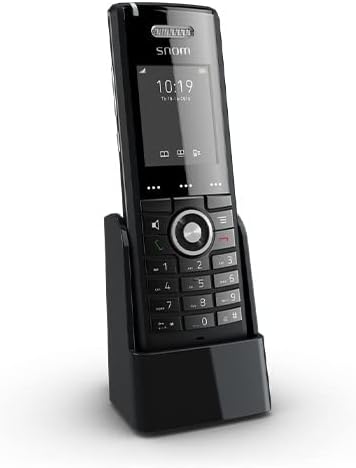
Figure 3.1: Snom M25 Cordless Handset in its charging cradle, illustrating the compact design and display. This image shows the primary components of the system.
3.2. Preparing the Handset
- Батареяны орнотуу: Open the battery compartment cover on the back of the Snom M25 Handset. Insert the rechargeable battery pack, ensuring correct polarity. Close the cover.
- Заряддоо аппараты: Place the handset in its charging cradle. Ensure the charging contacts align. The battery indicator on the handset display should show it is charging. Allow at least 4 hours for the initial charge.
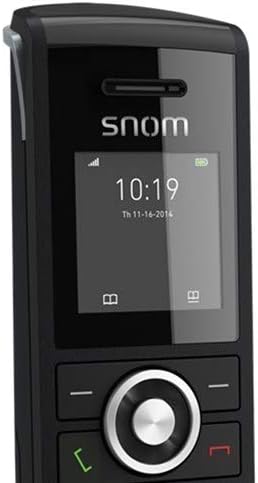
Сүрөт 3.2: Жакын пландан view of the Snom M25 Handset's display showing time and date, along with the navigation and numeric keypads. This highlights the user interface.
3.3. Registering Handsets
The M25 handset included in the M325 package is typically pre-registered to the M300 base station. If you need to register additional handsets or re-register an existing one, follow these steps:
- On the Base Station: Press and hold the registration button on the M300 Base Station until the LED indicator starts flashing.
- On the Handset: Navigate to the "Settings" or "Registration" menu on the M25 Handset. Select "Register Handset" or a similar option.
- PIN кодду киргизиңиз: If prompted, enter the base station's PIN (default is usually 0000).
- Ырастоо: The handset display will confirm successful registration.
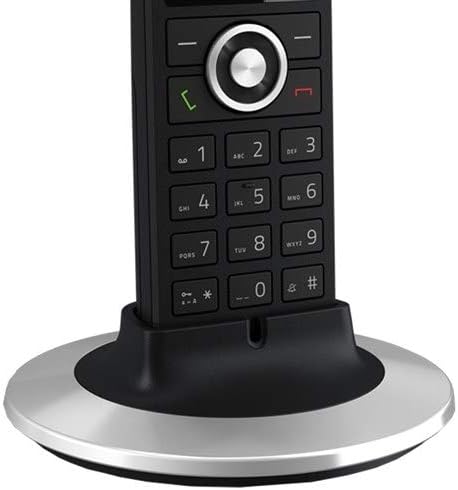
Figure 3.3: The Snom M25 Handset placed in an alternative circular charging base, demonstrating charging functionality. This image provides another perspective of the handset and its charging accessory.
4. Иштөө нускамалары
4.1. Негизги чалуу функциялары
- Чакыруу:
- Pick up the handset or press the green call key.
- Каалаган телефон номерин териңиз.
- Press the green call key again to initiate the call.
- Чалууга жооп берүү: Телефон шыңгыраганда, жашыл чалуу баскычын басыңыз.
- Чалууну аяктоо: Press the red end call key or place the handset back in the charging cradle.
- Үндү тууралоо: Чалуу учурунда, кулакчындын үнүн жөндөө үчүн навигация баскычтарын (өйдө/ылдый) колдонуңуз.
- Үнсүз: During a call, press the mute key (if available) to mute your microphone. Press again to unmute.
4.2. Өркүндөтүлгөн функциялар
- 3 тараптуу конференция:
- While on an active call, press the "Options" or "Menu" key.
- Select "Conference" or "Add Call".
- Dial the number of the third party and wait for them to answer.
- Press the "Conference" or "Join" key to merge all calls.
- Көп линиялуу операция: The system supports multi-line operation, allowing up to 5 parallel calls. You can switch between active calls or place a call on hold via the handset's menu options.
- Программалануучу ачкычтар: The M25 handset features programmable keys that can be configured for speed dial, line appearance, or other functions via the base station's web интерфейс.
5. Техникалык тейлөө
- Тазалоо: жумшак, кургак же бир аз колдонуу damp телефонду жана базалык станцияны тазалоо үчүн чүпүрөк. Абразивдүү тазалагычтарды же эриткичтерди колдонбоңуз.
- Батареяга кам көрүү:
- Always use the original Snom battery pack.
- Батареяны экстремалдуу температурага тийгизүүдөн сактаңыз.
- Эгерде телефон көпкө чейин колдонулбаса, батарейканы чыгарып салыңыз.
- Программалык камсыздоонун жаңыртуулары: Periodically check the Snom website for firmware updates for your M300 base station and M25 handsets to ensure optimal performance and security. Updates are typically managed via the base station's web интерфейс.
6. Кыйынчылыктарды
| Көйгөй | Мүмкүн себеп | Чечим |
|---|---|---|
| Чалуу сигналы жок / Чалууларды жасай албай жатам | Base station not powered or connected to network; Handset not registered; SIP account not configured. |
|
| Телефондун дисплейи бош | Батарея аз же туура орнотулган эмес. |
|
| Poor range or call quality | Base station placement; Interference from other devices. |
|
| Cannot register additional handsets | Maximum number of handsets reached; Incorrect registration procedure. |
|
7. Техникалык шарттар
| Өзгөчөлүк | Деталь |
|---|---|
| Модел | Snom M325 (M300 Base Station + M25 Handset) |
| Технология | DECT, SIP (Voice Over Internet Protocol) |
| Handset Support | Up to 20 handsets per base station |
| Parallel Calls | 5гө чейин параллелдүү чалуулар |
| Range (Indoor) | Болжол менен 50 метр |
| Ачык асман алдындагы аянтча | 300 метрге чейин |
| Күтүү убактысы | 75 саатка чейин |
| Talk Time | 7 саатка чейин |
| Конференция чалуу мүмкүнчүлүгү | 3 тараптуу конференция |
| Ethernet | Dual-Port 10/100 Mbps Ethernet Switch (on base station) |
| Power Source | Батарея менен иштейт (уюлдук телефон), AC адаптери (базалык станция) |
| Түс | Black (SNO-M65 Cordless Handset) |
8. Коопсуздук маалыматы
- Аппаратты сууга же нымга тийгизбеңиз.
- Берилген кубат адаптерлерин жана батарейкаларды гана колдонуңуз.
- Аппаратты жылуулук булактарынын жанына же тике күн нуруна коюудан алыс болуңуз.
- Аппаратты өзүңүз ачууга же оңдоого аракет кылбаңыз. Бардык тейлөөлөрдү квалификациялуу кызматкерлерге тапшырыңыз.
- Аппаратты балдар жетпеген жерде сактаңыз.
9. Кепилдик жана колдоо
Snom products are designed for reliability and performance. For specific warranty terms and conditions, please refer to the warranty card included with your product or visit the official Snom website. Technical support is available through your authorized Snom reseller or directly from Snom's support channels.
For the latest documentation, FAQs, and support resources, please visit: www.snom.com/support


