Introduction
This manual provides comprehensive instructions for the installation, operation, and maintenance of your Whistler Z-15R High Performance Radar Laser Detector. Please read this manual thoroughly before using the device to ensure optimal performance and understanding of its features.
Продукт өзгөчөлүктөрү
- Total Laser Detection: Detects all laser guns used in the United States.
- Real Voice Alerts: Provides clear voice announcements for detected threats.
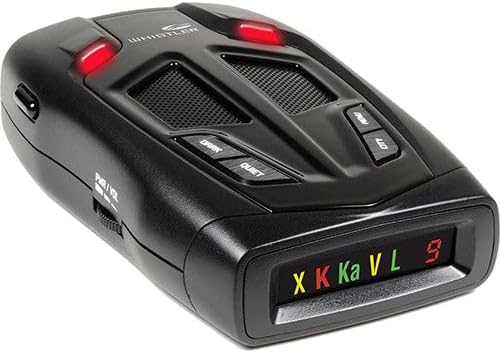
- Icon Display with Red Digital Signal Strength Indicator: Visual alerts with a numerical strength display.
- POP Mode Detection: Detects brief radar bursts.
- Stay Alert Feature: Promotes driver awareness during long drives.
- Setting Saver: Retains user settings when the unit is powered off.
- Dim/Dark Mode: Adjusts display brightness for night driving.
- Quiet/Auto Quiet Mode: Reduces audio alerts for less intrusive operation.
- Traffic Flow Signal Rejection (TFSR): Helps eliminate false alerts from radar-based traffic flow sensors.
- Field Disturbance Sensor Rejection (FDSR): Reduces false alerts from certain vehicle safety systems.
Орнотуу жана орнотуу
Proper placement of the Whistler Z-15R is crucial for optimal performance. The detector should have a clear view of the road ahead and behind, without obstruction from windshield wipers, tinted areas, or other objects.
- Монтаждоо: Attach the suction cup bracket to the windshield, ensuring it is level and provides an unobstructed view. Alternatively, use the dashboard mount if preferred.
- Кубат туташуу: Connect the power cord to the detector's power input and then to your vehicle's 12-volt accessory outlet (cigarette lighter socket).
- Позициялоо: Adjust the detector's angle to be parallel with the road for best detection range.
- Баштапкы күйгүзүү: Turn on your vehicle's ignition. The detector should power on automatically. Adjust the volume using the PWR/VOL control.
Иштөө нускамалары
Күйгүзүү/өчүрүү жана Көлөмү
The unit powers on and off with the vehicle's ignition when connected to a switched 12-volt outlet. The PWR/VOL scroll wheel on the left side controls the audio volume.
Дисплей режимдери
- Күңүрт режим: басыңыз КАРАҢЫЗ дисплейдин жарыктыгын азайтуу үчүн баскычты басыңыз.
- Караңгы режим: басыңыз КАРАҢЫЗ button a second time to turn off the display completely while keeping the unit active.
Тынч/Авто Тынчтык режими
- Тынч режим: басыңыз ТЫНЧ button during an alert to silence the audio for that specific alert.
- Auto Quiet Mode: басып, кармап туруңуз ТЫНЧ button to activate Auto Quiet, which automatically reduces the audio volume after the initial alert.
City/Highway Modes
басыңыз CITY button to cycle through City modes (City, City 1, City 2) to reduce false alerts in urban areas. Highway mode offers full sensitivity.
Меню орнотуулары
басыңыз МЕНЮ button to access various settings, including band selection, TFSR, FDSR, and other customization options. Refer to the on-screen prompts for navigation.
Сергек болуңуз
The Stay Alert feature is designed to test driver alertness. When activated, a series of beeps will sound, requiring the driver to press any button within a set time to confirm alertness. If no button is pressed, an alarm will sound.
Техникалык тейлөө
To ensure the longevity and proper functioning of your Whistler Z-15R detector, follow these maintenance guidelines:
- Тазалоо: Түзмөктүн сыртын тазалоо үчүн жумшак, кургак чүпүрөктү колдонуңуз. Абразивдүү тазалоочу каражаттарды же эриткичтерди колдонбоңуз.
- Дисплейге кам көрүү: Avoid touching the display screen directly to prevent smudges or scratches.
- Сактагыч: When not in use for extended periods, store the detector in a cool, dry place away from direct sunlight and extreme temperatures.
- Электр кабели: Inspect the power cord regularly for any signs of damage. Replace if necessary.
Проблемаларды чечүү
If you experience issues with your Whistler Z-15R, refer to the following common troubleshooting steps:
- Кубат жок:
- Check the vehicle's 12-volt accessory outlet for power.
- Ensure the power cord is securely connected to both the detector and the outlet.
- Verify the vehicle's fuse for the accessory outlet is intact.
- Ашыкча жалган эскертүүлөр:
- Activate City mode (City, City 1, or City 2) to reduce sensitivity in urban areas.
- Ensure TFSR (Traffic Flow Signal Rejection) and FDSR (Field Disturbance Sensor Rejection) are enabled in the menu settings.
- Check for other electronic devices in the vehicle that might cause interference.
- Алсыз сигналды аныктоо:
- Детектордун ачык жана тоскоолдуксуз экенин текшериңиз view жолдун.
- Verify the unit is mounted level and parallel to the road.
- Check for any metallic tinting or coatings on the windshield that might block signals.
For further assistance, contact Whistler customer support.
Техникалык шарттар
| Өзгөчөлүк | Деталь |
|---|---|
| Модель номери | Z-15R |
| Өлчөмдөрү (L x W x Y) | 4.44 x 2.85 x 1.23 дюйм |
| Салмагы | 5.4 унция |
| Power Source | 12 Volts (Vehicle Battery Powered) |
| UPC | 052303406492 |
| Detection Bands | X, K, Ka, Laser |
| Өзгөчөлүктөр | Total Laser Detection, Real Voice Alerts, Icon Display, POP Mode, Stay Alert, Setting Saver, Dim/Dark Mode, Quiet/Auto Quiet, TFSR, FDSR |
Кепилдик маалымат
The Whistler Z-15R High Performance Radar Laser Detector is covered by the manufacturer's warranty. Please refer to the warranty card included with your product or visit the official Whistler webкепилдик камтууга жана тейлөөгө байланыштуу толук шарттар жана шарттар үчүн сайт.
Кардарларды колдоо
For technical assistance, troubleshooting not covered in this manual, or general inquiries, please contact Whistler customer support. Contact information can typically be found on the manufacturer's webсайтында же продуктунун таңгагында.


