1. Киришүү
This manual provides comprehensive instructions for the Gvirtue Universal Replacement Remote Control, model PN-15+EL. Designed as a direct replacement for various Panasonic TV remote controls, this device offers broad compatibility and essential functions for your television viewing experience. Please read this manual carefully to ensure proper setup and operation.
2. Продукт бүтүп калдыview
The Gvirtue PN-15+EL remote control is engineered to provide a seamless replacement experience for your Panasonic TV. It features a user-friendly design with essential buttons and a learning function for advanced customization.
2.1 Негизги өзгөчөлүктөрү
- Жалпы шайкештик: Works with a wide range of Panasonic LCD, LED, 3D, Smart, and 4K Ultra HD TV models.
- Окуу функциясы: Ability to learn functions directly from your original remote control.
- Арткы жарык баскычтары: Designed for convenient use in low-light conditions.
- Эргономикалык дизайн: Lightweight and comfortable to grip, reducing the chance of slipping.
- Программалоо талап кылынбайт: Often works directly out of the box for basic functions.
- Тез жооп: Stable performance with a fast response time of 0.2 seconds.
2.2 Шайкештик
This remote is compatible with numerous Panasonic TV models and replaces many original Panasonic remote control models. A partial list of compatible TV models includes:
- TC-40AS520, TC-39AS530, TC-55AS530
- TC-42AS630, TC-50AS630, TC-60AS630
- TC-40AS520U, TC-39AS530U, TC-50AS530U, TC-55AS530U, TC-60AS530U
- TC-50AS530UE
- TC-42AS630U, TC-50AS630U, TC-60AS640U
- TC-50ASU534, TC-55LET64
- TC-32LX24, TC-42LD24, TC-42LS24
- TC-50PS24, TC-58PS24, TC-65PS24
- TC-L42ET60, TC-L47ET60, TC-L50ET60, TC-L55ET60
- TC-L32C22, TC-L22X2
- TC-L42U22, TC-L32U22, TC-L37U22, TC-L42U25
- TC-P42C2, TC-P50C2, TC-P46C2
- TC-P42U2, TC-P50U2
- TC-P42X2, TC-P50X2
- TC-P50GT50, TC-P55GT50, TC-P60GT50, TC-P65GT50
- TC-P55ST50, TC-P60ST
This remote also replaces original Panasonic remote models such as N2QAYB000100, N2QAYB000102, N2QAYB000221, N2QAYB000485, N2QAYB000779, and many others.
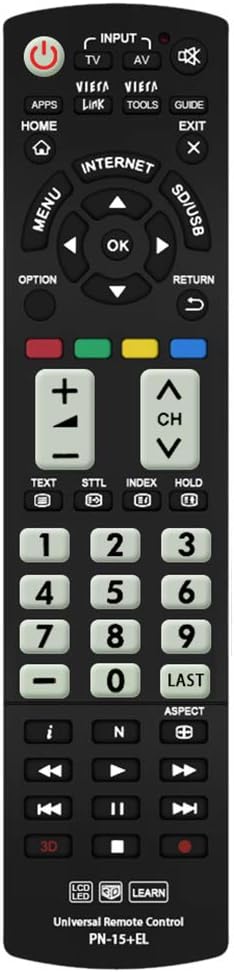
Сүрөт: алдыңкы view of the Gvirtue PN-15+EL Universal Replacement Remote Control.
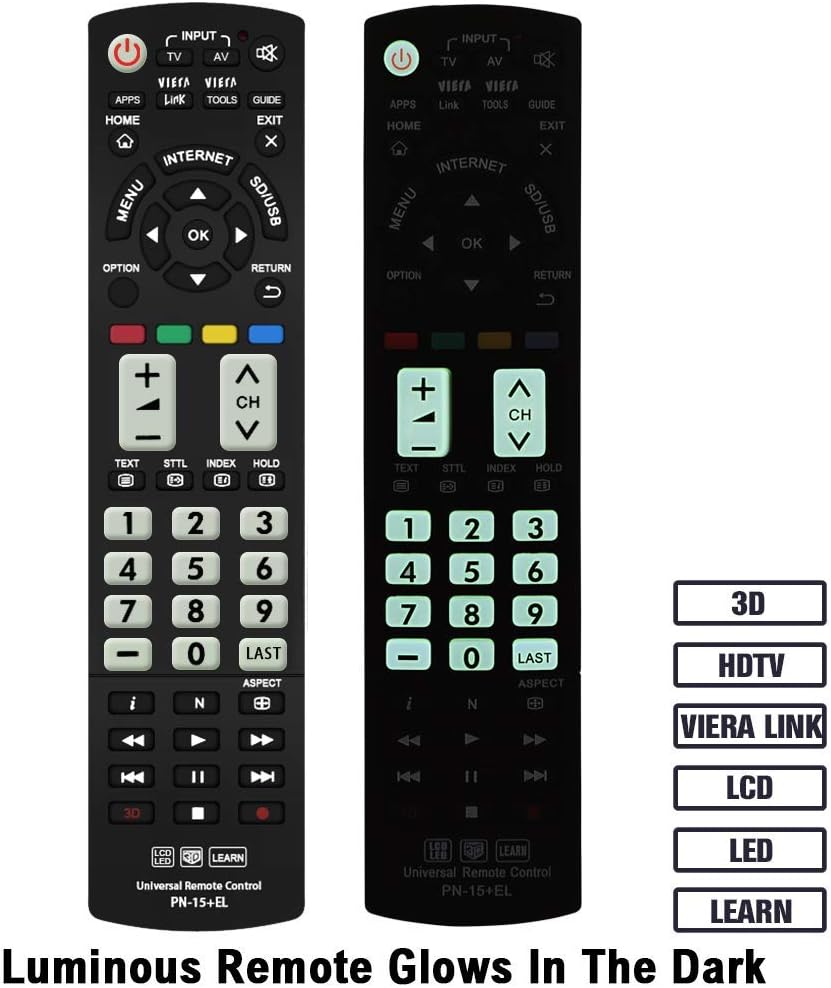
Image: The Gvirtue PN-15+EL remote control highlighting its luminous buttons for use in the dark.

Image: The Gvirtue PN-15+EL remote control shown alongside a list of compatible Panasonic TV models.
3. Орнотуу
3.1 Батареяны орнотуу
Алыстан башкаруу пультун иштеши үчүн эки (2) AAA батарейкасы (кошулмага кирбейт) керек. Батарейкаларды орнотуу үчүн төмөнкү кадамдарды аткарыңыз:
- Пульттун артындагы батарея бөлүкчөсүнүн капкагын табыңыз.
- Бөлүмдү ачуу үчүн капкакты ылдый жылдырыңыз же кулпуну (эгер бар болсо) басыңыз.
- Insert two fresh AAA batteries, ensuring the positive (+) and negative (-) terminals align correctly with the markings inside the compartment.
- Батарея бөлүмүнүн капкагын бекем чыкылдаган үн чыкканга чейин кайра ордуна жылдырып, жабыңыз.
Note: This remote control does not include batteries. Please purchase them separately.

Image: Illustration showing how to open the battery compartment and insert two AAA batteries into the Gvirtue PN-15+EL remote control.
3.2 Алгачкы колдонуу
For most compatible Panasonic TV models, the Gvirtue PN-15+EL remote control is designed to work immediately after battery installation without any additional programming or pairing. Simply point the remote at your TV and test its functions.
If the remote does not function correctly out of the box, or if you wish to customize specific buttons, refer to the "Learning Function" section below.
4. Иштөө нускамалары
This section details the functions of the buttons on your Gvirtue PN-15+EL remote control.

Image: Diagram illustrating the various function buttons on the Gvirtue PN-15+EL remote control.
4.1 Баскыч функциялары
- Кубат баскычы (●): Телевизорду күйгүзүп-өчүрөт.
- INPUT / TV / AV: Selects the TV input source directly.
- VIERA шилтемеси: Activates Panasonic's Viera Link feature for integrated control of connected devices.
- КУРАЛДАР: Displays frequently used functions or quick settings.
- ЖЕТЕКЧЕ: Электрондук программалык көрсөтмөнү (EPG) көрсөтөт.
- ҮЙ: Enters the TV's home menu or smart TV interface.
- ЧЫГУУ: Учурдагы менюдан же колдонмодон чыгат.
- МЕНЮ: Экрандагы негизги менюну көрсөтөт.
- OPTION: Displays available options for the current selection.
- КАЙТУУ: Мурунку менюга же экранга кайтат.
- Багыттоочу панель (өйдө, ылдый, солго, оңго) жана OK: Менюларды кыдырып, тандоолорду ырастайт.
- Түс баскычтары (кызыл, жашыл, сары, көк): Shortcut keys for interactive functions, often context-dependent.
- VOL +/-: Үн деңгээлин тууралайт.
- CH +/-: Каналдарды өзгөртөт.
- Үнсүз: Телевизордун үнүн өчүрөт же үнүн чыгарат.
- Сандар тактасы (0-9): Түздөн-түз канал тандоо.
- АКЫРКЫ: Мурункуга кайтат viewed каналы.
- 3D: Toggles the 3D function on or off (for compatible 3D TVs).
- Media Playback Controls (Play, Pause, Stop, Rewind, Fast Forward, Skip): Шайкеш түзмөктөрдө же сыналгы функцияларында медиа ойнотууну башкарат.
4.2 Окуу функциясы
The Gvirtue PN-15+EL remote control features a learning function, allowing you to program specific buttons to mimic functions from your original remote control. This is useful if certain advanced functions are not pre-programmed or if you want to consolidate controls.
Detailed instructions for activating and using the learning function are typically provided on a separate instruction sheet included with the product. Generally, the process involves:
- Entering a learning mode on the Gvirtue remote.
- Pointing your original remote at the Gvirtue remote.
- Pressing the desired button on the original remote, then the corresponding button on the Gvirtue remote to be programmed.
- Exiting the learning mode.
Refer to the specific learning function instructions provided with your remote for precise steps.
5. Техникалык тейлөө
Алыстан башкаруу пультуңуздун узак мөөнөттүү жана оптималдуу иштешин камсыз кылуу үчүн, төмөнкү техникалык тейлөө көрсөтмөлөрүн аткарыңыз:
- Тазалоо: Wipe the remote control with a soft, dry cloth. Do not use abrasive cleaners, solvents, or alcohol, as these can damage the surface and buttons.
- Батареяны алмаштыруу: Пульттун реакциясы жайлап же иштебей калганда батареяларды алмаштырыңыз. Эки батареяны тең бир убакта бирдей түрдөгү (AAA) жаңылары менен алмаштырыңыз.
- Сактагыч: If the remote control will not be used for an extended period, remove the batteries to prevent leakage, which can damage the device. Store in a cool, dry place.
- Зыяндан качуу: Do not drop the remote control, expose it to extreme temperatures, or immerse it in water. Keep it away from direct sunlight and heat sources.
6. Кыйынчылыктарды
If you encounter issues with your Gvirtue PN-15+EL remote control, refer to the following troubleshooting tips:
- Алыстан жооп бербейт:
- Батареялар туура полярдуулук менен (+/-) туура салынганын текшериңиз.
- Эски батарейкаларды жаңы AAA батарейкаларына алмаштырыңыз.
- Алыстан башкаруу куралы менен сыналгынын инфракызыл сенсорунун ортосунда эч кандай тоскоолдуктар жок экенин текшериңиз.
- Make sure you are within the effective operating range (approximately 10 meters / 30 feet) and pointing the remote directly at the TV.
- Атайын баскычтар иштебейт:
- If you used the learning function, try re-programming the problematic button.
- Some advanced functions might require specific TV settings or may not be supported by all Panasonic TV models.
- Remote Works Intermittently:
- Бул көбүнчө батареянын кубаттуулугу аз экенин билдирет. Батареяларды алмаштырыңыз.
- Батареянын контакттары таза жана коррозиядан таза экенин текшериңиз.
If the issue persists after trying these steps, please contact Gvirtue customer support for further assistance.
7. Техникалык шарттар
| Модел | PN-15+EL |
| Бренд | Gvirtue |
| Материал | ABS & Plastic |
| Байланыш технологиясы | Инфракызыл (IR) |
| Шайкеш түзмөктөр | Panasonic Televisions (LCD, LED, 3D, Smart, 4K UHD) |
| Power Source | 2 x AAA Батареялар (киргизилген эмес) |
| Продукциянын өлчөмдөрү | Болжол менен 6 x 2 x 0.7 дюйм (15.2 x 5.1 x 1.8 см) |
| Элемент Салмагы | Болжол менен 3.2 унция (90.7 грамм) |
| Өзгөчөлүктөр | Backlit buttons, Ergonomic design, Learning function |

Image: Visual representation of the Gvirtue PN-15+EL remote control's key specifications.

Сүрөт: алдыңкы, каптал жана арткы views of the Gvirtue PN-15+EL remote control with dimensions indicated.
8. Кепилдик жана колдоо
Gvirtue products are designed for reliability and performance. While specific warranty details may vary, please retain your proof of purchase for any warranty claims.
For technical support, troubleshooting assistance, or inquiries regarding your Gvirtue PN-15+EL remote control, please contact Gvirtue customer service through their official channels or the retailer from whom you purchased the product.
You may find additional support resources by visiting the Gvirtue Store on Amazon.


