1. Киришүү
The XOSS G+ GPS Bike Computer is a versatile device designed to track and analyze your cycling data. It features GPS, Bluetooth, and ANT+ connectivity, allowing for comprehensive monitoring of speed, distance, time, and compatibility with external sensors. This manual provides detailed instructions for setup, operation, and troubleshooting to ensure optimal use of your device.
2. Кутуда эмне бар
Upon unboxing your XOSS G+ GPS Bike Computer, please verify that all the following components are included:

Image: All components included in the XOSS G+ GPS Bike Computer package.
- XOSS G+ Computer x1
- Микро USB кабели x1
- Computer Mount x1
- Mount Rubber Pad x1
- Колдонуучунун колдонмосу x1
- Rubber Bands x2
3. Орнотуу
3.1. Монтаждоо
To install the XOSS G+ bike computer mount on your bicycle's handlebar:
- Place the rubber pad on the handlebar where you intend to mount the computer.
- Position the computer mount on top of the rubber pad.
- Secure the mount using the provided rubber bands, wrapping them around the handlebar and the mount's hooks.
- Align the tabs on the back of the XOSS G+ computer with the mount notches, press down slightly, and turn the device 90 degrees until it locks into place.
Video: Demonstrates the installation of the XOSS G+ bike computer mount on a bicycle handlebar and attaching the device.
3.2. GPS сигналын алуу
For accurate GPS tracking, ensure you are in an open, unobstructed outdoor area. The first GPS location fix may take approximately 30 seconds. Keep the device static during this initial acquisition. Once the GPS icon appears solid and you hear a beep, the device is ready for use.

Image: High-sensitivity GPS reception for accurate location tracking.
Video: Shows how to turn on the device, acquire a GPS signal, and begin a ride.
4. Аппаратты иштетүү
4.1. Viewing Data
The XOSS G+ displays various cycling metrics. Press the right button on the device to cycle through different data pages, showing information such as speed, time, distance, altitude, and more.
4.2. Түзмөктүн жөндөөлөрү
To access the settings mode, long-press both the left and right buttons simultaneously. Once in settings mode, you can adjust various parameters:
- Set Wheel Diameter (P1): In setting mode, press the left button to adjust the number for wheel diameter. Use the right button to switch between number positions.
- Switch Units (P2): Navigate to the P2 page in settings. Press the left button to toggle between kilometers per hour (km/h) and miles per hour (mph).
- Set Time Zone (P3): On the P3 page, press the left button to adjust the time zone number. The west time zone is negative, and the east is positive.
After adjusting a setting, long-press the right button to return to the homepage.
Video: Provides instructions on how to view different data pages and adjust settings such as wheel diameter, units, and time zone.
5. Байланыш
5.1. ANT+ Sensor Pairing
The XOSS G+ supports ANT+ sensors for heart rate, cadence, and speed. To pair sensors, long-press both buttons on the device to enter pairing mode. The device will automatically detect and pair with nearby ANT+ sensors. Ensure heart rate sensors are worn on the body for detection.

Image: XOSS G+ bike computer with support for ANT+ speed, cadence, and heart rate sensors.
Video: Demonstrates how to pair ANT+ sensors with the XOSS G+ bike computer.
5.2. XOSS App Connection
Connect your XOSS G+ computer to the XOSS app via Bluetooth for data analysis and additional settings. Once connected, your riding data can automatically sync to platforms like Strava and TrainingPeaks.

Image: XOSS app interface for cycling data analysis.
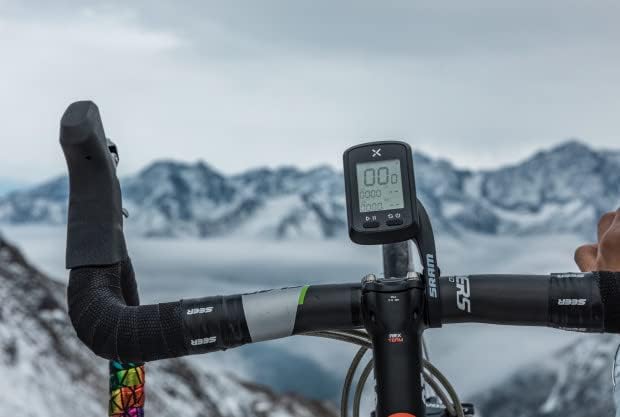
Image: XOSS app integration with Strava and TrainingPeaks.
Video: Illustrates how to connect the XOSS G+ bike computer to the XOSS app and perform settings.
6. Техникалык шарттар
| Өзгөчөлүк | Спецификация |
|---|---|
| Screen Size | 1.8 дюйм |
| Батареянын иштөө мөөнөтү | 25 саат |
| GPS | GPS/Glonass/Galileo |
| Зымсыз байланыш | Bluetooth BLE 5.0, ANT |
| Суу өткөрбөйт рейтинги | IPX7 |
| Экран түрү | LCD дисплей |
| Батарея түрү | Кайра заряддалуучу литий батареясы |
| Операция ыкмасы | Buttons |
| Sharing Platform | XOSS/Strava/TrainingPeaks |
| Дисплей маалыматтар | Speed, Max Speed, Average Speed, Heart Rate, Max Heart Rate, Average Heart Rate, Cadence, Max Cadence, Average Cadence, Exercise Time, Altitude, Clock, Mileage, Slope, Total Mileage |
| Монтаж түрү | Рул монтажы |
7. Кыйынчылыктарды
- Why no GPS signal is found?
Please verify the following: 1. You are using it in an outdoor environment (no obstructions above); 2. You’ve stayed still for a few minutes to find the signal faster. - How to switch km/mile?
Two methods: A. Open the bike computer and connect through the XOSS APP, click "Settings-Unit-Save"; B. Long press the left and right buttons to enter the P2 interface and press the left button to switch. - Can it be used on indoor spinning bikes or cycling platforms?
No, this device is designed for outdoor use with GPS functionality. - How to set the wheel diameter when using the speedometer?
Long press the left and right buttons to enter the P1 interface and press the left button to set wheel diameter. - What is the problem with DFU displayed on the screen?
There may be firmware bugs. Please contact XOSS support for assistance.
8. Кепилдик жана колдоо
XOSS products come with a one-year warranty. If you encounter any problems or have questions regarding your XOSS G+ GPS Bike Computer, please feel free to contact us through email or other available channels. We are committed to providing support and will do our best to resolve any issues you may experience.


