1. Киришүү
This manual provides detailed instructions for the safe and effective operation of your KAIWEETS KT360A Self-Leveling 3D Laser Level. Please read this manual thoroughly before using the device and retain it for future reference.
The KAIWEETS KT360A is a versatile 3D laser level designed for various construction and alignment tasks, featuring three 360-degree laser planes (one horizontal, two vertical) for comprehensive coverage.
2. Коопсуздук маалыматы
ЭСКЕРТҮҮ: This device emits laser radiation. Avoid direct eye exposure to the laser beam. Staring directly into the laser beam can cause eye injury.
- Do not disassemble the laser level. Repairs should only be performed by authorized service personnel.
- Аппаратты күйүүчү суюктуктар, газдар же чаң бар сыяктуу жарылуучу чөйрөдө иштетпеңиз.
- Аппаратты балдар жетпеген жерде сактаңыз.
- Use only specified batteries and charging accessories.
- Кокустан кыймылдап кетпеши үчүн, түзмөктү иштетүүдөн мурун туруктуу экенине ынаныңыз.
3. Пакеттин мазмуну
Пакетиңизде бардык буюмдар бар экенин текшериңиз:
- KAIWEETS KT360A Laser Level
- Lithium-ion Rechargeable Battery (installed)
- Laser Target Plate
- Ткани баштык
- User Manual
- Магниттик стенд
- USB Type-C кубаттоочу кабель
- Кубаттуу адаптер

Image: KAIWEETS KT360A Laser Level and its included accessories: laser unit, rechargeable battery, power adapter, USB-C charging cable, laser target plate, and a fabric carrying bag.
4. Продукциянын өзгөчөлүктөрү
- 3 x 360° Laser Lines: One horizontal and two vertical 360-degree laser planes for comprehensive leveling and alignment.
- Green Laser Technology: Offers 4 times better visibility and increased accuracy compared to red lasers.
- Self-Leveling Function: Automatically levels within ±4 degrees. Ensures fast and error-free work.
- Кол режими: Allows locking the pendulum for projecting lines at any angle.
- Импульс режими: Extends the working range up to 196ft/60m with a laser detector (not included) under 20000lux illuminance.
- Батареянын узак иштөө мөөнөтү: Equipped with a 3.7V x 7.5Ah (27.75Whr) lithium-ion rechargeable battery, providing over 20 hours of continuous operation.
- Күчтүү дизайн: IP54 waterproof and dustproof housing for durability in various working conditions.
- Magnetic Stand: Includes a 360° rotating magnetic bracket for versatile mounting options.

Image: The KAIWEETS KT360A laser level projecting bright green 360-degree laser lines, highlighting its visibility and comprehensive coverage.

Сүрөт: An overview of the KAIWEETS KT360A's key features, including its 3D green rotary laser, 4X visibility compared to red lasers, three 360-degree laser planes, 20-hour battery life, and IP54 rating for dust and water resistance.
5. Орнотуу
5.1 Батареяны орнотуу жана заряддоо
- The lithium-ion battery is typically pre-installed. If not, open the battery compartment and insert the battery, ensuring correct polarity.
- To charge the battery, connect the USB Type-C charging cable to the laser level and a compatible power adapter.
- The smart LED indicator on the battery will show the charging status. All four lights indicate a full charge.

Сүрөт: Жакын план view of the KAIWEETS KT360A's battery, highlighting its waterproof design, smart LED charge indicator, and Type-C charging port with 5V/2A input specifications.
5.2 Монтаждоо параметрлери
- Magnetic Stand: Attach the laser level to the included magnetic stand. The stand allows 360° rotation and can be securely fastened to metal surfaces.
- Tripod орнотуу: The device features a standard tripod thread at its base, allowing it to be mounted onto a compatible tripod (tripod not included).

Image: Demonstrates multiple ways of placing the KAIWEETS KT360A laser level, including mounting on its 360° rotating magnetic bracket and attaching it to a tripod.
6. Иштөө нускамалары
6.1 Күйгүзүү/өчүрүү жана режимди тандоо
- Күйгүзүү: Slide the pendulum lock switch to the unlocked position (АЧУУ icon). The device will power on and enter self-leveling mode, projecting horizontal and vertical lines.
- Өзүн-өзү тегиздөө режими: When the pendulum is unlocked, the device automatically self-levels within ±4°. If the tilt exceeds this range, the laser lines will flash rapidly to indicate an out-of-level condition. Adjust the device's position until the lines stabilize.
- Manual Mode (Locked Mode): To use the device for projecting lines at an angle, slide the pendulum lock switch to the locked position (БУЛПОО icon) while the device is off. Then press the power button. The laser lines will be projected, and the self-leveling function will be disabled, allowing for angled lines. The laser lines may flash slowly in this mode to indicate it is not self-leveling.
- Switching Laser Planes: Use the dedicated button(s) on the device to cycle through different laser line combinations (e.g., horizontal only, vertical only, all lines).
- Импульс режими: Press the pulse mode button (often indicated by a 'P' or receiver icon) to activate pulse mode. This mode is used with a laser detector (receiver) for outdoor use or in bright conditions to extend the working range.
- Өчүрүү: Slide the pendulum lock switch to the locked position (БУЛПОО icon). This secures the pendulum for transport and storage.

Image: A close-up of the control panel indicators, showing symbols for battery status, self-leveling mode, and manual mode (locked pendulum).

Image: A close-up of the control panel, specifically highlighting the pulse mode indicator, which is used when pairing with a laser receiver.

Image: Illustrates the two main operating modes: Manual Mode for fixed, angled lines, and Self-Leveling Mode for automatic leveling within ±4 degrees.
6.2 Колдонмо Examples

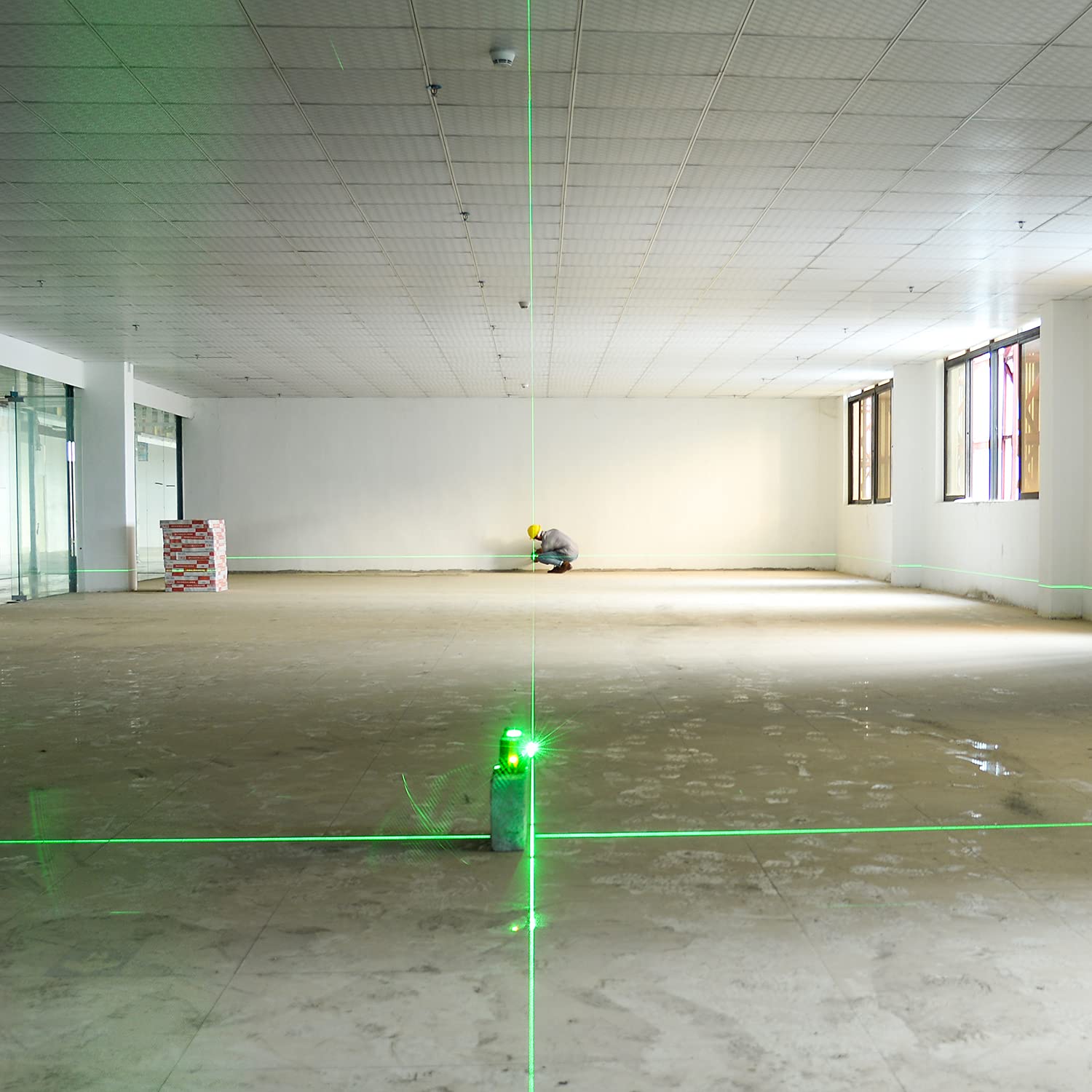
7. Техникалык тейлөө
- Тазалоо: жумшак колдонуу, damp Түзмөктү тазалоо үчүн чүпүрөктү колдонуңуз. Абразивдүү тазалоочу каражаттарды же эриткичтерди колдонбоңуз.
- Сактагыч: When not in use, store the laser level in its fabric bag with the pendulum locked. Store in a dry, cool place, away from direct sunlight.
- Батареяга кам көрүү: Батареянын иштөө мөөнөтүн сактоо үчүн, түзмөк көп колдонулбаса да, батареяны үзгүлтүксүз кубаттап туруңуз. Батареянын узак убакыт бою толук зарядын жоготпоңуз.
- Калибрлөө текшерүү: Periodically check the accuracy of the laser level. Refer to professional calibration services if accuracy deviates significantly.
8. Кыйынчылыктарды
| Көйгөй | Мүмкүн себеп | Чечим |
|---|---|---|
| Лазердик сызыктар тез жарк этүүдө. | Device is out of its self-leveling range (±4°). | Place the device on a more level surface or adjust its position until the lines stabilize. |
| Лазер сызыктары күңүрт же сыртта көрүнбөйт. | Bright ambient light or device is not in pulse mode. | Activate pulse mode and use a laser detector (receiver) for improved visibility and range. |
| Түзмөк күйбөйт. | Low battery or pendulum is locked. | Charge the battery. Ensure the pendulum lock switch is in the unlocked position. |
| Лазердик сызыктар түз же так эмес. | Device is in manual mode or requires calibration. | Ensure the device is in self-leveling mode (pendulum unlocked). If issues persist, contact customer support for calibration. |
9. Техникалык шарттар
| Өзгөчөлүк | Деталь |
|---|---|
| Бренд | KAIWEETS |
| Модель номери | KT360A |
| Лазердик түс | Жашыл |
| Laser Configuration | 3 x 360° (1 Horizontal, 2 Vertical) |
| Өз алдынча тегиздөө диапазону | ±4° |
| Тегиздөөнүн тактыгы | ±3mm / 10m |
| Working Range (with detector) | Up to 196ft / 60m (under 20000lux illuminance) |
| Батарея түрү | 3.7V x 7.5Ah (27.75Whr) Lithium-ion |
| Иштөө убактысы | 20 сааттан ашык |
| IP рейтинги | IP54 (Суу жана чаң өткөрбөйт) |
| Материал | Acrylonitrile бутадиен Styrene |
| Продукциянын өлчөмдөрү (болжол менен) | 13.9L x 9.9W x 11.8H см (5.47L x 3.89W x 4.64H дюйм) |
| Элемент Салмагы | 1.05 килограмм (1050 грамм) |
| UPC | 780007466879 |

Image: Dimensions of the KAIWEETS KT360A laser level, showing its length as 5.47 inches, width as 3.89 inches, and height as 4.64 inches.
10. Кепилдик жана колдоо
The KAIWEETS KT360A Laser Level comes with a 3 жылдык тейлөө кепилдиги as stated in the product features. For technical support, warranty claims, or service inquiries, please contact KAIWEETS customer service through their official channels or the retailer where the product was purchased.
Кепилдикти текшерүү үчүн сатып алганыңыздын далилин сактап коюңуз.


