1. Киришүү
The eKids Frozen 2 Bluetooth Karaoke Machine with Light Show is designed to provide an interactive music experience. This portable device allows users to stream audio wirelessly via Bluetooth, sing along with the included wired microphone, and expand content through a USB port. It features a multi-colored LED light show and built-in memory for storing music.
2. Кутуда эмне бар
- Bluetooth MP3 Karaoke Machine
- Зымдуу микрофон
- USB заряддоо кабели
3. Продукциянын өзгөчөлүктөрү
- Bluetooth байланышы: Connect to any compatible Bluetooth device to stream audio wirelessly.
- Зымдуу микрофон: Includes one real working wired microphone for singing along. An additional mic jack is available for a second microphone (sold separately).
- USB аудио ойноткуч: Features a USB port to play MP3 files from a USB flash drive (not included).
- Жазуу функциясы: Record performances while singing along to streaming music. Requires a USB flash drive (not included).
- Multi-colored LED Light Show: Integrated light show to enhance the performance experience.
- Камтылган эстутум: Store hours of music directly on the device.
- Кайра заряддалуучу батарея: Portable design with a built-in rechargeable battery for on-the-go use.

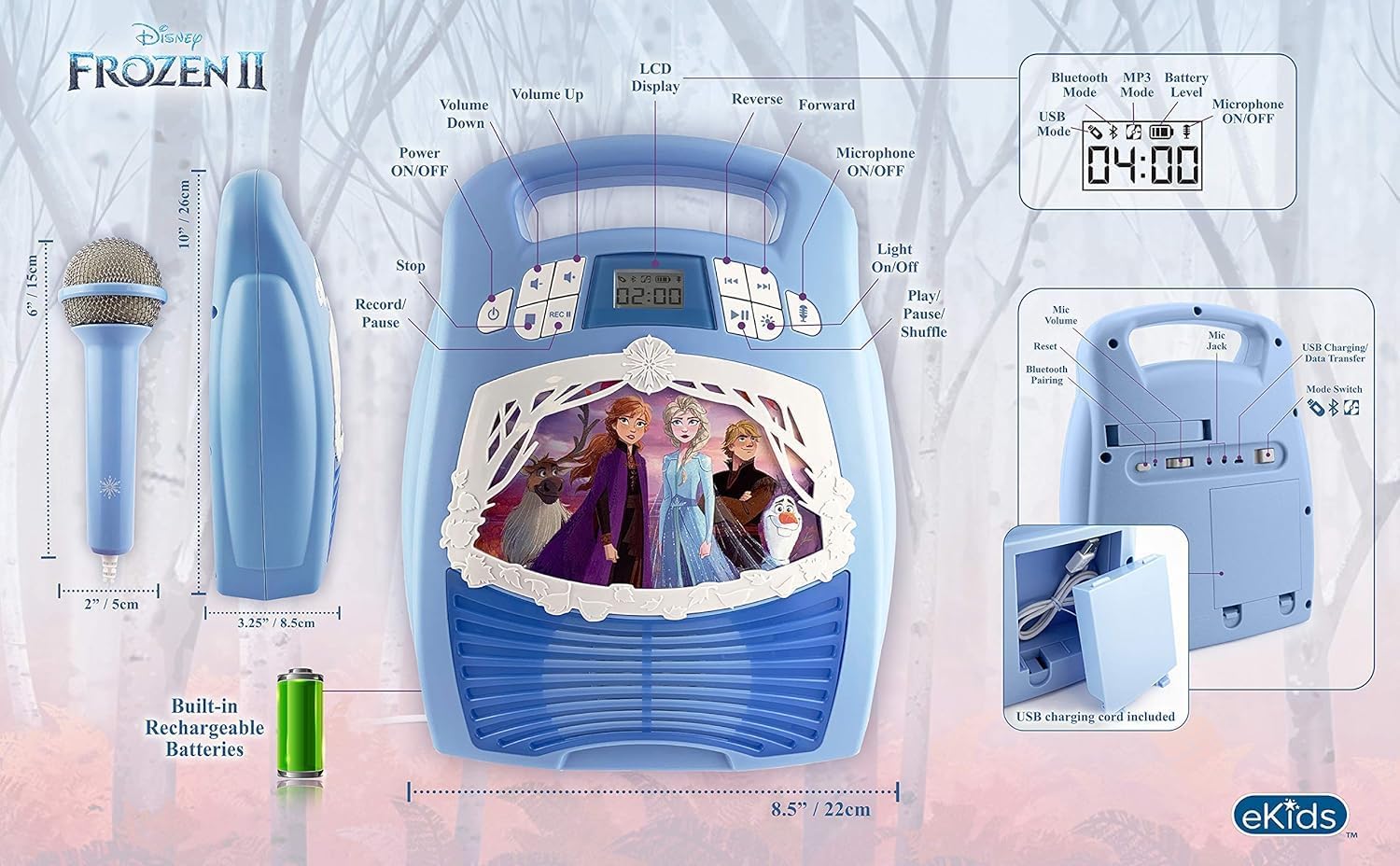
Figure 1: ашыкview of the Karaoke Machine's Controls and Features.

Figure 2: Bluetooth Compatibility with various devices.
4. Орнотуу
4.1 Агрегатты кубаттоо
The karaoke machine operates on a built-in rechargeable battery. Ensure the unit is fully charged before first use for optimal performance.
- Connect the supplied USB charging cable to the USB charging port on the back of the unit.
- USB кабелинин экинчи учун стандарттуу USB кубат адаптерине (кошулмада жок) же кубаттуу USB портуна туташтырыңыз.
- The charging indicator will illuminate. Allow sufficient time for a full charge.
4.2 Микрофонду туташтыруу
The wired microphone connects to the microphone jack on the unit.
- Locate the microphone jack on the side or back of the karaoke machine.
- Insert the microphone plug firmly into the jack.

Figure 3: Karaoke Machine with Microphone Connected.
5. Иштөө нускамалары
5.1 Күйгүзүү/өчүрүү
басып, кармап туруңуз Күч button located on the control panel to turn the unit on or off.
5.2 Bluetooth жупташтыруу
- Turn on the karaoke machine. The Bluetooth indicator on the display will flash, indicating it is in pairing mode.
- Bluetooth иштетилген түзмөгүңүздө (смартфон, планшет ж.б.) Bluetooth жөндөөлөрүнө өтүп, Bluetooth'ду иштетиңиз.
- Select "eKids Frozen 2 Karaoke" (or similar name) from the list of available devices.
- Жупташтырылгандан кийин, Bluetooth индикатору күйүп-өчүүсүн токтотуп, туруктуу бойдон калат. Эми түзмөгүңүздөн аудиону агылта аласыз.
5.3 Playing Music via USB
- MP3 камтыган USB флэш-дискти салыңыз files аппараттагы USB портуна.
- The unit should automatically switch to USB mode and begin playing music. If not, press the Mode USB режимин тандоо үчүн баскыч.
- колдонуу Ойнотуу/Тыныгуу, Кийинки трек, жана Мурунку трек ойнотууну башкаруу үчүн баскычтар.
5.4 Микрофонду колдонуу
- Ensure the microphone is securely plugged into the mic jack.
- басыңыз Микрофон ON / OFF button to activate the microphone.
- Adjust the microphone volume using the dedicated volume controls if available, or the main volume controls.
5.5 Жарык шоу
басыңыз Жарык КҮЙГҮЗҮҮ/ӨЧҮРҮҮ button to activate or deactivate the multi-colored LED light show.
5.6 Жаздыруу аткаруулары
To record your singing, a USB flash drive (not included) must be inserted into the USB port.
- Ensure a USB flash drive is inserted.
- Start playing your desired music (via Bluetooth or USB).
- басыңыз REC жазууну баштоо үчүн баскыч.
- Микрофонго ырда.
- басыңыз REC button again to stop recording. Your performance will be saved to the USB flash drive.
6. Техникалык тейлөө
- Агрегатты жумшак, кургак чүпүрөк менен тазалаңыз. Абразивдүү тазалагычтарды же эриткичтерди колдонбоңуз.
- Аппаратты күндүн түз тийген нурунан, жылуулук булактарынан жана нымдуулуктан алыс кармаңыз.
- Store the microphone in its designated compartment on the back of the unit when not in use to prevent loss or damage.
4-сүрөт: Арткы view with microphone storage compartment.
7. Кыйынчылыктарды
- Кубат жок: Ensure the unit is charged. Connect the USB charging cable and allow it to charge.
- Үн жок: Check the volume levels on both the karaoke machine and your connected Bluetooth device. Ensure the microphone is turned on if using it.
- Bluetooth туташпай жатат: Make sure Bluetooth is enabled on your device and the karaoke machine is in pairing mode. Try restarting both devices. Ensure no other devices are currently connected to the karaoke machine.
- Микрофон иштебейт: Verify the microphone is securely plugged into the correct jack and the microphone ON/OFF button is activated.
- Жаздыруу маселелери: Ensure a compatible USB flash drive is inserted and has sufficient free space.
8. Техникалык шарттар
| Өзгөчөлүк | Деталь |
|---|---|
| Продукциянын өлчөмдөрү | 8 x 3 x 10 дюйм |
| Элемент Салмагы | 2.64 фунт |
| Модель номери | FR-553v9M |
| Сунушталган Жаш | 3 - 35 ай |
| Батареялар | 3 AA батарейкасы талап кылынат (кошулган) - Note: Product description also mentions built-in rechargeable battery. Please refer to packaging for exact battery type. |
| Өзгөчө өзгөчөлүк | Портативдик, заряддоого болгон |
| Түс | Older Version |
| Өндүрүүчү | KIDdesigns |
9. Коопсуздук маалыматы
Please read and follow all safety instructions provided with the product packaging. This product is intended for use by children aged 3 and up, under adult supervision.
10. Кепилдик жана колдоо
Бул продукт менен келет Бир жылдык Чектелген Кепилдик. For warranty claims or technical support, please refer to the contact information provided in your product packaging or visit the eKids official webсайт.
11. Продукт видеосу
Video 1: An official product video from KIDdesigns, Inc. showcasing the eKids Frozen 2 Bluetooth Karaoke Machine with Light Show, highlighting its features and design.


