1. Киришүү
This manual provides essential information for the setup, operation, maintenance, and troubleshooting of your ViewSonic VX2758-2KP-MHD 27-inch WQHD 144Hz IPS Gaming Monitor. Please read this manual thoroughly before using the product to ensure optimal performance and safety.
The ViewSonic VX2758-2KP-MHD is designed for gaming and entertainment, offering a 27-inch WQHD (2560x1440p) IPS panel with a 144Hz refresh rate and 1ms (MPRT) response time. It features AMD FreeSync Premium technology to reduce screen tearing and stuttering, and includes Eye Care features for extended viewing comfort. Connectivity options include HDMI and DisplayPort.

2. Пакеттин мазмуну
Төмөндө көрсөтүлгөн бардык буюмдар продуктуңуздун таңгагында камтылганын текшериңиз. Эгерде кандайдыр бир буюмдар жок болсо же бузулуп калса, сатуучуга кайрылыңыз же ViewSonic кардарларды колдоо.
- LCD монитор (ViewSonic VX2758-2KP-MHD)
- Электр кабели
- HDMI кабели
- Аудио кабель
- Quick Start Guide

3. Орнотуу
3.1 Стендди чогултуу
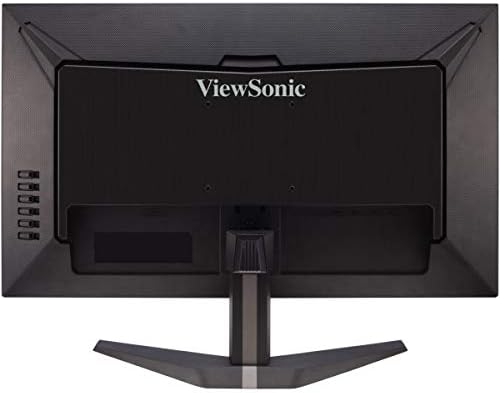
Carefully remove the monitor from its packaging. Attach the stand base to the stand neck, then secure the assembled stand to the back of the monitor. Ensure all screws are tightened appropriately to prevent instability.
3.2 Мониторду туташтыруу
Connect the monitor to your computer or other video source using the appropriate cables. The VX2758-2KP-MHD supports HDMI and DisplayPort connections.
- Кубат туташуу: Кубат кабелин монитордун кубат киресине, андан кийин розеткага туташтырыңыз.
- Видео туташуу: Use either an HDMI cable or a DisplayPort cable to connect your computer's graphics card to the corresponding port on the monitor. For optimal performance, especially at 144Hz and WQHD resolution, a DisplayPort connection is recommended.
- Аудио туташуусу: If you wish to use external speakers or headphones, connect the audio cable from the monitor's audio output to your audio device.

4. Мониторду иштетүү
4.1 Күйгүзүү/өчүрүү
Аны күйгүзүү же өчүрүү үчүн монитордун ылдыйкы оң жагында жайгашкан кубат баскычын басыңыз. Монитор күйүп турганда кубат индикаторунун жарыгы күйөт.
4.2 Экрандагы дисплей (OSD) менюсу
The OSD menu allows you to adjust various monitor settings. Use the control buttons on the right side of the monitor to navigate the menu.
- Экранды ачуу үчүн меню баскычын басыңыз.
- Меню параметрлери боюнча жылдыруу үчүн өйдө/ылдый баскычтарын колдонуңуз.
- Кошумча менюга кирүү же тандоону ырастоо үчүн тандоо баскычын басыңыз.
- Артка кайтуу же экрандык дисплейди жабуу үчүн чыгуу баскычын басыңыз.

4.3 Негизги өзгөчөлүктөр жана орнотуулар
- Киргизүүнү тандоо: Choose between HDMI 1, HDMI 2, or DisplayPort inputs.
- ViewРежим: Select from various preset display modes optimized for different content types (e.g., Standard, Game, Movie, Web, Текст, Моно).
- Түс тууралоо: Fine-tune brightness, contrast, color temperature, and gamma settings.
- Аудио тууралоо: Control volume and mute settings for the integrated speakers or audio output.
- Оюн режими: Access specific game modes (FPS, RTS, MOBA) for optimized visual settings.
- FreeSync Premium: Enable or disable AMD FreeSync Premium for tear-free gaming. Ensure your graphics card supports FreeSync and is connected via DisplayPort or compatible HDMI.
- Жооп убактысы (MPRT): Adjust the monitor's response time for reduced motion blur. The 1ms MPRT setting provides the fastest response.

Төмөнкү видеодо толук маалымат берилетview -ныкы ViewSonic VX58 Series, which includes the VX2758-2KP-MHD, showcasing its features and benefits for an incredible gaming experience.
5. Техникалык тейлөө
5.1 Мониторду тазалоо
Монитордун экранын тазалоо үчүн аны жумшак, түксүз чүпүрөк менен акырын сүртүңүз. өжөр белгилери үчүн, жеңил гampen the cloth with water or a mild, non-abrasive screen cleaner. Avoid using harsh chemicals, alcohol, or ammonia-based cleaners, as these can damage the screen surface.
5.2 Жалпы кам көрүү
Keep the monitor in a well-ventilated area. Avoid exposing it to direct sunlight, excessive heat, or moisture. Do not block the ventilation openings on the monitor. When moving the monitor, handle it carefully to prevent damage.
6. Кыйынчылыктарды
Мониторуңузда көйгөйлөргө туш болсоңуз, төмөнкү жалпы көйгөйлөрдү жана чечимдерди караңыз:
- Кубат жок: Кубат кабелинин мониторго жана иштеп жаткан розеткага бекем туташтырылганын текшериңиз. Кубат индикаторунун жарыгы күйүп турганын текшериңиз.
- Сигнал жок: Видео кабелдин (HDMI же DisplayPort) мониторго да, компьютериңизге да туура туташканын текшериңиз. OSD менюсунда туура киргизүү булагынын тандалганын текшериңиз.
- Image Flickering: This can sometimes be related to cable quality, graphics card drivers, or FreeSync settings. Try using a different, high-quality DisplayPort cable. Update your graphics card drivers. Experiment with FreeSync settings (on/off) or different overdrive settings in the OSD.
- Туура эмес чечим/жаңылоо ылдамдыгы: Check your computer's display settings to ensure the resolution is set to 2560x1440 and the refresh rate to 144Hz. Ensure your video cable and graphics card support these settings.
- Сүрөттүн сапаты начар: Adjust brightness, contrast, and color settings in the OSD menu. Ensure the monitor is set to its native resolution.
Эгерде бул кадамдарды жасагандан кийин көйгөй чечилбесе, биз менен байланышыңыз ViewSonic кардарларды колдоо.
7. Техникалык шарттар
Below are the key technical specifications for the ViewSonic VX2758-2KP-MHD monitor:
| Өзгөчөлүк | Спецификация |
|---|---|
| Бренд | ViewSonic |
| Модель номери | VX2758-2KP-MHD |
| Screen Size | 27 дюйм |
| Screen Resolution | WQHD (2560x1440) |
| Max Screen Resolution | 2560 x 1440 пиксел |
| Жаңыртуу ылдамдыгы | 144Hz |
| Жооп убактысы | 1 мс (MPRT) |
| Панел түрү | IPS |
| Аспект катышы | 16:9 |
| Байланыш | HDMI, DisplayPort |
| Өзгөчөлүктөрү | FreeSync Premium, Eye Care (Flicker-Free, Blue Light Filter) |
| Элемент Салмагы | 11.66 фунт |
| Продукциянын өлчөмдөрү | 24.2 x 17.7 x 7.4 дюйм |

8. Кепилдик жана колдоо
8.1 Кепилдик маалыматы
ViewSonic products are manufactured to the highest standards and deliver high-quality performance. For specific warranty details regarding your VX2758-2KP-MHD monitor, please refer to the warranty card included in your product package or visit the official ViewSonic webсайт.
8.2 Кардарларды колдоо
If you require technical assistance or have questions about your monitor, please contact ViewSonic customer support. Contact information can typically be found on the ViewSonic webсайтында же продуктуңуз менен кошо берилген Тез баштоо колдонмосунда.


