1. Киришүү
This manual provides detailed instructions for the safe and efficient operation of your Auna Sarah Ann multi-functional audio system. Please read this manual thoroughly before using the device and retain it for future reference.
The Auna Sarah Ann is a versatile audio system featuring a 3-speed turntable, CD player, cassette player, DAB+ and FM radio, Bluetooth connectivity, USB and SD card playback, AUX input, and headphone output. It also includes integrated stereo speakers and a remote control for convenient operation.
2. Коопсуздук нускамалары
- Колдонуудан мурун бардык нускамаларды кунт коюп окуп чыгыңыз.
- Аппаратты жылуулук булактарынан, түз тийген күн нурунан, нымдуулуктан, суудан жана башка суюктуктардан алыс кармаңыз.
- Электр шокунан, жарылуудан жана/же өзүңүздүн жаракатыңыздан жана аппараттын бузулушунан сактануу үчүн ага суу, ным же башка суюктуктар тийген болсо, аны иштетпеңиз.
- Эгерде ал кулап түшкөн же кандайдыр бир жол менен бузулган болсо, аны колдонбоңуз.
- Электр жабдууларын оңдоону квалификациялуу электрик гана жүргүзүшү керек. Туура эмес оңдоо колдонуучуну олуттуу коркунучка дуушар кылышы мүмкүн.
- Агрегатты ным кол менен колдонбоңуз.
- Эч кандай тешиктерге нерселерди салбаңыз.
- Агрегатты чаңдан, түктөн, чачтан ж.б. таза кармаңыз.
- Бул аппаратты максаттуу колдонуудан башка эч нерсе үчүн колдонбоңуз.
- Агрегатты балдар жетпеген жерде сактаңыз.
3. Пакеттин мазмуну
- Auna Sarah Ann Multi-functional Audio System
- Алыстан башкаруу
- 45 RPM адаптери
- Колдонуучунун Колдонмосу (бул документ)
4. Продукт бүтүп калдыview
The Auna Sarah Ann combines classic audio playback with modern connectivity options.

Сүрөт 4.1: Алдыңкы view of the Auna Sarah Ann audio system, displaying the turntable, control panel, CD tray, and integrated speakers. A remote control and a smartphone connected via Bluetooth are also shown.
4.1 Негизги өзгөчөлүктөрү
- 3 ылдамдыктагы айланма дөңгөлөк: Supports 33 1/3, 45, and 78 RPM records. Includes a 45 RPM adapter.
- Интеграцияланган стерео динамиктер: Так аудио чыгарууну камсыз кылат.
- Bluetooth байланышы: Шайкеш түзмөктөрдөн зымсыз аудио агымын өткөрүңүз.
- CD ойноткуч: For playback of audio CDs.
- Кассета ойноткуч: For playback of audio cassettes.
- DAB+ жана FM радиосу: Digital and analog radio reception.
- USB жана SD карта уячалары: MP3 ойнотуу жана жаздыруу үчүн.
- AUX киргизүү: Connect external audio sources via 3.5mm jack.
- Гарнитуранын чыгышы: For private listening via 3.5mm jack.
- RCA Line Out: Тышкы туташуу ampкөтөргүчтөр же кубаттуу динамиктер.
- Алыстан башкаруу: Ыңгайлуу операция алыстан.
- Автоматтык токтотуу функциясы: Protects vinyl records by stopping the turntable when a record finishes.
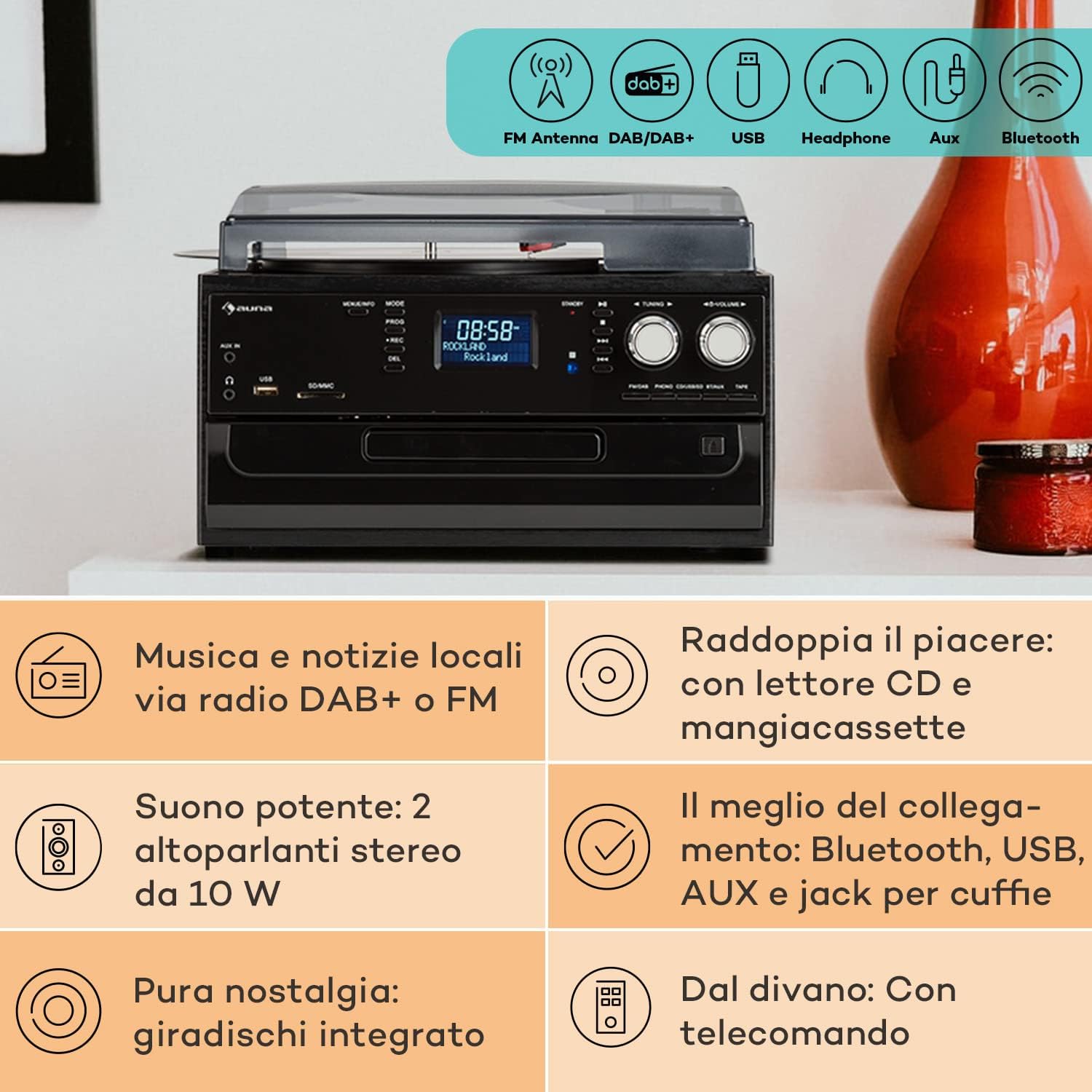
Image 4.2: Visual representation of the various connectivity options available on the Auna Sarah Ann, including FM/DAB+ radio, USB, headphone jack, AUX input, and Bluetooth.
5. Орнотуу
5.1 Пакеттен чыгаруу жана жайгаштыруу
- Агрегатты таңгагынан кылдаттык менен чыгарыңыз.
- Place the unit on a stable, level surface, away from direct sunlight, heat sources, and excessive dust or moisture.
- Агрегаттын айланасында жетиштүү желдетүүнү камсыз кылыңыз.
5.2 Кубат туташтыруу
Connect the power cable to the AC inlet on the back of the unit and then to a standard 230V, 50Hz wall outlet.
5.3 Алыстан башкаруунун батареясын орнотуу
The remote control requires 2 x AAA batteries (not included). Open the battery compartment on the back of the remote control, insert the batteries according to the polarity indicators, and close the compartment.
5.4 Антеннаны туташтыруу
The unit features an integrated FM antenna. For optimal DAB+ and FM radio reception, ensure the unit is placed in an area with good signal strength. Adjust the unit's position if reception is poor.
5.5 Connecting External Devices (Optional)
- Наушник: Plug 3.5mm headphones into the headphone jack on the front panel.
- External Audio Source (AUX IN): Connect an external audio device (e.g., MP3 player, smartphone) to the AUX IN jack on the front panel using a 3.5mm audio cable.
- Тышкы Amplifier/Speakers (RCA LINE OUT): Connect the RCA LINE OUT jacks on the rear of the unit to the audio input of an external amplifier or powered speakers using an RCA cable.
6. Иштөө нускамалары
6.1 Негизги операция
- басыңыз КҮЧ баскычын басыңыз.
- колдонуу РЕЖИМ button on the unit or remote control to select the desired function (PHONO, CD, TAPE, USB, SD, AUX, FM, DAB, Bluetooth).
- Үнүн колдонуп, үнүн жөндөңүз VOLUME knob on the unit or the VOL +/- алыстан башкаруудагы баскычтар.
6.2 Turntable Operation (PHONO)

Сүрөт 6.1: Детальдуу view of the turntable section, showing the platter, tonearm, and a vinyl record in place, highlighting the classic playback functionality.
- Чаң капкагын көтөрүңүз.
- Айлануучу табактын үстүнө винил пластинкасын коюңуз.
- Select the appropriate speed (33, 45, or 78 RPM) using the speed selector switch. Use the 45 RPM adapter for singles if needed.
- Колдун кулпусун бошотуңуз.
- Gently lift the tonearm and position the stylus over the desired track of the record.
- Тонометрди жай жаздырууга түшүрүңүз. Ойнотуу башталат.
- The automatic stop function will stop the turntable when the record finishes. To disable/enable this, refer to the specific switch on the unit (if present, usually labeled "AUTO STOP").
- At the end of playback, gently lift the tonearm, return it to its rest, and engage the tonearm lock.
6.3 CD Player Operation (CD)
- басыңыз РЕЖИМ баскычын басып, CD режимин тандаңыз.
- басыңыз АЧУУ/ЖАБУУ баскычын басыңыз.
- CD дискти этикеткасы бар тарабын өйдө каратып, лотокко салыңыз.
- басыңыз АЧУУ/ЖАБУУ button again to close the tray. The unit will read the CD.
- Басыңыз ОЙНОО/ТЫНЫТТЫРУ ойнотууну баштоо же тындыруу үчүн.
- Колдонуу АЛДЫГА/АРТКАГА ӨТКӨРҮҮ тректерди өтүү үчүн баскычтар.
- Басыңыз ТОКТОТ ойнотууну аяктоо үчүн.
6.4 Cassette Player Operation (TAPE)
- басыңыз РЕЖИМ button to select TAPE mode.
- Insert a cassette tape into the side cassette slot.
- Use the cassette control buttons (PLAY, STOP/EJECT, FWD, REW) to operate the cassette player.
6.5 Радио аркылуу иштөө (DAB+/FM)
- басыңыз РЕЖИМ FM же DAB режимин тандоо үчүн баскыч.
- FM режиминде басып, кармап туруңуз TUNING +/- buttons for automatic station search, or press briefly for manual tuning.
- In DAB mode, the unit will automatically scan for available stations. Use the TUNING +/- buttons to navigate through the station list.
- To save a station, refer to the manual's specific instructions for preset functions (usually involving a "PROG" or "MEMORY" button).
6.6 Bluetooth операциясы

Image 6.2: Demonstrates wireless music streaming via Bluetooth from a smartphone to the audio system, and the use of a USB drive for digital media playback.
- басыңыз РЕЖИМ button to select Bluetooth mode. The display will show "BT" or "Bluetooth" and the unit will enter pairing mode, indicated by a flashing Bluetooth icon.
- Bluetooth иштетилген түзмөгүңүздө (смартфон, планшет ж.б.) Bluetooth'ду иштетиңиз жана жеткиликтүү түзмөктөрдү издеңиз.
- Select "Auna Sarah Ann" (or similar name) from the list of devices.
- Once paired, the Bluetooth icon will stop flashing, and you can play music from your device through the Auna Sarah Ann.
6.7 USB/SD Card Operation
- Insert a USB flash drive into the USB port or an SD card into the SD/MMC slot.
- басыңыз РЕЖИМ button to select USB or SD mode. The unit will automatically detect and begin playing MP3 files.
- Колдонуу АЛДЫГА/АРТКАГА ӨТКӨРҮҮ тректерди өтүү үчүн баскычтар.
- колдонуу Папка button on the remote to navigate through folders (if applicable).
- MP3 Recording: The unit supports recording from other sources (e.g., vinyl, CD, radio) to USB/SD. Press the REC button to start recording. Manual title division is available during recording. Refer to the full manual for detailed recording instructions.
6.8 AUX киргизүү операциясы
- Connect your external audio device to the AUX IN jack using a 3.5mm audio cable.
- басыңыз РЕЖИМ AUX режимин тандоо үчүн баскычты басыңыз.
- Control playback from your external device. The volume can be adjusted on the Auna Sarah Ann unit.
7. Техникалык тейлөө
7.1 Агрегатты тазалоо
- Тазалоодон мурун аны дайыма электр розеткасынан сууруп алыңыз.
- Сырткы беттерди сүртүү үчүн жумшак, кургак чүпүрөктү колдонуңуз.
- Абразивдүү тазалагычтарды, момдорду же эриткичтерди колдонбоңуз, анткени алар финишке зыян келтириши мүмкүн.
- Чаңды каптоо үчүн жумшак чүпүрөктү жана зарыл болсо, жумшак, абразивдүү эмес тазалоочу каражатты колдонуңуз.
7.2 Айланма пластина стилусуна кам көрүү
- The stylus (needle) is a delicate component. Handle it with extreme care.
- Стилусту мезгил-мезгили менен жумшак щетка менен, артынан алдыга карай акырын сүртүп тазалап туруңуз.
- A worn stylus can damage records and degrade sound quality. Replace the stylus when signs of wear are apparent (e.g., distorted sound, skipping).
7.3 Жазууларды тейлөө
- Keep records clean and free of dust. Use a record brush before each play.
- Жазууларды жеңдеринде тигинен, ысыктан жана күндүн түз тийген таасиринен алыс сактаңыз.
8. Кыйынчылыктарды
If you experience problems with your Auna Sarah Ann, please consult the following table before seeking professional service.
| Көйгөй | Мүмкүн себеп | Чечим |
|---|---|---|
| Күч жок | Электр кабели туташкан эмес; Электр розеткалары активдүү эмес. | Электр кабели бекем туташтырылганын текшериңиз; Башка электр розеткасын колдонуп көрүңүз. |
| Үн жок | Үнү өтө төмөн; Туура эмес режим тандалды; Кулакчындар туташтырылган. | Increase volume; Select correct input mode; Disconnect headphones if using speakers. |
| Айлануучу таблица айланбайт | Unit not in PHONO mode; Auto-stop engaged and no record playing. | Select PHONO mode; Place a record and lower the tonearm. |
| Радио кабыл алуу начар | Weak signal; Antenna position. | Adjust unit position for better signal; Perform a new auto-scan for DAB+ stations. |
| Bluetooth жупташуу катасы | Түзмөк өтө алыс; тышкы түзмөктө Bluetooth иштетилген эмес; Түзмөк жупташтыруу режиминде эмес. | Ensure devices are within range; Enable Bluetooth on your device; Select Bluetooth mode on the Auna Sarah Ann. |
| Пульт иштебей жатат | Батареялар түгөнгөн же туура эмес салынган; Пульт менен блоктун ортосундагы тоскоолдук. | Replace batteries; Check battery polarity; Remove any obstructions. |
Бул чечимдерди колдонуп көргөндөн кийин көйгөй чечилбесе, кардарларды колдоо менен байланышыңыз.
9. Техникалык шарттар
| Өзгөчөлүк | Деталь |
|---|---|
| Бренд | AUNA |
| Модель аты | Sarah Ann |
| Продукциянын өлчөмдөрү (L x W x Y) | 30 x 32.5 x 21.5 см |
| Салмагы | 4.55 кг |
| Электр камсыздоо | 230V, 50Hz |
| Айлануучу ылдамдыктар | 33 1/3, 45, 78 RPM |
| Мотор түрү | Түздөн-түз Drive |
| Радио тюнер | DAB+, FM |
| Bluetooth колдоо | Ооба |
| Байланыш | USB Input, SD Input, AUX Input (3.5mm), Headphone Output (3.5mm), RCA Line Out |
| Аудио чыгаруу режими | Стерео |
| Алыстан башкаруунун батареялары | 2 x AAA (киргизилген эмес) |

Image 9.1: Visual representation of the unit's dimensions (length, width, height) and a summary of its various input/output connections.
10. Кепилдик жана колдоо
10.1 Кепилдик маалыматы
Your Auna Sarah Ann audio system comes with a manufacturer's warranty. Please refer to the warranty card or documentation included with your purchase for specific terms, conditions, and duration of the warranty. Keep your proof of purchase for warranty claims.
10.2 Кардарларды колдоо
For technical assistance, troubleshooting beyond this manual, or warranty inquiries, please contact Auna customer support. Contact details can typically be found on the Auna webсайтында же продуктунун таңгагында.


