1. Продукт бүтүп калдыview
The Schneider SC600SND is a versatile 2.0 channel soundbar designed to enhance your audio experience. It offers a total output power of 30W (15W x 2) and supports multiple connectivity options including Bluetooth, HDMI (ARC), Optical, and Aux. A unique feature of this soundbar is its convertible design, allowing it to be used as a single horizontal unit or split into two vertical speaker columns.

Image 1.1: The Schneider SC600SND Soundbar in its standard monoblock configuration.
2. Орнотуу
2.1 Пакеттен чыгаруу жана жайгаштыруу
Carefully remove all components from the packaging. Ensure you have the soundbar unit, remote control, and 3.5mm Jack cable.
The SC600SND soundbar offers two primary placement options:
- Monoblock Configuration: Use the soundbar as a single horizontal unit, ideal for placing below your television.
- Split Column Configuration: The soundbar can be separated into two vertical speaker columns. This allows for flexible placement on either side of your television or entertainment unit. To split, gently twist and pull the two halves apart at the central connection point. Attach the provided bases to each column for stability.

Image 2.1: Detail of the central connection point, allowing the soundbar to be split into two columns.
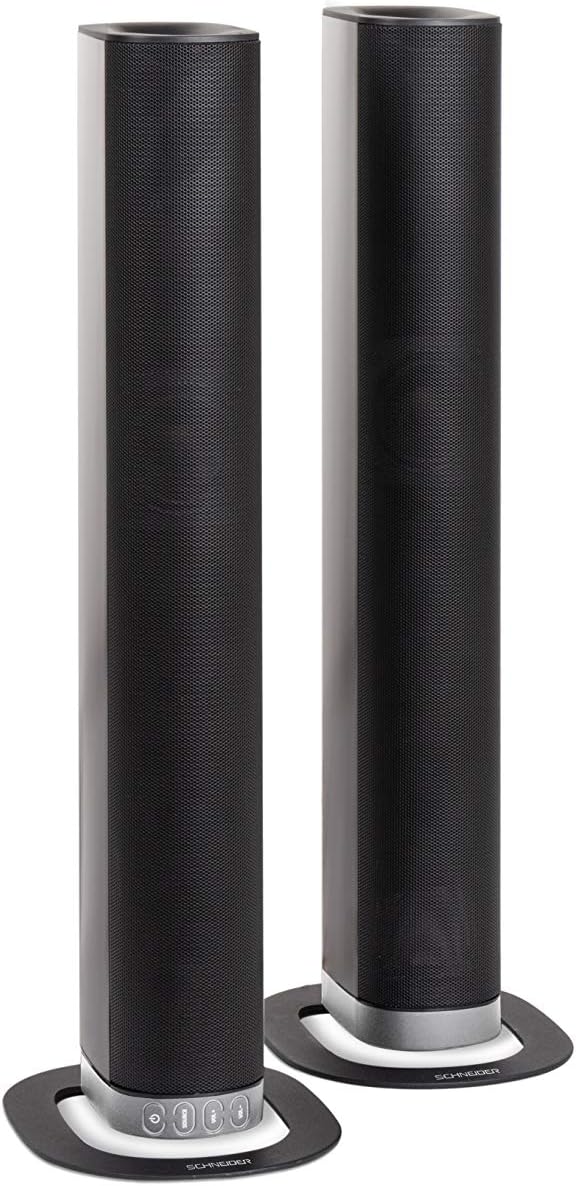
Image 2.2: The soundbar configured as two independent vertical speaker columns.
2.2 Кубатка туташуу
Connect the power cable to the soundbar's power input and then to a suitable wall outlet. The soundbar will enter standby mode.
2.3 Аудио байланыштар
Аудио булагын туташтыруу үчүн төмөнкү ыкмалардын бирин тандаңыз:
- HDMI (ARC): For optimal audio quality and control, connect an HDMI cable from the soundbar's HDMI ARC port to your TV's HDMI ARC port. This allows your TV remote to control the soundbar's volume.
- Оптикалык: Connect an optical cable from the soundbar's OPTICAL input to your TV's optical output.
- AUX: Use the included 3.5mm Jack cable to connect the soundbar's AUX input to the headphone jack or audio output of your device (e.g., TV, smartphone, MP3 player).
- Bluetooth: For wireless connection, refer to the Bluetooth pairing instructions in the Operating section.
3. Иштөө нускамалары
3.1 Күйгүзүү/өчүрүү
басыңыз Күч аппаратты күйгүзүү же өчүрүү үчүн саундбардагы же алыстан башкаруудагы баскычты басыңыз.
3.2 Булакты тандоо
басыңыз БУЛАК button on the soundbar or the remote control to cycle through the available input sources: Bluetooth (BT), HDMI (ARC), Optical, and AUX.

Image 3.1: On-unit control buttons for power, source selection, and volume adjustment.
3.3 Үндү башкаруу
колдонуу VOL+ жана VOL- buttons on the soundbar or remote control to adjust the volume. Press the БАСУУ аудиону убактылуу басуу үчүн пульттун баскычын басыңыз.
3.4 Bluetooth жупташтыруу
- Select Bluetooth as the source input. The soundbar will enter pairing mode, indicated by a flashing LED.
- Мобилдик түзмөгүңүздө (смартфон, планшет ж.б.) Bluetooth иштетип, жеткиликтүү түзмөктөрдү издеңиз.
- Select "SC600SND" from the list of devices.
- Once paired, the LED indicator on the soundbar will stop flashing and remain solid. You can now play audio wirelessly from your device.
3.5 Үн режимдери
The remote control includes dedicated buttons for different sound modes to optimize your listening experience:
- ЖАНЫЛЫКТАР: Enhances vocal clarity for news broadcasts and dialogue.
- КИНО: Provides a more immersive soundstagтасмалар үчүн e.
- МУЗЫКА: Музыка ойнотуу үчүн аудиону оптималдаштырат.

Image 3.2: The included remote control with dedicated buttons for power, source, volume, mute, and sound modes.
4. Техникалык тейлөө
Саундбарыңыздын узак иштөөсүн жана оптималдуу иштешин камсыз кылуу үчүн төмөнкү тейлөө көрсөтмөлөрүн аткарыңыз:
- Тазалоо: Use a soft, dry cloth to clean the exterior surfaces of the soundbar. Do not use liquid cleaners, aerosols, or abrasive materials, as these can damage the finish or internal components.
- Вентиляция: Ensure that the soundbar's ventilation openings are not blocked. Proper airflow prevents overheating.
- Сактагыч: Эгерде саундбарды узак убакытка сактап жатсаңыз, аны электр тармагынан сууруп, салкын, кургак жерде, күн нуру түз тийбеген жана өтө жогорку температурадан алыс сактаңыз.
- Колдонуу: Саундбарды түшүрүп алуудан же катуу соккуга кабылтуудан алыс болуңуз.
5. Кыйынчылыктарды
If you encounter issues with your SC600SND soundbar, refer to the following common problems and solutions:
- Кубат жок:
- Кубат кабелинин саундбарга жана иштеп жаткан розеткага бекем туташтырылганын текшериңиз.
- Башка аспапка туташтыруу менен электр розеткасынын иштешин текшериңиз.
- Үн жок:
- Verify that the correct input source (HDMI, Optical, AUX, Bluetooth) is selected on the soundbar.
- Increase the volume on both the soundbar and your connected audio source (e.g., TV, smartphone).
- Ensure the soundbar is not muted.
- Check all audio cables for secure connections and damage. Try a different cable if possible.
- If using HDMI ARC, ensure your TV's HDMI ARC function is enabled in its settings.
- Poor Sound Quality / Distorted Audio:
- Adjust the volume levels to avoid distortion.
- Try switching between the different sound modes (NEWS, MOVIE, MUSIC) to see if one improves the audio for your content.
- Ensure the soundbar is placed on a stable surface and not vibrating excessively.
- If using Bluetooth, ensure your device is within range and there are no obstructions causing interference.
- Bluetooth жупташтыруу маселелери:
- Ensure the soundbar is in Bluetooth pairing mode (flashing LED).
- Make sure your device's Bluetooth is enabled and it is searching for new devices.
- Түзмөгүңүздү саундбарга жакыныраак жылдырыңыз.
- Эгер мурда жупташтырылган болсо, түзмөктү ажыратып, кайра жупташтырып көрүңүз.
- Алыстан башкаруу иштебейт:
- Пульттун батареяларын текшерип, алмаштырыңыз.
- Алыстан башкаруу пульту менен үн панелинин сенсорунун ортосунда эч кандай тоскоолдуктар жок экенин текшериңиз.
- Пультту түз саундбарга багыттаңыз.
6. Техникалык шарттар
| Өзгөчөлүк | Спецификация |
|---|---|
| Модель номери | SC600SND |
| Каналдар | 2.0 |
| Чыгуу күчү | 30 Вт (15 Вт x 2) |
| Байланыш технологиясы | Bluetooth, HDMI (ARC), Optical, Aux |
| Зымсыз байланыш | Bluetooth |
| Башкаруу ыкмасы | Алыстан башкаруу |
| Динамик түрү | Саундбар |
| Динамик өлчөмү | 2 дюйм |
| Power Source | Кабель электр |
| Product Dimensions (Monoblock) | 80.5 x 6.2 x 9 см |
| Продукт Салмагы | 2.5 килограмм |
| Камтылган компоненттер | Remote Control, 3.5mm Jack Cable |
| Түс | Кара |
7. Кепилдик жана колдоо
7.1 Чектелген Кепилдик
This Schneider SC600SND Soundbar is covered by a Limited Warranty. Please refer to the warranty card included with your product or contact your retailer for specific terms and conditions regarding warranty coverage and duration.
7.2 Кардарларды колдоо
For technical assistance, troubleshooting beyond this manual, or warranty claims, please contact the retailer where you purchased the product or visit the official Schneider webколдоо маалымат үчүн сайт.


