Hach DR300 чөнтөк колориметринин колдонуучу колдонмосу
Model: DR300 Iron, FerroVer (LPV445.97.22110)
Бренд: HACH
Introduction
The Hach DR300 Pocket Colorimeter is a portable, single-parameter photometer designed for reliable and accurate water analysis. This instrument maintains the legacy of previous Pocket Colorimeters while introducing state-of-the-art data transfer capabilities and connection to Claros, Hach's Water Intelligence System. Its design aims to reduce data collection hassles, minimize transcription errors, and enhance compliance traceability. The optional Bluetooth connectivity allows for secure transfer of measurement data to existing databases or to Claros, streamlining data management and saving time by eliminating manual data entry.
This manual provides essential information for the proper setup, operation, maintenance, and troubleshooting of your DR300 Pocket Colorimeter.
Эмне камтылган
Each DR300 Pocket Colorimeter kit is supplied as a ready-to-use package within a sturdy custom carrying case. The kit includes:
- DR300 Pocket Colorimeter (Iron, FerroVer configuration)
- 4 AAA batteries (included and pre-installed)
- 2 glass sample клеткалар
- 2 plastic sample клеткалар
- Instruction Manual
- Ыңгайлаштырылган ташуучу куту
Note: Reagents for specific tests must be purchased separately.

The DR300 Pocket Colorimeter kit, neatly organized within its custom carrying case, includes the instrument, sample cells, and manual.
Жайгашуу
-
Пакеттен чыгаруу:
Carefully remove all components from the carrying case. Inspect the colorimeter and accessories for any signs of damage during transit. If any damage is observed, contact Hach customer support immediately.
-
Батареяны орнотуу/текшерүү:
The DR300 operates on 4 AAA batteries, which are typically pre-installed. To check or replace batteries, open the battery compartment cover located on the back of the instrument. Ensure batteries are inserted with correct polarity as indicated inside the compartment. Close the cover securely.
-
Баштапкы күйгүзүү:
Кубат баскычын басыңыз (①) located at the bottom of the instrument to turn it on. The display should illuminate, showing the Hach logo and then the main measurement screen.

The Hach DR300 Pocket Colorimeter with its clear digital display and intuitive button layout.
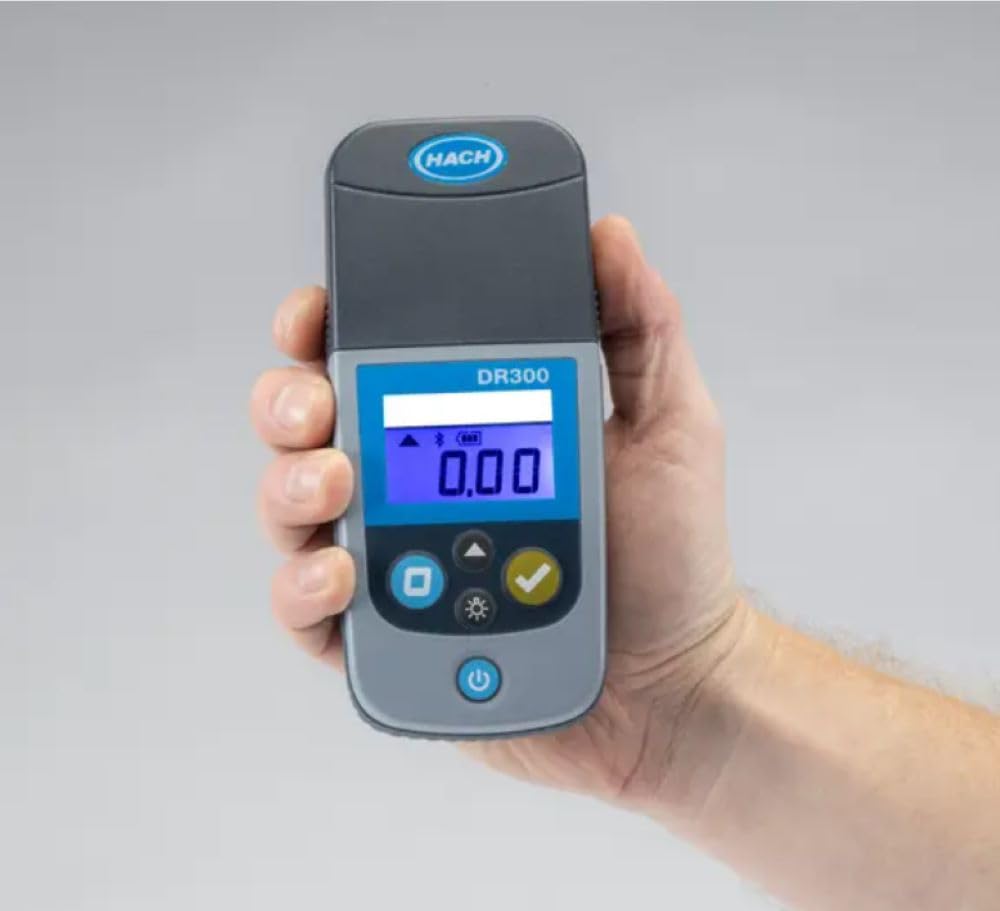
The DR300 Pocket Colorimeter is designed to fit comfortably in one hand, emphasizing its portability for field use.
-
Башкаруу элементтери менен таанышыңыз:
- Power Button (①): Аспапты күйгүзөт/өчүрөт.
- Zero Button (⑨): Used to zero the instrument with a blank sample.
- Read Button (✓): Өлчөөнү баштайт.
- Menu/Settings Button (☀): Accesses instrument settings and options.
Иштөө нускамалары
The DR300 Pocket Colorimeter is designed for straightforward operation. Always refer to the specific reagent instructions for the parameter you are testing (e.g., Iron, FerroVer) as sample preparation and reaction times are crucial for accurate results.
-
Prepare the Blank Sampле:
Таза с толтуруңузample cell with the appropriate blank solution (usually deionized water or a prepared reagent blank) as specified in your reagent instructions. Wipe the outside of the cell with a lint-free cloth to remove fingerprints or smudges.
-
Zero the Instrument:
бош s киргизиңизample cell into the cell holder of the DR300. Ensure the cell is oriented correctly (if applicable, check for alignment marks). Close the cell compartment lid. Press the Zero Button (⑨). The display will show "0.00" or "ZERO" indicating successful zeroing.
-
Prepare the Reacted Sampле:
Following your specific reagent instructions, prepare your sample by adding the required reagents and allowing the specified reaction time. This will typically result in a color change proportional to the concentration of the analyte.
-
Measure the Sampле:
Wipe the outside of the reacted sample cell with a lint-free cloth. Insert the reacted sample cell into the cell holder, ensuring correct orientation. Close the cell compartment lid. Press the Read Button (✓). The instrument will display the measurement result in the specified units (e.g., mg/L Fe).

The DR300 Pocket Colorimeter in use, demonstrating its portability and ease of handling during a measurement.
-
Data Transfer (Optional Bluetooth):
If your DR300 has Bluetooth connectivity, you can transfer measurement data to a compatible device or to Hach's Claros system. Refer to the detailed instructions in the full product manual or Hach's website for pairing and data transfer procedures.
Техникалык тейлөө
Proper maintenance ensures the longevity and accuracy of your DR300 Pocket Colorimeter.
-
Аспапты тазалоо:
Wipe the exterior of the colorimeter with a damp кездеме. Абразивдүү тазалоочу каражаттарды же эриткичтерди колдонбоңуз.ample cell compartment is clean and free of spills or debris. A cotton swab can be used to gently clean the optical path if necessary, but avoid scratching the lenses.
-
Sample Cell Care:
Always clean sample cells thoroughly after each use. Rinse with deionized water and allow to air dry. Store cells in a clean, dust-free environment. Scratched or dirty cells can significantly affect measurement accuracy.
-
Батареяны алмаштыруу:
Replace batteries when the low battery indicator appears on the display. Use only high-quality AAA alkaline batteries. Dispose of used batteries according to local regulations.
-
Сактагыч:
When not in use, store the DR300 in its carrying case in a cool, dry place, away from direct sunlight and extreme temperatures. The instrument is IP67 rated for water and dust resistance, but proper storage further protects it.
Проблемаларды чечүү
This section addresses common issues you might encounter with your DR300 Pocket Colorimeter.
| Көйгөй | Мүмкүн себеп | Чечим |
|---|---|---|
| Instrument does not turn on. | Өлүк же туура эмес орнотулган батарейкалар. | Батареянын полярдуулугун текшериңиз же жаңы AAA батарейкалары менен алмаштырыңыз. |
| Дисплейде "Ката" билдирүүсү. | Sample cell dirty, scratched, or improperly inserted; optical path obstructed; instrument malfunction. | Clean and re-insert sample cell. Ensure cell compartment is clean. If error persists, contact Hach support. |
| Туура эмес же дал келбеген окуулар. | Туура эмес сample preparation; dirty/scratched sample cells; expired reagents; incorrect zeroing. | Review reagent instructions for proper procedure. Clean/replace sample cells. Check reagent expiry dates. Re-zero the instrument with a fresh blank. |
| Bluetooth туташуу көйгөйлөрү. | Device not in pairing mode; out of range; interference; incompatible receiving device. | Ensure DR300 Bluetooth is enabled. Move closer to receiving device. Check for other wireless interference. Refer to full manual for detailed Bluetooth setup. |
Техникалык шарттар
- Модел: DR300 Pocket Colorimeter (Iron, FerroVer)
- Өндүрүүчү: ХАЧ
- Модель номери: Iron, Ferrover (LPV445.97.22110)
- ASIN: B07VP9CJD5
- Өлчөмдөрү (пакет): 8.19 x 7.2 x 5.35 дюйм
- Салмагы (пакет): 2.84 фунт
- Кубат булагы: 4 AAA батарейка (кошулган)
- Батареянын иштөө мөөнөтү: Болжол менен 5000 тест
- Суу өткөрбөйт рейтинги: IP67 (dust tight and protected against immersion in water up to 1 meter for 30 minutes)
- Байланыш: Optional Bluetooth for data transfer
- Биринчи жеткиликтүү: 23-июль, 2019-жыл

The DR300 Pocket Colorimeter is designed for rugged field use, as demonstrated by its application in an industrial environment.
Кепилдик жана колдоо
HACH provides a standard warranty for the DR300 Pocket Colorimeter against defects in materials and workmanship. For specific warranty terms, duration, and conditions, please refer to the warranty card included with your product or visit the official Hach webсайт. Сатып алганыңыздын далили катары сатып алуу дүмүрчөгүңүздү сактаңыз.
For technical support, troubleshooting assistance beyond this manual, or to order replacement parts and reagents, please contact Hach Customer Service:
- Hach Official Webсайт: www.hach.com
- Кардарларды тейлөө байланышы: караңыз webаймактык байланыш маалыматы үчүн сайт.


