1. Киришүү
The ANCEL BM300 is a 12V battery monitor designed to provide real-time data on your vehicle's battery health. It connects to your battery and communicates wirelessly via Bluetooth to a dedicated mobile application, allowing you to monitor key metrics such as voltage, cranking performance, and charging system health. This device helps users proactively manage battery condition and prevent unexpected issues.
Негизги өзгөчөлүктөр төмөнкүлөрдү камтыйт:
- Реалдуу убакыттагы батареянын көлөмүtage мониторинг.
- Cranking system test.
- Charging system (alternator) test.
- Trip recording and historical data storage for up to 30 days.
- Анормалдуу томtage and power alerts via the mobile application.
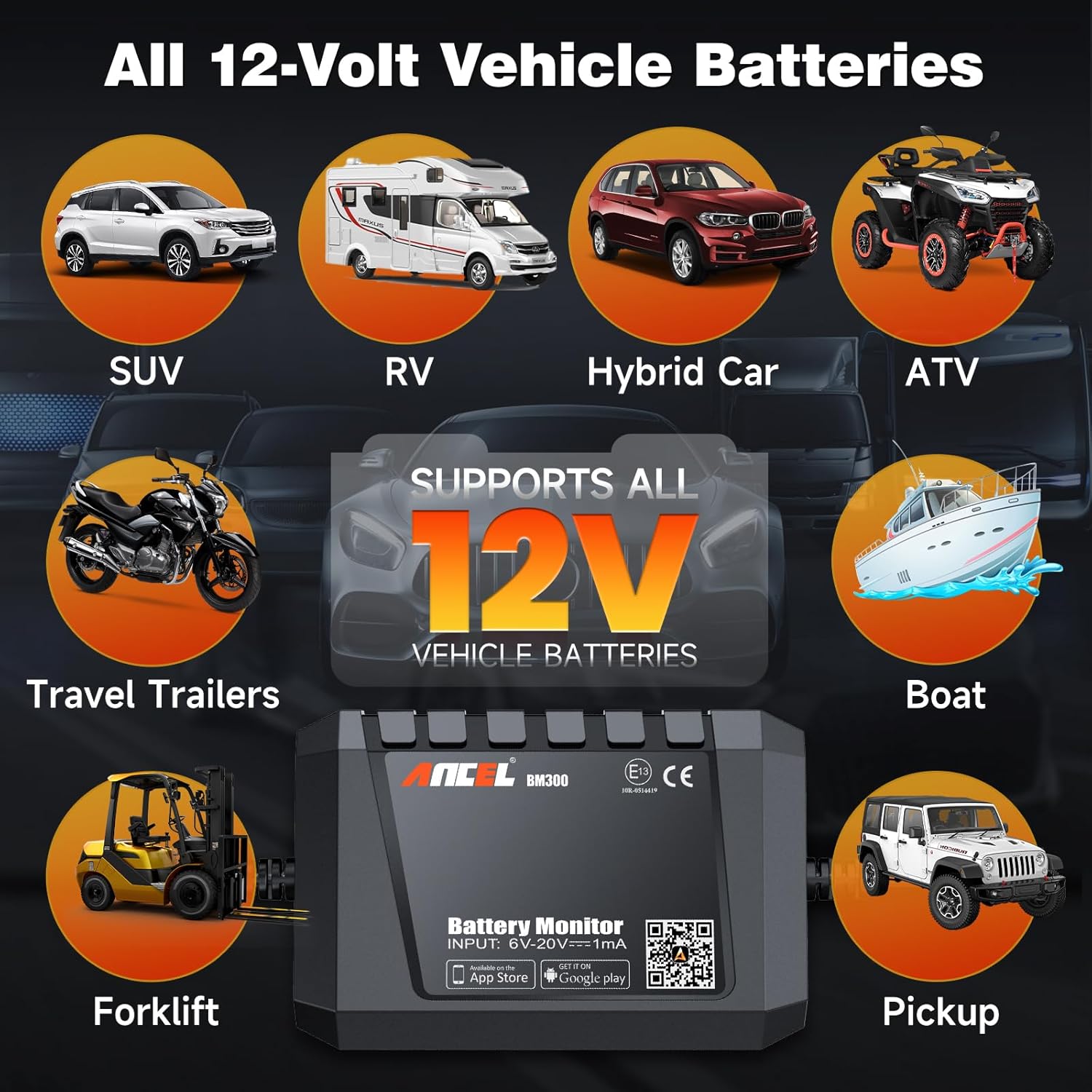
- Compatibility with all 12V lead-acid batteries (Flooded, AGM Flat, AGM Spiral, GEL, EFB).
2. Орнотуу жана орнотуу
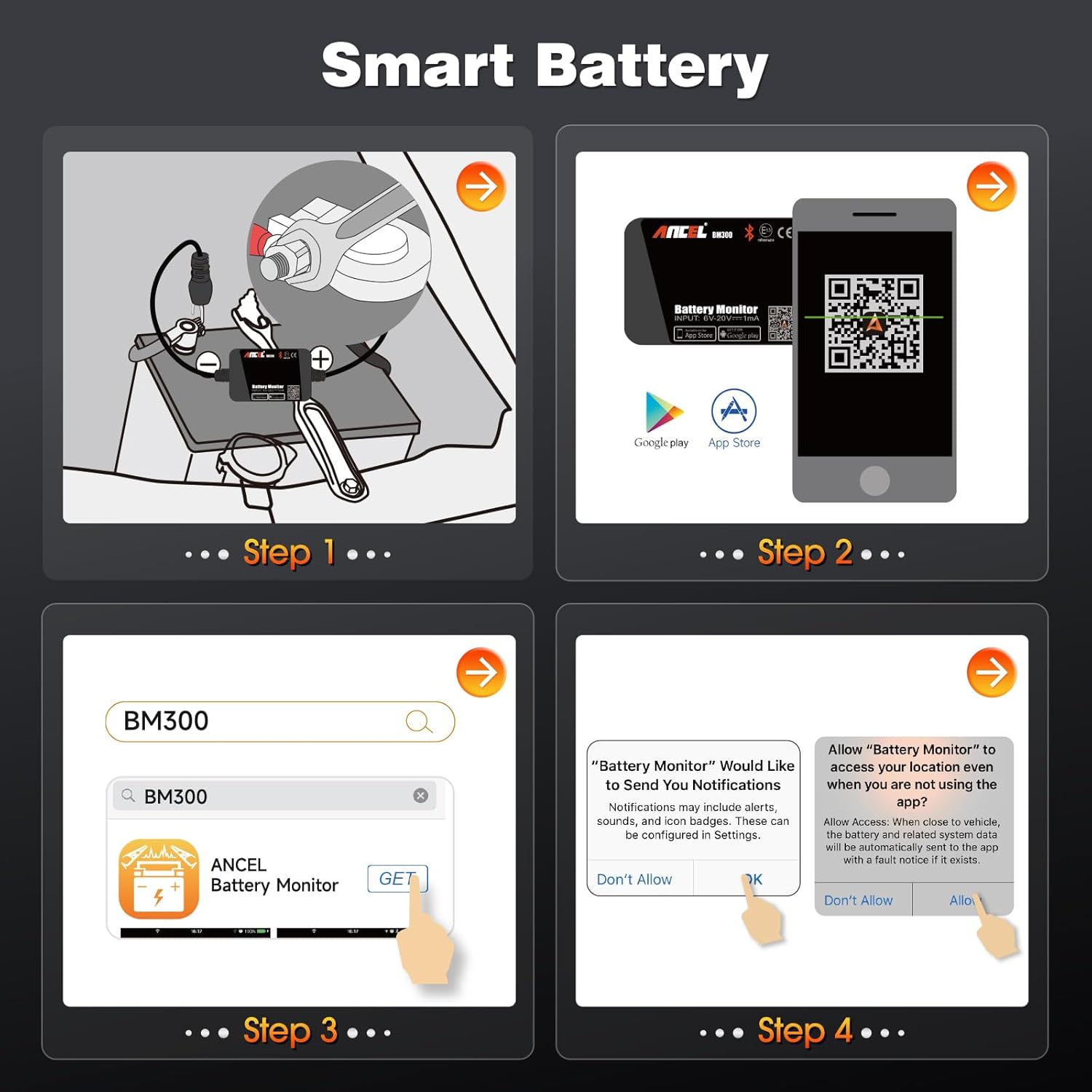
Follow these steps to install and set up your ANCEL BM300 Battery Monitor:
- Физикалык байланыш: кызыл cl туташтырууamp to the positive (+) terminal of your 12V battery and the black clamp to the negative (-) terminal. Ensure a secure connection. The device is designed for permanent attachment.
- Колдонмону жүктөп алыңыз: Scan the QR code on the device or search for "ANCEL Battery Monitor" in your device's app store (App Store for iOS, Google Play for Android). Install the application on your smartphone.
- Bluetooth аркылуу туташуу: Open the ANCEL Battery Monitor app. The app will automatically search for and connect to the BM300 device via Bluetooth. Ensure Bluetooth is enabled on your smartphone.
- Уруксаттарды берүү: The app may request permissions for notifications and location services. Granting these permissions allows the app to send alerts and record trip data effectively.

3. Иштөө нускамалары
The ANCEL BM300 provides various diagnostic functions through its mobile application:
3.1. Томtage Test
The app displays the real-time voltage of your battery. This allows for continuous monitoring of the battery's charge level. The data is presented visually with a large voltage reading and a historical graph.


3.2. Кран системасын сыноо
This test evaluates the performance of your vehicle's starting system. When the engine starts, the device automatically tests the cranking voltage and provides a result, indicating if the cranking performance is within the standard range.


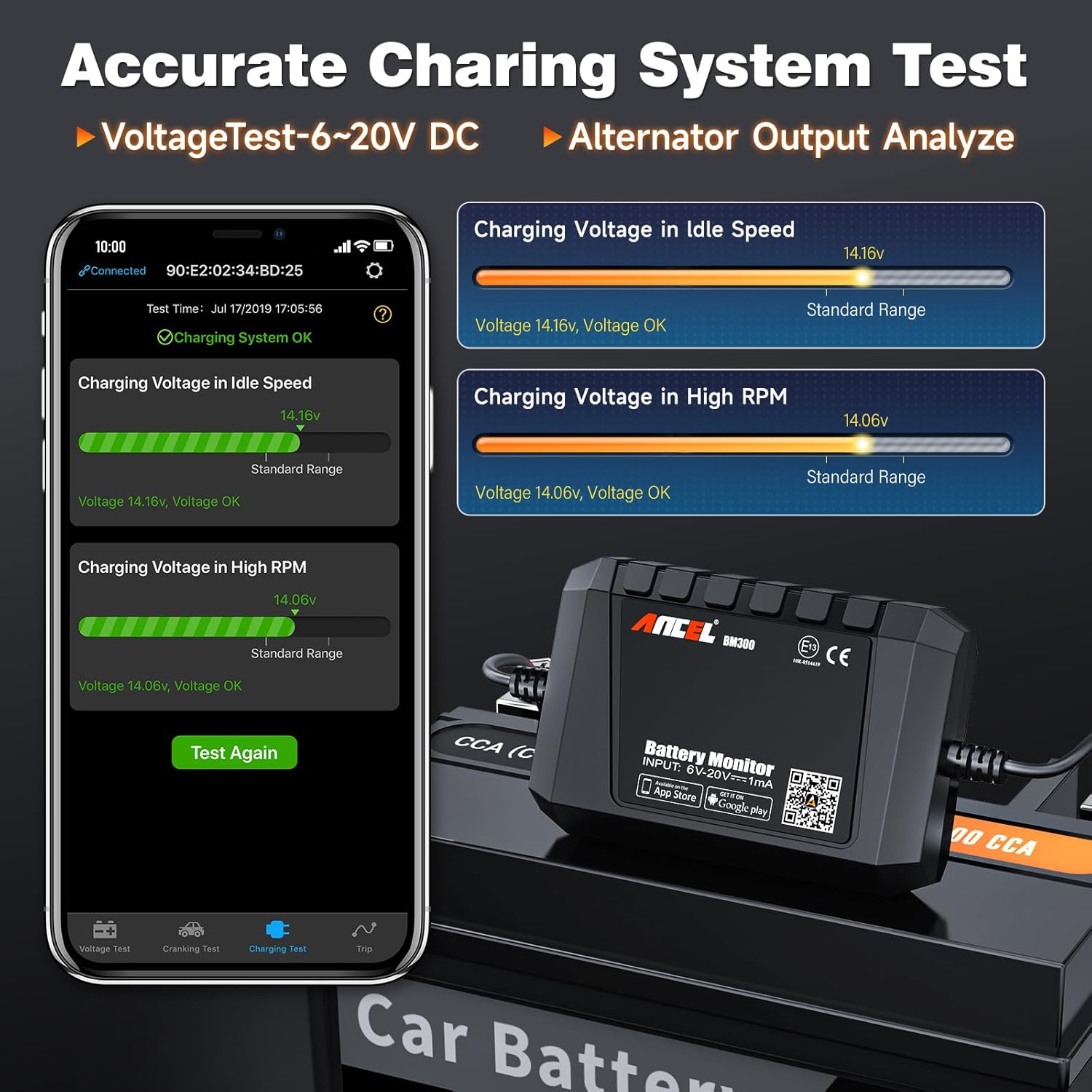
3.3. Кубаттоо системасын текшерүү
The charging system test assesses the alternator's output. The app guides you to perform tests at idle speed and high RPM, providing voltage readings and indicating if the charging system is operating correctly.

3.4. Trip Recording & Historical Data
The "Trip" function records the monitored output curve of each battery check and provides insights into usage patterns over the past 30 days. It logs every instance of power consumption, offering a comprehensive overview of battery performance. This historical data can be exported for further analysis.


3.5. Abnormal Alert Function
The device features an exceptional alarm functionality. It will notify you via the app when the battery encounters malfunctions, abnormal voltage, or low power, alleviating concerns about unexpected battery issues.

3.6. Status of Health (SOH) Display
The app provides a clear Status of Health (SOH) display, indicating whether the battery is normal, charging, or in a low power state. This visual cue helps in quickly understanding the battery's current condition.

4. Техникалык тейлөө
To ensure the longevity and accurate performance of your ANCEL BM300, consider the following maintenance tips:
- Keep the device and its connections clean and free from dirt, dust, and corrosive materials.
- Батарея clamps remain securely attached to the battery terminals. Loose connections can lead to inaccurate readings or intermittent operation.
- While the device is designed for durability, avoid exposing it to extreme physical shock or prolonged immersion in water.
- For optimal Bluetooth performance, use the device in a clear, open area with suitable temperatures, as extreme cold or obstacles may affect connectivity.
5. Кыйынчылыктарды
If you encounter issues with your ANCEL BM300, consider these common troubleshooting steps:
- Bluetooth байланышы жок:
- Ensure the BM300 is correctly connected to the 12V battery.
- Смартфонуңузда Bluetooth иштетилгенин текшериңиз.
- Restart the ANCEL Battery Monitor app.
- Move closer to the device. Bluetooth connectivity may be affected by distance or physical obstructions.
- Туура эмес окуулар:
- Check for clean and tight connections between the clampс жана батарея терминалдары.
- Ensure the battery type selected in the app matches your vehicle's battery (e.g., AGM, Flooded).
- Verify that the internal and external conditions and temperature are within the optimal operating range (above 0°C for best accuracy).
- Колдонмо жооп бербей жатат:
- Тиркемени жаап, кайра ачыңыз.
- Ensure your smartphone's operating system is compatible (Android 4.3 and higher, iPhone 4S and higher).
- Колдонмо дүкөнүңүздөгү колдонмо жаңыртууларын текшериңиз.
6. Техникалык шарттар
| Өзгөчөлүк | Спецификация |
|---|---|
| Байланыш | Bluetooth 4.0 |
| Тиешелүү батареянын түрү | All 12V Lead-Acid Batteries (100-2000CCA) |
| Киргизүү көлөмүtage | 6-20В DC |
| Орточо электр керектөө | 1.5мА (болжол менен) |
| Тtage Тактык | Over 99.5% (±0.03V) |
| Driving Trip Record | 30 күн |
| Иштөө температурасы | -40°F – 194°F (-4.44°C – 90°C) |
| Өлчөмдөрү (L x W x Y) | 4.33 x 0.98 x 5.12 дюйм |
| Салмагы | 2.4 унция |
| Коопсуздук өзгөчөлүктөрү | Built-in electrical overload circuit breaker, reverse polarity protection |

7. Кутуда эмне бар
The ANCEL BM300 package includes:
- 1 x ANCEL BM300 Battery Monitor
8. Кепилдик жана колдоо
For detailed warranty information and customer support, please refer to the official ANCEL website or the documentation provided with your product. A digital user manual (PDF) may also be available for download from the product's listing page or the manufacturer's support section.
You can find the user guide PDF бул жерде.
9. Коопсуздук маалыматы
Please read and understand the following safety precautions before using the ANCEL BM300:
- The product should not exceed the specified voltage range (6-20V). Excessive input voltage аппаратты бузушу мүмкүн.
- The application requires smartphones compatible with Android 4.3 and higher, and iPhone 4S and higher.
- Always ensure proper polarity when connecting the device to the battery (red to positive, black to negative) to prevent damage to the device or vehicle.
- Do not attempt to disassemble or modify the device. Refer to qualified personnel for any repairs.


