Introduction
The LENTION CB-C95 USB C Docking Station is designed to expand the connectivity of your USB-C enabled laptop, tablet, or smartphone. It provides multiple ports for video output, data transfer, network connection, and power delivery, enhancing your productivity and workspace organization.

Image: The LENTION CB-C95 docking station connected to a MacBook, showcasing its compact design and multiple ports.
Пакеттин мазмуну
Пакетиңизде бардык буюмдар бар экенин текшериңиз:
- LENTION USB C Docking Station (CB-C95)
- USB-C to USB-C Cable (for host connection)
- DC Power Adapter (24V/5.83A, 140W)
- USB-C - USB-A адаптер
- USB Stick (containing DisplayLink drivers for offline installation)
- Instruction Manual
Video: Unboxing the LENTION C95 11-IN-1 USB C Docking Station, showing the contents of the package including the dock, cables, and power adapter.
Продукт бүттүview
The LENTION CB-C95 features a comprehensive array of ports for various connectivity needs. Its unique riser design also aids in laptop cooling and ergonomic viewing.
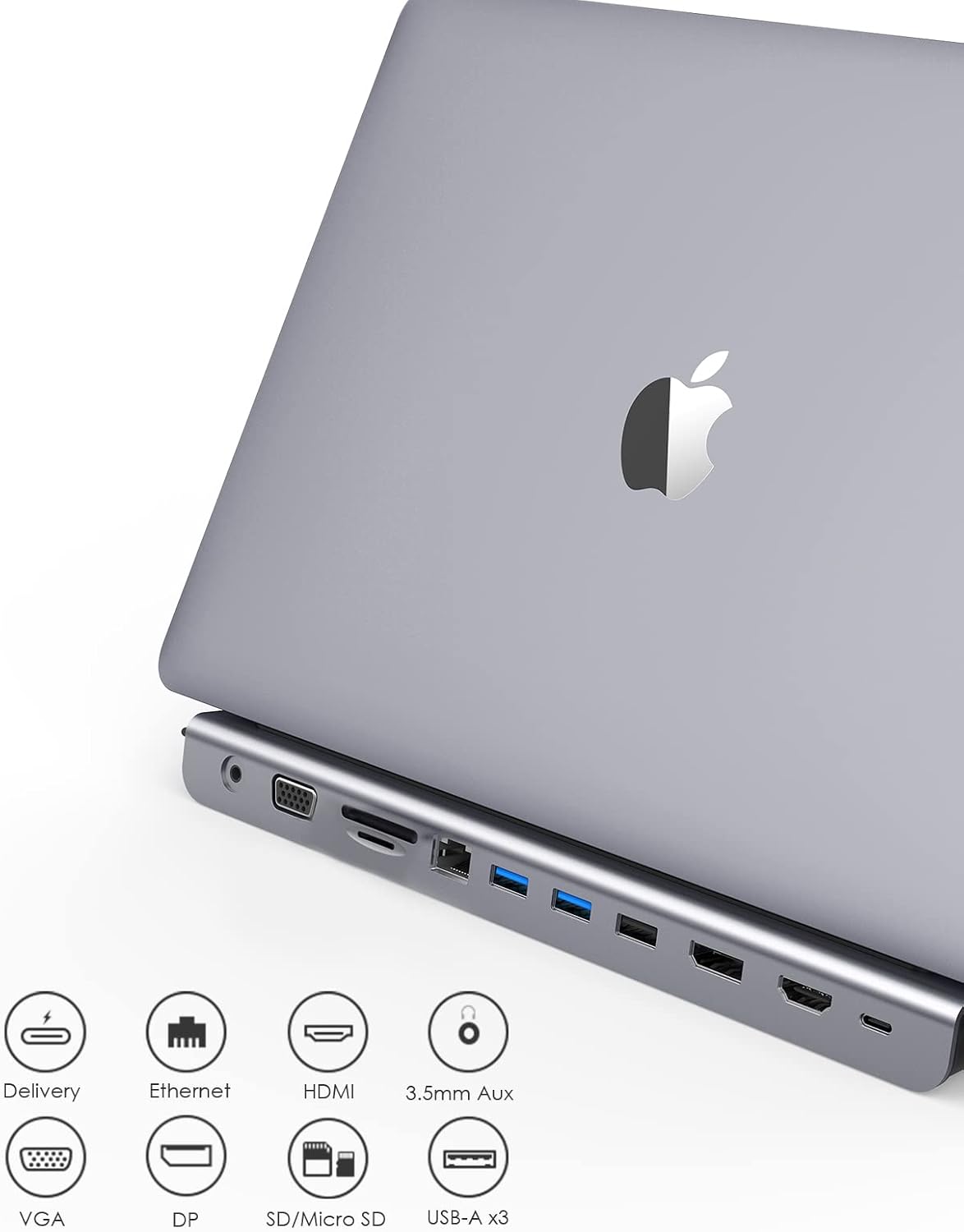
Сүрөт: деталдуу view of the LENTION CB-C95 docking station, highlighting its various ports including USB, HDMI, DisplayPort, VGA, Ethernet, and card readers.
Алдыңкы порттор:
- Кубат баскычы: To turn the dock on/off.
- SD & TF картаны окугуч: Supports speeds up to 104MB/s.
- 2 x USB 3.0 порттору: 10Gbps data transfer, 7.5W power output.
- 2 x USB-C 3.2 Gen2 Ports: 10Gbps data transfer, 7.5W power output.
- 1 x USB-C 3.2 Gen1 Port: 10Gbps data transfer, 30W Power Delivery (PD) output.
- 3.5mm Audio/Mic Jack: For headphones or microphones.
- 1 x USB 2.0 Port: For keyboard, mouse, or other low-bandwidth peripherals.
Арткы порттор:
- DC In: 24V/5.83A (140W) for power adapter.
- To Host (USB-C): Connects to your laptop's USB-C port for all data, video, and power.
- DP Alt Mode (HDMI 8K@30Hz or DP 8K@30Hz): Primary video output.
- Display 1 (HDMI 4K@60Hz or DP 4K@60Hz): Secondary video output.
- Display 2 (HDMI 4K@60Hz or DP 4K@60Hz): Tertiary video output.
- Гигабит Ethernet: 10/100/1000Mbps wired network connection.

Image: The docking station positioned under a laptop, demonstrating its riser design for improved ergonomics and heat dissipation.
Орнотуу колдонмосу
Follow these steps to set up your LENTION USB C Docking Station:
- Кубат туташуу: Connect the provided DC Power Adapter to the "DC In" port on the rear of the docking station, then plug it into a power outlet.
- Хост туташуусу: Use the included USB-C to USB-C cable to connect the "TO HOST" port on the rear of the docking station to a full-function USB-C or Thunderbolt 3 port on your laptop.
- Драйверди орнотуу (зарыл болсо): For optimal display functionality, especially on Windows, DisplayLink drivers may be required. If your system does not automatically install them, use the provided USB stick or download the latest drivers from the LENTION support webсайт.
- Перифериялык түзүлүштөрдү туташтыруу:
- Мониторлор: Connect your external monitors to the HDMI, DisplayPort, or VGA ports on the docking station.
- Тармак: Connect an Ethernet cable to the Gigabit Ethernet port for a wired internet connection.
- USB түзмөктөрү: Plug in your USB devices (keyboard, mouse, external drives, etc.) to the available USB 3.0, USB 2.0, or USB-C ports.
- SD/Micro SD карталары: Insert memory cards into the dedicated card reader slots.
- Аудио: Connect headphones or speakers to the 3.5mm audio jack.
- Күйгүзүү: Press the power button on the front of the docking station to turn it on.
Video: A demonstration of connecting various peripherals to the LENTION C95 Triple Display Docking Station, including power, USB-C host, and multiple display cables.
Operating Modes: Display Configuration
The LENTION CB-C95 supports various display configurations depending on your operating system.
Windows OS (MST/SST - Multiple Stream Transport / Single Stream Transport):
- Triple Extend Displays: Supports up to three split screens (MST) on most Windows devices.
- Видеонун чечилиши:
- HDMI + DisplayPort: Up to 3840x2160@30Hz.
- VGA + HDMI (or VGA + DisplayPort): Up to 1920x1080@60Hz.
- VGA + HDMI + DisplayPort: Limited to 1280x720@60Hz.
- Конфигурация кадамдары: Right-click desktop -> Graphic setting -> Display -> Extended Desktop/Clone Display.
macOS / ChromeOS / iPadOS (SST Only - Single Stream Transport):
- MirrorMode: All external displays will mirror the host screen.
- Узартуу режими: Only one mirroring screen (SST) is supported across all external displays. The external displays will show the same content, which can be different from the host screen.
- Видеонун чечилиши:
- HDMI + DisplayPort: Up to 3840x2160@30Hz.
- VGA + HDMI (or VGA + DisplayPort): Up to 1920x1080@60Hz.
- VGA + HDMI + DisplayPort: Up to 1920x1080@60Hz.
- Конфигурация кадамдары: Mac OS: Set -> Display -> Arrangement -> Mirror Display or Not.

Image: Visual guide illustrating mirror and extend display modes for both Mac and Windows operating systems when using the LENTION CB-C95 docking station.
Кубат жеткирүү (PD)
The LENTION CB-C95 supports up to 100W Power Delivery pass-through to charge your host device. Note that the docking station itself withholds approximately 15W of power for its operation.
The actual charging power delivered to your host device is the power of your PD power adapter minus the 15W required by the dock. Ensure your power adapter provides sufficient wattage for both the dock and your device.

Image: The LENTION docking station connected to a laptop, illustrating its 100W Power Delivery capability for charging the host device.
Power Delivery Charging Table (Partial List):
| USB-C Cable | Power of Charger (Watts) | Power Required for Hub (Watts) | Power to Host Device (Watts) | iPad | MacBook Air | MacBook Pro | Windows ноутбук | Samsung S9/S10 |
|---|---|---|---|---|---|---|---|---|
| 100 | 18 | 15 | 3 | ✓ | X | X | X | X |
| 100 | 20 | 15 | 5 | ✓ | X | X | X | X |
| 100 | 30 | 15 | 15 | ✓ | ✓ | X | X | ✓ |
| 100 | 45 | 15 | 30 | ✓ | ✓ | X | ✓ | ✓ |
| 100 | 60 | 15 | 45 | ✓ | ✓ | ✓ | ✓ | ✓ |
| 100 | 65 | 15 | 50 | ✓ | ✓ | ✓ | ✓ | ✓ |
| 100 | 87 | 15 | 72 | ✓ | ✓ | ✓ | ✓ | ✓ |
| 100 | 90 | 15 | 75 | ✓ | ✓ | ✓ | ✓ | ✓ |
| 100 | 96 | 15 | 81 | ✓ | ✓ | ✓ | ✓ | ✓ |
| 100 | 100 | 15 | 85 | ✓ | ✓ | ✓ | ✓ | ✓ |
Note: ✓ Recommended, O Slow charging speed, X Not recommended. The actual power to charge the host device is the power of the charger minus 15W. If the actual power is lower than the power required by the host device, it cannot be charged. It will also vary depending on the wattage of the cable and the host device.
Шайкештик
The LENTION CB-C95 is compatible with devices featuring a full-function USB-C port or Thunderbolt 3 port that supports DisplayPort Alternate Mode (DP Alt Mode).
Шайкеш түзмөктөр (Тизме жарым-жартылай):
- Ноутбуктар:
- New MacBook Air & Pro 13/14/15/16 (2016-2023, with Thunderbolt 3 Ports)
- MacBook Pro & Air 2020 M1 (supports 1 external monitor only)
- MacBook 12, New iMac, iMac Pro
- Dell XPS 13/15, Inspiron 13/15 7000, Latitude
- HP Spectre/Spectre X360/ENVY/ENVY X360
- Chromebook, Pixelbook/Pixelbook 2
- Surface Book 2/Surface Go/Surface Pro 7/Surface Laptop 3
- Lenovo Yoga 930/920/910/720
- Оюн консолу: Steam Deck
Маанилүү эскертүүлөр:
- MacBook with the M1 chip only supports extending 1 external monitor.
- Not compatible with Apple Superdrive.
- The USB-C port of your device needs to support DP Alt Mode.
- Some HP devices may have more limitations regarding external display output.
- Not compatible with devices that do not support "DisplayPort Alternate Mode" (e.g., HP EliteBook 745 G4, HP 14s-be102TX, Lenovo ideapad 340s, Tablets/Google Pixel phones/Nintendo Switch/Acer Aspire A5/Oneplus 5T Phone).

Image: The LENTION docking station displayed alongside various compatible devices, including MacBooks, MateBooks, and XiaomiBooks.
Stable Driver 3.0 Technology
LENTION's Stable Driver 3.0 standard addresses common concerns with docking stations, ensuring a reliable and efficient user experience. This technology focuses on three key areas:
- Non-Interference: Ensures different ports and connected peripherals operate without signal interference or conflicts during plug-and-unplug operations.
- Sufficient Power Supply: Guarantees adequate power delivery to support all connected peripherals working normally.
- Reasonable Operating Temperature: Maintains the device within a safe temperature range to maximize its lifespan and prevent overheating.

Image: An infographic explaining LENTION's Stable Driver 3.0 technology, highlighting its benefits for stable operation, safe temperatures, and non-interference.
Техникалык шарттар
| Бренд | ЛЕНЦИЯ |
| Модел | CB-C95 |
| Түс | Space Gray |
| Аппараттык интерфейс | USB түрү C |
| Жалпы USB порттору | 3 (2x USB 3.0, 1x USB 2.0) |
| Total USB-C Ports | 3 (2x USB-C 3.2 Gen2, 1x USB-C 3.2 Gen1 with 30W PD) |
| Жалпы HDMI порттору | 1 (up to 3840x2160@30Hz) |
| DisplayPort | 1 (up to 3840x2160@30Hz) |
| VGA порту | 1 (up to 1920x1080@60Hz) |
| Ethernet порту | 1 (Gigabit 10/100/1000Mbps) |
| Card Reader | SD/Micro SD (up to 104MB/s) |
| Аудио Jack | 3.5 мм Aux |
| Power Delivery | Up to 100W Pass-through (dock withholds 15W) |
| Элемент Салмагы | 1.15 фунт |
| Пакеттин өлчөмдөрү | 12.56 x 5.24 x 1.46 дюйм |
Проблемаларды чечүү
1. Why can't I extend three different screens to other monitors when I use my MacBook (MST mode)?
- Only Windows system laptops support MST (Multiple Stream Transport) mode for truly extended, independent displays.
- For macOS system laptops, non-mirrored mode can only support 3 duplicate (mirrored) external monitors due to system limitations (SST - Single Stream Transport). Your host laptop screen may have a different image than the 3 external monitors, but the external monitors will all show the same content.
2. Why does the HDMI port not work?
Сураныч, төмөнкүлөрдү текшериңиз:
- (a) Whether your laptop supports DisplayPort Alternate Mode (DP Alt Mode) via its USB-C port.
- (b) The HDMI cable itself (try a different cable).
- (c) The connected cable between the dock and the monitor.
- (d) Whether the laptop and monitor have sufficient power supply.
3. Why does the docking station feel warm?
It is normal for the docking station to generate some heat during operation, especially when multiple ports are in use or when charging. The Stable Driver 3.0 technology ensures it operates within reasonable temperature limits to maximize device lifespan.
Video: A short clip demonstrating the LENTION docking station in use, showing a laptop connected and displaying content on an external monitor.
Кепилдик жана колдоо
LENTION provides a 12-month warranty for this product. For any questions, technical support, or warranty claims, please contact LENTION customer service. You can find contact information on the official LENTION webсайт же сатып алуу платформасы аркылуу.


