1. Киришүү
This manual provides detailed instructions for the proper use and maintenance of your ELECTROPRIME SK-892 Mini Digital Voice Recorder. Please read this manual thoroughly before operating the device to ensure optimal performance and longevity. Keep this manual for future reference.
2. Продукт бүтүп калдыview
The ELECTROPRIME SK-892 is a compact and portable digital voice recorder designed for discreet audio capture and playback. It features 8GB of internal storage and a simple one-switch operation.
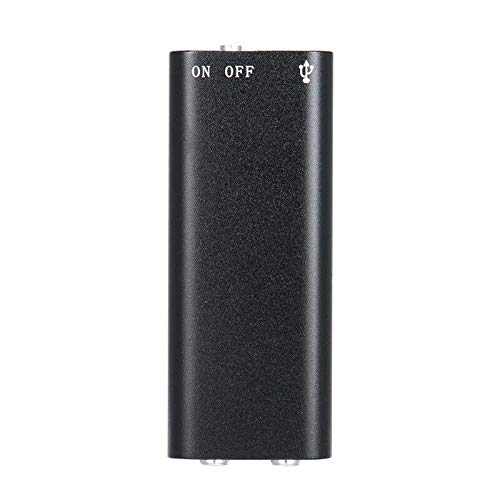
2.1-сүрөт: Жогорку view of the ELECTROPRIME SK-892 Mini Digital Voice Recorder, highlighting the ON/OFF switch and the USB port for connectivity.
Түзмөктүн компоненттери:
- ON/OFF которуу: Controls power and recording functions.
- USB порт: Used for charging the device and connecting to a computer for data transfer.
- Наушник уячасы (3.5 мм): For audio playback using earphones.
- Индикатор жарыгы: Абал боюнча пикир берет (мисалы, жаздыруу, кубаттоо).
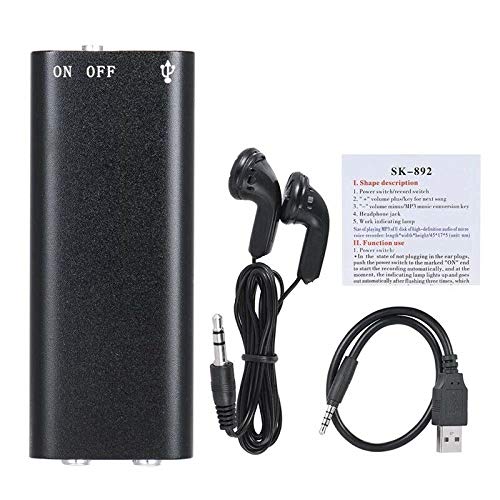
2.2-сүрөт: The SK-892 recorder shown with its accessories, including wired headphones and a USB charging/data cable. The small instruction card is also visible.
3. Орнотуу
3.1 Аппаратты заряддоо
- Connect the small end of the provided USB cable to the USB port on the recorder.
- Connect the other end of the USB cable to a powered USB port on a computer or a USB wall adapter (not included).
- The indicator light will illuminate during charging. Once fully charged, the light may change color or turn off.
- Толук кубаттоо адатта болжол менен 2-3 саатты талап кылат.
3.2 Баштапкы күйгүзүү
To power on the device, slide the ON/OFF switch to the "ON" position. The indicator light will briefly flash, indicating the device is ready for operation.
4. Иштөө нускамалары
4.1 Аудио жаздыруу
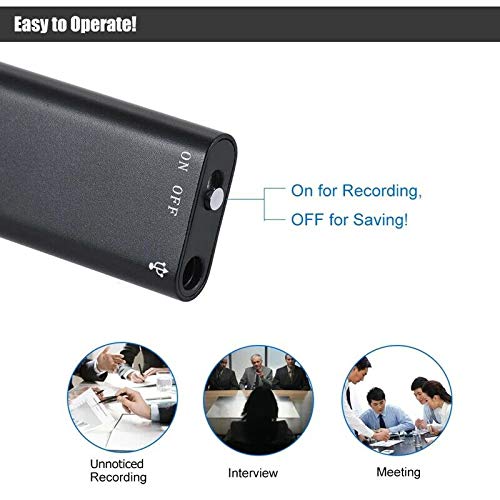
4.1-сүрөт: Detail of the SK-892's ON/OFF switch, illustrating its dual function for initiating recording and saving files.
- Аппарат жетиштүү заряддалганын текшериңиз.
- To begin recording, slide the ON/OFF switch to the "ON" position. The device will automatically start recording. The indicator light will typically flash or remain steadily lit during recording, then turn off to indicate discreet operation.
- To stop recording and save the audio file, slide the ON/OFF switch to the "OFF" position. The indicator light will flash a few times and then turn off, confirming the recording has been saved and the device is powered down.
Эскертүү: Ensure the switch is fully in the "OFF" position to properly save your recordings and prevent data loss.
4.2 Жаздырууларды ойнотуу
- Connect the provided headphones (or your own 3.5mm headphones) to the headphone jack on the recorder.
- Slide the ON/OFF switch to the "ON" position. The device will typically begin playing the most recent recording or cycle through recordings.
- Further controls for playback (e.g., next track, volume) may be available through the connected headphones if they feature inline controls, or by briefly toggling the ON/OFF switch (refer to the small instruction card for specific playback controls if available).
- To stop playback, slide the ON/OFF switch to the "OFF" position.
4.3 Компьютерге туташуу
To transfer recordings to your computer or manage files:
- Ensure the recorder is powered "OFF".
- Connect the recorder to your computer using the supplied USB cable.
- Your computer should recognize the device as a removable disk (similar to a USB flash drive).
- Navigate to the device's storage to access your recorded audio files (usually in a folder named "RECORD" or similar).
- Сиз көчүрүп, жылдырып же жок кыла аласыз fileкерек болсо.
- Safely eject the device from your computer before disconnecting the USB cable to prevent data corruption.
5. Техникалык тейлөө
- Аппаратты кургак кармаңыз. ным же суюктуктардын таасиринен алыс болуңуз.
- Аппаратты жумшак, кургак чүпүрөк менен тазалаңыз. Катуу химиялык заттарды же абразивдүү тазалагычтарды колдонбоңуз.
- Аппаратты жерге түшүрүүдөн же катуу таасирлерден сактаныңыз.
- Аппаратты колдонбогондо салкын, кургак жерде сактаңыз.
- Батареянын иштөө мөөнөтүн сактоо үчүн, көп колдонулбаса дагы, түзмөктү үзгүлтүксүз кубаттап туруңуз.
6. Кыйынчылыктарды
| Көйгөй | Мүмкүн чечим |
|---|---|
| Түзмөк күйбөйт. | Ensure the device is fully charged. Connect to a USB power source and check the indicator light. |
| Аудио жаздырылбай жатат. | Check if the device has sufficient battery. Ensure the ON/OFF switch is moved fully to the "ON" position. Verify there is enough free storage space. |
| Жазуулар сакталбай жатат. | Ensure the ON/OFF switch is moved fully to the "OFF" position to properly save the file. Do not disconnect power during recording or saving. |
| Cannot hear playback. | Ensure headphones are securely connected. Check headphone functionality with another device. Verify the device is powered "ON" for playback. |
| Түзмөк компьютер тарабынан таанылган жок. | Ensure the recorder is powered "OFF" before connecting to the computer. Try a different USB port or cable. Restart your computer. |
7. Техникалык шарттар
- Модел: SK-892
- Эстутум сактоо сыйымдуулугу: 8 ГБ
- Аудио формат: MP3
- Аппараттык интерфейс: USB
- Шайкеш түзмөктөр: MP3 Player (for playback)
- Өндүрүүчү: ELECTROPRIME
- Элемент бөлүгүнүн номери: ASHA20BEBUBEB19894
8. Кепилдик жана колдоо
For warranty information or technical support, please refer to the documentation included with your purchase or contact ELECTROPRIME customer service through their official channels. Please have your model number (SK-892) and purchase details ready when contacting support.
Кошумча жардам алуу үчүн, сиз иш сапары менен болот ELECTROPRIME brand page on Amazon.


