1. Introduction and Overview
The Blink Mini is a compact indoor plug-in smart security camera designed to help you monitor the inside of your home day and night. It features 1080p HD video recording, infrared HD night vision, motion detection, and two-way audio communication. With its easy setup and integration with Alexa, the Blink Mini provides a convenient solution for home monitoring.
This manual provides detailed instructions on setting up, operating, and maintaining your Blink Mini camera, along with troubleshooting tips and product specifications.

Figure 1.1: Blink Mini Camera Overview негизги өзгөчөлүктөрүн баса белгилөө.
2. Эмнелер камтылган
Your Blink Mini package includes the following components:
- Blink Mini camera (quantity dependent on package selected)
- 1 stand (attached to camera)
- 2 орнотуу бурамасы (камера үчүн)
- 1 USB cable (2 meters)
- 1 power adapter (100-240V 50/60 HZ 0.15A)
3. Орнотуу колдонмосу
Setting up your Blink Mini camera is a straightforward process. Follow these steps to get your camera operational:
- Blink Home Monitor тиркемесин жүктөп алыңыз: Издөө "Blink Home Monitor" in your smartphone's app store (iOS 15.0+, Android 9.0+, or Fire 9.0+ required) and install it.
- Каттоо эсебин түзүү: Open the Blink Home Monitor app and follow the on-screen instructions to create a new account or log in if you already have one.
- Камераңызды кошуңуз: In the app, tap the "+" icon to add a new device. Select "Blink Mini" and scan the QR code located on the back of your camera.
- Кубатка туташуу: Plug the small end of the USB cable into the back of the Blink Mini camera and the larger end into the power adapter. Plug the power adapter into a standard electrical outlet. The camera's blue LED will illuminate.
- Wi-Fi'га туташуу: Follow the app's instructions to connect your Blink Mini to your home's 2.4 GHz Wi-Fi network (802.11g/n). Ensure your Wi-Fi network has a minimum 2 Mbps upload speed. The camera does not support ad-hoc or paywall Wi-Fi networks.
- Камераны жайгаштырыңыз: Place your Blink Mini in the desired indoor location. The attached stand allows for flexible positioning on flat surfaces or can be mounted to a wall using the included screws.
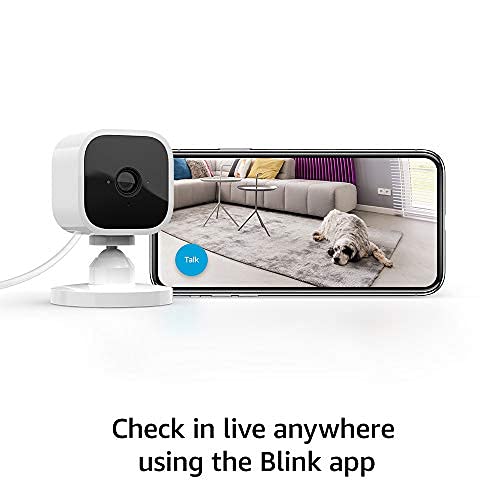
Figure 3.1: Connecting your Blink Mini to the Blink Home Monitor app.
4. Operating Your Blink Mini
4.1 Live View жана эки тараптуу аудио
The Blink Mini allows you to see, hear, and speak to people and pets in your home directly from your smartphone. Open the Blink Home Monitor app and select your camera to initiate a live view. Use the microphone icon within the live view to enable two-way audio communication.
4.2 Кыймылды аныктоо жана эскертүүлөр
Receive alerts on your smartphone whenever motion is detected by your Blink Mini. You can customize motion detection zones within the app to focus on specific areas and reduce unnecessary notifications. Adjust sensitivity settings to optimize performance for your environment.
4.3 Alexa интеграциясы
The Blink Mini works seamlessly with Alexa-enabled devices. Pair your Blink Mini with a supported Alexa device to engage live view, arm and disarm your camera, and more using simple voice commands. For example, you can say, "Alexa, show me the kitchen camera" to view the live feed on an Echo Show device.
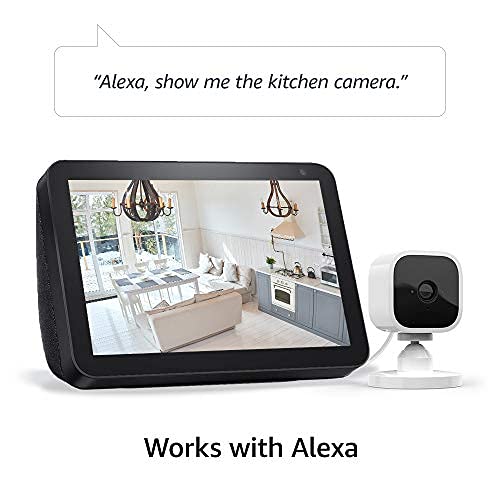
Figure 4.1: Using Blink Mini with Alexa for voice-controlled live view.
4.4 Видео сактоо параметрлери
You have options for saving and sharing video clips:
- Blink Subscription Plan: Choose to save and share clips with a free 30-day trial of the Blink Subscription Plan. Continued use requires a subscription.
- Local Storage with Sync Module 2: You can store clips locally using the Blink Sync Module 2 (sold separately) and a USB flash drive.
5. Техникалык тейлөө
To ensure optimal performance and longevity of your Blink Mini camera, consider the following maintenance tips:
- Тазалоо: Gently wipe the camera lens and body with a soft, dry, lint-free cloth. Avoid using harsh chemicals or abrasive materials that could scratch the lens or damage the device.
- Программалык камсыздоо жаңыртуулары: Your Blink Mini receives automatic software security updates. Ensure your camera is connected to Wi-Fi and powered on to receive these updates, which improve performance and add new features.
- Кубат туташуу: Ensure the USB cable and power adapter are securely connected and free from damage.
6. Кыйынчылыктарды
If you encounter issues with your Blink Mini camera, try the following troubleshooting steps:
- Камера оффлайн:
- Check if the power adapter is securely plugged into the camera and the wall outlet.
- Verify your Wi-Fi network is active and the camera is within range of your router.
- Wi-Fi роутериңизди өчүрүп күйгүзүңүз.
- Unplug the camera for 30 seconds and then plug it back in.
- Видеонун сапаты начар:
- Камера объективинин таза жана чаң же тактар жок экенин текшериңиз.
- Check your Wi-Fi signal strength in the Blink Home Monitor app. A weak signal can affect video quality.
- Ensure your internet connection meets the minimum 2 Mbps upload speed requirement.
- Кыймылды аныктоо маселелери:
- Review your motion detection settings and zones in the Blink Home Monitor app.
- Сезгичтик деңгээлин тууралаңыз.
- Камеранын иштөө талаасын тосуп турган эч кандай тоскоолдуктар жок экенин текшериңиз view.
- Эки тараптуу аудио көйгөйлөр:
- Check the volume settings on your smartphone and within the Blink Home Monitor app.
- Ensure your phone's microphone is not muted or blocked.
For more detailed troubleshooting and support, please visit the official Blink Mini support page: Blink Mini Support Page.
7. Техникалык шарттар
| Өзгөчөлүк | Спецификация |
|---|---|
| талаасы view | 110° диагональ |
| Камеранын чечилиши | Жазуу жана view in 1080p HD video during the day and with infrared HD night vision after dark |
| Камеранын кадр жыштыгы | Секундасына 30 кадрга чейин |
| Өлчөмү | 2 дюйм x 1.9 дюйм 1.4 дюйм (50 мм х 49 мм х 36 мм) |
| Салмагы | 1.7 унция (48 грамм) |
| CPU | Immedia Proprietary – AC1002B, 4 cores / 200 MHz |
| Күч | 2 meter micro USB and power adapter, electrical rating: 100-240V 50/60 HZ 0.15A |
| Wifi байланышы | Supports 2.4 Ghz 802.11g/n; does not support connecting to ad-hoc (or peer-to-peer), or paywall wifi networks. Minimum 2 Mbps upload speed required. |
| Жеткиликтүү түстөр | Ак, Кара |
| Смартфондун минималдуу талаптары | iOS 15.0, Android 9.0 же Fire 9.0 |
| Blink колдонмосу | Blink HomeMonitor |
| Аудио | Динамиктин чыгышы жана эки тараптуу аудио жаздыруу |
| Светодиоддор | Анын качан иштеп турганын билүүгө жардам берүүчү бир көк LED (милдеттүү эмес) |
| муун | 1st generation – 2020 release |
8. Кепилдик жана колдоо
Кепилдик: The Blink Mini comes with a 1-year limited warranty and service included. Use of Blink cameras is subject to the terms found on the official Blink webсайт.
Программалык камсыздоонун коопсуздук жаңыртуулары: Бул аппарат жаңы бирдик катары акыркы жолу сатылып алынгандан кийин кеминде төрт жылга чейин кепилдик берилген программалык камсыздоо жаңыртууларын алат. websites. For more information on these updates, please refer to the official Blink documentation.
Колдоо: For additional information, FAQs, and technical assistance, please visit the Blink Mini support page: Blink Mini Support Page.


