Introduction
This manual provides detailed instructions for the proper setup, operation, maintenance, and troubleshooting of your Douk Audio G5 Mini Digital Stereo Ampкөтөргүч. Оптималдуу иштешин жана коопсуздугун камсыз кылуу үчүн, түзмөктү колдонуудан мурун бул колдонмону кылдат окуп чыгыңыз.
Продукт өзгөчөлүктөрү
- Компакт дизайн: Small footprint suitable for various setups.
- Жогорку кубаттуулугу: Delivers up to 50W per channel (100W total) into 4 Ohm speakers.
- Bluetooth 5.0 туташуусу: Features a Qualcomm 3003 Bluetooth chip for wireless audio streaming.
- Бир нече аудио киргизүүлөр: Supports 3.5mm AUX input and Bluetooth input.
- Сапаттуу компоненттери: Utilizes TPA3116 power amplifier chip and NE5532 op-amp чипсы.
- Динамиктин чыгышы: Compatible with banana plugs or bare speaker wire.
Packing List
Таңгактан чыгаргандан кийин, төмөндө көрсөтүлгөн нерселердин бардыгы бар экенин жана жакшы абалда экендигин текшериңиз:
- 1x Douk Audio G5 Power Ampөмүрлүү
- 1x 19V кубат адаптери
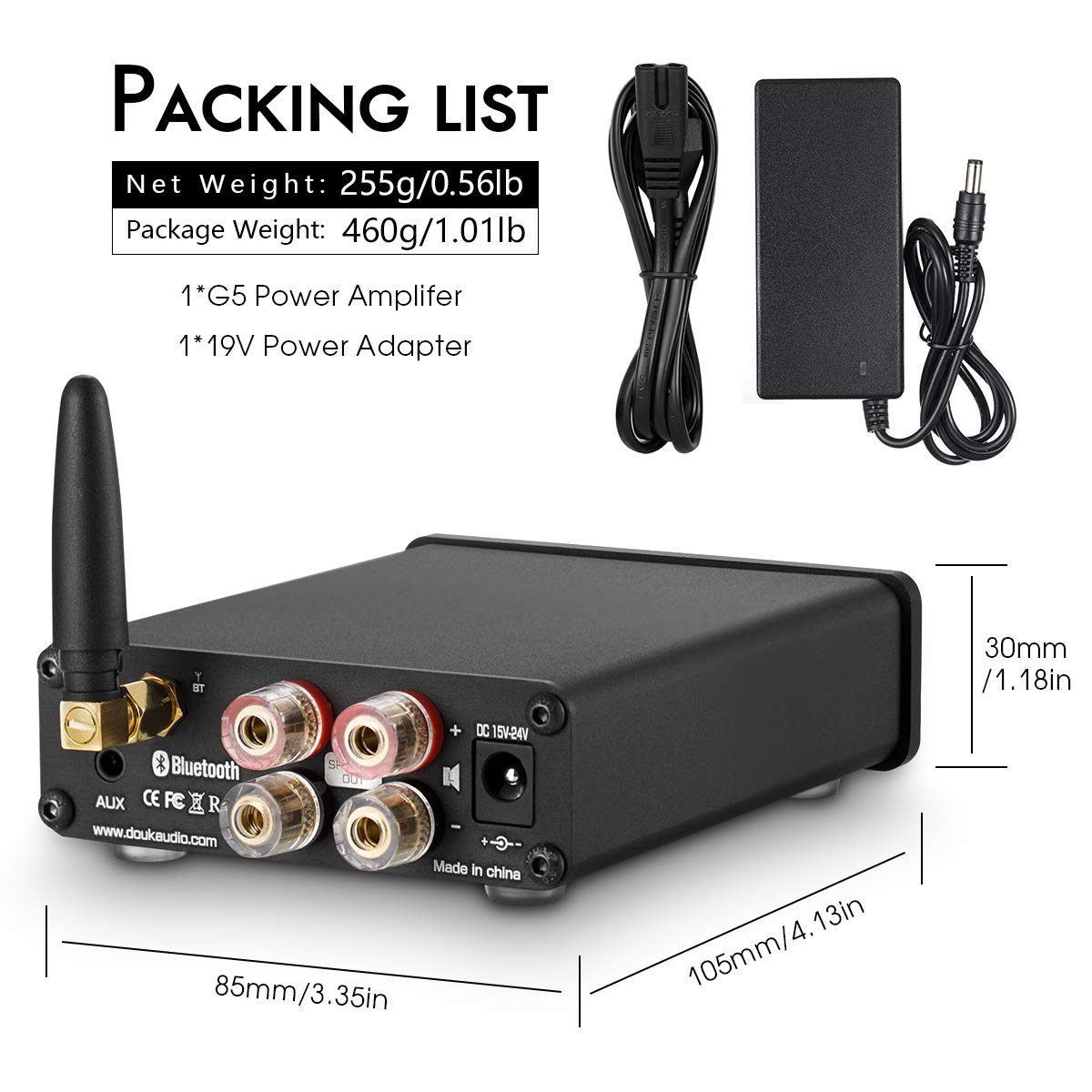
This image provides the physical dimensions of the Douk Audio G5 amplifier: approximately 105mm (4.13in) in length, 85mm (3.35in) in width, and 30mm (1.18in) in height. It also lists the packing contents: one G5 Power Amplifier and one 19V Power Adapter.
Орнотуу нускамалары
1. Динамиктерди бириктирүү
Connect your passive speakers to the speaker output terminals on the rear panel of the G5 amplifier. Ensure correct polarity (+ to + and - to -) for each speaker. The terminals support both banana plugs and bare speaker wire.
2. Connecting Audio Source
- 3.5 мм AUX киргизүү: Connect your audio source (e.g., smartphone, tablet, PC, CD player) to the 3.5mm AUX input jack on the rear panel using a 3.5mm audio cable.
- Bluetooth киргизүү: Ensure the Bluetooth antenna is securely attached to the connector on the rear panel.
3. Кубатты туташтыруу
Connect the provided 19V power adapter to the DC 15V-24V power input jack on the rear panel of the amplifier, then plug the adapter into a suitable power outlet.

The rear panel of the Douk Audio G5 amplifier features the input and output connections. On the left, the 3.5mm AUX input and Bluetooth antenna connector are visible. The center has speaker output terminals for left and right channels, compatible with banana plugs or bare wire. On the right is the DC 15V-24V power input.

The Douk Audio G5 amplifier is shown here powering two bookshelf speakers, emphasizing its ability to deliver up to 100W (50W x 2) of output power. The image suggests a typical home audio setup.
Иштөө нускамалары
1. Күйгүзүү/өчүрүү жана үндү көзөмөлдөө
The large knob on the front panel controls both power and volume. Rotate the knob clockwise from the 'Min' position to turn on the amplifier and increase the volume. Rotate counter-clockwise to decrease volume and turn off the ampөмүрлүү.
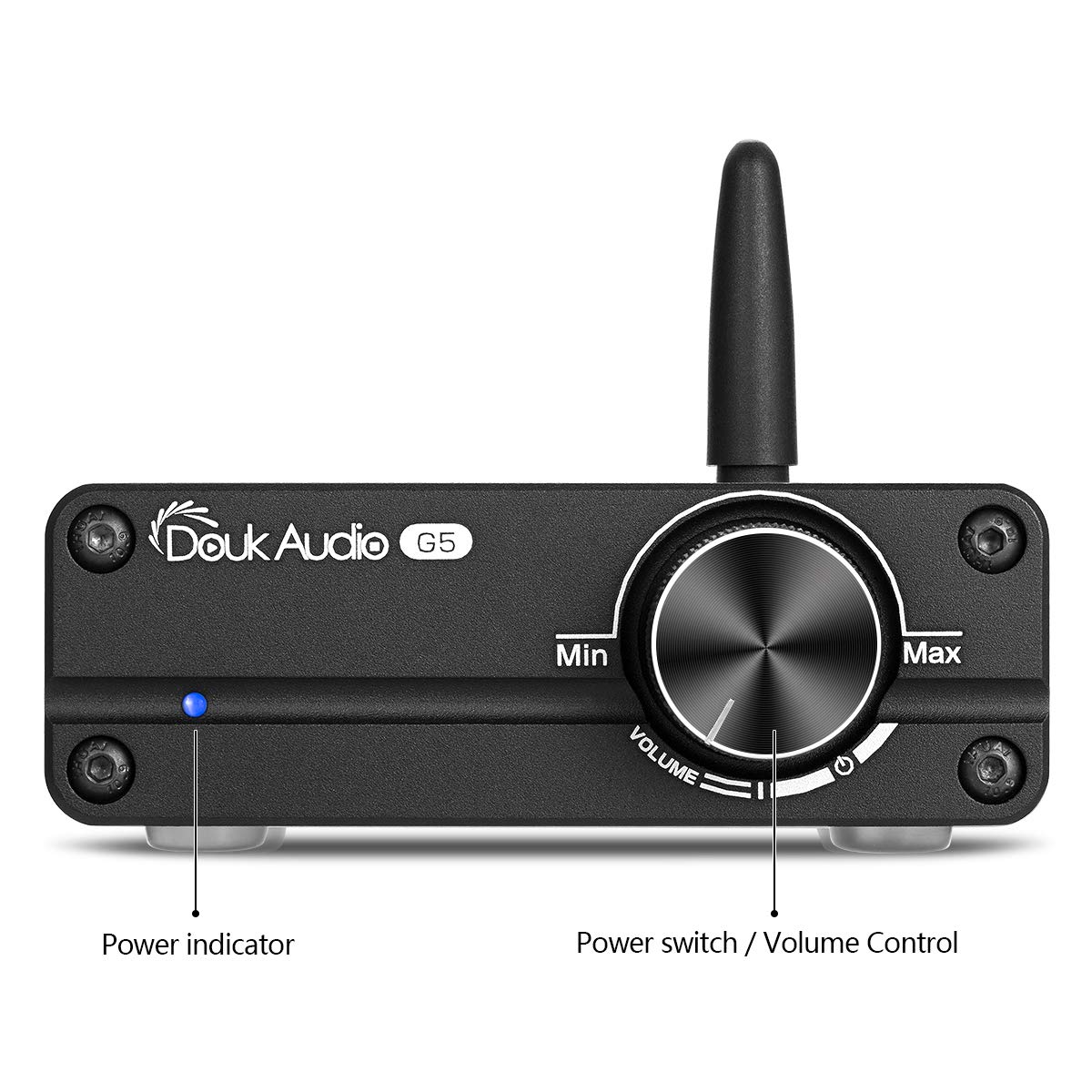
This image displays the front panel of the Douk Audio G5 amplifier. On the left, a blue LED serves as the power indicator. The large knob on the right functions as both the power switch and volume control, rotating from minimum (Min) to maximum (Max) volume.
2. Bluetooth Жупташтыруу
- камсыз кылуу ampкөтөргүч күйгүзүлгөн.
- On your Bluetooth-enabled device, search for available Bluetooth devices.
- Select "Douk Audio G5" (or similar name) from the list to pair.
- Жупташкандан кийин, amplifier will play audio from your device.
Note: The Bluetooth connection remains active. If an AUX cable is connected, the amplifier will prioritize the Bluetooth audio if a Bluetooth device is actively paired and playing. To switch to AUX input, you must disconnect the Bluetooth device from the amplifier's pairing list.
3. AUX киргизүүсүн колдонуу
Connect your audio source to the 3.5mm AUX input. If a Bluetooth device is currently paired and playing, disconnect it from your device's Bluetooth settings to allow the AUX input to become active.

This image illustrates the versatility of the Douk Audio G5 amplifier, showing it connected to a laptop via Bluetooth 5.0 and a smartphone via AUX input. It highlights the amplifier's compatibility with various devices such as phones, tablets, MP3 players, TVs, and computers.
Техникалык тейлөө
- Тазалоо: Сыртын тазалоо үчүн жумшак, кургак чүпүрөктү колдонуңуз ampСуюк тазалоочу каражаттарды же эриткичтерди колдонуудан алыс болуңуз.
- Вентиляция: камсыз кылуу amplifier has adequate ventilation. Do not block any vents or place it in an enclosed space.
- Сактагыч: Эгерде түзмөк көпкө колдонулбаса, аны кубат адаптеринен сууруп, салкын, кургак жерде сактаңыз.
Проблемаларды чечүү
| Көйгөй | Мүмкүн себеп | Чечим |
|---|---|---|
| Кубат индикатору жок | Power adapter not connected or faulty; power outlet not active; ampкөтөргүч өчүрүлгөн. | Check power adapter connection to amplifier and outlet. Ensure outlet is functional. Rotate volume knob clockwise to turn on. |
| Үн чыгышы жок | Volume too low; incorrect input selected; speaker connections loose; audio source issue. | Increase volume. Ensure Bluetooth device is disconnected if using AUX, or ensure Bluetooth is paired if using Bluetooth. Check all speaker wire connections. Verify audio source is playing. |
| Бурмаланган үн | Volume too high; poor audio source quality; speaker impedance mismatch; faulty cable. | Reduce volume. Use a high-quality audio source. Ensure speakers are within recommended impedance range (4-8 Ohm). Try a different audio cable. |
| Bluetooth байланышы көйгөйлөрү | Түзмөк өтө алыс; тоскоолдук; amplifier not in pairing mode (always on). | Түзмөккө жакыныраак жылдырыңыз amplifier. Reduce interference from other wireless devices. Ensure no other device is currently connected to the ampBluetooth аркылуу көтөргүч. |
| Sound cuts out at high volume | Overload protection activated; insufficient power supply; speaker impedance too low. | Reduce volume. Ensure the power supply is the original 19V adapter. Verify speaker impedance is not below 4 Ohms. |
Техникалык шарттар
| Өзгөчөлүк | Деталь |
|---|---|
| Модель номери | DZ076_H (G5) |
| Бренд | Douk Audio |
| Чыгуу күчү | 50 Watts x 2 (into 4 Ohm) |
| Каналдардын саны | 2 |
| Bluetooth версиясы | 5.0 (Qualcomm 3003 Chip) |
| Аудио киргизүү | 3.5 мм AUX, Bluetooth |
| Күч Ampкөтөргүч чип | TPA3116 |
| Оп-Amp Чип | NE5532 |
| Minimum Supply Voltage | 15 вольт (ток) |
| Maximum Supply Voltage | 24 вольт (ток) |
| Сунушталган электр булагы | 19V 4.74A (included) |
| Элемент Салмагы | 1.32 фунт (болжол менен 0.6 кг) |
| Пакеттин өлчөмдөрү | 7.72 x 7.2 x 2.24 дюйм (болжол менен 19.6 x 18.3 x 5.7 см) |
Кепилдик маалымат
Douk Audio products are covered by a limited warranty against defects in materials and workmanship. For specific warranty terms and conditions, please refer to the warranty card included with your product or contact Douk Audio customer support.
Кардарларды колдоо
If you encounter any issues or have questions regarding your Douk Audio G5 amplifier that are not addressed in this manual, please contact Douk Audio customer support through their official website or the platform where you purchased the product. Please have your model number (G5 or DZ076_H) and purchase details ready.


