1. Киришүү
Thank you for choosing the Kaidi KD-750 Bluetooth Headphones. This manual provides essential information for the proper setup, operation, and maintenance of your device. Please read it thoroughly before use to ensure optimal performance and longevity of your headphones.
2. Пакеттин мазмуну
Пакетиңизде бардык буюмдар бар экенин текшериңиз:
- 1 x Kaidi KD-750 Bluetooth Headphones
- 1 x USB заряддоо кабели
- 1 x Reinforced 3.5mm Audio Cable with Microphone (P2 Cable)
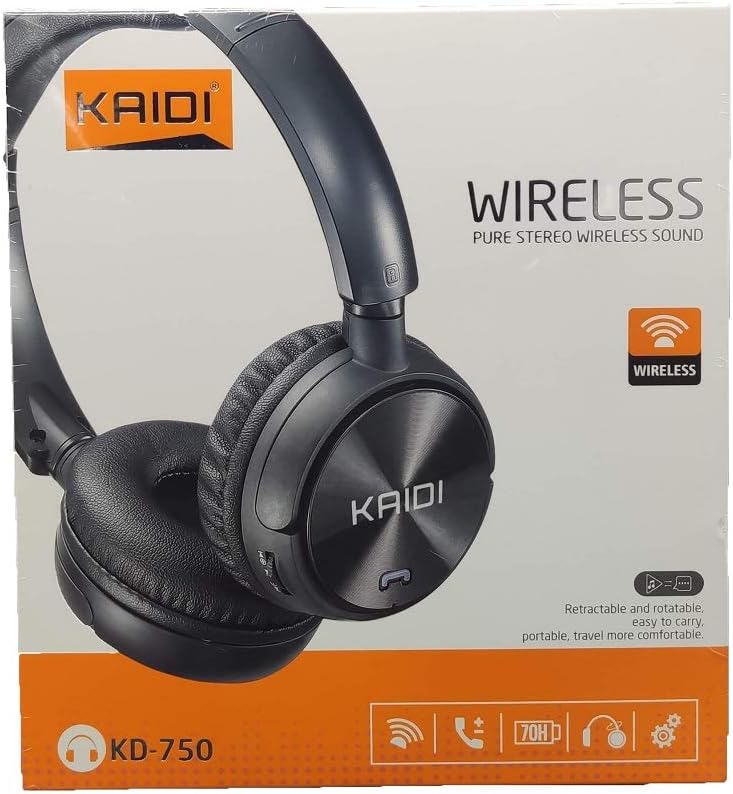
Сүрөт: алдыңкы view of the Kaidi KD-750 retail packaging, showing the headphones and branding.
3. Продукт бүтүп калдыview
Familiarize yourself with the various parts and controls of your Kaidi KD-750 headphones.

Сүрөт: алдыңкы view of the Kaidi KD-750 Bluetooth Headphones, showcasing the earcups with Kaidi logo and the adjustable headband.
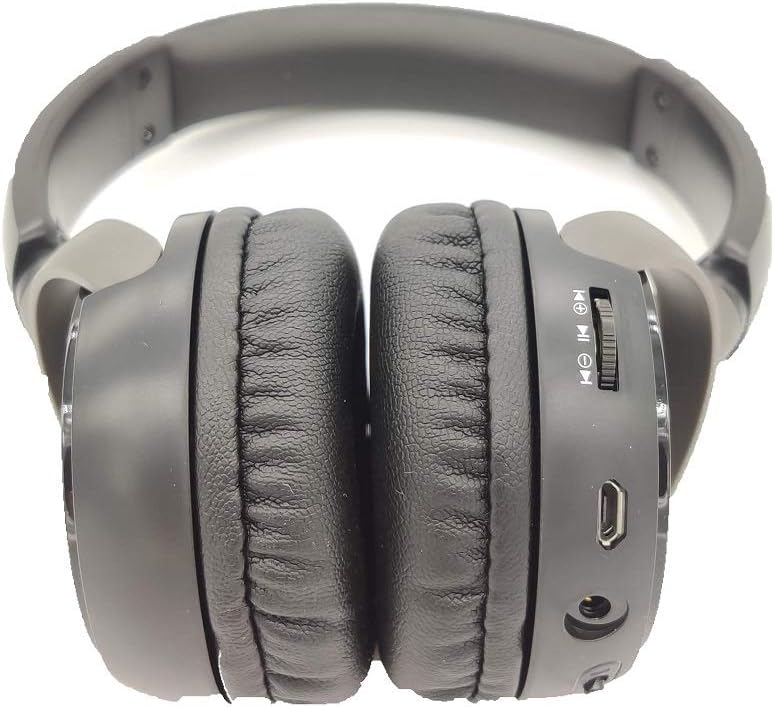
Сүрөт: каптал view of the Kaidi KD-750 Bluetooth Headphones, highlighting the control buttons, charging port, and audio jack on the earcup.

Image: Back of the Kaidi KD-750 retail box, featuring a diagram of the headphone controls and key product features.
3.1. Башкаруу каражаттары жана порттор
- Power Button / Multi-function Button: Power On/Off, Play/Pause, Answer/End Call.
- Volume Up / Next Track Button: Short press for Volume Up, Long press for Next Track.
- Volume Down / Previous Track Button: Short press for Volume Down, Long press for Previous Track.
- Режим баскычы (M): Switch between Bluetooth, FM Radio, and SD Card modes.
- Микро USB кубаттоочу порт: Наушниктерди заряддоо үчүн.
- 3.5 мм AUX киргизүү: Камтылган аудио кабелин колдонуу менен зымдуу туташуу үчүн.
- Микро SD карта слоту: Micro SD картадан түз музыка ойнотуу үчүн.
- Микрофон: Үнсүз чалуулар үчүн.
4. Орнотуу
4.1. Наушниктерди заряддоо
Биринчи колдонуудан мурун, наушникиңизди толук заряддаңыз.
- Connect the Micro USB end of the charging cable to the charging port on the headphones.
- Кубаттоочу кабелдин USB-A учун USB кубат адаптерине (кошулмада жок) же компьютердин USB портуна туташтырыңыз.
- The LED indicator will illuminate (usually red) during charging.
- Once fully charged (approximately 2 hours), the LED indicator will change color or turn off (refer to specific LED behavior in the specifications).
Эскертүү: Батареянын иштөө мөөнөтү толук кубатталганда болжол менен 5 саатты түзөт.
4.2. Bluetooth Жупташтыруу
Pair your headphones with a Bluetooth-enabled device.
- Наушниктердин өчүрүлгөнүн текшериңиз.
- LED индикатору жупташтыруу режимин көрсөтүүчү көк жана кызыл түскө кезек-кезеги менен күйгүчө кубат баскычын болжол менен 3-5 секунд басып туруңуз.
- Түзмөгүңүздө (смартфон, планшет, компьютер) Bluetooth иштетип, жеткиликтүү түзмөктөрдү издеңиз.
- Select "KD-750" from the list of found devices.
- Жупташтырылгандан кийин, LED индикатору адатта жай көк түстө күйүп-өчөт же бир калыпта көк түстө калат.
- Эгер сырсөз талап кылынса, "0000" киргизиңиз.
Натыйжалуу Bluetooth диапазону болжол менен 10 метрди (33 фут) түзөт.
5. Иштөө нускамалары
5.1. Күйгүзүү/өчүрүү
- Күйгүзүү: Press and hold the Power Button for 2-3 seconds until the LED indicator lights up.
- Өчүрүү: Press and hold the Power Button for 3-4 seconds until the LED indicator turns off.
5.2. Music Playback (Bluetooth Mode)
- Ойнотуу/тындыруу: Кубат баскычын кыска басыңыз.
- Кийинки трек: Үндү жогорулатуу баскычын көпкө басыңыз.
- Мурунку трек: Үндү азайтуу баскычын көпкө басыңыз.
- Көлөмү: Үндү жогорулатуу баскычын кыска басыңыз.
- Үнүн азайтуу: Үндү азайтуу баскычын кыска басыңыз.
5.3. Телефон чалуулар
- Чакырууга жооп берүү: Short press the Power Button when an incoming call rings.
- Чакырууну аяктоо: Short press the Power Button during a call.
- Чакырууну четке кагуу: Long press the Power Button when an incoming call rings.
- Акыркы номерди кайра терүү: Кубат баскычын эки жолу басыңыз.
5.4. Mode Switching (FM Radio / SD Card / AUX)
басыңыз Режим (M) баскычы to cycle through available modes: Bluetooth, FM Radio, and SD Card playback.
5.4.1. FM радио режими
- Switch to FM mode using the Mode (M) Button.
- Long press the Power Button to automatically scan and save available FM stations.
- Short press the Volume Up/Down buttons to adjust volume.
- Long press the Volume Up/Down buttons to switch between saved stations.
5.4.2. Micro SD карта ойнотуу
- Insert a Micro SD card (with MP3 files) into the SD card slot.
- Switch to SD Card mode using the Mode (M) Button. The headphones will automatically begin playing music from the card.
- Use the Play/Pause, Volume Up/Down, and Next/Previous Track controls as in Bluetooth mode.

Сүрөт: Жакын план view of the Micro SD card slot on the Kaidi KD-750 headphones.
5.4.3. AUX Wired Mode
- Connect one end of the included 3.5mm audio cable to the AUX input on the headphones.
- Экинчи учун түзмөгүңүздүн 3.5 мм аудио чыгышына туташтырыңыз.
- The headphones will automatically switch to AUX mode.
- In AUX mode, controls on the headphones (volume, track control) may not function; use your connected device for control.
6. Техникалык тейлөө жана кам көрүү
- Наушниктерди жумшак, кургак чүпүрөк менен тазалаңыз. Абразивдүү тазалагычтарды же эриткичтерди колдонбоңуз.
- Наушниктерди экстремалдык температурага, нымдуулукка же тике күн нуруна тийгизүүдөн сактаңыз.
- Наушниктерди сууга же башка суюктуктарга салбаңыз.
- Наушниктерди колдонбогондо салкын, кургак жерде сактаңыз.
- Батареянын ден соолугун сактоо үчүн, узак убакыт бою колдонулбаса дагы, гарнитураны үзгүлтүксүз заряддаңыз.
7. Кыйынчылыктарды
7.1. Headphones do not power on.
Чечим: The battery may be depleted. Connect the headphones to a power source using the USB charging cable and allow them to charge for at least 30 minutes before attempting to power on again.
7.2. Cannot pair with a Bluetooth device.
- Чечим 1: Ensure the headphones are in pairing mode (LED flashing blue and red alternately).
- Чечим 2: Make sure Bluetooth is enabled on your device and it is within 10 meters of the headphones.
- Чечим 3: Turn off Bluetooth on your device, then turn it back on and try searching again.
- Чечим 4: If previously paired, try "forgetting" or "unpairing" the headphones from your device's Bluetooth list and then re-pairing.
7.3. No sound or low volume.
- Чечим 1: Наушниктердин жана туташкан түзмөгүңүздүн үнүнүн деңгээлин текшериңиз.
- Чечим 2: Наушниктердин Bluetooth же 3.5 мм AUX кабели аркылуу туура туташтырылганын текшериңиз.
- Чечим 3: If using AUX mode, ensure the cable is fully inserted into both the headphones and the audio source.
7.4. FM radio reception is poor.
Чечим: Move to an open area away from obstructions or electronic interference. The 3.5mm audio cable can sometimes act as an antenna; try connecting it even if not using AUX mode for improved reception.
8. Техникалык шарттар
| Bluetooth версиясы: | v4.2 |
| Колдоого алынган протоколдор: | AVRCP1.3, A2DP1.0, HFP1.5, HSP1.0 |
| Натыйжалуу колому: | 10 метр (33 фут) |
| Иштөө жыштыгы: | 2.402 ГГц - 2.480 ГГц |
| Батарея түрү: | Built-in 3.7V 300mAh Rechargeable Lithium Battery |
| Заряддоо Voltage: | Туруктуу ток 4.2V - 5.5V |
| Заряддоо убактысы: | Болжол менен 2 саат |
| Батареянын узактыгы: | Approximately 5 hours (playback) |
| Динамик Импеданс: | 32 Ом |
| Ызы-чууну көзөмөлдөө: | Пассивдүү ызы-чууну жокко чыгаруу |
| Байланыш технологиясы: | Bluetooth, 3.5 мм уя |
| Шайкеш түзмөктөр: | Any device supporting Bluetooth connectivity |
| Продукт Салмагы: | 190 г |
| Түсү: | Кара |
9. Кепилдик жана колдоо
The Kaidi KD-750 Bluetooth Headphones come with a standard manufacturer's warranty against defects in materials and workmanship. Please refer to the warranty card included with your purchase for specific terms and conditions, including the warranty period.
For technical support, troubleshooting assistance, or warranty claims, please contact your retailer or the official Kaidi customer service. Contact information can typically be found on the product packaging or the official Kaidi webсайт.
Сураныч, кепилдик максаттары үчүн сатып алганыңыздын далилин сактап коюңуз.


