1. Киришүү
Thank you for choosing the DEPSTECH 5.0MP WiFi Endoscope. This device is a high-definition inspection camera designed for various applications, including mechanical parts inspection, appliance maintenance, pipeline inspection, and more. Featuring a 5.0MP camera, WiFi connectivity, and a semi-rigid cable, it provides clear visuals in hard-to-reach areas. This manual provides essential information for setting up, operating, maintaining, and troubleshooting your endoscope.

The DEPSTECH WiFi Endoscope is versatile, suitable for car/auto maintenance, air-conditioning inspection, pipeline inspection, and home appliance repairs.
2. Продукт бүтүп калдыview жана өзгөчөлүктөрү
The DEPSTECH 5.0MP WiFi Endoscope is engineered for detailed visual inspection. Its robust design and advanced features ensure reliable performance in diverse environments.
Негизги өзгөчөлүктөрү:
- 5.0 мегапикселдүү HD камера: Equipped with an 8.5mm 5.0MP camera, it captures super clear 2952*1944 resolution pictures and videos, allowing for detailed inspection.
- WiFi байланышы: Utilizes double antennas for fast and stable real-time transmission to your smart device.
- Кеңири шайкештик: Works with Android 4.2+ and iOS 6.0+ devices (note: iOS 8.0 lower devices cannot record videos).
- Extended Focal Range & Zoom: Offers a large focal range from 1.57 inches to 15.7 inches (4cm to 40cm) and a 1-3X digital zoom function for examining both small articles and larger scenes.
- Жөнгө салынуучу LED жарыктандыруу: Features 6 adjustable LED lights on the camera head to illuminate dark areas and reduce overexposure, plus a built-in torchlight on the control unit.
- IP67 суу өткөрбөй турган зонд: The camera probe is IP67 rated, allowing for inspection in wet or underwater environments.
- Жарым катуу кабель: The 32ft (9.75m) long semi-rigid cable maintains its shape, enabling precise navigation into various hard-to-reach spaces.

The endoscope features a 5.0MP camera lens with Bluart 2.0 sensor technology for clear imaging in various lighting conditions.

The endoscope offers an optimal observation distance of 2.76 to 15.7 inches (7cm to 40cm) for clear viewing.

Utilize the 3X digital zoom function to magnify details for more precise inspection.

The camera head is IP67 waterproof and features 6 adjustable LED lights to provide optimal illumination in dark environments.
3. Пакеттин мазмуну
Upon opening your DEPSTECH 5.0MP WiFi Endoscope package, please verify that all the following items are included:
- DEPSTECH 5.0MP WiFi Endoscope Unit (with integrated cable and control box)
- USB заряддоо кабели
- User Manual
- Accessory Kit (includes hook, magnet, and side mirror attachments)
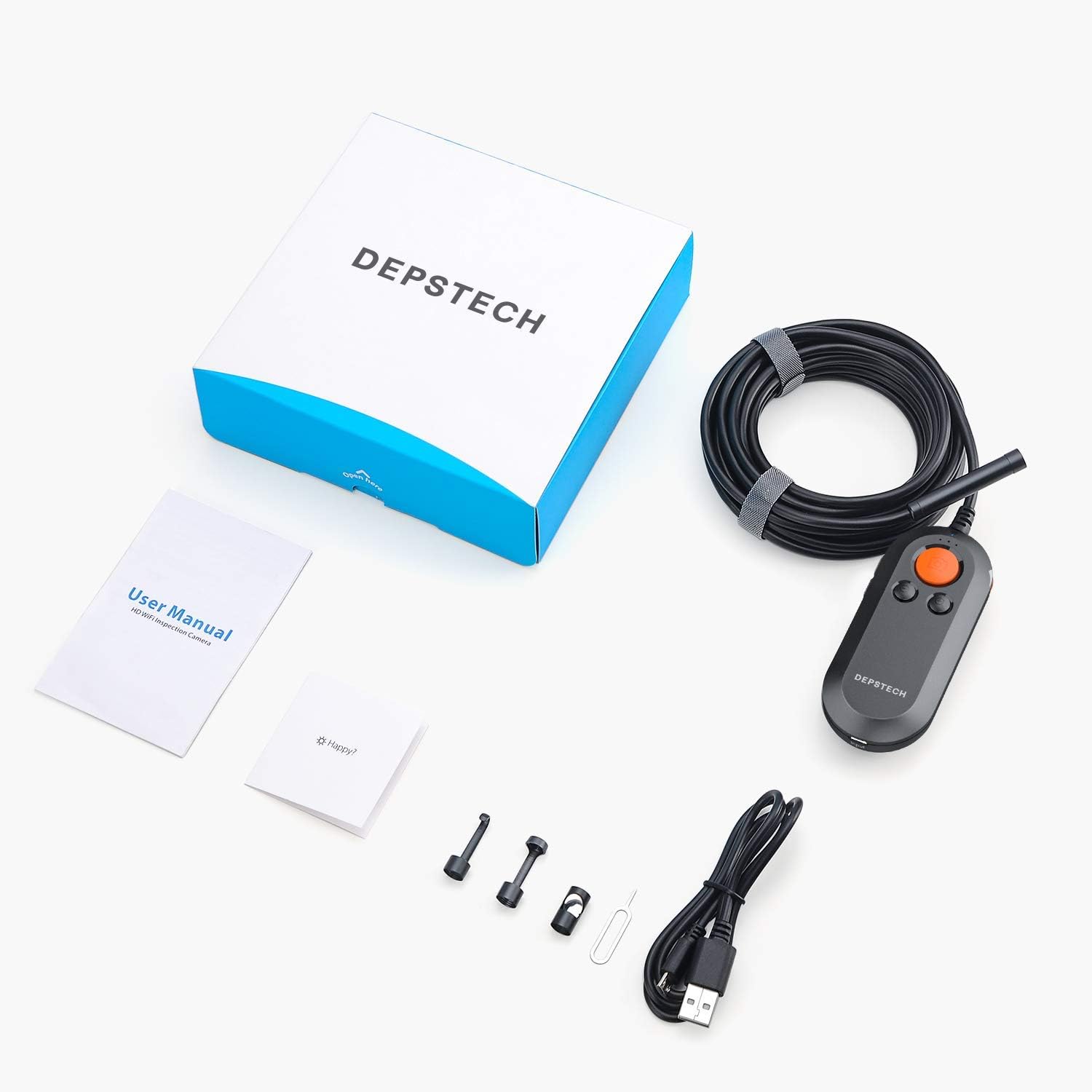
The complete package includes the endoscope, user manual, charging cable, and various attachments.
4. Орнотуу колдонмосу
4.1 Charging the Endoscope
Before first use, fully charge the endoscope's built-in battery. Connect the provided USB charging cable to the Micro USB input port on the control unit and plug the other end into a standard USB power adapter (not included) or a computer's USB port. The power indicator light will show charging status.
4.2 Кошумча тиркемени жүктөп алуу
Издөө and download the official DEPSTECH companion app (e.g., "DEPSTECH-View" or similar as indicated in the quick start guide) from your device's app store (Google Play Store for Android, Apple App Store for iOS).
4.3 Connecting to Your Device via WiFi
- Power on the endoscope by pressing and holding the power button on the control unit. The WiFi indicator light will begin to flash.
- On your smartphone or tablet, go to your WiFi settings.
- Locate and select the WiFi network named "DEPSTECH_XXXX" (where XXXX is a unique identifier).
- Enter the default password (usually provided in the quick start guide or on the device itself, often "12345678").
- Once connected, open the DEPSTECH companion app. The live video feed from the endoscope camera should appear on your screen.
5. Иштөө нускамалары
Familiarize yourself with the control unit's buttons for optimal operation.

The control unit features clearly labeled buttons for power, camera, zoom, and LED brightness control.
5.1 Күйгүзүү/өчүрүү
- Күйгүзүү: Индикатор жарыктары күйгүчө кубат баскычын басып, кармап туруңуз.
- Өчүрүү: Индикатор жарыктары өчмөйүнчө Кубат баскычын кайра басып, кармап туруңуз.
5.2 LED жарыктыгын жөндөө
Use the LED brightness control wheel or buttons on the control unit to adjust the intensity of the 6 LED lights around the camera lens. Rotate or press to increase or decrease brightness as needed for clear visibility.
5.3 Сүрөттөрдү жана видеолорду тартуу
- Сүрөткө тартуу: Press the Camera button on the control unit or the corresponding button within the app to capture a still image.
- Видеону жаздыруу: Press the Video Record button within the app to start recording. Press it again to stop recording. All captured media will be saved directly to your connected smart device.
5.4 Using Zoom Function
Use the 'Zoom In' and 'Zoom Out' buttons on the control unit to digitally magnify or reduce the view on your screen. This allows for closer inspection of details.
5.5 Navigating with the Semi-Rigid Cable
The semi-rigid cable can be bent and will hold its shape, allowing you to guide the camera into specific positions. Gently maneuver the cable to navigate through pipes, ducts, or other confined spaces. For very long or complex paths, consider attaching the camera to a fish rod or similar tool for better control.
6. Техникалык тейлөө
Proper maintenance ensures the longevity and optimal performance of your DEPSTECH Endoscope.
- Cleaning the Lens and Cable: After each use, especially in dirty or wet environments, gently wipe the camera lens and the semi-rigid cable with a soft, damp cloth. For stubborn dirt, a mild cleaning solution can be used, but ensure no liquid enters the control unit.
- Сактагыч: Эндоскопту салкын, кургак жерде, күндүн түз тийген нурларынан жана өтө жогорку температурадан алыс сактаңыз. Ийилип же бузулуп калбашы үчүн кабелди бош ороп коюңуз.
- Батареяга кам көрүү: Батареянын иштөө мөөнөтүн узартуу үчүн, бат-баттан батарейканы толук зарядсыздандырбаңыз. Узак мөөнөткө сактасаңыз, батарейканы бир нече ай сайын болжол менен 50%га чейин заряддаңыз.
- Катуу химиялык заттардан алыс болуңуз: Do not use strong solvents, abrasive cleaners, or corrosive liquids on any part of the endoscope.
7. Кыйынчылыктарды
If you encounter issues with your endoscope, refer to the following common problems and solutions:
- No Image on Screen / WiFi Connection Failure:
- Ensure the endoscope is powered on and its WiFi indicator light is active.
- Verify that your smart device is connected to the endoscope's WiFi network (e.g., "DEPSTECH_XXXX").
- Restart both the endoscope and your smart device.
- Ensure the DEPSTECH app has necessary permissions (e.g., local network access, storage).
- Poor Image Quality / Blurry Image:
- Adjust the LED brightness using the control wheel/buttons.
- Ensure the camera lens is clean and free of debris.
- Adjust the distance between the camera and the object being inspected to be within the optimal focal range (1.57-15.7 inches / 4-40cm).
- Батарея заряддалбай жатат:
- Check if the USB cable is securely connected to both the endoscope and the power source.
- Башка USB портун же кубат адаптерин колдонуп көрүңүз.
- Заряддоочу кабелдин бузулбагандыгын текшериңиз.
- App Crashing / Lagging:
- Close other background applications on your smart device.
- Ensure your device's operating system and the DEPSTECH app are updated to the latest versions.
- Clear the app's cache (via your device's app settings).
If these steps do not resolve your issue, please contact DEPSTECH customer support for further assistance.
8. Техникалык шарттар
| Спецификация | Нарк |
|---|---|
| Продукциянын өлчөмдөрү | 6.3 x 6.3 x 1.97 дюйм |
| Элемент Салмагы | 1.25 фунт |
| ASIN | B07XM7S7VQ |
| Батареялар | 1 литий-иондук батарейкалар талап кылынат (кошулган) |
| Дата биринчи жеткиликтүү | 16-сентябрь, 2019-жыл |
| Өндүрүүчү | DEPSTECH |
| Макро фокустоо диапазону | 7 см - 40 см (2.76 - 15.7 дюйм) |
| Атуу режимдери | Суу астындагы |
| Экспозицияны башкаруу түрү | Автоматтык |
| Түс | Кара |
| Видео тартуунун резолюциясы | 5.0 депутат |
9. Кепилдик жана колдоо
For information regarding warranty coverage, technical support, or service inquiries, please refer to the warranty card included in your product packaging or visit the official DEPSTECH webсайт. Кардарларды колдоо үчүн байланыш маалыматтары, адатта, өндүрүүчүнүн сайтында болот webсайт.


