Introduction
The TTfone TITAN TT950 is a user-friendly 3G flip mobile phone designed with simplicity and essential features in mind, making it ideal for seniors. It combines a large physical keypad with a responsive touchscreen, running a simplified Android operating system. Key functionalities include WhatsApp, photo contacts, and a dedicated SOS emergency button. This manual provides detailed instructions for setting up, operating, maintaining, and troubleshooting your TTfone Titan TT950.

The TTfone Titan TT950, shown both open with its large keypad and simplified display, and closed in its convenient charging dock.
Орнотуу колдонмосу
1. SIM картаны жана батареяны салуу
Before first use, ensure the phone is powered off. Carefully remove the back cover of the phone. Insert your 3G compatible SIM card into the designated slot. Ensure the gold contacts face downwards. Then, insert the Lithium-ion battery, aligning the contacts. Replace the back cover securely.
2. Баштапкы заряддоо
For optimal battery performance, fully charge the phone before its first use. Place the phone into the included charging dock. The charging indicator light on the dock or phone screen will confirm it is charging. A full charge typically takes a few hours. The phone can also be charged directly via the Micro USB port.
3. Күйгүзүү / Өчүрүү
To power on, press and hold the red 'End Call' button until the screen illuminates. To power off, press and hold the same button and follow the on-screen prompts.
Иштөө нускамалары
Негизги навигация
The TT950 features both a physical keypad and a touchscreen. You can navigate menus and select options using either the directional keys and central 'OK' button on the keypad, or by tapping directly on the screen icons.

The main menu interface of the TTfone Titan TT950, designed for easy access to key features.
Чалууларды жасоо
Dial the number using the keypad and press the green 'Call' button. To answer an incoming call, press the green 'Call' button or open the flip. To end a call, press the red 'End Call' button or close the flip.
Photo Contacts
The Photo Contacts feature allows you to assign a photo to up to 8 frequently called contacts. To call a Photo Contact, simply tap on their picture on the screen or navigate to the 'Photo Contacts' menu and select the desired contact. This simplifies calling for users who prefer visual cues.

The external display of the TTfone Titan TT950 showing an incoming call from a Photo Contact, 'Joan'.
Messaging (SMS/MMS)
Access the 'Message' application from the main menu. You can compose new messages using the keypad (T9 predictive text is available) or the on-screen keyboard. View received messages in the inbox.
The TT950 comes with WhatsApp pre-installed. Ensure you have a SIM card with mobile data enabled for WhatsApp functionality. Access WhatsApp from the main menu to send messages, make voice calls, and video calls over the internet.

The TTfone Titan TT950 displaying the WhatsApp application, enabling easy communication.
SOS өзгөчө кырдаал баскычы
The SOS button is located on the back of the phone. In an emergency, press and hold this button. The phone will automatically send an emergency text message with your location (if GPS is enabled and connected) to pre-programmed emergency contacts and then begin calling them in sequence until one answers. It is crucial to set up these emergency contacts in the phone's settings.

The SOS emergency call feature, which sends a text with location and calls pre-set contacts for immediate assistance.
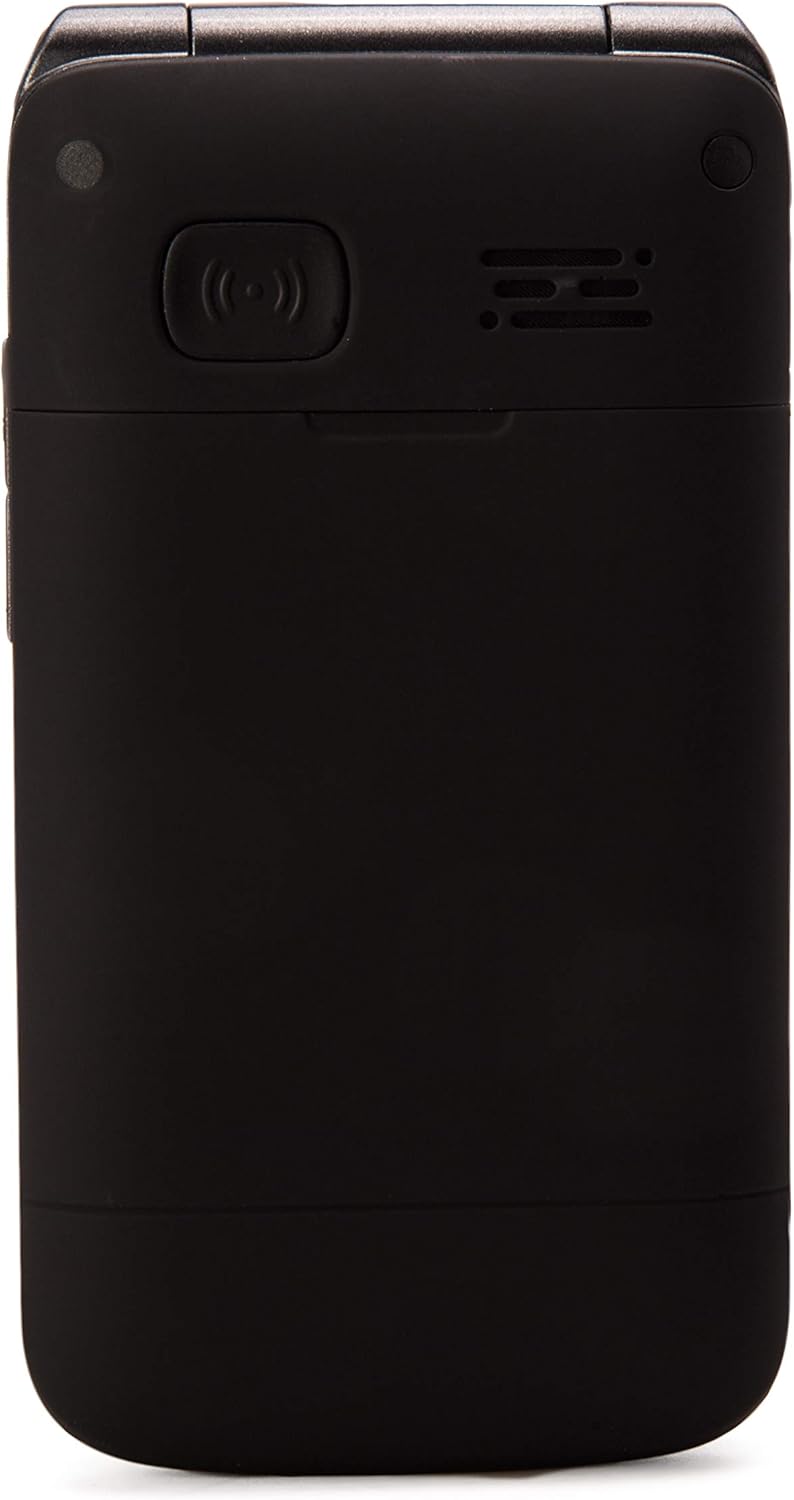
Арткы view of the TTfone Titan TT950, showing the prominent SOS button for emergencies.
Тышкы дисплей
The 1.8-inch external color screen displays important information such as time, date, battery status, and caller ID (including photo contacts) without needing to open the flip.

The external display of the TTfone Titan TT950 showing an analog clock when the phone is closed.
Техникалык тейлөө
Тазалоо
Wipe the phone and screen with a soft, dry, lint-free cloth. Avoid using harsh chemicals or abrasive materials, which can damage the phone's surface or screen.
Батареяга кам көрүү
To prolong battery life, avoid exposing the phone to extreme temperatures. Charge the battery regularly using the provided charging dock or Micro USB cable. If the phone will not be used for an extended period, charge it to about 50% before storing.
Проблемаларды чечүү
- Телефон күйбөй жатат: Батарея туура салынганын жана заряддалганын текшериңиз. Кубаттоочу түзүлүшкө туташтырып, кайра аракет кылыңыз.
- Чалууларды кабыл алуу/кабыл алуу мүмкүн эмес: Check if the SIM card is properly inserted and activated. Ensure you have network signal.
- WhatsApp date/time error: Some users report issues with WhatsApp due to incorrect date/time settings. Ensure your phone's date and time are set to automatic network synchronization. If the issue persists, try manually setting the correct date and time.
- Батареянын иштөө мөөнөтү начар: Disable unnecessary features like Wi-Fi, Bluetooth, or GPS when not in use. Reduce screen brightness. Ensure background apps are closed.
- SOS button not working: Verify that emergency contacts are correctly programmed in the settings. Ensure the phone has network signal and, for location sharing, mobile data or Wi-Fi connectivity.
- Заряддоо маселелери: Ensure the charging dock or Micro USB cable is securely connected to both the phone and a power source. Check for any debris in the charging port.
Техникалык шарттар
| Бренд | TTfone |
| Модель аты | Титан |
| Модель номери | TT950 |
| Түс | Кара |
| Операция системасы | Android (Simplified) |
| Screen Size (Internal) | 2.8 дюйм |
| Screen Size (External) | 1.8 дюйм |
| Резолюция | 240 x 320 |
| Уюлдук технология | 3G (also 2G compatible) |
| Зымсыз оператор | Бардык операторлор (кулпусу ачылган) |
| Байланыш | Wi-Fi Built-In, Micro USB |
| RAM өлчөмү | 512 MB |
| Эстутум сактоо сыйымдуулугу | 4 ГБ |
| Натыйжалуу дагы эле чечим | 5 мегапиксел |
| Батареянын курамы | Литий-ион (1 камтылган) |
| Өзгөчөлүктөр | 3G, Camera, Facebook, Photo Contacts, WhatsApp, SOS Button, Charging Dock |
Кепилдик маалымат
The TTfone Titan TT950 comes with a manufacturer's warranty of 2 жыл from the date of purchase. This warranty covers defects in materials and workmanship under normal use. Please retain your proof of purchase for warranty claims. The availability of spare parts is also guaranteed for 2 years.
This warranty does not cover damage caused by misuse, accidents, unauthorized repairs, or normal wear and tear. For detailed warranty terms and conditions, please refer to the documentation included with your product or contact TTfone customer support.
Колдоо
For further assistance, technical support, or inquiries regarding your TTfone Titan TT950, please visit the official TTfone website or contact their customer service. Contact details are typically available on the product packaging or the manufacturer's webсайт.
When contacting support, please have your product model (TT950) and purchase details ready to facilitate a quicker resolution.


