1. Киришүү
This manual provides detailed instructions for the safe and efficient operation of your WZRELB RBP300012 3000W 12V Pure Sine Wave Solar Power Inverter. This device converts 12V DC battery power into 110-120V AC pure sine wave electricity, suitable for a wide range of household and sensitive electronic appliances. Please read this manual thoroughly before installation and operation to ensure proper use and to prevent damage to the unit or connected devices.
Негизги өзгөчөлүктөрү:
- 3000W continuous power, 6000W peak power pure sine wave output.
- Converts 12V DC to 110-120V AC at 60Hz.
- Dual US outlets for convenient power access.
- LED displays for monitoring DC input voltage жана AC чыгышы томtage.
- Comprehensive safety protections: Over voltage, Low voltage, Overload, Short circuit, Over heat, Polarity reverse (fuse), and Ground protection.
- Intelligent cooling fan operates based on temperature, prolonging battery life and reducing noise.
- Compact and robust design, ideal for mobile and off-grid applications.
- High-quality pure copper inductance ensures true pure sine wave AC output.

Image: The WZRELB Pure Sine Wave Inverter is suitable for various applications including RVs, boats, and home solar systems, providing stable and reliable power.
2. Коопсуздук чаралары
Adhering to these safety guidelines is crucial for your safety and the longevity of the inverter:
- Do NOT connect the inverter directly to grid power. This unit is designed for DC to AC conversion only.
- Ensure correct polarity: Reverse connection of positive and negative terminals is strictly forbidden and will cause severe damage.
- Ашыкча жүктөөдөн качыңыз: Do not exceed the inverter's continuous power rating. For inductive loads (e.g., motors, compressors, refrigerators, microwaves), choose an inverter with a continuous power 3-10 times higher than the appliance's rated power due to high startup surge requirements.
- Proper Power-Up Sequence: Always turn on the inverter first, then turn on your loads. When shutting down, turn off the loads first, then the inverter. This prevents unstable output during startup and protects your appliances.
- Кабель өлчөмү: Use the provided standard battery cables. Using undersized or excessively long cables can lead to significant voltage drop and prevent the inverter from delivering full output. Ensure cable specification is at least AWG 4, and thicken if length exceeds 24 inches.
- Вентиляция: Ensure adequate ventilation around the inverter. The cooling fan activates when the internal temperature exceeds 50°C (122°F).
- Fuse коргоо: The inverter has built-in fuses. Spare fuses are included in the package.
- Кызыл жарык күйүп: Кызыл жарыктын күйүп-өчүшү киргизүү көлөмүнүн жогорулаганын билдиретtage бир аз жогору.
- Орнотуу чөйрөсү: Инверторду кургак, жакшы желдетилген жерге, түз күн нурунан, жылуулук булактарынан жана тез күйүүчү материалдардан алыс орнотуңуз.

Image: The inverter features all-sided protection technology to safeguard both your battery and connected devices from high and low voltage шарттары.
3. Пакеттин мазмуну
Пакетиңизде бардык буюмдар бар экенин текшериңиз:
- WZRELB 3000W 12VDC Pure Sine Wave Inverter x 1
- Battery Cables x 4 (2 positive, 2 negative)
- Колдонуучунун колдонмосу x 1 (бул документ)
- Cable Lugs (for secure connections)
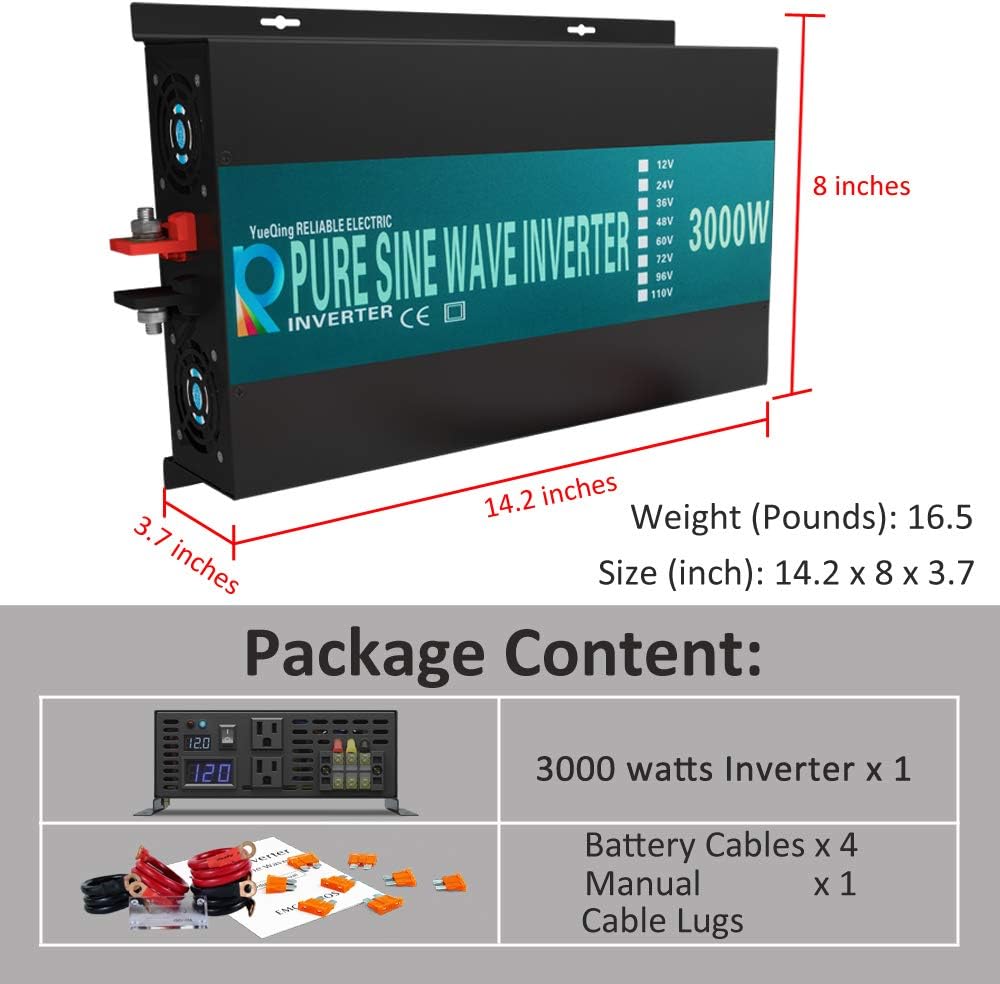
Image: The package includes the 3000-watt inverter, four battery cables, the user manual, and cable lugs for installation.
4. Продукт бүтүп калдыview
Алдыңкы панели:

Image: The front panel features dual US type AC sockets, a terminal block for direct wiring, an ON/OFF switch, LED power indicator, and digital displays for input DC voltage жана чыгаруу AC көлөмүtage.
- AC розетка: Standard US type outlets for connecting AC appliances.
- Терминал блогу: For direct hardwire connections of AC loads.
- ON/OFF которуу: Инвертор үчүн негизги кубат которгучу.
- Чыгуу AC Voltage Дисплей: Учурдагы AC чыгышынын көлөмүн көрсөтөтtage.
- Киргизүү DC Voltage Дисплей: Учурдагы DC киргизүү көлөмүн көрсөтөтtage батареядан.
- LED Power көрсөткүчү: Illuminates when the inverter is powered on.
Арткы Panel:

Image: The rear panel shows the positive and negative DC input terminals, cooling fans, and the grounding lug.
- Позитивдүү терминал (+): Батареянын оң кабелин туташтыруу үчүн кызыл терминал.
- Терс терминал (-): Терс батарея кабелин туташтыруу үчүн кара терминал.
- Муздатуу желдеткичтери: Two intelligent cooling fans for heat dissipation.
- Жерге туташтыргыч: Инверторду жерге туташтыруу үчүн.
5. Орнотуу
Коопсуз жана туура орнотуу үчүн бул кадамдарды аткарыңыз:
5.1 DC Connection:
- Инвертордун күйгүзүү/өчүрүү баскычы "OFF" абалында экенин текшериңиз.
- Connect the positive (red) battery cables to the positive (+) terminal of the inverter.
- Connect the negative (black) battery cables to the negative (-) terminal of the inverter.
- Connect the other end of the positive (red) cables to the positive (+) terminal of your 12V battery system.
- Connect the other end of the negative (black) cables to the negative (-) terminal of your 12V battery system.
- Tighten all terminal connections securely using the provided nuts and washers. Loose connections can cause overheating and damage.

Сүрөт: деталдуу view of connecting the battery cables to the inverter's positive and negative terminals, ensuring proper use of flat washers, up washers, and nuts for secure installation.
Маанилүү: A reverse connection of positive and negative is strictly prohibited and will damage the inverter. Always double-check polarity before making connections.
5.2 Cable Requirements:
It is critical to use appropriately sized cables for optimal performance and safety. The inverter comes with standard battery cables. If you use your own cables, ensure they are at least AWG 4. If the cable length exceeds 24 inches, consider using thicker gauge cables to minimize voltage drop, which can affect inverter performance and trigger low voltagэ сигналдар.
5.3 Жерге туташтыруу:
For safety, connect the grounding lug on the inverter's rear panel to a proper earth ground. This helps protect against electrical shock in case of a fault.

Image: This composite image illustrates the DC connection process, the importance of tightening terminals, and a crucial warning against overloading, especially with inductive loads.
6. Иштөө нускамалары
6.1 Күйгүзүү/өчүрүү:
- Before powering on, ensure all DC connections are secure and correct.
- Flip the ON/OFF switch on the inverter's front panel to the "ON" position. The LED power indicator should illuminate, and the voltage displays will show readings.
- Once the inverter is stable (after a few seconds due to soft start function), you can connect and turn on your AC appliances.
- To power off, first turn off all connected AC appliances.
- Then, flip the ON/OFF switch on the inverter to the "OFF" position.
6.2 Load Considerations:
Understanding your load type is essential for optimal inverter performance and to prevent overloading:
- Каршылык көрсөтүүчү жүктөмдөр: Appliances like laptops, TVs, electric cookers, and LED lights. For these, choose an inverter with continuous power higher than the appliance's rated power. It is best to use about 80% of the inverter's rated power.
- Индуктивдүү жүктөр: Appliances with motors or compressors, such as microwaves, water pumps, air conditioners, and refrigerators. These require a significantly higher surge power at startup (3-10 times their continuous rating). For such appliances, select an inverter whose continuous power is 3-7 times higher than your appliance's rating. For refrigerators, a 10 times higher power inverter is recommended.
7. Техникалык тейлөө
Үзгүлтүксүз техникалык тейлөө сиздин инверторуңуздун узак мөөнөттүү жана ишенимдүү иштешин камсыз кылат:
- Тазалыкты сактоо: Инвертордун сыртын мезгил-мезгили менен кургак, жумшак чүпүрөк менен тазалап туруңуз. Желдетүүчү тешиктердин жана муздатуучу желдеткичтердин чаңдан жана таштандылардан тазаланганын текшериңиз.
- Байланыштарды текшерүү: Regularly inspect all DC and AC connections for tightness. Loose connections can cause resistance, heat buildup, and power loss.
- Батареянын ден соолугу: Ensure your battery system is well-maintained and fully charged. A low battery can cause the inverter to shut down or enter protection mode.
- Курчап турган чөйрө: Maintain a cool, dry, and well-ventilated environment for the inverter.
8. Кыйынчылыктарды
Бул жерде сиз кабылышы мүмкүн болгон жалпы маселелерди чечүү жолдору бар:
Q: Why can't the inverter be turned on?
- A: Ensure the battery is fully charged. The inverter may be in low-voltage protection if the battery power is low.
- A: Due to the soft start function, turn on the inverter first, then turn on your loads. Otherwise, the output may not be stable or normal.
- A: Check for overload. If the load exceeds the inverter's capacity, it will shut down.
Q: Why does the inverter automatically shut down when running loads?
- A: Check if a fuse or breaker is installed in your system. For a 3000W 12V DC version, a 300Amp fuse between the inverter and battery is recommended.
- A: Verify that standard cables are used and all connections are secure. If using four cables, ensure all are connected. If using your own cables, ensure they are larger than AWG 4, and thicken if length exceeds 24 inches to prevent voltagд тамчы.
- A: The battery capacity might be too small. For a 3000W 12VDC inverter, a battery system of ≥ 300AH is recommended. If the DC LED reading drops significantly under load, your battery capacity may be insufficient. Consider adding more batteries.
С: Чыгуу том болотtagе туураланат?
- A: Output voltage may deviate due to load or other factors. The output voltage can be reset within a certain range by the user. Refer to the detailed user guide (PDF) for advanced settings.
9. Техникалык шарттар
| Өзгөчөлүк | Спецификация |
|---|---|
| Модель аты | RBP300012 |
| Ватtage (Үзгүлтүксүз) | 3000 ватт |
| Ватtage (чоку) | 6000 ватт |
| DC Input Voltage | 12V DC (Range: 10V-15V) |
| AC Output Voltage | 110-120В AC |
| Жыштык | 60Hz |
| Натыйжалуулук | 85%-90% |
| Low Voltage Ойготкуч | 9.5V-10.5V |
| Low Voltage Өчүрүү | 9V-10V |
| Voltage Өчүрүү | 15.5V |
| Муздатуу ыкмасы | Intelligent Cooling Fan (activates > 50°C) |
| Продукциянын өлчөмдөрү | 16.2 x 9.7 x 3.7 дюйм |
| Элемент Салмагы | 11.5 фунт |
10. Кепилдик жана колдоо
WZRELB provides an 18-month warranty for this product, ensuring prompt reply and friendly customer service. For further assistance, detailed diagrams, or specific technical inquiries, please refer to the official PDF documents:
For customer service, please contact WZRELB directly through their official channels or the retailer where the product was purchased.


