1. Introduction and Overview
This manual provides detailed instructions for the installation, operation, and maintenance of your Soundstream VRN-DD7HB Double DIN Bluetooth In-Dash Car Stereo Receiver. Please read this manual thoroughly before using the product to ensure proper functionality and to prevent damage.
The VRN-DD7HB is designed to enhance your in-car audio experience with features such as Smart Sense Glass Panel Touch Screen Technology, Bluetooth V4.0 for hands-free calling and A2DP wireless audio playback, and compatibility with OEM steering wheel controls and rear view камералар.
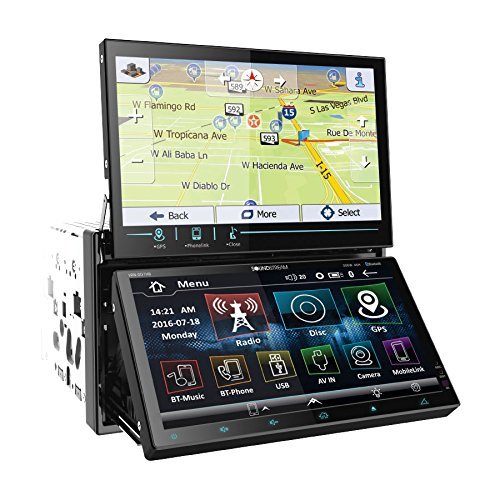
1.1-сүрөт: Фронт view of the Soundstream VRN-DD7HB Car Stereo Receiver, showcasing its double DIN form factor and touchscreen display.
2. Коопсуздук маалыматы
To ensure safe operation and prevent injury or damage, observe the following precautions:
- Агрегатты айдоодон алаксыта тургандай иштетпеңиз. Ар дайым жол коопсуздугун биринчи орунга коюу.
- Электр зымдарына зыян келтирбөө жана туура эмес туташтырбоо үчүн орнотуу үчүн адиске кайрылыңыз.
- Түзмөктү бөлүктөргө бөлбөңүз же өзгөртпөңүз. Бул бузулууга же электр тогуна урунууга алып келиши мүмкүн.
- Үндү сырткы жол кыймылынын үндөрүн дагы эле уга тургандай деңгээлде кармаңыз.
- Сунуш 65 Эскертүү: Бул продукт Калифорния штатында рак жана тубаса кемтик же башка репродуктивдүү зыян алып келген химиялык заттарды камтыйт.
3. Орнотуу жана орнотуу
Professional installation is highly recommended for this car stereo receiver. Incorrect wiring can cause severe damage to the unit or your vehicle's electrical system.
3.1 Зымдарды туташтыруу
Ensure all power, ground, speaker, and accessory wires are connected correctly according to your vehicle's wiring diagram and the unit's wiring harness. Pay close attention to the following:
- Күч (сары): Туруктуу 12V кубаттуулукка туташтырыңыз.
- Аксессуар (Кызыл): 12V кубаттуулуктагы которгучка (тутандыруу) туташтырыңыз.
- Жер (Кара): Таза шасси жерге туташтыруучу чекитке бекем туташтырыңыз.
- Динамиктин чыгышы: Туура полярдуулукту камсыз кылуу үчүн унааңыздын динамиктерине туташтырыңыз.
- Арткы View Камера киргизүү: Connect the video output of your rear view camera to the designated input on the receiver. Ensure the reverse trigger wire is connected to your vehicle's reverse light circuit.
- Руль дөңгөлөгүн башкаруу киргизүү: Connect to your vehicle's OEM steering wheel control interface (if applicable). Refer to your vehicle's manual and the steering wheel control interface instructions for proper connection.
3.2 Монтаждоо
Mount the double DIN unit securely into your vehicle's dashboard using the provided mounting hardware. Ensure there is adequate space for ventilation and wiring.
4. Иштөө нускамалары
4.1 Күйгүзүү/өчүрүү
Press the power button (usually located on the front panel or a soft-touch button on the screen) to turn the unit on or off. The unit will also power on/off with your vehicle's ignition.
4.2 Сенсордук экрандын иштеши
The VRN-DD7HB features a Smart Sense Glass Panel Touch Screen. Navigate menus, select functions, and adjust settings by touching the corresponding icons or areas on the display.
4.3 Bluetooth байланышы
- Түзмөктү жупташтыруу:
- Мобилдик түзмөгүңүздө Bluetooth иштетилгенин текшериңиз.
- On the VRN-DD7HB, navigate to the Bluetooth menu.
- Издөө available devices on your mobile phone. The unit should appear as "Soundstream VRN-DD7HB" or similar.
- Select the unit on your phone to pair. Enter the PIN (usually "0000") if prompted.
- Жупташтырылгандан кийин, аппарат байланышты ырастайт.
- Hands Free Чалуу: After pairing, you can make and receive calls directly through the unit using the built-in front panel Bluetooth microphone and your car's speakers.
- A2DP Audio Playback: Stream audio wirelessly from your paired device. Select the Bluetooth audio source on the receiver and control playback (play/pause, skip) from the unit or your phone.
4.4 Арткы View Камера киргизүү
When the vehicle is shifted into reverse, the unit will automatically display the image from the connected rear view camera on its 800x480 widescreen resolution display. This feature provides assistance for parking and maneuvering.
4.5 Рулду башкаруу
If an OEM steering wheel control interface is connected, you can program the unit to respond to your vehicle's steering wheel buttons for functions such as volume control, track skipping, and mode selection. Refer to the unit's settings menu for steering wheel control configuration.
5. Техникалык тейлөө
Proper maintenance ensures the longevity and optimal performance of your car stereo receiver.
- Экранды тазалоо: Сенсордук экранды акырын сүртүү үчүн жумшак, түксүз чүпүрөктү колдонуңуз. өжөр тактар үчүн, бир аз гampчүпүрөккө суу же экранды тазалоочу каражат. Абразивдүү материалдардан же катуу химиялык заттардан алыс болуңуз.
- Жалпы тазалоо: Агрегатты чаңдан жана таштандыдан алыс кармаңыз. Желдетүүчү тешиктерди жана топчу жерлерди тазалоо үчүн жумшак щетка же кысылган абаны колдонуңуз.
- Ашыкча температурадан сактаныңыз: Аппаратты өтө ысыкка же суукка тийгизбеңиз, анткени бул анын иштешине жана иштөө мөөнөтүнө таасир этиши мүмкүн.
6. Кыйынчылыктарды
If you encounter issues with your VRN-DD7HB, refer to the following common problems and solutions:
| Көйгөй | Мүмкүн болгон себеп / Чечим |
|---|---|
| Түзмөк күйбөйт. |
|
| Динамиктерден үн жок. |
|
| Bluetooth device fails to pair. |
|
| Арткы view camera image not displayed. |
|
7. Техникалык шарттар
| Өзгөчөлүк | Деталь |
|---|---|
| Модель номери | VRN-DD7HB |
| Дисплей | Smart Sense Glass Panel Touch Screen, 800x480 Widescreen Resolution |
| Bluetooth версиясы | V4.0 (Hands-Free Calling, A2DP Audio Playback) |
| Микрофон | Built-in Front Panel Bluetooth Microphone |
| Байланыш технологиясы | Bluetooth, USB, 3.5 мм уя |
| Шайкеш түзмөктөр | Смартфон, Динамик |
| Controller Type | Android (via Bluetooth/USB connection) |
| Аудио чыгаруу режими | Стерео |
| Көлөмдүү үн каналынын конфигурациясы | 4.0 |
| Чыгуу күчү | 220 Ватт |
| Түс | КАРА |
| Продукциянын өлчөмдөрү | 11.3 x 4.7 x 9.2 дюйм |
| Элемент Салмагы | 9.01 фунт |
8. Кепилдик жана колдоо
This product is offered as a renewed item. Renewed products are professionally inspected and tested to work and look like new. If not satisfied with the purchase, renewed products are typically eligible for replacement or refund under the Amazon Renewed Guarantee. Please refer to the specific terms and conditions of the Amazon Renewed Guarantee for details regarding your purchase.
For technical support or further assistance, please contact the seller or refer to the Soundstream official webжалпы продукт маалымат үчүн сайт.


