Introduction
The SYMA S5H Airwolf Helicopter is a compact and user-friendly radio-controlled aircraft designed for both indoor and outdoor use. It incorporates advanced features such as one-key take-off and landing, auto-hovering, and two-speed modes, making it suitable for beginners and experienced pilots alike. This manual provides essential information for safe operation, setup, and maintenance of your helicopter.

Image: The SYMA S5H Airwolf Helicopter, showcasing its sleek design and main rotor blades.
Коопсуздук чаралары
To ensure safe operation and prevent damage to the helicopter or injury, please observe the following precautions:
- Always operate the helicopter in an open area, away from people, animals, and obstacles.
- Do not fly near power lines, trees, or water.
- Keep fingers, hair, and loose clothing away from rotating parts.
- Do not touch the motor or battery immediately after use, as they may be hot.
- Supervise children during operation. Recommended age for use is 8-16 years.
- Turn off the helicopter and remote control when not in use.
- Берилген оригиналдуу заряддоо кабелин гана колдонуңуз.
- Тик учакты же анын компоненттерин өзгөртүүгө же бөлүктөрүн ажыратууга аракет кылбаңыз.
Пакеттин мазмуну
Пакетте бардык буюмдар бар экенин текшериңиз:
- SYMA S5H Airwolf Helicopter
- Радио башкаруу өткөргүч
- USB заряддоо кабели
- Spare Tail Propeller
- Көрсөтмө (бул документ)
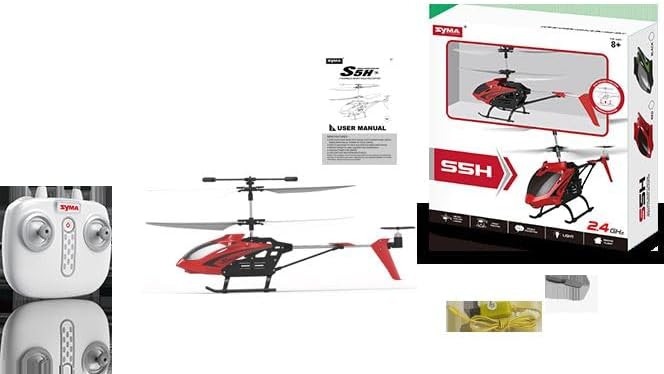
Image: The SYMA S5H Airwolf Helicopter, its remote control, and the USB charging cable.
Жайгашуу
1. Алыстан башкаруунун батареясын орнотуу
- Пульттун артындагы батарея отсегин табыңыз.
- Батареянын капкагын ачыңыз.
- Туура полярдуулукту (+/-) камсыз кылуу менен 4 "AA" батарейканы (кошумча эмес) бөлүмгө салыңыз.
- Батареянын капкагын бекем жабыңыз.
2. Тик учакты заряддоо
The helicopter's internal battery must be charged before first use and after each flight.
- Ensure the helicopter is powered off.
- Connect the small end of the USB charging cable to the charging port on the helicopter.
- Connect the larger USB end of the cable to a USB power source (e.g., computer USB port, USB wall adapter).
- The indicator light on the USB cable will illuminate during charging and turn off when charging is complete.
- Charging time typically takes approximately 60-90 minutes. Do not overcharge.
Иштөө нускамалары
1. Pairing the Helicopter and Remote Control
- Тик учакты тегиз, түз жерге коюңуз.
- Turn on the helicopter's power switch. The helicopter's lights will flash.
- Алыстан башкарууну күйгүзүңүз.
- Push the left joystick (throttle) all the way up, then pull it all the way down. The helicopter's lights will stop flashing and remain solid, indicating successful pairing.
2. Учууну башкаруунун негизги каражаттары
- Сол жактагы джойстик (дроссель): Өйдө көтөрүлүү үчүн түртүңүз, ылдый түшүү үчүн ылдый тартыңыз.
- Right Joystick (Directional): Алдыга учуу үчүн алдыга түртүңүз, артка учуу үчүн артка тартыңыз. Солго учуу үчүн солго түртүңүз, оңго учуу үчүн оңго түртүңүз.
- Кесүү баскычтары: Use the trim buttons on the remote control to fine-tune the helicopter's stability if it drifts in any direction.
3 Бир ачкыч менен учуп-конуу
- Бир баскычтуу учуу: After pairing, press the one-key take-off button (usually marked with an arrow pointing up). The helicopter will automatically ascend and hover at a stable altitude.
- Бир ачкыч конуу: During flight, press the one-key landing button (usually marked with an arrow pointing down). The helicopter will automatically descend and land gently.
4. Auto-Hover Function
The SYMA S5H features an auto-hover function, which allows the helicopter to maintain a stable altitude without constant throttle input. This makes it easier for beginners to control.
5. Ылдамдык режимдери
The helicopter offers two speed modes:
- Жай ылдамдык: Ideal for beginners and indoor flying, providing more stable and controlled movements.
- Тез ылдамдык: For more experienced pilots and outdoor flying, offering increased responsiveness and speed.
Refer to your remote control diagram for the specific button to switch between speed modes.

Image: The SYMA S5H Airwolf Helicopter demonstrating its flight capabilities.
Техникалык тейлөө
- Тазалоо: Use a soft, dry cloth to clean the helicopter. Do not use water or chemical cleaners.
- Сактагыч: Store the helicopter and remote control in a cool, dry place, away from direct sunlight and extreme temperatures.
- Батареяга кам көрүү: If not used for an extended period, remove batteries from the remote control. Charge the helicopter's battery periodically to maintain its health.
- Пропеллер текшерүү: Regularly check propellers for damage. Replace any bent or broken propellers with the provided spare or genuine replacement parts.
Проблемаларды чечүү
| Көйгөй | Мүмкүн себеп | Чечим |
|---|---|---|
| Helicopter does not respond to remote control. | Not paired; low battery in remote or helicopter; out of range. | Re-pair the helicopter and remote. Check/replace remote batteries. Charge helicopter battery. Ensure within operating range. |
| Учуу учурунда тик учак кулап түштү. | Needs trimming; uneven surface during take-off. | Use trim buttons on the remote control to adjust. Ensure helicopter is placed on a flat surface for take-off. |
| Кыска учуу убактысы. | Батарея толук заряддалган эмес; батарея эскирип калган. | Ensure battery is fully charged before each flight. Battery life naturally decreases over time. |
| Helicopter cannot take off. | Low battery; damaged propellers. | Charge helicopter battery. Check propellers for damage and replace if necessary. |
Техникалык шарттар
| Модель номери | 36762 |
| Бренд | SYMA |
| Материалдын түрү | Пластик |
| Алыстан башкаруу түрү | Радио башкаруу |
| Каналдардын саны | 4 |
| Батареялар талап кылынат | Yes (4 "AA" for remote, internal rechargeable for helicopter) |
| Сунушталган Жаш | 8 - 16 жыл |
| Продукциянын өлчөмдөрү | 70 x 285 x 280 см |
| Салмагы | 2 Grams (product only) |
Кепилдик жана колдоо
This product is covered by a standard manufacturer's warranty against defects in materials and workmanship. Please retain your proof of purchase for warranty claims.
For technical support, troubleshooting assistance, or to inquire about replacement parts, please contact the retailer or the manufacturer's customer service department. Contact information can typically be found on the product packaging or the manufacturer's official webсайт.


